

Description
This addon provides scripts to control the Black Square TBM 850 (payware). You need the software Axis And Ohs (payware) to execute them. If you don't use AAO you can nevertheless download this package and peek into. It will provide information for other programs like spad.next, MobiFlight, ... on how to control the airplane.
This is no typical addon to be installed into the community folder. You need the software Axis And Ohs to import theses scripts and to map them to whatever hardware you are using. Unpack the archive file and use Axis And Ohs "Scripting | Import Scripts" to import these files. Your scripts will have a new group BKSQTbm850 containing all scripts.
Because the Garmin GTX 327 Transponder is used in more than one airplane these scripts are to be found in the script group GTX327. These script can be used for all airplanes providing a GTX-327 transponder.
There are no B-variables anymore in the scripts. When possible IEs (Input Events) are used. No need to start AAO with admin rights or have the FIP panel to be active.
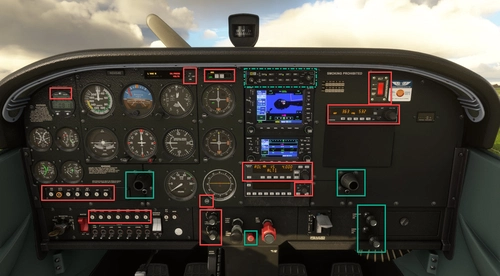
If some levers or buttons are missing, just leave a comment. The screenshots will give hints on which element is controlled using which scripts.
BlackSquare TBM 850 scripts for Lorby's Axis And Ohs (AAO)
Scripts package for BlackSquare TBM 850, designed for use with Axis And Ohs software. This addon includes scripts for controlling the TBM 850 aircraft and can be imported into AAO for hardware mapping. Scripts are also compatible with programs like spad.next and MobiFlight for alternative control options. No B-variables included, using Input Events instead for improved functionality and ease of use. Detailed instructions and screenshots provided for seamless integration and customization.

User Reviews
5 reviews
Version History
All usage of B-variables was replaced by Input Events. No need to have AAO run with admin rights or the FIP panel being active. For the GTX327 Transponder all scripts were changed from using H-variables to IEs too. Using the new scripts you will hear the button press sound. The missing buttons 8 and 9 were added. If you ask why they are presen, when a transponder code consists of digits 0 to 7: You can program a count down on the GTX327 which will need theses digits too ;-)
Related
A2A PA-24 Comanche scripts for Lorby's Axis And Ohs (AAO)
Control the A2A PA-24 Comanche with ease using these scripts designed for Lorbys Axis And Ohs. Import the provided scripts into Axis And Ohs to map controls to your hardware. Enhance your flight experience with walkaround assistance scripts for a more immersive simulation. Compatible with MIDI devices like Behringer Xtouch and Korg nanoKontrol2 for seamless control.
by Ape42
Cessna 152X (WBSim/JPLogistics) Scripts for Lorby's Axis And Ohs (AAO)
Scripts to enhance control of the Cessna 152X Addon by WBSim/JPLogistics with Axis And Ohs software. Import and map scripts for various functions like lights, autopilot, and annunciator panel to your hardware. Explore new ways to interact with the aircraft, enabling control over a range of systems and components.
by Ape42
Cessna 414 scripts for Lorby's Axis And Ohs (AAO)
Enhance your Cessna 414 experience with this set of scripts designed for Lorbys Axis And Ohs. Enjoy full autopilot support, interior light control, transponder digits, cabin pressurization, DME, and more. Developed by Collin and CopperNu, these scripts cover a wide range of functionalities to elevate your flight simulation experience.
by Ape42
Cessna 172X (WBSim) Scripts for Lorby's Axis And Ohs (AAO)
Enhance your Cessna 172X experience with this addon, offering scripts for control within Lorbys Axis And Ohs software. These scripts allow for detailed management of various features within the aircraft, from audio panels to autopilot functions. Import and customize them in Axis And Ohs to streamline your flight operations seamlessly.
by Ape42
Log in to join the discussion
Log InComments(42)
3 months ago
8 months ago
8 months ago
12 months ago
Any ideas on how to get the condition lever to work as an axis?
almost 2 years ago
about 2 years ago
about 2 years ago
over 2 years ago
over 2 years ago
For more information please refer to the AAO manual.
over 2 years ago
over 2 years ago
When using the mouse to control the throttle, this variable will be changed automatically. When using something like AAO to control the throttle you'll now be able to control it on your own.
over 2 years ago
over 2 years ago
Thank you for your help.
over 2 years ago
Even though this server is mostly in german you can ask questions on AAO in the channel #axis-and-ohs in english: https://discord.gg/7R2DcKKy
almost 3 years ago
Any ideas?
almost 3 years ago
almost 3 years ago
almost 3 years ago
almost 3 years ago
The command I can see... but how do I assign it to a button ?
It needs holding in, obvs, until you adjust pitch, and releasing.
Thnx for any advices.
almost 3 years ago
You can assign the first and second script to your button press and button release action. Using AAO, spad.next, whatever you do have.