
Description
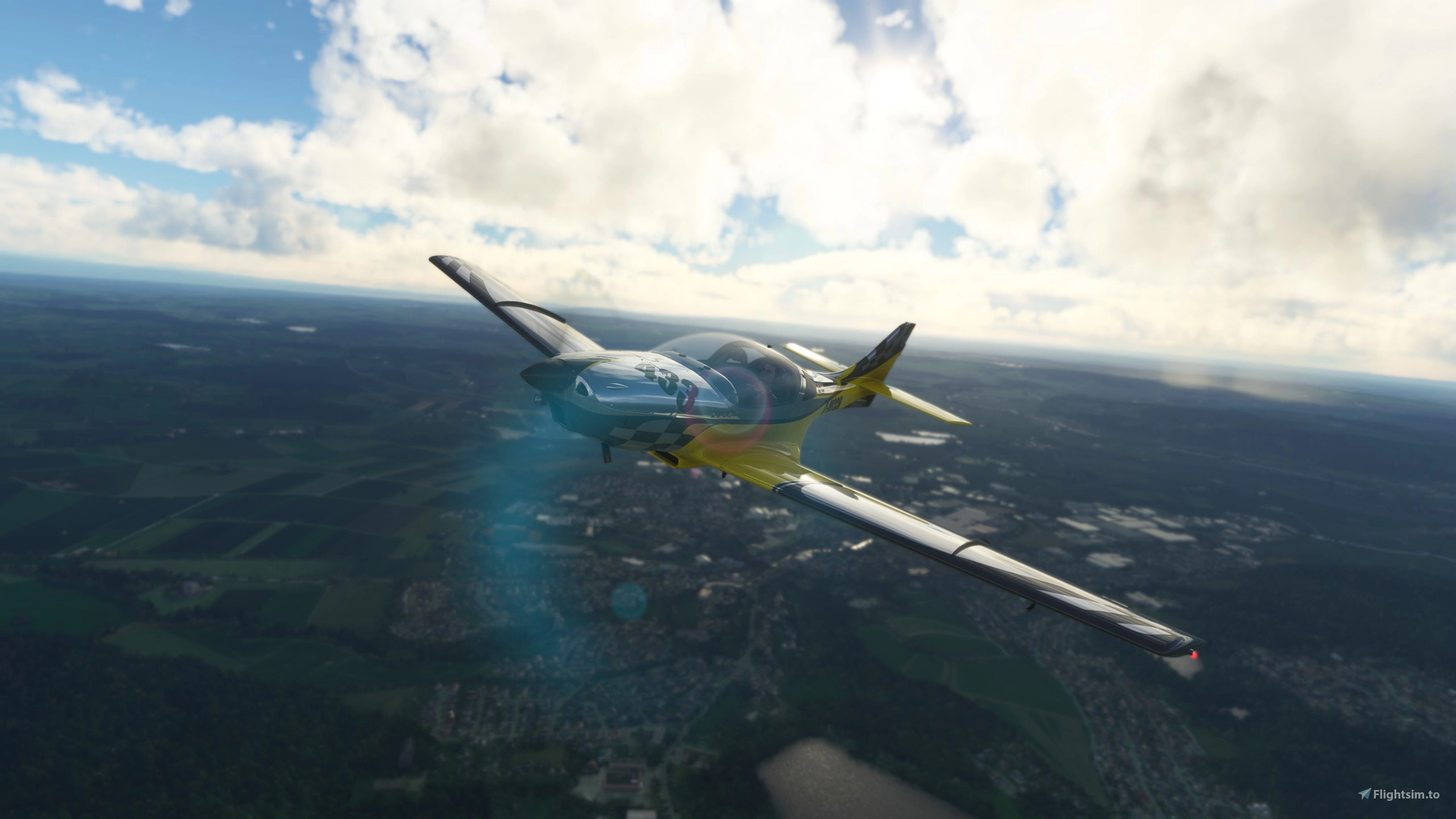
VL3 915iS from JMB aircraft
The VL3 915iS is inspired by real world Youtuber Pilot Frank, the content creator about aviation and adventure surrounding germany.
Now you can even experience his trips and adventures, e.g. into the wilderness in Microsoft Flight Simulator.
Special Shoutout to Pilot Frank who sent me a lot of information about the plane. Checkout Pilot Frank Youtube channel Pilot Frank Youtube also checkout his shop https://pilot-frank.de/shop/
The Plane is base on Asobo VL3 a lot of assets and textures from MSFS is using in the current VL3 915iS
(!) Note: the 4 blade propeller setting is a bit slower than the version with 3 blades
(!) The flight model and effects are based on https://github.com/r9r-dev/fs2020-vl3-rotax915 Big shoutout to the team that made the awesome 915is mod
VL3 915iS - JMB Aircraft
VL3 915iS is an ultralight, aerodynamically directed, single-engined, low-wing airplane, retractable landing gear with Rotax 915iS, 4 blade propeller. The airplane is base on Asobo VL3 a lot of assets and textures from MSFS is using in the current VL3 915iS



User Reviews
52 reviews
Version History
- added WT G3X - added autopilot to G3X - updated 3D model - fixed uv map - added new texture - added registration number to blue and red version
Related
Van's RV-7 and RV-7A
Explore the Vans RV-7 and RV-7A kit airplanes in MSFS, now updated to version 1.1.1 with a work-in-progress GTN750 integration. Choose between the tail-wheel RV-7 or the nose-wheel RV-7A for a unique flying experience. Enhance your flights with additional liveries and a new paintkit available for customization.
by deejing
FK9 Mark 4
Explore the FK9 Mark 4 Ultralight aircraft in Microsoft Flight Simulator, famously flown by Pilot Frank in his aviation adventures. Take part in his trips into the wilderness and experience the thrill of flying this legendary aircraft. Check out the FK9 Paintkit and get ready to soar the skies in this unique and exciting addition to your simulator fleet.
by deejing
Van's RV-4
Experience flying the iconic Van’s RV-4 in Microsoft Flight Simulator with this first version of the homebuilt aircraft, featuring a tandem seating configuration and powered by an O-360 engine with a fixed pitch propeller. The add-on, a work in progress, utilizes default assets from Asobo and offers a fun, non-realistic flight experience with room for future enhancements. Additionally, enjoy smoke effects by BlueMesh and detailed textures for a more immersive flying experience.
by deejing

Van's RV-7
The Vans RV-7 add-on for MSFS2024 features an updated 3D model and flight model, offering a detailed and realistic experience. Currently available is the glass cockpit taildragger variant, with plans for additional variants and liveries in the future. Notable enhancements include an updated cockpit, improved systems, and a fixed battery issue, while a sliding canopy variant is in progress.
by deejing
Log in to join the discussion
Log InComments(149)
2 months ago
2 months ago
3 months ago
3 months ago
4 months ago
5 months ago
I assume that I won’t get an answer but I give it a try anyways. Someone has problems with the autopilot? For me it’s totally broken. Won’t hold the altitude at no way. And yes Info know how the autopilot works. Vs not working, standard modes like pitch and roll not working. The plane is always going down. Anyone any ideas what could be the problem or anyone who has the same problems?
Thanks a lot for any help.
Except of the autopilot I really do love this plane! Thanks a lot for this great work!!!
4 months ago
After downloading and extracting the .rar file , copy the folder : zEnsiFerrum JMB VL3 915is-G3XTouch-v2, to your community (2024) folder.
This will install the latest version of GarminG3X Touch.
This also solves the problem of importing and displaying the correct flight plan.
4 months ago
The autopilot is activated when you left-click on the annunciator area on the left Garmin.
See the top green arrow in the image.
The autopilot menu appears (right green arrow).
This menu works perfectly.
Sorry, I don't know how to insert the image.
https://postimg.cc/sQ1Mw4Yg
2 months ago
6 months ago
"Note: the 4 blade propeller setting is a bit slower than the version with 3 blades" - is there a 3 blade version, what am i missing?
6 months ago
7 months ago
9 months ago
thank you so much for sharing.
I have a question. What do you need to create a "new" airplane? I own a Storm Century (it is a Storm 300 with bigger wings).
Of course I am available to send you all technical data you might need.
I would like to have it on MSFS, do you think you can create this ULM?
Thank you so much for your answer.
6 months ago
about 1 year ago
I'm looking for a replacement for my BlackWing 635RG because it's not compatible with MSFS2024.
I've now flown this fantastic VL3 915is.
This will now be my standard aircraft in MSFS2024, perfect.
Unfortunately...
I often fly in a club with a flight plan that's been sent to me.
It's not possible to import a standard (MSFS2024) flight plan (.pln) from the hard drive via the EFB.
The flight plan displays perfectly in the EFB, but after "send to avionics and ATC," the imported flight plan is corrupted, often a single waypoint, but mostly unusable.
This often happens when MSFS2020 aircraft are quickly converted to MSFS2024.
The flight plan structure in MSFS2024 is a little different from that of MSFS2020.
It would be great if this routine could run smoothly.
Is this possible?
Thank you very much.
--------------------
The problem has been solved.
Downloaded : Garmin Navigation Suite Fixes by EnsiFerrum version 1.6.1 from Flightsim.to.
After downloading and extracting the .rar file , copy the folder : zEnsiFerrum JMB VL3 915is-G3XTouch-v2, to your community (2024) folder.
This will install the latest version of GarminG3X Touch.
This also solves the problem of importing and displaying the correct flight plan.
Thank you very much for this wonderful aircraft.
about 1 year ago
about 1 year ago
I want to fly this aircraft in FS2024 but the installation is difficult for me. When I copied the aircraft in the community folder, i can choose the aircraft but the plane is pink, also the glass shield. The cockit is the standart one from asobo without prob.
What must I do, that the aircraft is a compelte and useful aircraft. Please give me a liitle help for my mistakes, that I can use this aircraft.
Thx a lot for all helpful answers.
9 months ago
about 1 year ago
One of my all time favourite aircraft mods, and with the full WT G3X with AP, it's just fantastic in MFS2024!
The only thing that would make it even better would be a Garmin GFC500 AP head unit in the panel, as most VL3s have these.
[EDIT: I just found that that exact AP head unit appears when you press the unmarked switch in the cockpit!!!!! amazing!]
5 star rating deservedly given!