
Description
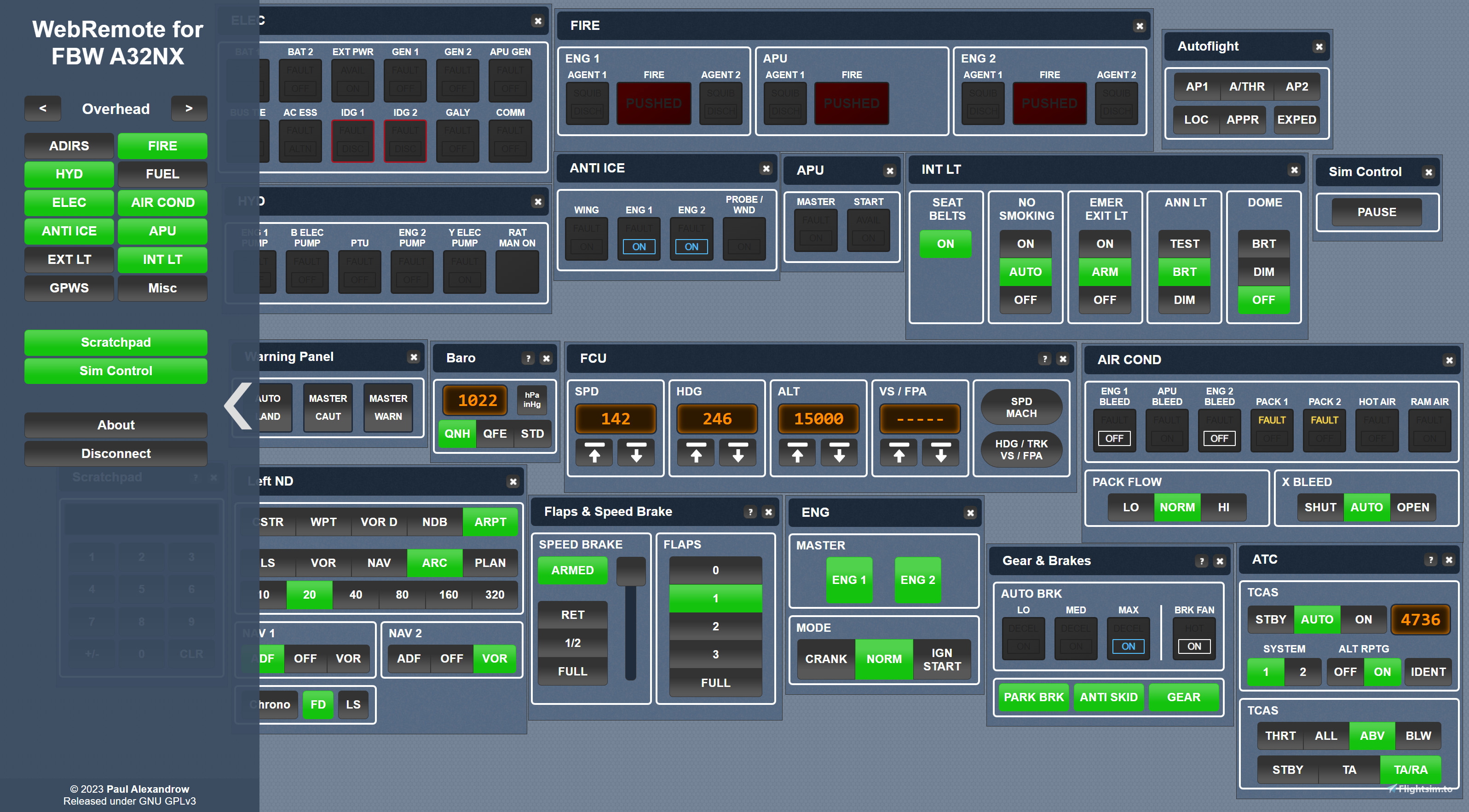
WebRemote for FBW A32NX is a free customizable browser-based remote control for FlyByWire's A32NX that works with any modern PC, tablet or phone.
It was created to manage the aircraft systems that a flight crew most frequently interacts with during a normal flight, so that immersion-breaking use of the mouse cursor is almost not necessary anymore. This is especially useful when using a VR headset, where a second person, i.e. pilot monitoring, can assist the pilot flying. WebRemote works best when used in conjunction with FlyByWire's own SimBridge MCDU.
With that in mind, please note the following:
- WebRemote does not aim to replace or mimic cockpit indications like FMAs or any gauges,
- dimensions were deliberately chosen to facilitate the use of touch screens,
- most numeric values are entered directly instead of using real-world in- and decrement functions.
It is best to think of it more like an instructor's station rather than an external cockpit!
You will also need to install FSUIPC7 (free version) for the connection to MSFS.
If you are interested in contributing to or modifying this tool, you can clone it on GitHub.
There is a video on YouTube that will guide you though the setup process: https://youtu.be/_fMCXbj3bt8
WebRemote for FBW A32NX
A free customizable browser-based remote control for FlyByWire's A32NX that works with any modern PC, tablet or phone. Manage the aircraft systems that a flight crew most frequently interacts with during a normal flight - no more immersion-breaking use of the mouse cursor!


User Reviews
4 reviews
Version History
Added TERR ON ND pushbuttons and WX/TERR brightness sliders. Call for help: I do not own MSFS2024 and I do not intend to purchase it. Therefore I am not able to verify if WebRemote works with MSFS2024 or not. If you have any experience in (not) successfully running WebRemote with MSFS2024 I kindly ask you to send me a message regarding your experience. This way I could or could not mark WebRemote compatible with MSFS2024 with more confidence. Thank you!
Log in to join the discussion
Log InComments(46)
3 months ago
10 months ago
8 months ago
about 1 year ago
8 months ago
8 months ago
over 1 year ago
Hello Paul,
since a few days i get a error message (especially with the ext.lights):
"The Server reported a problem:
Any Uses the legacy LVAR Interface. This command is not supported."
Before it was running without any errors.
Can you help me with this?
Thanks!!!!!
almost 2 years ago
almost 2 years ago
almost 2 years ago
Thx again for this Tool will use it well on a Touchscreen 2 Person Simpit (as a said in my other post this is like the only Tool that currently works with up to date A32NX Dev)
When setting up the Remote Setup however i got stuck for a while with a socket error. I resolved that problem and before i share what went wrong i can only recommend the Setup video helped very much: The fault was very simple when setting up the "URL Rewrite" make sure you use a INBOUND rule i didnt at first. Hope this helps People and Paul if there are any more Issues in Github or here that pop up to remind them to check that they use a inbound rule.
almost 2 years ago
almost 2 years ago
almost 2 years ago
cheers for a excellent tool :)
over 2 years ago
over 2 years ago
over 2 years ago
FUEL : all ops but status remains OFF on webremote
ELEC : APU GEN ops but status remains OFF on webmote
EXT LT : BEACON , WING, NavLogo, RWYturn : can only switch ON with no update on webremote status + cannot switch off from webremote
INT LT : Seat ok with no update status on webremote
Overhead misc : WIPERS OK but no update status on webremote.
Have more or less same issues on most panels. Did i do something wrong ?
Currently fsuipc 7.4.9, webremote 2.0.4 and 32NX 3b825a.
Ready to stream on Discord if you think it can help you find the problem.
Update : Looks like i was running an old version of myoffset.txt...My bad...Everything is good now and works perfeclty :) I give a 6 stars ! Thxs for the must have tool !
over 2 years ago