
Description
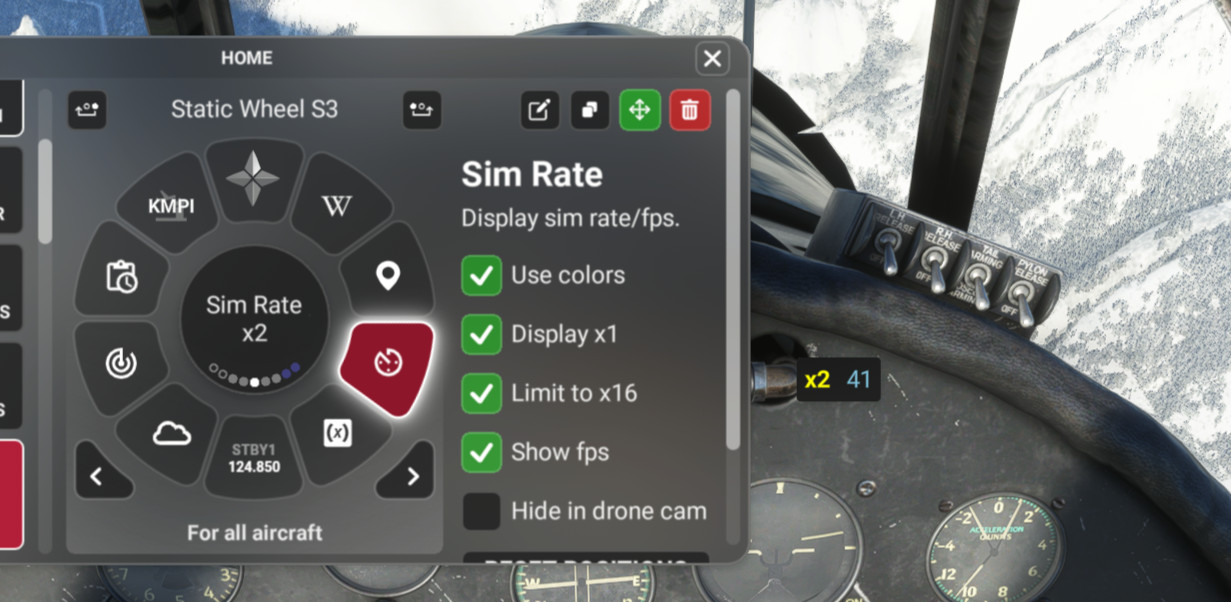
This enables a small floating window that will display the current sim rate. Flow Pro required.
I designed the window to be small and unobtrusive so I leave it on all the time and it can be dragged anywhere on the screen.
New features 1.4:
- When hovering over the simrate window use your mouse scroll wheel to change the size of the window and it will remember it. This allows you to make the window/text smaller or larger quickly.
- Double clicking on the window will hide it so not necessary to bring up the wheel anymore just to remove window.
- FPS counter improved a bit (but still may lag behind other counters such as your GPU counter)
- Below FPS threshold (currently 15 fps) color will change from blue to yellow. This is customizable in the JS file along with other colors (see below for more detail).
To show/hide the sim rate window just click on the tile to toggle or use Otto: "sim rate on" or "sim rate off"
//42 provides Sim Rate +/- widgets but I use control mappings to change the sim rate since I do it often during long flights.
If you have this always enabled consider adding it to the new Flow "Ghost Wheel" so it doesn't take up space in your primary wheels. Can still be enabled/disabled via Otto.
To install simply unzip folder and make sure the folder p42-util-flow-wasabidad-simrate is in your Community folder either directly or via addons linker.
Update from previous version
Sometimes there are problems having flow register a new version if you have a previous version installed. I believe the easiest workaround is to simply delete the old widget and then re-add the new one.
Settings available on the tile
- Use colors (on by default) will apply different text colors to various sim rates and fps. You can customize the colors if you want (see below).
- Display x1 (on by default) will show "x1" when there is no acceleration. I turn this OFF once I've dragged the window where I want so it's practically invisible unless acceleration is used.
- Limit to x16 (off by default). When checked if you increase the sim rate beyond x16 it will throttle it back automatically. I find bad things happen in most planes above x16 so leave this on to prevent accidentally going above x16.
- Show fps (off by default). When checked will show the frame rate (fps) next to the sim rate.
- Hide in drone cam (off by default). When checked will hide the sim rate window when camera is in drone mode.
I welcome all feedback and suggestions. Thank you.
Note about customizing colors
If you want to change the colors that I picked for rate or fps display it's easy to change these even if you aren't familiar with javascript. There is a small edit icon for each widget when it is selected in configuraiton mode and you can edit the code in the tab labeled "JS".
All of the custom colors are defined at the very top of the JS file as constants so they are easy to change.. Here is a link to the list of valid html color names: https://www.w3schools.com/colors/colors_names.asp
Once you have modified the widget if there are future updates you'd need to re-apply your color changes so you should save your block of colors somewhere. If you run into problems you can delete the widget and re-install by copying the original p42-util-flow-wasabidad-simrate folder back into Community. Hope that is useful for those who want to try changing the colors.
There are other ways to define html colors (e.g. rgb values) but for that google can provide more tech details if you need them.
Flow Sim Rate Monitor
I've been wanting an onscreen display of the sim acceleration rate for a long time and this widget enables a small floating window that will display the sim rate and can be dragged anywhere on screen. You can see it in the 2nd photo in the lower right of the screen.


User Reviews
3 reviews
Version History
- Scroll wheel changes size and other small changes (see description for detail)
Featured in Collections(1)

Related
Flow SimBrief OFP
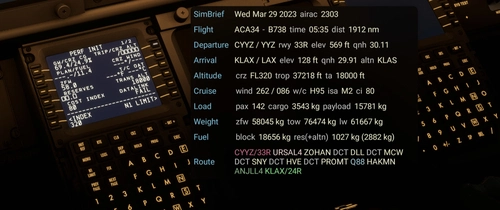
This widget will display data from your latest SimBrief OFP (Operational Flight Plan) in a window once you’ve configured it with your simbrief user name or user id. I welcome feedback regarding the info displayed as I will continue to evolve this with additional features and data.
by wasabidad
Flow FR24 Launcher
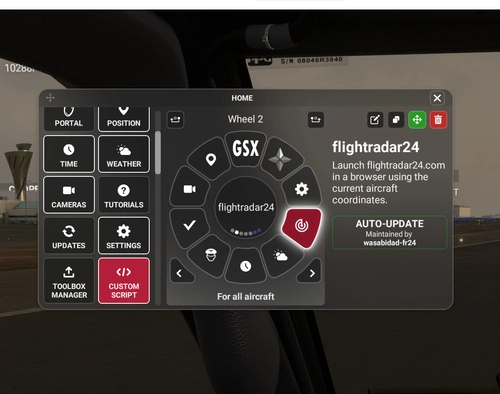
Flow widget to launch flightradar24.com in a browser with the current coordinates of your aircraft . I’ve created it so that it also adjusts the default zoom level depending on altitude. For example, when on the ground at an airport it will zoom in closer to the airport so you can see what other aircraft are parked nearby but when you are airborne depending on the altitude it will gradually zoom out.
by wasabidad
Log in to join the discussion
Log InComments(8)
over 3 years ago
I have 1.2 but the FPS option doesn't appear to be there! Great mod BTW!
over 3 years ago
Thanks! In developing/testing other widgets I have seen instances where it seems like newer versions don't get updated immediately but not sure if there is caching or conflicts with versions I have in the toolbox. Probably the best thing would be to delete the widget from the wheel in flow, remove the ...wasadbidad-simrate folder completely and then restart the sim. Then copy/install the folder back into the Community folder and restart the sim. In theory those kind of steps shouldn't be necessary when doing an update, but I would think that should eliminate any possibility of it still using some older version.
over 3 years ago
Yep - remove/reinstall did the trick - many thanks!
almost 4 years ago
Hey my Friend, i did download and moved into community folder as every other mod. but it does not appear ingame.
almost 4 years ago
Hi, there have been reports in general of issues with community widgets sometimes not showing. Once installed it should appear under Community Widgets section on the left under "UTILITIES" and can be added to a wheel to activate.
The official //42 discord channel has a discussion about the issue of Community Widgets sometimes not appearing. Possible workarounds discussed in the discord channel include restarting flow from the main toolbar and putting community widgets directly in Community folder (instead of using addons linker for those using that). Hopefully it will be resolved soon if not already resolved in the latest Flow update.
almost 4 years ago
Perfect, just what Flight Sim needed. Thank you so much.
almost 4 years ago
Thank You!
almost 4 years ago
You're welcome! I've been waiting a long time for something like this and thanks to //42 for creating such an awesome product that allows me and other users to add their own utilities to the sim.