

Description
KTYS McGhee Tyson, Knoxville, TN
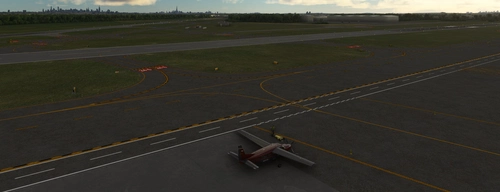
This airport is developed with static Military, Commercial Airliner and General Aviattion Aircraft. For those users that don't want static aircraft, I am including a file in the no-static-acft folder along with instructions on how to copy the file to the correct location to remove the commercial airliners and GA, but leaving the military aircraft.
To use the static aircraft you will need to install UK2000 Common Library (free, in marketplace), FSLTL (free) and AGAIM (free, if you don't have this, you will not be able to download it, AIG been having server problems for a long time). FSLTL and AIGAIM provides aircraft, FedEx, UPS, American, Boeing Business Jet and Delta. All of the GA aircraft is provided by UK2 and Microsoft.
The jetway bug is still causing issues. I may later consider just adding static jetways, until a fix is released.
The 134 ARW hangar was modeled using two photos so it's not close to the correct size or even look like the real thing.
At first start, I felt that this airport was small, but after modeling all the 3D models I changed my feelings about the size, but this was a fun airport to do.
The one thing that I'm not satisfied with is the Terraforming (tunnel) beneath part of the main terminal. I am trying to smooth the sides of the tunnel out so to have a better appearance. The parking garage is also lower than the rest of the airport, but my terraforming skills are not good enough to attempt that yet.
AI does strange things such as landing and taxing in the woods, but eventually end up at a gate. Also on taxing to runway 5R, near the hold short line, all aircraft appear to make a move to the left and back to the right, inline with the taxi lines. AI seems to not follow taxi line sometimes.
I decided to model aprons, roads and taxiways as 3D models and place them using projected mesh as appose to drawing aprons in the sim. I find it easier and looks cleaner and you have more choices in selecting textures.
=======================
KTYS-McGhee-Tyson_v1.0.24
All KTYS versions starting with 1.0.24 dated July 15, 2025 have the Cirrus Vision Center included in the scenery package. No need to download two packages.
To install
1. Delete jd-airport-ktys-Knoxville from FS2020 and FS2024 community folders.
2. If using MSFS Addon Linker - deactivate modellib-visioncenter and delete it from FS2020 and FS2024 community folders, or just delete it if not using the linker.
3. Extract the KTYS archive and copy the static or non-static version to your FS2020 and/or FS2024 community folde
Location
KTYS - McGhee-Tyson
Explore KTYS McGhee Tyson Airport in Knoxville, TN with static Military, Commercial Airliner, and General Aviation Aircraft. This add-on offers the option to remove commercial airliners and GA for a customized experience. Requires UK2000 Common Library, FSLTL, and AGAIM for static aircraft variety. Note potential issues with jetways and AI behavior. Experience detailed 3D modeling of aprons, roads, and taxiways for an immersive airport scenery in Microsoft Flight Simulator.



User Reviews
19 reviews
Version History
KTYS-McGhee-Tyson_v1.0.26 Changes Added the two new ramps at the terminal Reduced the night texture brightness on the terminal Changed the terminal ramp texture Added tire gum marks to runways ========================== If you want the glass jetway in fs24 The BGL file KTYS.gla for the glass jetway is located here --> jd-airport-ktys-knoxville-static-fs24\Scenery\airport-ktys-knoxville-static-fs24\scenery and jd-airport-ktys-knoxville-no-static-fs24\Scenery\airport-ktys-knoxville-no-static-fs24\scenery Rename KTYS,bgl to something else and rename KTYS.gla to KTYS.bgl To install Delete existing version Extract the archive and copy the new version to your community folders and activate the version you want to use if using MSFS Addon Linker.
Related
KLGA - LaGuardia Full Airport
Enhanced version of KLGA LaGuardia Airport featuring updated taxiway network and detailed buildings, with ongoing improvements and adjustments to enhance realism and functionality. Includes fixes for jetway bugs and issues with scenery and addon compatibility. Detailed parking assignments for terminals A, B, C, and D, providing a more immersive flying experience at this busy airport hub.
by danielsjam
KCHA_Lovell_Chattanooga
Experience a detailed rendition of KCHA Lovell Chattanooga airport with handcrafted 3D models and PBR textures. Explore various updates including corrected taxiway signs, removal of default buildings, and added jetways and lighting improvements. Immerse yourself in a more realistic aviation environment with each version update of this Microsoft Flight Simulator add-on.
by James Daniels
KHSV Huntsville International Airport-Carl T Jones Field
KHSV Huntsville International Airport-Carl T Jones Field adds a detailed simulation of Huntsville International Airport, located 10 miles southwest of downtown Huntsville, Alabama. This public service airport also functions as a spaceport for the Dream Chaser spaceplane. The add-on features hand-crafted models, including 25 open hangars with animated doors operating between 6 am and midnight. The scenery includes updated taxiways and signs, enhancing the realism of the airport experience in Microsoft Flight Simulator.
by danielsjam
KTEB_Taxiway_Cleanup_And_Mod
Enhance the default scenery of KTEB Teterboro with version 1.0.0, featuring revamped taxiways, new fire department and VOR antenna, additional parking, and more. Version 1.0.1 further improves the experience by fixing floating OSM Orb street lights.
by James Daniels
Log in to join the discussion
Log InComments(126)
about 8 hours ago
Just an FYI that they are adding another gate and renumbering the gates currently. KnoxNews just did an article about it that I'm sure a quick google would find. Don't want to link here as I'm unsure how the .to would like that.
about 3 hours ago
about 2 months ago
5 months ago
5 months ago
5 months ago
5 months ago
5 months ago
about 1 year ago
This is a great add-on, I've been using it as long as I can remember. I do have a question also. Can you model the newly opened RON ramps that just opened up? They are on both sides of the terminal and hold about three aircraft each and have lighting. I understand if not, but it would be welcome as they expand and grow the airport IRL.
about 1 year ago
about 1 year ago
Here is a video and you can see they face away from the terminal:
https://www.youtube.com/watch?v=r4Xh4XIhL7I
about 1 year ago
about 1 year ago
Edit: I figured it out. Looks great!
about 1 year ago
about 1 year ago
about 1 year ago
PS: Sorted, for those who will struggle the same as me, you will need to additionally download: "Cirrus Aircraft Vision Center at KTYS" addon and activate it together with the airport scenery.
PS2: And with the most recent scenery update - it is now 2-in-1, so no need to download Cirrus facility separately, the new version covers it entirely.
about 1 year ago