
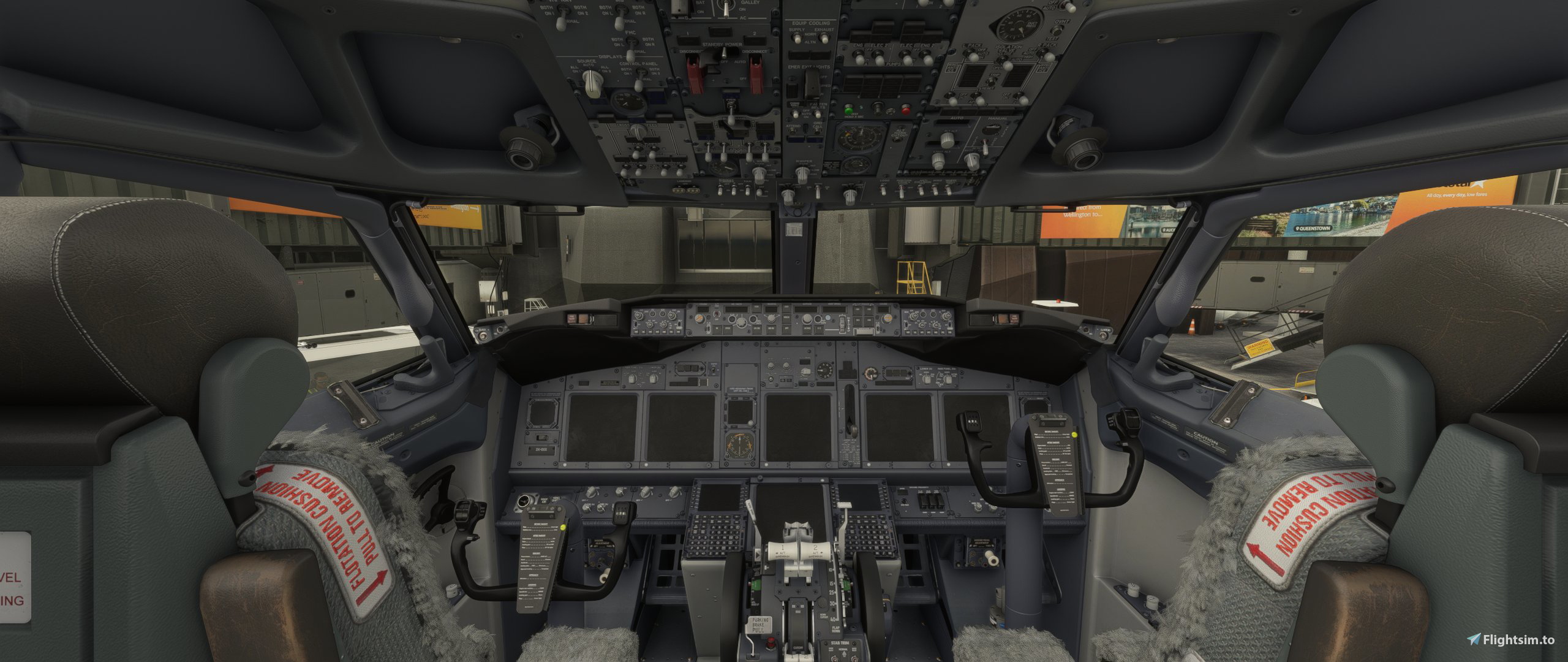
Description
PMDG 737-700 - Cold & Dark Panel State
Version 1.2
- 1.2 loads with 5% fuel to ensure APU is available without ground power unit.
- 1.1 introduces an additional panel state setting "DEADEMPTYGROUND" where ground power unit already available.
Start your flight from scratch with a complete cold and dark panel state.
By using this file, you'll load in to the sim with:
- 0 Pax
- 5% Fuel qty
- 0 Cargo
Plane battery, standby power and emergancy light switches are set to "OFF". Flick down the switch guards and away you go.
Please don't hesitate to ask questions or comment with panel requests.
Installation
Download and unzip file, track down your "pmdg-aircraft-737" folder, copy and paste both "DEADEMPTYOFF.fmc" & "DEADEMPTYOFF.sav" into your PanelState folder located within "pmdg-aircraft-737\work\PanelState".
Steam directory:
C:\Users\*your user name*\AppData\Roaming\Microsoft Flight Simulator\Packages\pmdg-aircraft-737\
MS Store directory:
C:\Users\*your user name*\AppData\Local\Packages\Microsoft.FlightSimulator_8wekyb3d8bbwe\LocalState\packages\pmdg-aircraft-737\work\PanelState
Once installed, load a flight with the 737. Depending on your current panel state settings, you'll need at least battery power ON so you can use the FMS to load the new panel state settings.
Please follow the next steps correctly.
- PMDG SETUP
- Click STARTUP STATE
- Select "DEADEMPTYOFF" and EXEC
- Select PANEL STATE LOAD
- Select "DEADEMPTYOFF" and EXEC
Aircraft will now load DEADEMPTYOFF panel state by default on every future flight.
*DEADEMPTYGROUND*
Please use this file if you wish to load your flights with the ground power unit already attached.
PMDG 737-700 - Cold & Dark Panel State - 1.2
Complete cold and dark panel state package. By using these settings, you'll load in to the sim with 0 pax, 5% fuel qty and 0 cargo. Plane battery, standby power and emergency light switches are set to "OFF". Flick down the switch guards and away you go.


User Reviews
2 reviews
Version History
- 1.2 loads with 5% fuel to ensure APU is available without ground power unit.
Related

MSFS World Map - Landmarks Permanently OFF
A simple mod for Microsoft Flight Simulator that permanently disables landmark labels on the world map, allowing for a cleaner and less cluttered navigation experience. Just drop it into your Community folder to apply the change.
by jmknights93
Headwind A330 Neo - Default Thumbnails
Enhance your Headwind A330 Neo experience with the Headwind A330 Neo Default Thumbnails V3.0 add-on. Simply unzip, copy, and replace folders to update thumbnails for the popular aircraft, ensuring a seamless process for future updates. Keep your simulator organized and up-to-date with this convenient drag and drop solution.
by jmknights93
PMDG 737-600 - Cold & Dark Panel State - 1.1
Complete cold and dark panel state package. By using these settings, you'll load in to the sim with 0 pax, 5% fuel qty and 0 cargo. Plane battery, standby power and emergency light switches are set to "OFF". Flick down the switch guards and away you go.
by jmknights93
JPL C152 Dark Cockpit
Customize your JPL C152 experience with the JPL C152 Dark Cockpit Textures V1.0. Choose between the "Black and Clean" or "Black and Wood Grain" cockpit variants included in this pack. Simply install by copying the desired texture folder into your Community folder. Developed by Jmknights93, with credit to N95JPL, Whiskytango208, and Fsce for their contributions.
by jmknights93
Log in to join the discussion
Log InComments(32)
about 2 years ago
almost 4 years ago
make a setting for gsx or jetway start up.
i changed these settings on my config
GroundPaxEntry=0
JetwayStairsEntry=1
almost 4 years ago
Thanks, I'll take this in to consideration for future updates.
about 4 years ago
will this work for pmdg 737-800?
about 4 years ago
Hello, I'm still playing around with the 800 panel state settings and will be incorporating a few updates for the 600/700. I will sit down create a specific 800 upload today.
about 4 years ago
works like a champ Beautiful
about 4 years ago
Enjoy!
over 4 years ago
Nice idea, but it seems the panel state is not working with the lates PMDG Update from 24/6: After energizing, the Pilot´s all Panels stay black. Please have a check of this.
over 4 years ago
Thanks for notifying me about this, I'll open the sim and take a look.
over 4 years ago
Hello, I cannot see any problems with startup. Is it possible that you are not using ground power once you turn on the standby and plane battery power switches?
over 4 years ago
Maybe this was an issue. I meanwhile made my own preset. Nevertheless thanks for sharing.
over 4 years ago
what an original idea😉
over 4 years ago
Don't want to be a party-pooper. but fuel in 0 is nearly impossible in real life. 😶. Everything else is just perfect.
over 4 years ago
Yeah I thought that'd be the case. I figured it looked better when fueling for your first flight though.
over 4 years ago
Hey this is great! Can you make it where the Ground Power is already connected as well? thank you!
over 4 years ago
Hello, I can look in to this for you. Thanks
over 4 years ago
Hello, I've issued an update with your panel request.. Thanks :)