
Description
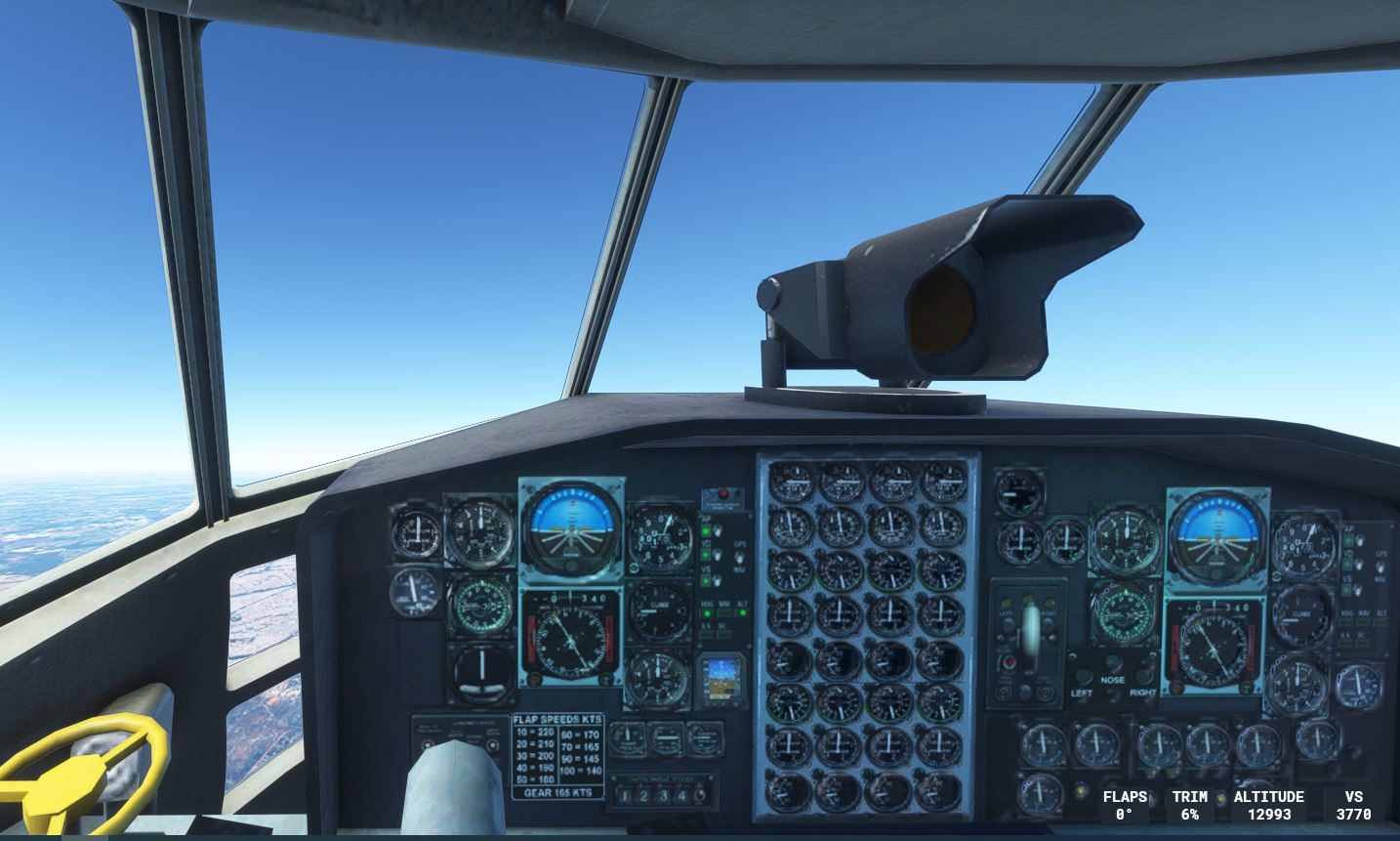
This is the UPDATED texture required for the Cockpit view CaptainSim C-130 Exterior, as posted by Joseph.
This texture file will give you gauges in the otherwise blank space inside the cockpit - please note that the gauges are slightly out of focus, as apparently this texture was never designed to be used as cockpit, but it is the best we have . . . and it surely makes a difference to the C-130.
How to install : unzip first , you will find a texture file CS130_COCKPIT_08_D.PNG.DDS
Now locate the folder of the aircraft.... captainsim-aircraft-m131\SimObjects\Airplanes\CS_C-130E, and look for the TEXTURE folder. Drop the newly downloaded texture .dds in here, it will ask you if it must replace the original - say yes. (you may wish to make a copy of the original .dds just in case you want to revert back to it at a later stage)
Contact me at armithea@gmail.com if you require assistance.
Update - Texture file for Cockpit view CaptainSim C-130 Exterior
Enhance your CaptainSim C-130 experience with this updated texture file for the cockpit view exterior. Although the gauges may appear slightly out of focus, this texture brings life to the once blank cockpit space. Simply unzip, locate the aircraft folder, and replace the texture file to see the difference in your C-130 simulation. Need help? Contact the developer at armithea@gmail.com for assistance.


Version History
Old graphics file replaced with a 4k file which results in improved visual appearance of cockpit.
Related
Lockheed L-18 Lodestar update
Enhance your Lockheed L-18 Lodestar experience with this update featuring a KingAir cockpit, new liveries, improved flight dynamics, and cockpit animations. This final version by Milton Shupe and team brings a more realistic and detailed aircraft to your simulator.
by Albie
Lockheed Harpoon PV-2
Lockheed Harpoon PV-2 is a detailed FSX port over add-on, featuring eight aircraft models with various repaints including US army/air force and civilian designs. This aircraft offers a KingAir cockpit with adjustable controls, pilot and turret animations, and a realistic flying experience. Converted to MSFS with high-quality models, animations, and excellent sound, this add-on guarantees hours of enjoyable flying.
by albie
Update: FADN - Durban International Airport
Experience the nostalgia of FADN - Durban International Airport in MSFS2020 with this mod, bringing back the closed airport with added runway and buildings for takeoffs and landings.
by albie
Z11L - Leipheim
The Z11L - Leipheim add-on modifies the airport scenery by replacing a large hangar next to the runway with three smaller, more realistic hangars. It also includes the addition of an ATC control tower and static aircraft to enhance the visual experience at the airfield. Proper installation requires placing the extracted folder into the Community folder, along with the necessary totof-aircraft library v4 for the static elements to function correctly.
by albie
Log in to join the discussion
Log InComments(20)
over 3 years ago
Thank you.
over 3 years ago
Thank you so much for putting the effort into making this Aircraft usable!
over 3 years ago
C-130の愛好者です。
albieさん作成のコックピット写真で楽しく飛んでいます。
あなたが作成したthe sound filesを欲しいのでEメールを送りました。
益々のご活躍をお祈り申し上げます。
I am a fan of C-130.
Enjoy flying with the cockpit photo created by albie.
I sent you an email because I want the sound files you created.
I wish you all the best in your future endeavours.
over 4 years ago
I Love The C130 Thankyou For Fixing it So I will Fly it- do you have a sound file? Where I Got the Cockpit he Said you have a sound file ?
over 4 years ago
Yes, please send me an e-mail so I can upload it for you
about 4 years ago
Can I also get Sound Files? TNX
almost 4 years ago
Hello, I sent you my email in a private message. Can you send me the sound files as well? Thanks in advance!
almost 4 years ago
Hi, Anyone who wants the sound file must send me an email to armithea@gmail.com, as I need to send the sound files via WETRANSFER, and require your mail address for that purpose.
almost 4 years ago
Why can’t the files be uploaded here OR just provide a link to Google drive or to GitHub ? 🤷🏻♂️
almost 4 years ago
Hi sorry for the late reply, I don't visit this site often . . . you have my permission to upload it here . . . or anywhere you like. Regards, Albie (that is for the sound file as well as the cockpit texture file)
over 3 years ago
Can you send me the sound files link? Thank you!
over 3 years ago
Hi, please send me an email to armithea@gmail.com I need your email address for the file download. Regards, Albie
over 4 years ago
Not trying to be rude, but why are you trying to do someone else's job? They chose to release an aircraft without a cockpit to make money easy without doing the hard work.
over 4 years ago
I get it. the C-130 is an iconic aircraft that many of us would love to have in our collection. Yes, Capt Sim has a history of phoning it in and leaving their aircraft part undone. But I'm grateful that those on here will take the time to try and turn it into something positive for all of us to enjoy. And let's be honest, if we leave it up to Capt Sim to fix their products, well...
Then again, look at all the "fixes" on here for the base game. Runway textures, lighting fixes, water fixes... So you could argue that Microsoft isn't really that much better than Capt Sim, in the sense that they have a game that is not really well polished and people on here are investing their time and energy to improve and finish it.
But back to the C-130, I was initially excited about it until I realized how unfinished it really was. I had written it off. But thanks to some folk on here, it's moved back into the "maybe" column.
over 4 years ago
I don't think CS will ever attend to the cockpit problem, and for me this was the only solution, at least for now. I'm not doing this to help CS, but my fellow simmers. Rather be part of the solution than part of the problem.
over 4 years ago
Well said, Albie!
over 4 years ago
Very well thought out answer Albie... the Herk is one of my Favorite aircraft , i have seen them since i was a kid 50 plus yrs...
about 4 years ago
So release your own C-130 model for free, since it's so easy. Change yourself not others.
almost 4 years ago
You do realize you're posting this comment on a site specifically created to host files that fix, enhance, or add what is missing from the SIM....
over 3 years ago
Because without this mod, I would throw the c-130 in the trash, at least thanks to the efforts of these guys, I can actually get my money's worth.