
Description
This is a community-maintained update of the original FSPM VFR Map by Scelt, now compatible with MSFS 2020 and MSFS 2024.
To install, simply remove your existing Community\fspm-panel-vfrmap folder and unzip the downloaded file. into the Community directory.
Image tutorial: https://a5tr0.sk/this/fspm-panel-vfrmap-fix/howto2024/
Home website: https://a5tr0.sk/this/fspm-panel-vfrmap-fix/
If you enjoy the add-on, please consider supporting the author (a5tr0)!
Major New Features
- SimBrief Integration: One-click download and display of your latest SimBrief flight plan waypoints. Requires a SimBrief (Navigraph) account and entering your username in the add-on’s API dialog.
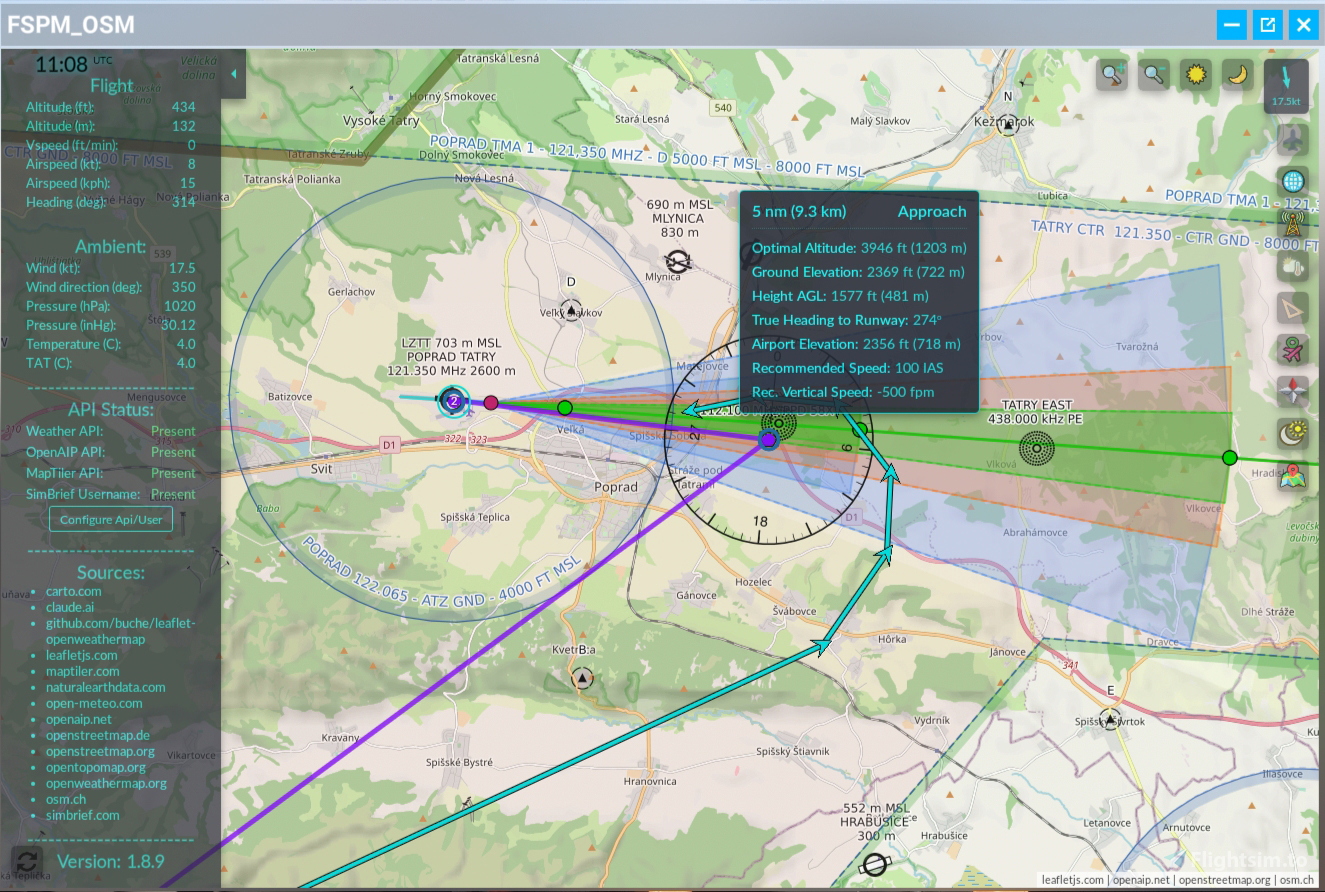
- Runway & Approach Visualization: When a SimBrief flight plan is loaded, an approach-corridor button appears showing ILS, NPA, and visual corridors with distances, altitudes, and speeds; clicking a corridor waypoint presets teleport settings.
Enhanced Map Toggles & Tools
- Satellite, OpenAIP & Weather Layers: New buttons to toggle satellite imagery (MapTiler), airspaces/navaids (OpenAIP) and weather overlays (clouds, precipitation, wind, temperature) via free API keys.
- Trail & KML Export: Record and export your flight track to Google Earth Pro in KML format with a single click.
- Measurements & Waypoints: Improved ruler tool with multiple-point distances/headings and “For AP use” option; dedicated waypoints toggle for lines between successive navpoints.
- Teleport Enhancements: Editable coords with virtual keypad, “random lost” generator (day/land options), auto-elevation +2,500 ft, and direct heading/lat-long presets.
UI & Quality-of-Life Updates
- Adjustable map brightness and zoom (VR-friendly)
- Four-mode clock (UTC/Local/System/Off) with terminator line toggle
- Earth-curvature corrections, distortion fixes crossing the dateline
- Hide-plane icon option (state saved), blank-icon fix, status panel starts closed
- Standard VFR map key binding support (MSFS2020).
Future Plans
A5tr0 will continue maintenance and occasional fixes—enjoy!
Free Tools & Data Sources
The app uses many free tools and APIs maintained by generous community contributors. Support for these services may be discontinued at any time, but for now we can enjoy them absolutely free—please use them responsibly and contribute if you can.
Sources:
carto.com
claude.ai
github.com/buche/leaflet-openweathermap
leafletjs.com
maptiler.com
naturalearthdata.com
open-meteo.com
open-aip.net
openstreetmap.de
openstreetmap.org
opentopomap.org
openweathermap.org
osm.ch
simbrief.com
FSPM/OSM VFR Map
The FSPM/OSM VFR Map is a community-maintained modification of the original FSPM VFR Map, designed for compatibility with MSFS 2020 and MSFS 2024. It offers features such as SimBrief integration for flight plan management, runway and approach visualization, and various map overlays including satellite imagery, airspaces, and weather. The tool also includes enhancements for teleportation, measuring distances, and exporting flight tracks, while providing user-friendly interface updates and quality-of-life improvements.



User Reviews
145 reviews
Version History
- Traffic button (via Connector app) - Weather menu: "Wind" visualization - open-meteo.com (via Connector app) - Plane tracking data stored (via Connector app) - Weather menu: "Radar" - rain and snow - rainviewer.com - Measurement tool: "Cross-Fix Tool" for triangulation - Measurement tool: Any point created can be moved by clicking and dragging, even when the measurement tool is closed - Control panel: "Soft-Close/Open" keyboard shortcut: after you start the addon, you can hide/show it via a hotkey (make sure to choose a shortcut that doesn't conflict with your existing keybinds) - Control panel: "Use connector app" - if you are running the Connector app as well, I suggest you turn this option on. - Control panel: "Actual map view" - see the actual zoom and coordinates - Control panel: "Show Autopilot" - still in development. Currently, when a plane has its own AP, it will turn on (HDG + ALT hold). If you draw a route via the Measurement tool and set the "AP Route" option - you can trigger the autopilot to follow that route. My aim is to make this work for planes which don't have a native AP - but right now it's still kinda too buggy to "release" :) - Control panel: "Factory reset" - this will clear all your settings and APIs from MSFS and from the Connector app if it is connected. - Tiny optimizations for mobile displays, but I would use those only for viewing, not direct interaction (tablets should be ok). - Addon update notification - A couple of bugs fixed, but with this amount of changes, you might find some new ones - just report them here or send me a private message. * Thank you kindly for supporting the development and future updates of this addon 💜☕ : - https://buymeacoffee.com/a5tr0.sk
Related

Gees - In game landing analysis (standalone App)
Enhance your landing skills with Gees, a standalone app designed for landing analysis in Microsoft Flight Simulator 2020. This tool provides insights into key metrics such as descent rate, G force at touchdown, airspeed, ground speed, wind speed and direction, and sideslip angle. Improve your performance and receive real-time feedback on your landings.
by scelt

GEES 2.0 Landing Analysis for MSFS
Enhance your landing skills with GEES 2.0 Landing Analysis for MSFS. This in-game add-on provides detailed feedback on your landing rate, G-force, speed, wind conditions, sideslip, bounces, and landing location. It also offers instant replay recording to review your landings and can be easily installed by copying files into the Community folder. Improve your piloting abilities and track your progress with GEES 2.0.
by scelt
Log in to join the discussion
Log InComments(650)
about 15 hours ago
about 10 hours ago
3 days ago
I downloaded Version 1.11.1 from the website.
In the previous version, I was able to open the FSPM Map in MSFS2024 using the "Tools - Map - Display Map" key command, but I am unable to open it in V1.11.1.
Is there a different key command I should use?
Thank you for all your hard work.
2 days ago
Why it is off:
That key is not a shortcut of the addon. It is the simulator's own command for opening the MSFS VFR map, and the addon was attached to it. Many users found that it got in the way and they had no means of turning it off: one key press opened or closed the FSPM in-game panel and the sim's VFR map at the same time.
In MSFS 2024 it is more awkward still. The key opens or closes the FSPM panel, and at the same time it opens the EFB with the MSFS map. Pressing it again closes the FSPM panel, but the EFB stays open.
For these reasons the feature has been disabled by default since version 1.8.9. Installing a new version puts the default back, which is why it stopped working for you after the update.
What I recommend in MSFS 2024 – the EFB:
The FSPM map is available inside the EFB too, as long as the Connector app is running. The Connector is part of the addon and I recommend using it anyway (you can set it up to start and exit together with the sim).
Add the FSPM addon to the favourites bar in the EFB (there is an option to set it as the default app too). Then the TAB key opens the EFB with the FSPM map right there – one key, no conflict with the sim's own map.
If you still want the old key back:
1. Close MSFS.
2. Open the folder Community\fspm-panel-vfrmap\InGamePanels\.
3. Run KEY_SHOW_VFRMAP-toggle.bat and confirm.
4. Start MSFS.
(The script replaces the panel's configuration file (OSM.spb) with the variant that is attached to the sim's map key. It shows you the current state and asks before it changes anything. It does not create a new key binding – the panel simply reacts to whatever key you have assigned to "Display Map". Running the script again switches the feature back off.)
Another option for the in-game panel:
The addon has its own shortcut for hiding and showing the map: "Soft-Close/Open" in the map's settings panel. The key is shown next to the setting and can be changed there. It becomes active once the map is running, so open the FSPM map from the toolbar icon first; after that the shortcut hides and shows it without touching the sim's own map or the EFB.
I hope this helps :) let me know
Btw, version 1.12.0 with lots of improvements is cooking – stay tuned :)
2 days ago
Thank you very much.
23 days ago
Also the on-screen menu for teleporting gets out of the window bounds and unreachable on a normal 1920-1080 monitor. Should be easy to correct.
23 days ago
25 days ago
New stuff:
* MSFS 2024 EFB - the map now runs on the in-cockpit EFB tablet, not just the toolbar panel. It needs the Connector app running - it's included in the download (fspm-osm-connector.exe in the addon folder).
* FSPM Multiplayer - see your teammates and friends live on your map, and they see you. Everyone needs the Connector running, a registered callsign and to be in the same team. It's our own lightweight position sharing, not the sim's multiplayer (no shared airspace, ATC or collisions).
* Offline maps (browser only) - for the hardcore users :) OpenStreetMap styles and OpenAIP airspace served from files on your own PC. The files are large and prepared by hand - skip it if it's not your thing, everything else works without it.
* Other highlights:
- Connector: Start/Stop with MSFS, secure remote access (password + HTTPS), backup & restore, redesigned window for high-DPI / 4K displays
- Much steadier SimConnect - no more stalls while the sim loads or pauses, and the MSFS 2020 position mix-up after a reconnect is fixed
- Autopilot: "Direct!" and "Follow!" to a clicked point or aircraft. Aircraft with a native autopilot work as before; the FSPM autopilot for aircraft without one is tested only on the Cessna 152 and the JMB VL-3.
- Carto DB and Carto Dark now need a free CARTO API key (CARTO watermarks maps without one), so they stay hidden until you add it - [Configure API/User] > "?" next to CARTO API Key walks you through it in about a minute
- Map scaling, on-map zoom buttons, Smart zoom & Map Data Saver
- Tracking reload & repair, extra MapTiler styles, stale-data warning, mobile "Keep screen awake"
- Full changelog: https://a5tr0.sk/fspm-osm/
* Recommended installation:
- Delete your old Community\fspm-panel-vfrmap folder first, don't extract over it.
- Extract the zip into your MSFS Community folder.
- Run fspm-osm-connector.exe from the addon folder and accept both settings in the Recommended Setup dialog: "Start/Stop with MSFS" (the Connector then launches and closes together with the sim) and "Auto-hide to system tray" (it starts minimised). Set it up once and forget it.
- Start MSFS - the map is available in the toolbar panel, on the MSFS 2024 EFB tablet and in your browser.
* Antivirus note: the Connector isn't code-signed, so Windows SmartScreen may warn on first run ("More info" > "Run anyway"), and the very first launch takes a bit longer. Both files are clean on VirusTotal (0 of 75 engines):
- https://www.virustotal.com/gui/file/abb8458f2aafc70a308b69a9b01c319cd211ea4e1df8a91a1fd6a4c59e16796d
- https://www.virustotal.com/gui/file/7156dad207144d633b425232aa119c3a8a52dc8e6cd083035e04cc14fdbfa051
- A few warnings inside those reports look worse than they are - each one is explained in the Download section at https://a5tr0.sk/fspm-osm/
* With this many changes some new bugs may have slipped in - just report them here or send me a private message.
* Heavily beta-tested by DDare - many thanks mate!
* Thank you kindly for supporting the development and future updates of this addon 💜☕ :
- https://buymeacoffee.com/a5tr0.sk
* Download: https://a5tr0.sk/fspm-osm/
- It will also be available for download on Flightsim.to soon
25 days ago
Download here:
https://github.com/n30a5tr0/fspm-panel-vfrmap-releases
about 1 month ago
I've been trying to get FSPM/OSM VFR Map (v1.10.0) working in MSFS 2024 and the addon simply never appears — no toolbar icon, not listed in Marketplace/My Library, no error anywhere. I've worked through the full troubleshooting checklist and I'm stuck, so wanted to give you complete diagnostic info rather than a vague "it doesn't work":
**Setup**
- MSFS 2024, Microsoft Store version
- Community folder: confirmed correct (other addons — PMS50 GTN750, Navigraph packages — load fine from the same folder)
**What I've checked**
- Folder structure: `Community\fspm-panel-vfrmap\manifest.json` sits directly at the correct depth, no extra nesting from unzipping
- manifest.json contents are intact: `content_type: MISC`, `title: FSPM_OSM`, `package_version: 1.10.0`, `minimum_game_version: 1.38.2`
- Tried lowering minimum_game_version to 1.0.0 as a test — no change
- layout.json present and looks intact
- Windows Defender protection history — no quarantine entries for anything related to this addon
- Full clean reinstall (deleted folder, re-downloaded, re-extracted, fresh copy into Community)
- Full PC restart + full MSFS restart (not just a flight reload) after every change
- Ran KEY_SHOW_VFRMAP-deactivate.bat to make sure the alternate keybind config wasn't interfering
- Enabled Developer Mode → Debug → Console, searched for "fspm", "vfrmap", and "FSPM_OSM" after a fresh sim launch — zero log entries of any kind (no error, no warning, nothing)
- Checked the toolbar customization menu for a hidden/unchecked icon — addon isn't listed there either
Given the console shows literally nothing referencing the package, it seems like MSFS isn't even attempting to scan/load it, rather than failing partway through. Any idea what could cause that, or something else worth checking on my end?
Thanks for maintaining this addon — happy to test anything.
25 days ago
Thank you for the incredibly detailed diagnostic information! I really appreciate you taking the time to test and document all of those steps.
Since you are running MSFS 2024, I highly recommend updating to the latest version of the add-on. You can download it directly from here: https://a5tr0.sk/fspm-osm/
Before installing the new version, please make sure to completely delete any existing old versions of the add-on from both of these folders:
- ...\Community\
- ...\Community2024\
Give the new version a try and let me know if it successfully shows up in the toolbar for you.
3 months ago
Mitre signatures
29 medium
26 low
10 info
IDS rules
2
Sigma Rules
2 Medium
Dropped files
108 others
1 script
1 Pe Dll
1 text
Network Comms
18 Dns
16 IP !!!
1 HTTP
73 JA3
3 months ago
The most important bit first: what you posted is a behavioural sandbox report (the "MITRE / Sigma / IDS / JA3 / dropped files" format), not an antivirus verdict. Those are heuristic observations of behaviour, not detections. The number that actually answers "is this malware?" is the AV detection score on VirusTotal's Detection tab - the "X / 70 engines flagged this" line. That's the one that matters, and I'd genuinely encourage you to check it; nothing in what you posted is an engine calling it malicious.
🗂️ "Dropped files: 108 + 1 PE DLL + 1 script + 1 text"
This is the scariest-looking item and it's 100% expected. The Connector is a self-contained single-file .NET app - the entire .NET runtime and its native libraries are bundled inside the one .exe so you don't have to install anything. The first time it runs, .NET unpacks those bundled libraries into a temp folder (%TEMP%\.net\…) and runs from there. That "unpack a pile of files on launch" step is exactly what the sandbox reports as 108 dropped files + a DLL. It's standard .NET single-file behaviour - nothing is written outside your own temp/install, nothing persists, nothing hides.
(Fun fact: this same self-extraction is why a handful of AV engines sometimes throw a generic false positive on single-file .NET builds - more on that below.)
🌐 Network: "18 DNS / 16 IP / 1 HTTP / 73 JA3"
It's a live VFR map + weather tool, so it contacts exactly the kinds of things a map app contacts - and nothing else:
Map tiles: OpenStreetMap, MapTiler, OpenTopoMap, Carto, tile.osm.ch, OpenAIP (aviation charts), OpenWeatherMap tiles
Weather / rain: open-meteo.com, RainViewer
Version check + anonymous usage stat: my little a5tr0.sk/…/ver2.php (ver.php in older version) (just "which version, roughly which country" - no accounts, no personal data)
Localhost: 127.0.0.1:9870 - the Connector's own local server that the in-sim panel / browser map talk to, entirely on your machine
The 16 IPs look like a lot, but map + weather tiles are served from CDNs that hand out many rotating IPs, so a handful of providers easily becomes 16 addresses. The 73 JA3 entries are just TLS fingerprints of all those HTTPS tile/weather requests - normal for anything pulling map data. No hardcoded C2, no odd ports, nothing outbound that isn't a map / weather / version endpoint.
🧩 MITRE (29 med / 26 low / 10 info), Sigma (2), IDS (2)
Generic "this program does networking, writes files, and reads some system info" heuristics. Any networked desktop app lights up dozens of them - note there's nothing High or Critical, it's all medium/low/info. The 2 Sigma / 2 IDS hits are the same flavour: "process made an outbound connection / dropped a file in temp."
On code signing: you're right that a proper signing certificate would make a lot of this look cleaner to sandboxes and AV. Honestly, this is a free hobby project and a cert just isn't something I can justify paying for right now - so I completely get it if the unsigned + self-extracting combo raises an eyebrow. It's a well-known rough edge of free .NET tools, not a sign of anything hidden.
If it helps, I'm more than happy to walk through any specific signature, hand over the complete list of endpoints it contacts, or answer anything else - I'd rather over-explain than leave anyone uneasy. Cheers, and thanks again for the diligence! ✈️
3 months ago
4 months ago
4 months ago
4 months ago
Edit: Just did some checking. If you leave your app at it's default scale (with the no plus adjustment on the interface), the text on the map is readable at 1920p, worse at 1440, and at 4k unreadable. If you then use the interface +, there are not enough increments available to get you to a comfortable readable scale as far as map text goes. One is too big and the other too small. Hope that helps.
5 months ago