
Description
AIG Manager offers a vast number of liveries making it often difficult to decide which models to download.
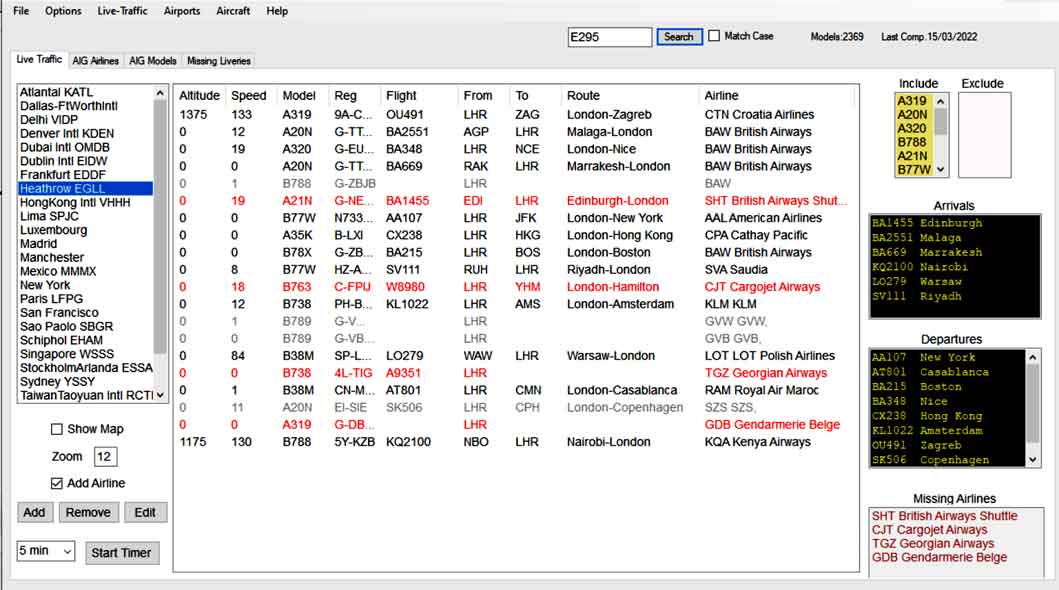
AIG Model Checker helps you select the essential models by examining live traffic at most airports.
Click on an airport to highlight models you have or haven't downloaded.
Live Traffic
Obtain live traffic from ANY ICAO airport by clicking on the airport's name.
AIG Model Checker contains all airports used by MSFS2020.
A list of 'key' airports has been included but the user can add new airports using their ICAO codes.
Tip: choose a busy time, ie NOT late at night
All 'missing airlines' highlighted in red are logged and can be accessed by clicking the 'Missing Liveries' tab.
You can create a printed copy by exporting the list to Notepad . Go File,Export Missing Liveries.
You can tweak the parameters for Live Traffic, ie range / height of aircraft.
Double Click on a flight to see picture of plane if available.
Colour Code
Black Lines:Models have been downloaded via AIG Manager and are found on your device.
Red Lines:Models have not been downloaded.When using the map, these models have red lables.
Grey Lines: Models are excluded,ie helicopters,pipers,cessnas etc.
Dark Brown Lines:AIG models have not been compiled - see below.
The list can be altered by clicking the AIG Missing Liveries tab.
Click on a model in the red list and move it to the green list by clicking on the ---> button.
Compiling AIG data
Just locate the 'aig-aitraffic-oci-beta' folder on your device via Options,Main Settings.
Make sure the folder is called 'aig-aitraffic-oci-beta'
More than likely it is located in the Community Folder.
Once located you need to compile the AIG data - this won't take long and must be done everytime you add new liveries via the AIG Manager.
From the main menu Go : Aircraft,Compile AIG Airlines
The program collects airline and model data.
After compiling, check for live traffic.
Look for the Lines in Red & make a note of the airline. Use AIG Manager and download the airline if listed.
Check Airlines
Click the 'AIG Airlines' tab and click on an airline to see what models have been downloaded.
Check Models
Click the AIG Models tab and click on a type to list all the airlines with that type.
Check Missing Liveries
Click the missing liveries tab to see missing models.
You can use the timer to collect traffic information at given intervals.
Click 'Check AIG Model List' to check if models included in the AIG model list are nevertheless found in your excluded list.
Flight Numbers
Each airport shows incoming and outgoing traffic using arrival and departure boards.
Microsofts 'Live' Traffic is always behind the real live traffic - in some cases it can be 30 minutes!
MSFS uses the numbers of an official Flight Number, not the letters, ie LX1413 becomes Swiss1413
AIG Traffic is not truly live as it is based on flight plans.
VMR
You can create VMR files from current models using the Export Menu.
Logging Traffic
The aim of logging live traffic is to obtain flight numbers at a specific time.
The idea is to collect such data in order to provide a picture of which flights to expect at any given
time.
Click Live Traffic Tab and select an airport
Right Click and select Edit
Click Log Flights
You need the IATA code for this airport but it should be automatically added when logging live
traffic.
Untick to cancel logging of this airport
Logged airports have an asterisk in front , ie Heathrow becomes *Heathrow
Flights in grey (ie model of plane is excluded) are not logged..
Number of entries logged are shown on the Live Traffic tab, ie Logged:12
Example:
You fly from an airport at 10.22. Click Flights by airport tab and check the Set Time option.
Time is set to your PC time. Click on the Airport's IATA code to provide a list of flights
previously logged
If you are using Microsoft Live Traffic you have to tweak the number of minutes before the actual
time, ie 30 mins to obtain the so called current live traffic
For more information check out https://pinns.co.uk/osm/aig.html
AIG Model Checker 3.1
AIG Model Checker 3.1 offers a detailed solution for managing and selecting essential aircraft models within Microsoft Flight Simulator. With live traffic examination at various airports, users can easily track and manage downloaded models. The tool allows for customization of live traffic parameters, compiling AIG data, and creating VMR files, enhancing the overall flight planning experience. Explore missing liveries, check airline and model data, and log live traffic efficiently with this comprehensive add-on.


User Reviews
2 reviews
Version History
Related
Beyond ATC LOG Scanner
Analyze your BeyondATC logs to review vector/descent /speech recognition issues and much more. Added limited support to end of Feb BATC update.
by WilbikFS
GSX Mapper Visualising GSX Profiles
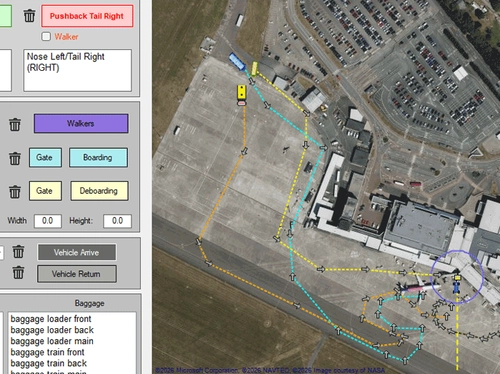
GSX Mapper is a Windows tool that displays all items and routes in a GSX profile, making it easier to choose stands and gates. It lets users rotate, move, and adjust objects without the GSX editor, and includes a simple editor for creating or modifying boarding, deboarding, and walking routes.
by WilbikFS
Log in to join the discussion
Log InComments(19)
almost 3 years ago
almost 3 years ago
They 've obviously blocked access.
I have personally resorted to an open source API which does the job but is not as responsive as FlightRadar24.
about 4 years ago
What a nice little application. It is nice to see what AIG packages I need to complete an airport. If there was one thing I'd ask you to change it would be the handling of commuter airlines in the US. For example, QXE Horizon Air shows up as red for KSEA Seattle. AIG includes Horizon Air as part of their Alaska Air package. Other commuters include JIA PSA Airlines, ASH Mesa Airlines, RPA Republic Airways, and EDV Endeavor Air. All of these show as red, but are included with other AIG packages. Thanks for the application.
about 4 years ago
Thanks for your comments;will look into the commuter airlines showing red even though they have been installed!
about 4 years ago
I think I know the reason why Air Horizon is flagged as red:
Eventhough it is part of Air Alaska the icao code is different, ie QXE and not ASA.
I am not sure if AIG traffic regards QXE as ASA, but I'm sure Microsoft traffic and Enhanced Live Traffic uses icao codes found in the .cfg file and QXE is not found in any of my cfg files - check using the cfg tab.
At heathrow, we have a similar problem with BA shuttle not being parsed as it has a different icao code. With some care it would be possible to make the required changes in the cfg file but it has to done with care taking into account engine type etc
about 4 years ago
Thanks for responding. Looking at the aircraft.cfg files for the AIG Dash8-400, for example, I see that AIG sometimes sets the icao_airline to "ASA" and sometimes "ASAX". Maybe I'll raise the question on their forum.
over 4 years ago
Nice program, but unfortunately the function of listing all installed AIG models does not work correctly. Many A/C types are depicted wrongly (e.g. Learjet 35 is mentionend as A359) and the column "Airline" which should be "TITLE" is not selectable. Please ad a function to copy & paste this column, so one can use the information for a enhanced/manual .VMR file for Vatsim. Thank you!
over 4 years ago
OK will have a look at that when I have time.To be honest, I was more interested in commercial airlines
over 4 years ago
Very nice little app, is there a way to add other airports I mainly fly out od EGKK Gatwick but its not in the list?
over 4 years ago
Yes, you can add any airport. From the Live Traffic tab click Add
Then enter EGKK and click Search
It should provide the necessary lat lon info and click Add
over 4 years ago
thankyou
over 4 years ago
⭐⭐⭐⭐⭐
This small app fills a crucial gap in AIG.
The first time I tried to use AIG I spent about half an hour trying to get a list of traffic for an airport.
I ended up opening Flight Radar and looking for all traffic in and around the airport.
This app does that for me now.
I do not know if there is a way to automatically get AIG to download missing airlines, but it is easy to just do a search in AIG for these airlines.
---
I did not read the description of this properly and missed a critical step.
It is important to read the description (above) fully.
over 4 years ago
Three small problems I have found (but with no real impact of usability)
I don't know what the timer does, but after starting the timer the text in the button will always say "stop" even after stopping the timer.
Show map just opens an empty browser window
I added this airport to my list, but it doesn't work
King Shaka FALE#-29.6100/31.1169#DURover 4 years ago
II too tend to just try an app without reading the instructions!
I'll insert a msg to compile data once youy've entered the oci folder.
Many thanks for your interest!
over 4 years ago
Thanks for your reply.
I had issues with a couple of airports earlier, but now I think there just wasn't any traffic at the airport.
Curious if you did something to check because I am sure I saw a flight called TEST pop up at FALE earlier.
Again, thank you for filling this gap, because I always thought this functionality was needed in AIG.