
Description
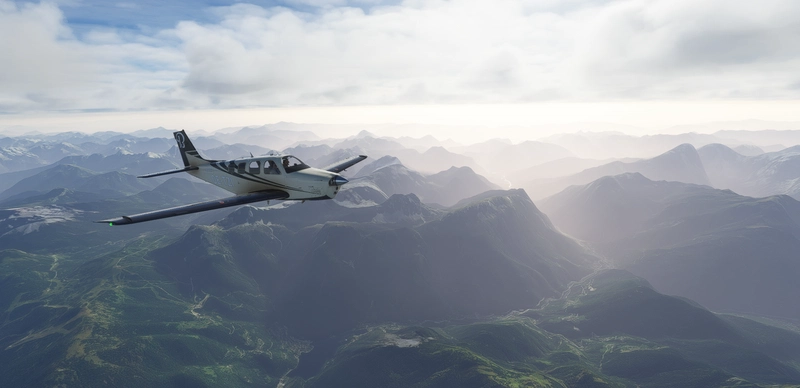
The Discus-2c is a single-seat, high-performance sailplane by German glider manufacturer Schempp-Hirth. The sailplane also comes in a front electric sustainer version (FES) available for purchase in the Discus-2c Premium Edition. The Discus-2c features composite construction, advanced flight control surfaces for precise control, and a state-of-the-art wing design that maximizes glide performance and aerodynamic efficiency. The 18 meter version has a 28.5 aspect ratio and each version has a top speed of 174 miles per hour. One of the most advanced soaring craft ever developed, the incredible Discus-2c allows aviators to master the heights in the purest form of flight. Stay aloft in the mountains by riding ridge lift, circle into a cloud base on thermals, or just glide along silently on laminar air. The Discus-2c allows aviators to become one with the sky.
OPTIONAL LX-NAV REPLACEMENT PACKAGE:
JackBilbo, an avid Discus-2c Community Member, has developed a very exciting Navigation Replacement Addon. If installed to your Community Folder, this add-on will replace the default Navigation Display in your Discus-2c. This optional add-on is very robust and includes features like Customization Options, Color Grading, Visual Ballast Control, Topology Maps, Advanced Thermal Tracking, Additional Overlay Options, Task Management, Competitive Timers, Visual Polar Sequencing, Precise Unit of Measurement Customization and More! Consider flying with this Replacement Add-on if you are delving into advance gliding and wish to have more customization. His Replacement Package is Drag-n-Drop Ready for your Community Folder.
HOW TO INSTALL:
- Locate your Microsoft Flight Simulator installation folder.
- You need to locate and open the folder named Community.
- Copy the "gotfriends-discus2c" folder you just extracted to the Community folder.
- Read the included Flight Manual for an in-depth look into all the aircraft features.
- Start the game and your Discus-2c will be sitting in your hanger ready to fly!
- NEED HELP? Follow this Flightsim.to Tutorial
CREDITS:
- Jonx: XML Coding, Navigation HTML Modifications & Weather Presets
- Got Gravel: Flight Model, Winch Launch HTML and V8 Variomenter HTML
- twoseventyinc: Liveries and Material Effects
- MyKrode: Full 3D Modeling
- GurtTractor: Custom Sound Design and Professionally Recorded Elements
- Touching Cloud: FLARM System, Towplane System, and Supporting Code
- Ian Lewis (B-21): Supporting HTML and Supporting XML Coding
- Flying Hedgehog: Got Friends Glider Club Scenery (Airfield) (ICAO: GTFD)
- JackBilbo: Navigation Modifications (Discus-2c/DG808S NavMod)
- Asobo/Microsoft: General Assets & SDK
OPTIONAL ADD-ONS & DOWNLOADS:
- Premium Version: Includes a FES Motor Variant: https://flightsim.to/product/discus-2c-premium
- Additional Community Liveries: https://flightsim.to/c/liveries/discus-2c/
- Official Paint Kit: https://flightsim.to/file/25526/discus-2c-glider-paint-kit
Frequently Asked Questions
Discus-2c: Standard
The Discus-2c is a single-seat, high-performance sailplane by German glider manufacturer Schempp-Hirth. This is the Freeware Version of the Discus-2c Glider by Got Friends. If you like this add-on, feel free to purchase the Discus-2c Premium for additional gliding features.
Deleted by Creator
This addon has been deleted by the creator and is no longer available.

Contributors



Supporters

VHEEE
$50
Virtualwombat
$50
SIMMERDAAN
$20
Thekarlness
$20
cdrkrotchetyusn
$20
TonyTazer
$20
Flyfoxswiss
$20
airwingle
$20
volkand
$15
hajodoc2310
$15
glider1001
$15
PaulRix
$15
bigwol
$15
ERKLO
$11
Tonocasa
$10
tommey
$10
Mjollnir73
$10
WarmZeebra
$10
TooOldToFly
$10
WarmZeebra
$10
Stonepile
$10
rosomakoo
$10
petebrooks2
$10
Lozmo
$10
DJAMES
$10
bobdschingis
$10
khill
$10
JarekL
$10
Caladhan
$10
cbdavid
$10
Manu5ahau
$10
matthewrupp
$10
bjrno
$10
francobrega
$10
Blizzard
$10
Ravaude04
$10
skyeagle24
$10
BertRC
$10
Michelf
$10
larsenm
$10
gruenelli
$10
Rabski
$10
sundflight
$10
HoNau
$8
aka_Thrillhouse
$7
Paul0805
$7
KeithFly
$6

deepfuture
$6
ClaudeMont
$5
Pa1
$5
bloggerbert
$5
loftyc
$5
GypsyPilot
$5
H3nn1n9
$5
FMB
$5
fillouze
$5
Blizzard
$5
Zimmy
$5
berurier
$5
Lacaria
$5
BAGSHOTT
$5
SEBDD
$5
petegorny
$5
SoaringTonnio
$5
PetrZ13
$5
benjgdc
$5
Red_Rover
$5
Jokki63
$5

Slowfox
$5
Hansflight
$5
FOD31
$5
Red_Rover
$5
StartingCat6
$5
odscenery
$5

Tom1957
$5

jansmit2020
$5
Coyote0815
$5
Stebarktian
$4
warrenellyett
$3
MivecGPX
$3
Dennisvanheteren
$2
CCSGoebel
$2
Gustavd
$2
geibak
$2
Ernest
$2
bkmichaelis
$1
User Reviews
128 reviews
Version History
Official Version 2.0.6. Changelog: - Incorporated Native Launch Features - Added New Launch Menu Options - Moved Old Launch Menu Options - Merged Native and Multiplayer Launch Features - Added New F-150 Winch Vehicle - Updated GTFD Glider Airfield - Updated LX-NAV HTML Display - Added Settings Menu to LX-NAV Display - Removed Button Features on Navigation Display - Removed How-to-Glide Document from Pocket - Updated Ballast Dump Visual Effects - Updated Model XML Animation Scripts - Added Optional No Registration Panel - Added Freedom Livery - Added Homelander Livery - Updated Flight Model and Flight States - Updated Checklists - Updated Aircraft.cfgs - Updated Release Cable Sounds - Updated Adverse Yaw Default Parameters
Log in to join the discussion
Log InComments312
EXTRA INFORMATION:
The Discus-2c is now fully compatible with native features, we have included a new launch menu for additional launch options and our old launch menu is still accessible for those who enjoyed the old winch launch. Thank you for all the patience throughout this process. We have been delayed for quite some time because of the lack of Official Glider support from Asobo and marketplace delays of the Wilga 35/80 Series. We hope that you enjoy this update and we will continue to improve it in the future. Also, JackBilbo’s LXN Navigation Replacement Mod is in the process of being updated. Hopefully soon you will all get that latest update as well. We have been working with him throughout this process, but for now, if you want to use version 2.0.6., please remove his LXN Navigation Mod from your community folder until he has released an updated version.
ALL DISCUS-2C LIVERY CREATORS:
You must change your aircraft.cfg and texture.cfg fallback files after this update. This is a MAJOR update and we had to change the aicraft type to “Glider” from “Single-Engine”. The paintkit has been updated with new example files if you need help. Starting now, EVERY COMMUNITY LIVERY will be INCOMPATIBLE until the livery artist updates their packages. We deeply apologize for any inconvenience, however this update had to be made and these files were always bound to change once the 40th Anniversary incorporated gliders.
Cheers! We hope this transition isn’t painful and look forward to everyone’s feedback.
The link to the flight manual does not work anymore. It seems to have changed to this one: https://www.got-friends.com/pages/flight-manuals
is there a way to save the adverse yaw setting? when starting a new flight it's always at 50%
will this be updated to work with the programming done for the 40th anniversary gliders thermals/wench and Cessna tow?
I am a pilot, but not on gliders, am familiar with airspeed indicator markings, but that yellow triangle and blue marks must be glider specific. What do they indicate?
Best glide speed and/or minimum rate of descent speed?
Update: Ok, now I found that the yellow triangle is the best L/D speed, aka best glide speed. Is it then with or without water ballast?
Still have to figure out the blue marks. On twin engine planes it means the best rate of climb speed with one engine inop., it must be something else here :)
The triangle is approach speed for landing.
The blue mark is best climb speed. (so you were kind of right)
Thank you for the explanation.
Before getting into my issue, thx for developing and sharing your Team's work with the community !!! The bird looks fantastic :-P
I've installed the Discus-2c folder in my Community folder and all looks fine until I close the canopy :-/ The glider's interior is all ok but the view looking out is immediately and entirely blocked by some sorts of "Star Wars warp speed" graphics -- all dark with rays of lights had zoomed by.
I do not have this issue with any other birds in the sim. Am I the only one?
Thx
did you remove the cover from the canopy?
7/10 for comic relief, and
a solid 8/10 for apathy
sorry, installed the latest version yesterday after i posted. It seems that there is no cover for the canopy anymore. Sorry. I do not have this bug. Maybe someone else can help.
Would it be possible to implement the adverse yaw number into the monitor?
Because sometimes there is a reset and the only way to check it is to activate the helping tool to see the number.
You should update the aircraft.cfg file parameter ui_typerole to "Glider" so this aircraft will be identified and organized in the Hangar aircraft filters as a "Glider" instead of an "Other" aircraft type.
HOW DO I GET IT TO START MOVING
Loved it and have bought the premium version! Thank you for this excellent and beautiful piece of software :) I am currently flying Floyd's Alpine Odyssey with the Discus which I would very much recommend as well! Take your time, take in the views...
How do I use the towing function in multiplayer?
ça me rappel des souvenirs!! merci beaucoup! :)