

Description
SmartILS v1.5.2.0
This is the external Windows - version.
The in-game panel - version is also released!
Get it the panel version here:
https://de.flightsim.to/file/25519/smartils-panel-the-smartest-ils-frequency-database
All Airports of MS FS 2020 that have ILS are included (SU 9, 07/2022) and these work also with MSFS 2024.
Type in the ICAO code of the airport and you will get the data of runways with ILS.
Klick on NAV1 or NAV 2 to set the frequency in MS Flightsimulator into the standby radio.
Check "Set Active Radio" to set the frequency into the active radio instead.
Check "Swap Act/Stby. after setting" Swaps active and stby radio after setting the frequency.
(This function is sometimes not working correctly!)
Option to report wrong or missing data by using "Report Data".
You will need to sign up with the website to report data.
When a number of user-corrections was reviewed, a new database version will be released.
DB updates: Download and install quick and easy using "Check for updates".
First Release 12/28/2021
Latest Update to 1.5.2.0 09/16/2025: Fixed a bug.
Homepage: https://fs-addons.de/smartils/
SmartILS - The smartest ILS frequency database!
SmartILS v1.5.2.0 is a comprehensive ILS frequency database for Microsoft Flight Simulator 2020 & 2024. Access all airports with ILS systems by simply entering their ICAO codes. Set frequencies with ease using the NAV1 or NAV2 buttons in-game. Stay updated with regular database updates and report any discrepancies for future releases. Visit the homepage for more information.


Supporters

User Reviews
5 reviews
Version History
Fixed a crash in 1.5.x.x
Related

SmartILS Panel - The Smartest ILS frequency database!
Access the SmartILS Panel for Microsoft Flight Simulator, a handy in-game addon that provides the latest ILS frequency database, now compatible with VR. Input airport ICAO codes to access runway data with ILS capabilities and easily adjust airplane NAV radio frequencies. Keep your settings saved and contribute to data accuracy by reporting any discrepancies. Explore the additional features like a virtual keyboard, customizable display options, and a standalone Windows app version for more convenience.
by Abtzero
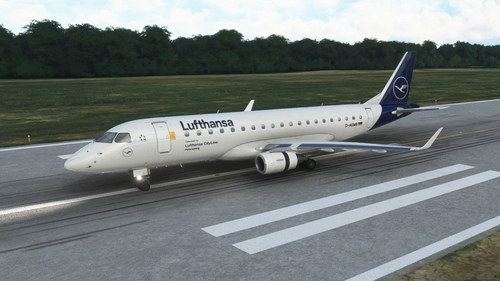
FSS E-175 Lufthansa Livery
Fictive MSFS Lufthansa livery for FSS Embraer E-Jets 175 with short and long wings. As far I know, Lufthansa has a E-195, but before this model will be finished by FlightSimStudio, we have to deal with the fictive E-175 "Petersberg" D-AEMB. Just copy into Your "Community" folder.
by Abtzero
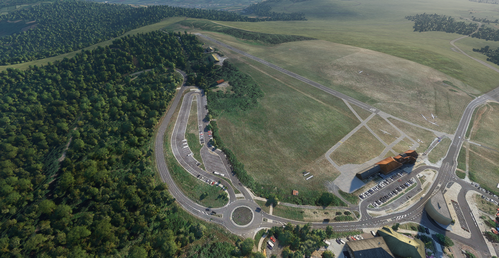
EDER Wasserkuppe
Discover EDER Wasserkuppe, the highest airfield in Germany and a significant location where gliding planes were invented after World War 1. This add-on provides a quick edit to include the airport with a runway, parking spots, and a tower radio frequency in Microsoft Flight Simulator. Enhance your simulation experience by exploring this historic recreation zone in the area of Fulda.
by Abtzero
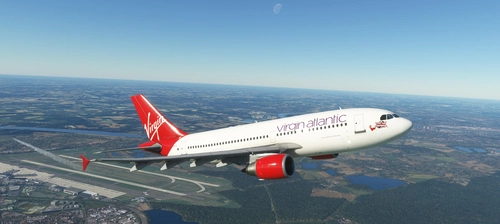
iniBuilds A310-300 Virgin Atlantic Livery
Add a touch of Virgin Atlantic to your IniBuilds A310-300 with this updated livery by Abtzero. Perfect for fans of the virtual airline "Virgin Atlantic" on Fly the World. Just copy the folder to your Community folder and enjoy!
by Abtzero
Log in to join the discussion
Log InComments(26)
about 7 hours ago
10 months ago
10 months ago
Microsoft.NET Framework
An unhandled exception occurred in the application. Click "Continue" to ignore the error and continue the application. Clicking "Exit" will terminate the application immediately.
Object reference not set to an instance of an object.
Information on how to invoke JIT debugging instead of this dialog box can be found at the end of this message.
************** Exception text **************
System.NullReferenceException: The object reference was not set to an instance of an object.
bei SmartILS.Form1.SaveSettings()
bei System.Windows.Forms.Form.OnFormClosed(FormClosedEventArgs e)
bei System.Windows.Forms.Form.WmClose(Message& m)
bei System.Windows.Forms.NativeWindow.Callback(IntPtr hWnd, Int32 msg, IntPtr wparam, ntPtr lparam)
************** Loaded assemblies **************
mscorlib
Assembly-Version: 4.0.0.0.
Win32-Version: 4.8.9221.0 built by: NET481REL1LAST_25H2.
CodeBase: file:///C:/Windows/Microsoft.NET/Framework64/v4.0.30319/mscorlib.dll.
----------------------------------------
SmartILS
Assembly-Version: 1.5.2.0.
Win32-Version: 1.5.2.0.
CodeBase: file:///C:/Daten/_Samlung%20von%20Flightsim.to/SmartILS_1.5.2.0_s_7kx/SmartILS.exe.
----------------------------------------
System.Windows.Forms
Assembly-Version: 4.0.0.0.
Win32-Version: 4.8.9221.0 built by: NET481REL1LAST_25H2.
CodeBase: file:///C:/Windows/Microsoft.Net/assembly/GAC_MSIL/System.Windows.Forms/v4.0_4.0.0.0__b77a5c561934e089/System.Windows.Forms.dll.
----------------------------------------
System
Assembly-Version: 4.0.0.0.
Win32-Version: 4.8.9321.0 built by: NET481REL1LAST_25H2_B.
CodeBase: file:///C:/Windows/Microsoft.Net/assembly/GAC_MSIL/System/v4.0_4.0.0.0__b77a5c561934e089/System.dll.
----------------------------------------
System.Drawing
Assembly-Version: 4.0.0.0.
Win32-Version: 4.8.9221.0 built by: NET481REL1LAST_25H2.
CodeBase: file:///C:/Windows/Microsoft.Net/assembly/GAC_MSIL/System.Drawing/v4.0_4.0.0.0__b03f5f7f11d50a3a/System.Drawing.dll.
----------------------------------------
System.Configuration
Assembly-Version: 4.0.0.0.
Win32-Version: 4.8.9221.0 built by: NET481REL1LAST_25H2.
CodeBase: file:///C:/Windows/Microsoft.Net/assembly/GAC_MSIL/System.Configuration/v4.0_4.0.0.0__b03f5f7f11d50a3a/System.Configuration.dll.
----------------------------------------
System.Core
Assembly-Version: 4.0.0.0.
Win32-Version: 4.8.9319.0 built by: NET481REL1LAST_25H2_B.
CodeBase: file:///C:/Windows/Microsoft.Net/assembly/GAC_MSIL/System.Core/v4.0_4.0.0.0__b77a5c561934e089/System.Core.dll.
----------------------------------------
System.Xml
Assembly-Version: 4.0.0.0.
Win32-Version: 4.8.9221.0 built by: NET481REL1LAST_25H2.
CodeBase: file:///C:/Windows/Microsoft.Net/assembly/GAC_MSIL/System.Xml/v4.0_4.0.0.0__b77a5c561934e089/System.Xml.dll.
----------------------------------------
Microsoft.FlightSimulator.SimConnect
Assembly-Version: 11.0.62651.3.
Win32-Version: .
CodeBase: file:///C:/Daten/_Samlung%20von%20Flightsim.to/SmartILS_1.5.2.0_s_7kx/Microsoft.FlightSimulator.SimConnect.DLL.
----------------------------------------
mscorlib.resources
Assembly-Version: 4.0.0.0.
Win32-Version: 4.8.9032.0 built by: NET481REL1.
CodeBase: file:///C:/Windows/Microsoft.Net/assembly/GAC_MSIL/mscorlib.resources/v4.0_4.0.0.0_de_b77a5c561934e089/mscorlib.resources.dll.
----------------------------------------
System.Windows.Forms.resources
Assembly-Version: 4.0.0.0.
Win32-Version: 4.8.9032.0 built by: NET481REL1.
CodeBase: file:///C:/Windows/Microsoft.Net/assembly/GAC_MSIL/System.Windows.Forms.resources/v4.0_4.0.0.0_de_b77a5c561934e089/System.Windows.Forms.resources.dll.
----------------------------------------
************** JIT-Debuggen **************
To enable just-in-time (JIT) debugging, the `jitDebugging` value must be set in the `system.windows.forms` section of the application or machine configuration file (`machine.config`).
The application must then be compiled with debugging enabled.
For example:
When JIT debugging is enabled, any unhandled exceptions are sent to the JIT debugger registered on the computer and are not handled in this dialog box.
Many thx in advance for ur help, Best Regards Greg
10 months ago
11 months ago
Oh just saw that there is an in-game panel version of this. Please apply the suggestion to that. I see there is a virtual keyboard but the recent or suggested codes would still be wonderful.
over 2 years ago
Thanks for making this small fantastic tool. I've just recommend it to my readers with www.facebook.com/FSMAGAZIN.
May I propose to make a tool for NDB,VOR/DME and VORTAC as well or an integrated version? Would be nice to have indications of this "endangered" land-based navaids.
Thanks in advance - have a good time!
Bert
about 4 years ago
great mod! quick question, what database are you using?
about 4 years ago
It's the MSFS in-game database.
about 4 years ago
Where is the database file located?
about 4 years ago
It is in the folder where You extracted the program.
about 4 years ago
What would be the permissions for using this database?
about 4 years ago
May be one could add LTFM later on...?!
Meanwhile, I'd like to thank you very much for this useful tool...!
best Thomas
about 4 years ago
If You know an airport, that needs to be added to the database, register on the homepage and fill out the form for airport suggestions and add as much information as You have (frequencies, runway herading...)
almost 5 years ago
Hi,
Thank you for this application that helps simmers.
For my part it does not work, I have an error message as soon as I press the "FIND" button
Here is what the error says:
"An unhandled exception has occurred in your application.
If you click Continue the application will ignore this error and try to continue. If you click Exit, the application will shut down immediately."
"The input string format is incorrect."
Here is a link to a screenshot showing the problem, I can't get the image in directly here.
https://i10.servimg.com/u/f10/15/40/63/45/smart_10.jpg
I tried to run the exe in admin mode or directly but no luck.
I have placed the application folder in various places on my PC, without success either.
Thanks in advance.
almost 5 years ago
Did You mention:
"Just unzip the .exe-file and copy it into a location of Your choice, where You have the rights to write data (C:\Program Files\.. is NOT recommended!), because the app would not be able to write a database update into it. We recommend to make a directory like "Smart ILS" in Your Documents folder and unzip the files there."?
And it needs .Net framework 4.7.2
to understand the errormessage would help, but it's french...
You still can use the igame-panel-version.
almost 5 years ago
Thank u very mutch
Framework 4.8 already installed
Unzipped folder in Documents"
SmartILS.exe authorised in W10 FireWall
Aplication authorised in W10 parameters.
Nothing to do it doesn't work
I'll try the in-game panel version and come back to report
Updated post:
After install Vrsion In-Game Panel all is fine
Thank u
almost 5 years ago
Very strange. The only remaining things: Did You try the .exe on the machine where Flightsimulator is installed?
Did You make the download again? Maybe from fs-addons.de?
Did a anti-virus steel a file?
Did You try to run it on a different Windows 10 PC?
I am really interested to examine waht would cause the error.
almost 5 years ago
Yes the exe run where FS is running
No i have not re-download the zip(I will be try it now)
WinDefender did not report any virus except just at this moment with last download
with this warning.:
""Microsoft Defender SmartScreen has prevented an unrecognized application from starting. Running this application may put your computer at risk." The following link appears:
Further information.
Clicking on the link will display a button
"Run anyway"
Then SmartILS starts after agreement given, but it still does not work with the same problem as before."
I have only one W10 PC
almost 5 years ago
Perfect and useful.