
Description
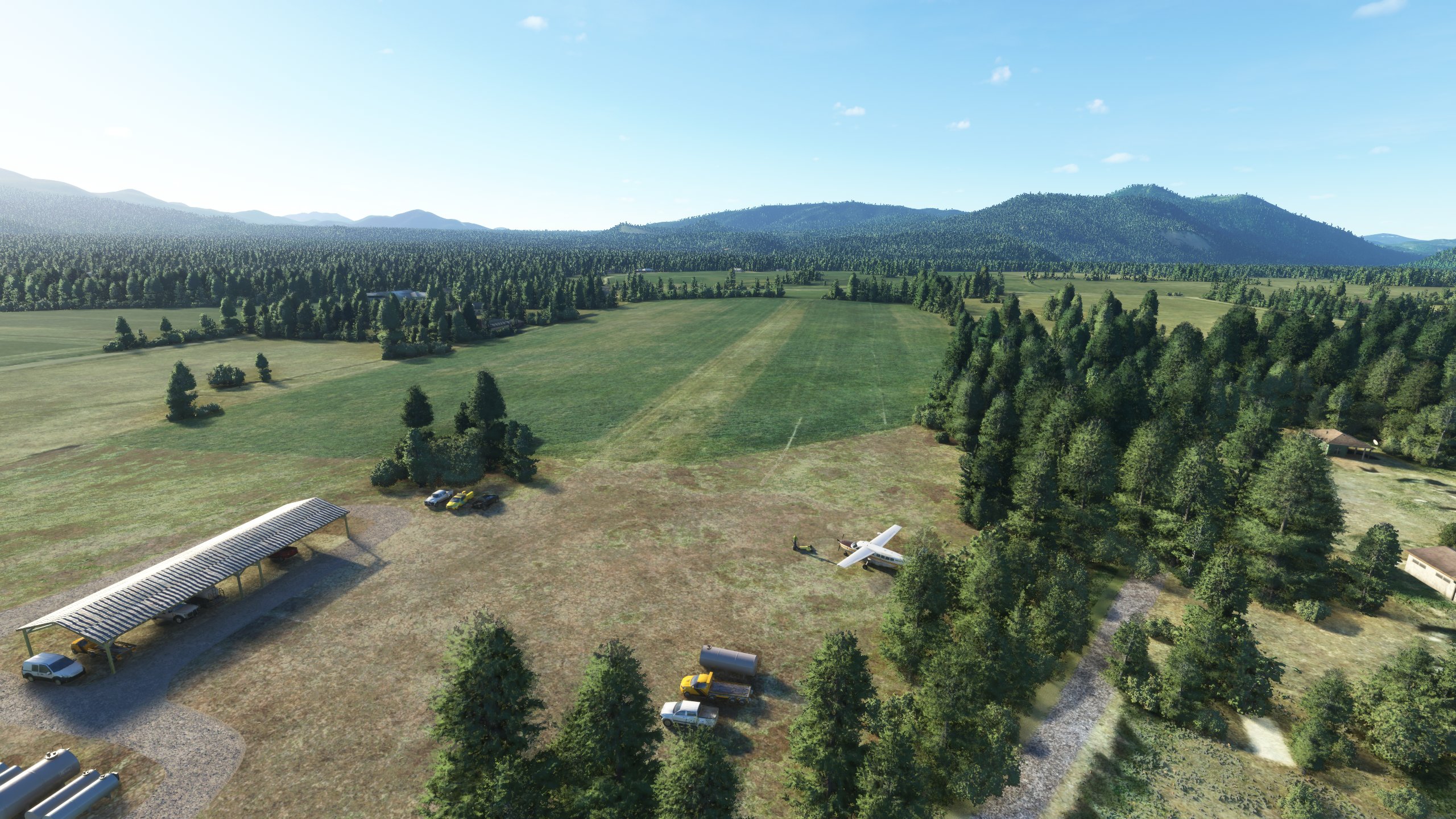
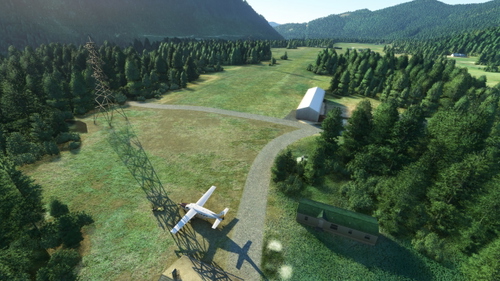
This scenery contains my rendition of the Trout Lake airport. It has a very short runway that looks to be a part of a farm in Trout Lake, Washington. In real life, this airport is "Closed indefinitely," but it is still visitable in MSFS as of right now, even without this addon. It is located about 35 miles southeast of Mt. St. Helens, 15 miles south of Mt. Adams, and 45 miles north of Mt. Hood. The runway is only about 1,500 feet long if you include the usable part of the grass "apron" area that the runway connects to.
Notable Features
The imagery for this airport contains a lot of unknown objects that appear to be some combination of vehicles, trailers, storage pods, boxes, and just general miscellaneous stuff laying around. I could not identify what most of that stuff was, and the default scenery libraries do not contain a lot of small little "filler objects" like that. So, most of them are represented in 3D space by metal tanks (the container kind, not the armored kind) and vehicles. The objects that I did not place in 3D, including a parked aircraft, have been covered up so that the airport looks less like a flat image.
I added 2 parking spaces that can be used by players off to the side on the grass "apron." This should allow people to spawn in the cold-and-dark state, which was previously impossible because the only available spawns were runway spawns.
The gravel roads going into and around the airport are overlaid with actual roads in the simulator, partially to cover up random objects and their shadows so that shadows are not in the wrong spots for the time of day.
I also removed a section of trees from the departure end of runway 26. Those trees are probably not removed in real life, just rather short, but I could not make trees that short in the simulator so instead I simply removed the ones that would block the runway. Admittedly, this is primarily for the purpose of allowing a Grand Caravan to fly in and out without hitting the trees. I'm sure that if the owners of the airport had expected operations from such an aircraft they would have cut them down anyway.
That's all for now! Hope you enjoy.
Location
Trout Lake Airport (66WA)
Experience flying into Trout Lake Airport (66WA) with this realistic scenery add-on. Located in Washington, the airport features a short runway set amidst a picturesque farm landscape. Discover unique details like 3D-rendered objects and improved parking options, enhancing your flight simulation experience in Microsoft Flight Simulator.


User Reviews
2 reviews
Version History
Removed modellib and materiallib, as they are no longer used. Should fix any potential compatibility issues with other addons.
Featured in Collections(2)


Related
Cascade Locks State Airport (KCZK)
Discover the revamped Cascade Locks State Airport (KCZK) in this detailed scenery add-on, located along the picturesque Columbia River, 30 miles east of Portland, Oregon. Experience realistic enhancements, including adjusted tree heights, added airport fence sections, repositioned windsock, and improved taxiway and runway alignment for a more authentic flight simulation experience.
by Synoxys787
FSX Mission: Resort Supply (Incl. C310R version)
Fly apples to a resort near Methow Valley State Airport, and then fly another load to Lost River Resort. After delivering the apples, recover an abandoned aircraft at Stehekin State Airport. This project aims to recreate the FSX mission “Resort Supply.”
by Synoxys787
FSX Mission: Whiteout
Take an ice fisherman to Trout Lake (66WA), then return to Portland (KPDX) in instrument meteorological conditions. This mission is intended to be a faithful recreation of the FSX: Acceleration mission "Whiteout." Please read the description below for important info.
by Synoxys787
Mount St. Helen's Aero Ranch Airport (WN10)
Experience a remote bush strip at Mount St. Helens Aero Ranch Airport (WN10), just 15 miles southwest of the iconic volcano. This short, grass runway in Washington state offers a challenging landing experience with high tension wires running parallel. Enjoy the serene setting nestled between Lake Merwin and Yale Lake, enhanced with minor details for added realism.
by Synoxys787
Log in to join the discussion
Log InComments(5)
almost 5 years ago
Thank you for this :-)
almost 5 years ago
I am glad you posted this file. Thank you. And I'm looking forward to your updates as well.
But first, please update the name of the modellib.BGL file to reflect MS/Asobo guidelines to give it a unique name, such as adding the 'ICAO code' to the file: Example (ICAO-modellib.BGL) and then update the layout.json file to reflect the new name.
The Problem: MSFS only reads the first file in the Community folder named modellib.BGL and then uses that file for all others with the same name. Renaming it avoids conflicts with any other scenery in the Community folder and gives your scenery the proper appearance with fewer problems.
The same is true for the 'mycompany' folder. Rename this as a unique name. Simply add the ICAO code to the folder name: ICAO-mycompany and then update the layout.json file.
The same is basically true for the MaterialLibs folder (unless you use unique child folder names within the MaterialLibs folder. Rename it and then update all occurences of MaterialLibs in the layout.json file.
almost 5 years ago
I wasn’t aware of this, thank you for the information. I’ll go through all of my uploads and fix it.
almost 5 years ago
Okay, I've fixed it. Turns out, since I made some changes, the airport was not even using the modellib or materiallib asset groups, so I removed them entirely. Also, I couldn't find a mycompany folder, so unless I am missing something, we are all good there. My other uploads also don't have those items.
almost 5 years ago
This was a fun place to fly. Tried it with Seneca V and loved it. Enough room for a steep approach. Great work. Too bad the airfield is closed even though in the maps (on websites) show a plane or two.