
![[A32NX] TUI - 4K - Image 1](https://cdn.flightsim.to/images/16/a32nx-tui-4k-RfDkn.jpg)
Description
I will soon update with the larger engine logo.
Grateful!
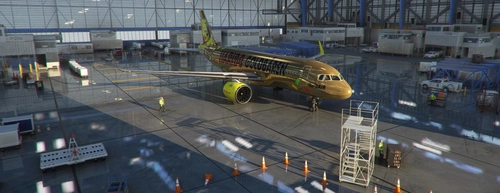
[A32NX] TUI - 4K
Enhance your flight simulator experience with the A32NX TUI livery featuring high-quality 4K textures and a soon-to-be-added larger engine logo. Grateful for a detailed and realistic addition to your virtual fleet.


User Reviews
1 reviews
Version History
No version history available.
Related
![[A32NX]TUI](https://cdn.flightsim.to/images/01/9rxNtevA.png?width=500)
[A32NX]TUI
A custom TUI logo for the A32NX, with updated features. Simply drag and drop into your community folder.
by MattTerry3
![[A32NX] FlyByWire | Airbus A320neo TUI FLY D-ATUI in 8k](https://cdn.flightsim.to/images/23/flybywire-airbus-a320neo-tui-fly-d-atui-in-8k-YAFK8.jpg?width=500)
[A32NX] FlyByWire | Airbus A320neo TUI FLY D-ATUI in 8k
A detailed 8k livery mod for the Airbus A320neo TUI FLY D-ATUI by FlyByWire, including custom colors and logo. Compatible with SimUpdate 7+. Installation is straightforward – simply extract the files and enjoy your new livery. Creator appreciates ratings and offers livery request fulfillment with a gesture of gratitude.
by Selcuk_Dikilitas
![[A32NX] FlyByWire | Airbus A320neo TUI FLY D-AHXG in 8k](https://cdn.flightsim.to/images/22/flybywire-airbus-a320neo-tui-fly-d-ahxg-in-8k-eNsKG.jpg?width=500)
[A32NX] FlyByWire | Airbus A320neo TUI FLY D-AHXG in 8k
Experience the TUI FLY D-AHXG Airbus A320neo in stunning 8k resolution with this FlyByWire add-on. Features include a custom TUI livery, compatibility with FlyByWire version, and SimUpdate 7+. Simple installation instructions make it easy to get started on your next flight adventure.
by Selcuk_Dikilitas
FlyBy Wire A32NX NEO TUI Haribo HaribAIR
Enhance your FlyByWire A32NX experience with a custom texture inspired by the original Boeing 737-800. Simply unzip and copy the folder into your community folder to enjoy this new look. Feel free to share your feedback and suggestions for future updates.
by Chrispaesi
Log in to join the discussion
Log InComments(6)
almost 3 years ago
about 1 year ago
over 4 years ago
just something I picked up on, although this is for FBW, the filename when first downloaded says 'ASOBO'. May cause a bit of confusion. I'd consider changing it. 🙂
about 5 years ago
Very nice livery. Thanks for creating this for us.
about 5 years ago
Is it compatible with flybywire a320?
about 5 years ago
Nice livery, thank you