
Description
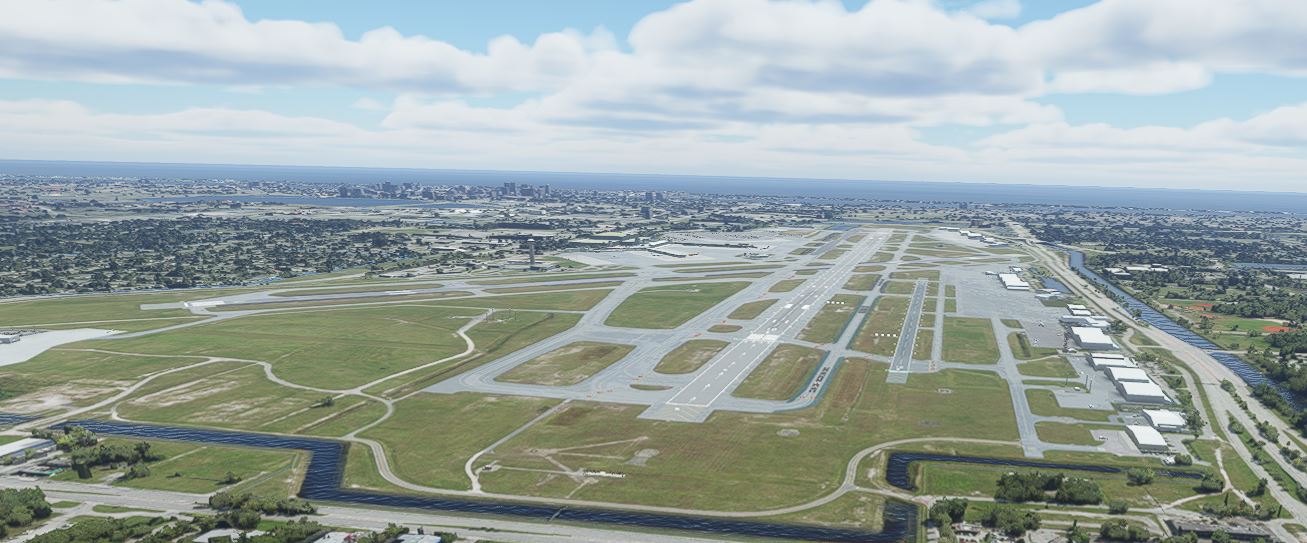
I was extremely disappointed with West Palm Beach International airport scenery purchased from the MSFS marketplace. It wasn't the buildings with generic textures, rather it was that none of the many problems with the default airport were not fixed making it non-functional. Therefore, I decided to resurect models from freeware scenery I had done for FSX to make my own airport scenery. KPBI is continuously being revised and this scenery is based on 2014-2016 satellite imagery, which is the same as the Bing imagery used by MSFS, but with some updates where possible. Since taxiways are currently a lot different from what is in MSFS, I have included an airport diagram in the package from 2014 that applies for this scenery. Terminal gate numbers are actual, and separate GA parking areas are identified so parking at specific locations on the airport can be requested from ground control. Version 1.3 adds airline codes to terminal parking to work with new AI traffic mods. Airliners will park at their proper gate. Tested with FS Traffic.
To install, merely place the kpbi-palm-beach-intl, ap-fences-1v1 and kb_static_aircraft_MSFS folders in your MSFS community folder. Custom models in this scenery were converted with ModelConverterX. If it is a problem for you, remove the file from your community folder. Assembly of the scenery was accomplished entirely with Airport Design Editor. Some scenery items are from kb_static_aircraft_FSX and FSX default libraries converted with ModelConverterX.
Location
West Palm Beach International Airport - KPBI
Ground elevations at the terminal appear to have changed and have been flattened. Adjustments previously made for sloped ground elevations have been eliminated to work with the new elevations. Broken jetways, cause unknown, have also been fixed. Replace the original file.


User Reviews
11 reviews
Version History
Featured in Collections(1)
Related
Bahamas
Explore the beautiful Bahamas with this add-on featuring major airports like Nassaus Lynden Pindling International Airport (MYNN) and more. Enhanced with custom scenery objects and parking spots, this mod brings the Bahamas to life in Microsoft Flight Simulator. Updates like LODs for better performance and removal of obstructions enhance the flying experience in version 1.3.
by Art_P
Daytona Beach International Airport - KDAB
Enhance Daytona Beach International Airport in Microsoft Flight Simulator with this add-on featuring updated taxiways and custom buildings. Version 3.1 includes LODs for static aircraft and improved textures. Simply place the folder in your community folder to enjoy the updated scenery.
by Art_P
Brooksville-Tampa Bay Regional Airport, Florida
Explore Brooksville-Tampa Bay Regional Airport in Florida, once a WWII military airfield, now the largest airport north of Tampa Bay. This add-on features two active runways, a control tower, and detailed representations of actual airport buildings. Experience realistic aerial views with photogrammetry, enhancing your flying experience in this historic location.
by Art_P
Log in to join the discussion
Log InComments(34)
about 7 hours ago
9 months ago
about 1 year ago
about 2 years ago
over 2 years ago
almost 3 years ago
The stock airport is...... well, stock.
The add-on in the marketplace is awful. I can't even tell what they changed but for a few textures.
This version is so much better, considering it has proper labeled and sized gates!!
about 3 years ago
over 3 years ago
over 3 years ago
Nice! When placing it into the community folder, I had to remove the individual folders from the main one as mentioned by @Series7man to make it work. I flew my Hype Performance H145 all around the airport and it looks good! Thank you!
over 3 years ago
Hey, It will not work on MSFS. I read what you replied to Series, and I think that is because you already had it downloaded. But, when you install it, it does not work. I see it listed on the content manager, but it says "Not installed", and there is no option to install it, though it is in my community folder. Please fix this, this is the only GOOD KPBI.
over 3 years ago
Here is what I did to make it work. Putting the folder West Palm Beach International Airport 1.2 into the Community Folder did not work. Open that folder and put the folder kpbi-palm-beach-intl directly into the Community Folder and it works just fine. There are two other folders in their also, ap-fences-1v1 and kb_static_aircraft_MSFS. If you want to use these, then do the same thing as you did with kpbi-palm-beach-intl. I don't know why this is happening but this fixed it for me.
over 3 years ago
This is correct, and is as stated in the install instructions.
over 3 years ago
Bro- I did that, and it did not work... I re-downloaded it and it works now..... LOL.... welp thanks!
over 3 years ago
Not sure when this happened but none of this scenery shows up anymore in MSFS. I deleted and and downloaded it again; still nothing. All had been fine since you posted it here and the scenery was fantastic. Not sure which update did this to the scenery. Anyone else having this problem?
over 3 years ago
I haven't been active online in a while but finally saw your comment. I started the sim and find that PBI shows as it should with my scenery. In fact, the jetways are working way better than they were before. The only issue I encountered was that the airport was nearly covered with what appears to be Dreamliners with one texture at gates, taxiing (sometimes in grass), landing, taking off, and in GA parking. GA traffic is limited to Learjets. I've got traffic set to real world with no addons.
over 3 years ago
Thanks for the reply. I will keep trying to figure out what is wrong as I love flying out of PBI. I got it to work again. I had to change the file structure. I have no idea why, but until I changed it, MSFS refused to install it. MSFS is a funny beast!
almost 4 years ago
My download of KPBI is hung up in MSFS and did not load into my Community folder. Is there a problem? Is there something I can do to get it into my Community folder?
over 3 years ago
You have to paste it into the community folder.
about 4 years ago
Art_P, Any interest in doing KLNA? I'm still blown away by the quality of the work you did on PBI. Even the GA side of the airport got some needed care.
about 4 years ago
Wow, this is a much improved PBI over the official Marketplace version. The misplaced PAPI lights on the taxiway were always driving me crazy.