
![[A32NX] (13bandit) A320neo Jetstar Airways [8k] VH-XSJ - Image 1](https://cdn.flightsim.to/images/14/TirFuU1I.png)
Description
***Compatible with Sim Update 7***
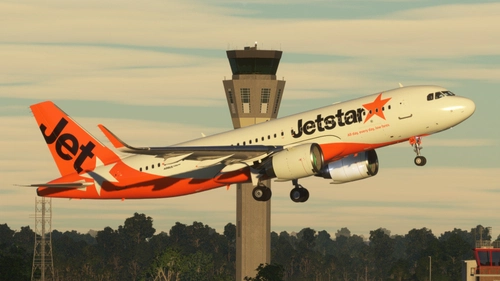
Scratch built rendition of VH-XSJ, one of Jestar Australia's newer A320CEOs. Qantas Group has a large order for A320 and A321NEOs - so we can expect to see this livery in reality soon.
VH-XSJ is featured with 8k textures and added dirt/discolouration for additional realism.
DON'T FORGET TO RATE! :)
[A32NX] (13bandit) A320neo Jetstar Airways [8k] VH-XSJ
Fly in style with the [A32NX] A320neo Jetstar Airways add-on featuring the VH-XSJ livery. This high-quality rendition of one of Jetstar Australias newer A320CEOs comes with 8k textures and added dirt effects for enhanced realism. Compatible with Sim Update 7.


User Reviews
13 reviews
Version History
V1.6 - bug fixes and corrections. Completely overhauled reflections and hand-painted fuselage.
Featured in Collections(1)

Related
![Jetstar Pack for A32NX [8K]](https://cdn.flightsim.to/images/27/jetstar-vh-a5a-for-a32nx-8k-285225-1734428433-aUzJL.jpg?width=500)
Jetstar Pack for A32NX [8K]
This add-on features Jetstar liveries for the FlyByWire Airbus A320neo, representing one of Australias leading airlines. Jetstar, based in Melbourne, operates a variety of aircraft, including the A320 and A321 models, servicing destinations throughout Australia and beyond. The installation process is straightforward, requiring a simple drag and drop into the MSFS Community folder.
by Brqdders
![[A32NX] (13bandit) A320neo Jetstar Japan [8k] JA26JJ](https://cdn.flightsim.to/images/19/a32nx-13bandit-a320neo-jetstar-japan-8k-ja26jj-7P4p2.jpg?width=500)
[A32NX] (13bandit) A320neo Jetstar Japan [8k] JA26JJ
Enhance your fleet with the A320neo Jetstar Japan livery, featuring 8k textures and weathered detailing for a realistic touch. Compatible with Sim Update 7, this fictional rendition of JA26JJ brings a fresh look to your Microsoft Flight Simulator experience.
by 13onearmedbandit
![[A32NX] (13bandit) A320neo Jetstar 'Generation' [8k] VH-VGF](https://cdn.flightsim.to/images/14/BzJN3QGy.png?width=500)
[A32NX] (13bandit) A320neo Jetstar 'Generation' [8k] VH-VGF
Fly in style with the A32NX A320neo Jetstar Generation, featuring VH-VGF in the Jetstar Australia 10th Anniversary livery. This add-on offers 8k textures, added dirt/discoloration for enhanced realism, and is compatible with Sim Update 7. Experience the future of aviation with this meticulously crafted rendition.
by 13onearmedbandit
Jetstar (VH-A5A) - FlyByWire A32NX
This add-on features the Jetstar livery for the Airbus A320neo, specifically the VH-A5A registration. It includes custom 8K textures with accurate coloring and stencils, as well as custom SELCAL and MSN details. Future registrations will be added as they are delivered, enhancing the realism of your virtual flights with Jetstars latest aircraft. Installation is straightforward, requiring the file to be placed in the community folder after unzipping.
by AvGeekNic
Log in to join the discussion
Log InComments(57)
almost 2 years ago
about 2 years ago
about 2 years ago
over 2 years ago
almost 3 years ago
about 3 years ago
almost 4 years ago
can you remove the masking on the windshields
almost 4 years ago
Hey, love your work! Is there a maskless version?
about 4 years ago
out of date plz update it
about 4 years ago
Hi. Noob question. I've installed the livery in my Community folder, but when loading up MSFS I can't see it as an available Livery. I have other liveries installed (Virgin Australia for example) but I don't have Jetstar available to choose from. Being a noob, I don't understand the Sim versions. I can see I have the latest MSFS installed. Just purchased last week on Steam. Any help would be appreciated. Thank you!
about 4 years ago
possibly means the livery is out of date and has not been updated as of now, as one another user has pointed out that it is not working so i do not recommend to download it. might cause severe crashes to desktop.
btw current MSFS game update is SU10 or sim update 10. make sure anything you download from here has written in description something like this.. updated or SU10.
almost 4 years ago
Maybe check if the folder is a zip, if it is drag into your desktop and right click and press 'extract all' then drag the unziped folder into your community folder
Hope This helps
over 4 years ago
FYI SU8 Beta - Livery causes CTD whilst game is loading (before reaching the main menu).
FBW Experimental Version ec5e1b8 (12th Feb 22)
over 4 years ago
Disappointing! I’ll look into this ASAP.
almost 5 years ago
Could you make one of these for the pmp a321? I know there already is one but its just an livery import from fsx. I would love it if you could make a propper one msfs.
almost 5 years ago
No worries. I’ll have a look. I don’t use the PMP A321, but if I have some spare time, I’ll make one up.
almost 5 years ago
thanks :]
almost 5 years ago
Can you make a version without the black mask?
almost 5 years ago
Sure - can do.