
![[A32NX] Airbus A320neo - Emirates Wildlife - Image 1](https://cdn.flightsim.to/images/12/q5VUOGPC.png)
Description
Installation
Unzip the downloaded file
Place it into your community folder
Launch Microsoft Flight Simulator
Enjoy!
Future Updates
No further development, this version is final.
Created By
Created by Scott Kiely, CraftDesigns.
Notes
Do not reupload without permission
This mod is compatible with FBW A32NX.[A32NX] Airbus A320neo - Emirates Wildlife
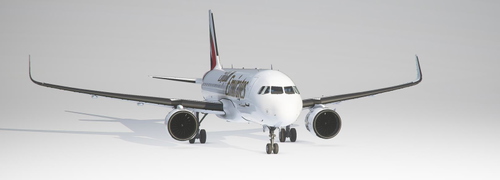
Experience the A32NX Airbus A320neo in Emirates Wildlife livery created by Scott Kiely, CraftDesigns. Compatible with the FBW A32NX, this final version add-on brings a unique touch to your Microsoft Flight Simulator flights. Just unzip, place in your community folder, and take off to enjoy!

User Reviews
1 reviews
Version History
No version history available.
Related
![[PACK] FlyByWire A32NX Emirates 2023 with & without mask](https://cdn.flightsim.to/images/27/flybywire-a32nx-emirates-new-livery-63608-1727637968-MWg5w.jpg?width=500)
[PACK] FlyByWire A32NX Emirates 2023 with & without mask
This add-on features a repaint of the FlyByWire A32NX in the Emirates 2023 livery, created by Kikiwi at the request of a user. The package includes versions with and without a mask. Installation instructions are provided for easy integration into your community folder.
by Kikiwi
![[A32NX] Emirates Livery [8K High Res]](https://cdn.flightsim.to/images/13/uf1JPn2Y.png?width=500)
[A32NX] Emirates Livery [8K High Res]
Explore this high-resolution Emirates livery for the A320 Neo in Microsoft Flight Simulator, designed for the FBW A32NX. Contact the creator on Discord for feedback or requests.
by xZreai
![[A32NX] FlyByWire | Airbus A320neo EMIRATES AIRLINE A6-TAC in 8k](https://cdn.flightsim.to/images/22/flybywire-airbus-a320neo-emirates-airline-a6-tac-in-8k-OgcMW.jpg?width=500)
[A32NX] FlyByWire | Airbus A320neo EMIRATES AIRLINE A6-TAC in 8k
Discover the Emirates Airline livery for the Airbus A320neo in stunning 8k resolution with this FlyByWire add-on. Compatible with FlyByWire version and featuring a custom Emirates color scheme and logo, this livery is ready for SimUpdate 7 and beyond. Dive into the skies with this simple installation process and let your wings dance.
by Selcuk_Dikilitas
A32NX Emirates
Fly in style with this Emirates livery for the A32NX by FlyByWire. Download now for a high-resolution, authentic experience.
by Phumchanok
Log in to join the discussion
Log InComments(5)
over 5 years ago
over 5 years ago
over 5 years ago
cause i can choose it in game but when i want to fly it i cant see the aircraft!
over 5 years ago
If you do not have the A32NX mod, you can get it here. You will need the Development version to use this livery until the latest stable release is out.
https://flightsim.to/file/8486/flybywire-a32nx
over 5 years ago
If you download the Stable version, it is still part of the default A320 airplane. However, if you download their Dev / Exp versions, the FBW A320 is now a stand alone, or separated, aircraft. If you have downloaded liveries for the A320, you will have to look at the specifics as to which skin works on what plane.