
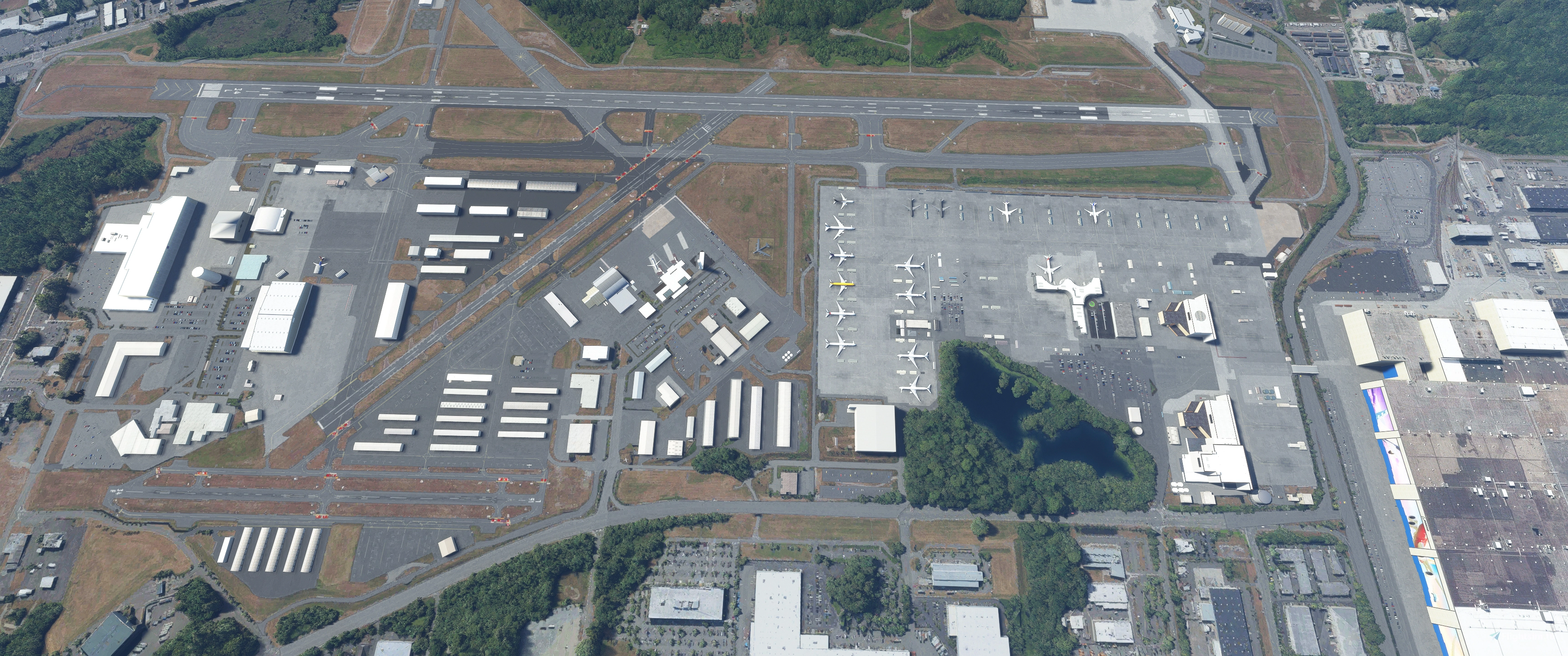
Description
V5.0 - Made compatible with MSFS2024
V4.1 - New/revised/fixed painted lines. Fence fixes. Revised and fixed groundt textures.
V4.0.1 - Corrected taxi lines. Corrected parked cars
V4.0 - Complete re-do of all parking spots and taxiway network, including fixing the taxiway mess around C/J/A area, added taxiway H1, closed north end of taxiway H, repositioning Boeing parking spots such that when selected, the airplane spawns nose out. I also removed selectable parking spots where static airplanes are placed (no more spawning ontop of existing models). Added functional jetways at Boeing Delivery Center and commercial terminal.
V3.10 - Terraforming fixes. New details added in the vacinity of the field.
V3.9.01 - Some small quality of life improvements including fence edits, ground texture fixes, taxiway sign fixes.
V3.9 - Numerous revisions including:
- Revised siding color on EDC
- Added functioning wigwag lights leading out of Boeing flightline
- Added details to Boeing paint hangar models
- Revised textures on Boeing 40-88 roof (helipad)
- Revised texture and added details to Boeing EMC hangar
- Added A1/A2/A3 gates on commercial ramp, with functioning jetways and now selectable from map
- Added new PBR textures to the old FBO office on the central ramp
- Revised all taxiway signs
- Revised perimeter fencing
- Added new library assets throughout
- Corrected terraform/height throughout
- Added new ground textures including:
- Boeing Flightline
- Passenger Terminal
- Grass Throughout Airfield
- Taxiway Stripes
- Parking Lots Throughout Airfield
- Gravel Pit Near Future of Flight Museum
- Apron on the far West Ramp (on Taxiway K7)
- Sewer Drains Throughout Airfield
Also, created WA82 helipad port, which now allows you to select it from the map and start a flight from that position. You need to install the additional WA82 file now included in the download.
Keep in mind, if you want to start your flight from the commercial airport, be sure to select GATE A1, GATE A2 or GATE A3 from the map. Ignore the other nearby parking spots. If you start from A1/A2/A3, note that the in-game ATC will not provide a taxi route to the active runway, so you're on your own to find your way. Why is this... the SDK does not allow me to edit existing taxiways to link them up to the new parking spots unless I remove all existing taxiways and re-build them from scratch. Maybe someday I'll have the motivation to do that.
INSTALLATION INSTRUCTIONS
If you have V3.8 and older installed, delete the old version from your community folder. Start sim. Exit sim (this will ensure old unused textures are removed from your system). Install new kpae_v_3_9. Start sim and enjoy.
If it's your first time installing this KPAE package, simply install kpae_v_3_9 into your community folder and go fly.
If you would like to add the WA82 heliport as a selectable start point from the map, install the WA83 folder into your community folder. This is not required unless you want to add the heliport as a selectable start point. All 3D model assets reside in the main KPAE scenery package.
V3.8 - Added details to EDC and Boeing doghouse blender models (including EDC event center inside the building). Added KC-46 tankers on Boeing flightline. Added 1 ANA 787 on Boeing flightline. Re-textured the following models:
- ATS Hanger
- Dreamlifter Ops Center
- Boeing Everett Delivery Center
- Boeing Flightline Dog Houses
- FBO Building
- Composite Wing Center
V3.7.01 - Added red anti-collision lights ontop of Boeing paint hangers and factory.
V3.7 - Added Boeing office buildings 40-88 & 40-87, with land-able helicopter landing pad on 40-88. Also added attached cafeteria 40-92 building.
V3.6 - Added new terminal model. Fixed some fence issues. Added in-storage B-52.
V3.5 - Reworked details around the commercial terminal, including the car parking area, the curb drop off, folliage and aircraft parking textures.
V3.4 - Added details throughout the airfield. FIxed some issues that I think were from WU10 elevation changes.
V3.3 - Cleaned up various superflous model assets. Fixed some new mysterious gap fencing that popped up. Added some new model assets throughout. Added some animated ramp workers on the Boeing flightline.
V3.2 - Added library asset details throughout airfield. Removed static 787 airplanes from Boeing flightline due to unresolved texture issues from SU6. Added animated (wind dependant) flags.
V3.1 - Added Boeing specific airstairs at each Boeing stall. Fixed some scaling issues with previous model assets.
V3.0 - Multiple changes including:
- Added United 787 back on the flight line with corrected textures
- Added hand modeled Dreamlifter Operations center
- Added static Dreamlifter (LCF)
- Added hand modeled Future of Flight Museum, replacing the google model
So, with this version, there are no longer any google models in this scenery package. I recommend you delete KPAE V2.91 or older, restart MSFS2020, exit MSFS2020 then install V3.0. This will clear up about 10MB of data from your harddrive.
V2.91 - I finally figured out what the issue was with the static Boeing airplanes and have removed the color enomolies (turned out to be a normals issue). WIth that issue being fixed, I could add a shiny finish to each model.
V2.9 - Added hand modeled airport fire station, added additional lighting throughout the airfield and added more details to Boeing paint hangers #1 and #2.
V2.8 - Mutiple changes including:
- Added hand modeled ATS facilities
- Replaced Boeing doghouse model with 2 high detail versions
- Added Regal Air office building
- Revised tower model to add more detail
- Revised terminal model to add more detail
- Added details around terminal
- Removed the AI generated blocky trees around the field perimeter
- Revised fencing
Additionally, this version was cleaned up to remove no longer utilized assets (the old google models). I recommend you delete KPAE V2.71 or older, restart MSFS2020, exit MSFS2020 then install V2.8. This will clear up about 7MB of data from your harddrive.
V2.71 - Fixed error associated with blender scaling, causing the objects to load in late. This update sets the blender scale to 1:1, allowing assets to spawn in sim at normal distances. Also fixed the textures on the composite wing building.
V2.7 - Replaced the Google Boeing Delivery Center and Paint Hangers with hand crafted blender models. Added emmisive lighting to the PAE street sign. Added jeyways (static) to commercial terminal.
V2.6 - Updated to correct for any modellib.bgl conflicts
V2.5 - Updated scenery to correct some issues created from the US update. Added a few more cars randomly throughout the airfield.
V2.4 - Multiple changes including:
- Replaced google models with hand crafted models for the Boeing Factory, Boeing flightline doghouses and Boeing Static Wing Test building
- Added Future of Flight museum
- Added KPAE tower and connected office building
- Added KPAE commericial passenger terminal building
- Added hand modeled Boeing Everett Modification Center building
- Revised lighting in various places around the airport
- Added PAE signage along Airport Rd
- Added additional parked cars in various parking lots around Boeing factory and flightline
- Changed the arrangement of static airplanes on Boeing flightline (tried to correct some of the texture issues on these models, but was not able to)
This will probably be the last update of this package.
V2.3 - Added static 747, 767, 777s and 787s on Boeing Flightline
NOTE: I plan on adding 767 Tankers in stall 107-109 once I find available models
V2.2 - Added hand modeled control tower plus replaced some autogen hangers with closely matching library hangers.
V2.1 - Added 777X Composite Wing Center and added Static Wing Test building
V2.0 - Revised models to minimize vertices. Tweaked texture shading. Added factory/field bridge over HW526.
V1.0 - Scenery enhancement to Paine Field (KPAE) in Everett WA; home of the Boeing Everett factory, the largest building in the world by volume. Enhancements include:
- Boeing Flight Line
- Everett Delivery Center (EDC) Building
- Flight Line Stall Dog Houses
- Paint Hangers 1, 2 & 3
- Various parking lots
- Blast fencing
- Boeing Factory
- Fencing around entire airport
- Corrected various GA parking stalls around the airport
Stay tuned as I am planning more updates in the near future!
Dependencies
Location
Paine Field, Everett WA USA - KPAE V5.0
Paine Field (KPAE) V5.0 is an updated scenery add-on for Microsoft Flight Simulator 2024, featuring improved taxiway configurations, ground textures, and detailed models of Boeing facilities. This version includes new parking spots, functioning jetways, and fixed painted lines, enhancing realism at the airport. Additional changes span various versions, addressing quality of life improvements and adding new assets throughout the airfield. The package also offers a selectable helipad start point with the newly included WA82 file.
User Reviews
43 reviews
Version History
MSFS2024 Compatible
Featured in Collections(1)

Related
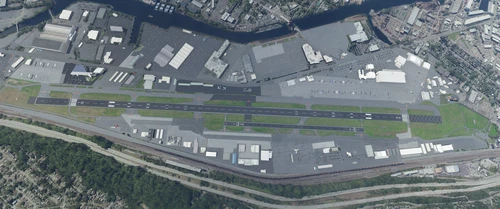
Boeing Field, Seattle WA USA - KBFI V3.0
Enhance Boeing Field in Seattle with version 2.5, featuring new ground textures, wigwag lights, and revised fencing. This update also includes various detailed additions throughout the airport, ensuring a realistic experience for pilots.
by FreakyD
Tri-Cities Airport, Pasco WA USA - KPSC (V3.0 MSFS2020) / (V1.0.2 MSFS2024)
This add-on features a detailed enhancement of Tri-Cities Airport (KPSC) in Pasco, WA, for both MSFS2020 and MSFS2024. The latest versions include significant updates such as a new terminal, FedEx depot, and ATC tower models with improved PBR textures, alongside revised ground textures and layout adjustments. Additional updates fix various issues related to model rendering and compatibility. The add-on aims to provide an accurate representation of the airport with high-quality assets and textures.
by FreakyD
Yakima Air Terminal/McAllister Field, Yakima WA USA - KYKM V4.0
Enhance the realism of Yakima Air Terminal/McAllister Field in Yakima, WA with version 2.0. This update brings PBR textures and fixes previous texture issues, as well as adding new details like fencing, animated people, and more. Custom hand-modeled buildings, revised lighting, and improved overall scenery make this add-on a must-have for your Microsoft Flight Simulator experience.
by FreakyD
Felts Field, Spokane WA USA - KSFF V2.0
Enhance your virtual flights with the Felts Field add-on for Microsoft Flight Simulator, featuring hand-modeled buildings, upgraded lighting, and detailed textures. Version 1.3 includes added fencing, revised PBR textures, and various enhancements throughout the airfield. Experience the historic charm of Felts Field in Spokane, WA, brought to life in stunning detail.
by FreakyD
Log in to join the discussion
Log InComments(115)
4 months ago
10 months ago
over 1 year ago
It looks like the taxiway signs only have information on 1 side of the sign and not the other which isn't accurate. I have it installed for MSFS 2024. There is a weird texture thing at A5 area where it enters the runway. The pavement is a different texture for some reason here, and it's not accurate to IRL if that was the intention.
The section of taxiways around A, D, C, and J are incorrect in your version. It got all sorts of buggered up when they closed that old runway, which I'm glad to see you captured that closure! Would be cool to see 777X's sitting there like there are IRL.
Looking at the current Google Maps imagery of KPAE and the refernced taxiway section you'll see that C (headed NW) does this sort of jog to the left towards D, then comes back around. You have an extra dirt island in that area that does not exist anymore. Also, J no longer connects to 34L/16R, it stops on A.
At A8 there is a VOR test spot indicator on the ground that is not in this mod (super pedantic, I know lol).
In the Central ramp area, NW side, the fences are all in the wrong locations. The aircraft ramp area parking is significantly smaller IRL. This is where Rainier Flight Service parks their planes.
The fuel station (Propeller) by Regal Air Services has a much larger roof and footprint overall. Obviously super minor "complaint" just being super pedantic!
D2 taxiway is a much smaller piece of pavement IRL.
Where D goes down to G, there's actually a bit of a downhill. Not much but it does exist. Hard to tell if it's modelled. Again, still a really really minor comment. The NE section of the Central ramp, G1. G1 is surprisingly steep and can require quite a bit of power to get up from the ramp to G.
Again, I'm super happy with this FREE gigantic improvement to the default KPAE. Thank you so much for putting it out there for us to enjoy. These were just some comments on things I noticed that differ from the real life airport. My biggest complaint is the 1 sided taxiway signage in MSFS 2024.
over 1 year ago
Thank You
over 1 year ago
almost 2 years ago
Again thanks for the great work!
over 2 years ago
over 2 years ago
over 2 years ago
over 2 years ago
Many thanks from Warstein in Germany that you re-designed this to a wonderfull place to fly and also, that you updated it for technical improvements, as so many of your Addons here :-)
over 2 years ago
over 2 years ago
over 3 years ago
Here is my footage in VR over Paine Field using your add-on
https://www.youtube.com/watch?v=D9QtJY741Pw
over 3 years ago
Absolutely love your work. KPAE is my go to airport in MSFS. I hope you can some day detail the air museum hangar there at south end. I would like to have a parking spot there to start my warbird flights.
over 3 years ago
Cannot find a WA82 heliport folder and version number is not correct in manifest,json.
over 3 years ago
Thanks for your work.
over 3 years ago
Despite following all the instructions, the Content Manager says it is not installed.
over 3 years ago
Greetings, thank you very much for your excellent work. The runway 34R has terraforming issues with the latest update.
over 3 years ago
I am not getting the results pictured. In desperation, I renamed my community folder communityx and then created a new community folder with just your folder in it. The airfield looks the same. I look for the bridge not dropping down onto the highway, the colorful factory doors, the taller paint shops; nothing. Same old Same old.