
Description
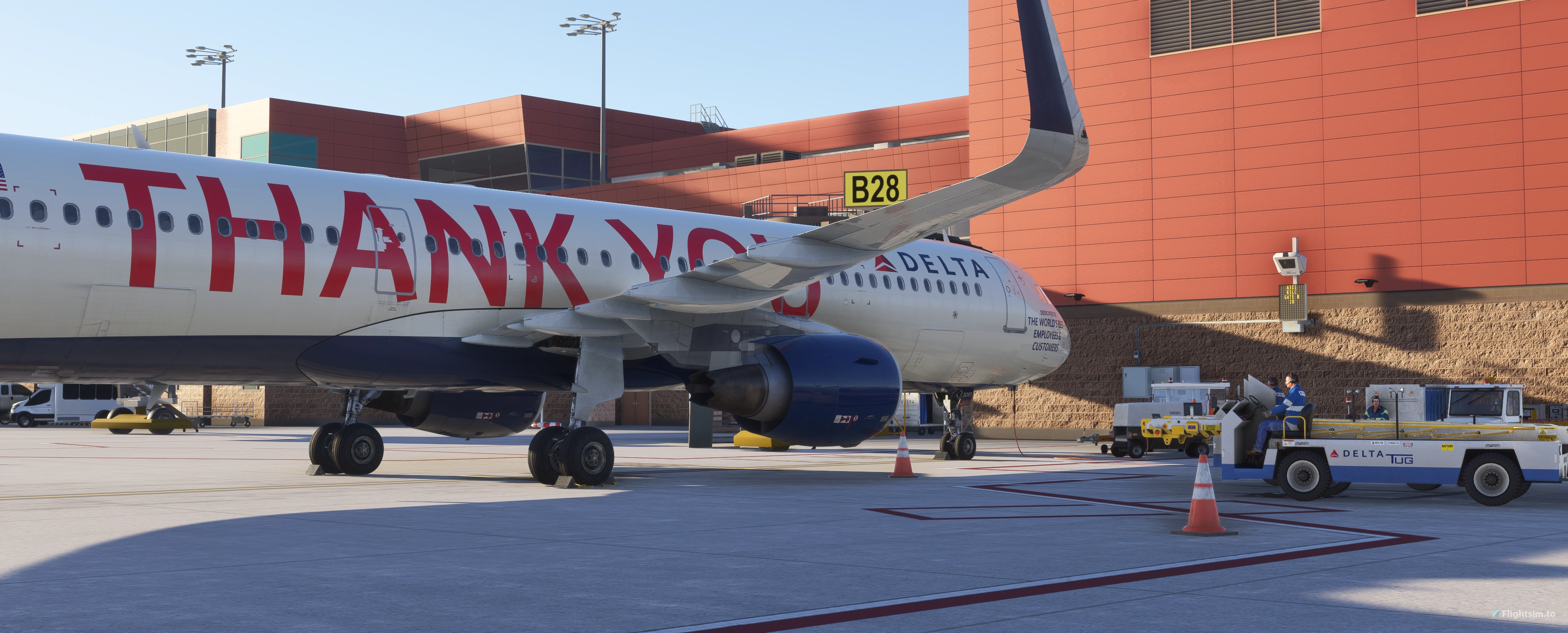
This is the Official GSX Profile for PacSim's NEW KSLC Airport for MSFS2024/2020. Depicting the 2028 version of SLC Airport in Salt Lake City Utah, this profile brings up to date current day operators and operations to MSFS.
This profile includes a Python file for correct stop-line position points.
Included is the A/B gates concourses with accurate ground equipment positions, ADB SafeGate models on applicable gates, custom pushback routes, correct stop line markers for the 737/8/9/M,A320,A321,A319,A359, E170,E175, A300, 777 and 727.
In addition, all 25 De-Ice pads are simulated as well. Simply taxi into one of the De-Ice lanes and request De-Icing.
Also included is a GA parking position to simulate commercial charter ops at Atlantic Aviation's ramp.
This profile will be updated in the future to bring new features and compatibility to real world operations.
Install Instructions:
Unzip the "PacSim-NEW-SLC" Folder and place "pacsim-kslc.ini" and "pacsim-kslc.py" files in "C:\Users\YourName\AppData\Roaming\Virtuali\GSX\MSFS" folder.
IMPORTANT : To remove Nool Aerosystems default VDGS (Not compatible with GSX) You need to remove the Nool Aerosystems VDGS folder in "pacsim-saltlakecity\SimObjects" , or use Windows Unistall to uninstall the module listed as "Visual Guidance Docking System" (FS2020 and/or FS2024) by Nool Aerosystems.
Happy flying!
PacSim KSLCv2/2024 Native Official GSX Profile
This is the official GSX profile for PacSim's KSLC airport, depicting the 2028 Salt Lake City International Airport in MSFS 2020 and 2024. It features accurate gate equipment, ADB SafeGate models, custom pushback routes, and proper stop line markers for various aircraft. All 25 de-ice pads are fully simulated, along with a designated GA parking area for charter operations. The profile includes a Python script for enhanced stop-line positioning and will receive future updates for improved realism.
User Reviews
2 reviews
Version History
No version history available.
Log in to join the discussion
Log InComments(13)
7 months ago
Update : Okay, after searching the GSX manual, I added this line to the very beginning of the .ini file and it's all good now.
[jetway_rootfloor_heights]
GMkslcjetway = 6.80
2 months ago
4 months ago
7 months ago
Update : Okay, after searching the GSX manual, I added this line to the very beginning of the .ini file and it's all good now.
[jetway_rootfloor_heights]
GMkslcjetway = 6.80
7 months ago
7 months ago
1.Gates A42, A44, and A49 already come with a pole in the scenery for the VDGS, so instead of using a GSX VDGS on a pole, why not the use a wall mounted VDGS and put it on the pole that comes as default with the scenery.
2. Many VDGS that should be wall mounted but instead placed as an L-support VDGS.
3. Stop positions at parking that can fit both small and heavy aircraft (e.g.: A19/A19A, A21/A21A, A33/A33A, A41/A41A) are wrong. I would appreciate if you add lateral deviation in the .py file for these gates so that it directs you to the correct position (heavy aircraft should use the gate with A suffix, and small aircraft with the one without the A suffix).
7 months ago
7 months ago
7 months ago
7 months ago
7 months ago
It's a bit of a pain to do this manually but just did it to this profile and it seems to do the trick. That said, Nool for this particular airport seems wrong/unfinished (?). The east side of the B terminal doesn't seem to have any VDGS at all on my side...
7 months ago
"We sent 3 emails to Nool to update the last few remaining gates with ADB Safe gate system and zip reply to date so we opted to go with GSX in the meantime. One more final update of the product will be at the end of this year, so hopefully the Nool guy will get back to us before then so that you get the full Nool system treatment at all gates. But I see your point."
7 months ago
7 months ago
Proved your own point.
PacSim is "reportedly" ending support for Nool with this airport. I have no interest creating another separate profile for that antiquated VDGS module, especially since not all gates are included at this time. Also, I don't get paid for this.
You or someone else are more than welcome to make your own Nool profile, from scratch that is...its not like I hold a monopoly on the GSX profile freeware marketplace lol...