
Description
🇪🇸 Descripción (Español):
Performance Calculator es una herramienta externa diseñada para ayudarte a calcular rendimiento de despegue (V-Speeds, configuración, runway data, viento, QNH, temperatura, etc.) en Microsoft Flight Simulator 2020/2024.
✈️ Características- Introduces el ICAO, pulsas un botón y la aplicación obtiene: METAR real, Pistas disponibles, Longitud, rumbo y elevación y Condición de pista
- Interfaz moderna y minimalista con animaciones suaves
- Compatible con cualquier avión
- Ajustes rápidos de: Peso (KG), CG, Flaps / Config, Anti-Ice y Packs
- Motor avanzado de cálculo (con tablas JSON por avión)
- Funciona como aplicación independiente (.EXE)
🛠️ Instalación
- Descarga el archivo .zip
- Extrae la carpeta donde quieras
- Ejecuta PerformanceCalculator.exe
- ¡Listo! Puedes usarlo mientras vuelas.
👨💻 Autor: Fabiiipilot
💬 Créditos: METAR via AVWX y Airport database by OurAirports
📄 Permisos: Puedes usar y modificar esta aplicación para uso personal, pero no se permite su redistribución sin permiso del autor
🇬🇧 Description (English)
Performance Calculator is an external tool designed to help virtual pilots compute takeoff performance (V-speeds, configuration, runway data, wind, QNH, temperature, etc.) for Microsoft Flight Simulator 2020/2024.
✈️ Features
- Enter an ICAO and instantly autofill: Real or simulated METAR, Available runways, Runway length, heading, and elevation and Runway condition
- Minimalist, modern UI with smooth animations
- Works with any aircraft
- Quick setup: Weight (KG), CG Flaps / Config, Anti-Ice and Packs
- Advanced performance engine (JSON takeoff tables per aircraft)
- Standalone Windows application (.EXE)
- Download the .zip
- Extract the folder anywhere
- Run PerformanceCalculator.exe
- You’re ready to use it while flying.
👨💻 Author: Fabiiipilot
💬 Credits: METAR via AVWX and Airport database by OurAirports
📄 Permissions: Free for personal use and modification, redistribution without permission is not allowed
Performance Calculator
The Performance Calculator is an external tool for Microsoft Flight Simulator 2020/2024 that assists virtual pilots in calculating takeoff performance metrics, including V-speeds and runway details. It features a modern user interface and supports any aircraft, with quick adjustments available for weight, configuration, and more. The application automatically provides real or simulated METAR data and runway conditions based on the entered ICAO code. Designed as a standalone Windows application, it allows users to access essential performance information while flying.


Version History
🇪🇸 Changelog – v1.3 ✈️ Nuevas funciones Nuevo sistema completo de Landing Performance para todos los aviones compatibles. Añadida animación visual de pista tanto en Takeoff como en Landing. Implementado Stop Margin en Landing, mostrando cuánta pista sobra según: Autobrake LOW Autobrake MED Nuevo sistema de avisos inteligentes basados en METAR: Windshear Lluvia / pista mojada Viento cruzado elevado Aviso automático de pista incorrecta si el headwind es negativo. Popup de sobrepeso en Landing Weight (no permite calcular hasta corregirlo). 🧠 Mejoras de realismo Cálculos de velocidades y distancias más realistas, basados en tablas por aeronave. Colores de viento mejorados: A más viento → colores más intensos (rojo/amarillo). Resultados de Landing ahora incluyen: TD SPEED Landing Distance Required (LD REQ) Autobrake recomendado Reversas (REV) Configuración de FLAPS Auto Thrust 🖥️ Interfaz y experiencia Diseño de Landing igualado al de Takeoff para mayor consistencia. Selector de Runway funcional, cambiando correctamente la pista seleccionada. Animaciones de pista sincronizadas con los cálculos. Mejor visibilidad y jerarquía visual de resultados. ⚙️ Correcciones Corregidos errores que impedían calcular Landing en algunos aviones. Solucionados fallos de variables no definidas y resultados que no aparecían. Mejor manejo de errores al cargar datos de aeronaves. 🇬🇧 Changelog – v1.3 ✈️ New Features Brand-new Landing Performance system for all supported aircraft. Added runway visual animation for both Takeoff and Landing. Implemented Landing Stop Margin, showing remaining runway for: LOW autobrake MED autobrake New METAR-based intelligent warnings: Windshear alerts Rain / wet runway detection High crosswind warnings Automatic wrong runway warning when headwind is negative. Landing weight overload popup (calculation blocked until corrected). 🧠 Realism Improvements More realistic speed and distance calculations based on aircraft tables. Enhanced wind color coding: Stronger winds → more intense colors (yellow/red). Landing results now display: TD SPEED Landing Distance Required (LD REQ) Recommended autobrake Reversers (REV) FLAP configuration Auto Thrust status 🖥️ UI & UX Landing layout matched to Takeoff for a consistent design. Fully working Runway selector, correctly updating selected runway. Runway animations synced with calculations. Improved readability and visual hierarchy of results. ⚙️ Fixes Fixed issues preventing Landing calculations on some aircraft. Resolved undefined variable errors and missing results. Improved aircraft data loading error handling.
Related
Fly Ground | Ground Services
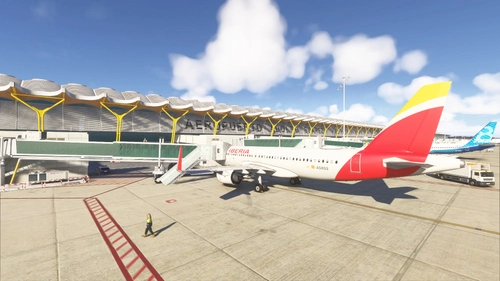
Fly Ground | Ground Services is an interactive add-on for Microsoft Flight Simulator 2024, providing a comprehensive ground service experience inspired by GSX. Users can request boarding, utilize authentic crew communications, and manage passenger boarding times. The add-on features an in-game toolbar for easy access, automatic jetway connections, and custom sound effects for an immersive ground handling experience.
by Fabiiipilot

MMFS - Mods Manager Flight Simulator
MMFS - Mods Manager Flight Simulator is an application designed to streamline mod management for Microsoft Flight Simulator 2020 and 2024. This tool automates the process of downloading, extracting, and installing mods directly into the Community folder, eliminating manual efforts. It features a modern interface and supports various mod types, allowing for easy activation or deactivation of installed mods. MMFS is intended for personal use, with no redistribution allowed without permission from the original authors.
by Fabiiipilot
Normal Checklist Airbus A350
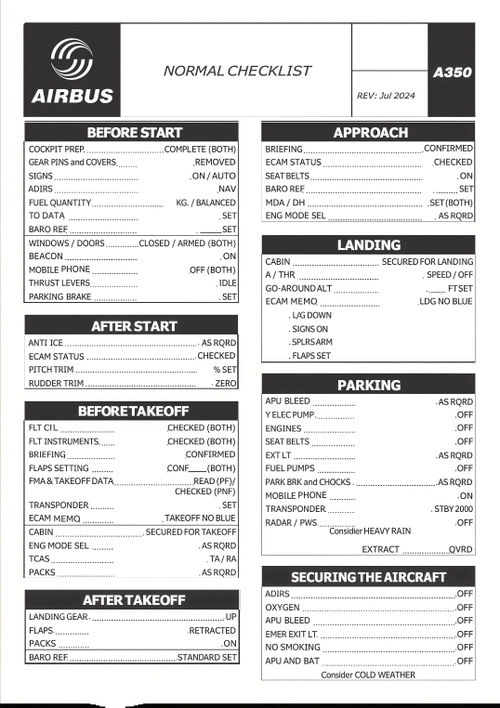
This add-on provides a comprehensive and realistic checklist for the Airbus A350, tailored for use in Microsoft Flight Simulator 2020/2024. It includes essential procedures for various flight phases, such as cockpit preparation, takeoff, and landing. The checklist is available in both PDF and PNG formats, ensuring easy access and readability for virtual pilots. Designed to enhance the simulated flying experience, it adheres to authentic Airbus protocols.
by Fabiiipilot
Normal Checklist Airbus A320
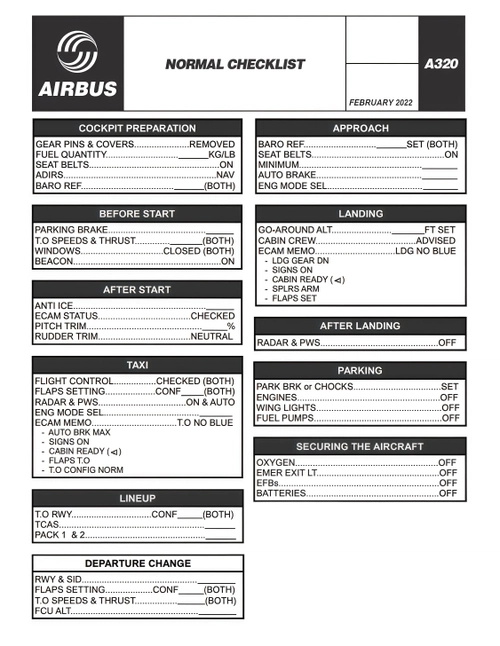
This add-on features a comprehensive and realistic checklist for the Airbus A320, tailored for Microsoft Flight Simulator 2020/2024 and the FlyByWire A32NX mod. It provides step-by-step procedures from cold and dark startup to complete shutdown, helping virtual pilots adhere to authentic Airbus protocols. Available in both PDF and PNG formats, it caters to different usage preferences, such as printing or displaying on secondary screens. The checklist is structured by flight phases and utilizes official aviation terminology for clarity.
by Fabiiipilot
Log in to join the discussion
Log InComments(6)
7 months ago
8 months ago
some minor points
- Settings menu not translated into English
- The contrast on dark mode on the V-Speeds, Flaps etc needs to be improved (brighter red!, its to dark the red u used)
- Missing option to mute the program.I dont need and i dont want some sound shouting "Cleared for takeoff" .... simulating real world procedures means simulating also risks or potential threads - > A tool shouting "Cleared for takeoff" while you are at the holding point and want to check something is a absolute no-go.
9 months ago
9 months ago
9 months ago
9 months ago