
Description
✈️ Checklist Reader
Your Voice-Controlled Copilot for Microsoft Flight Simulator 2024
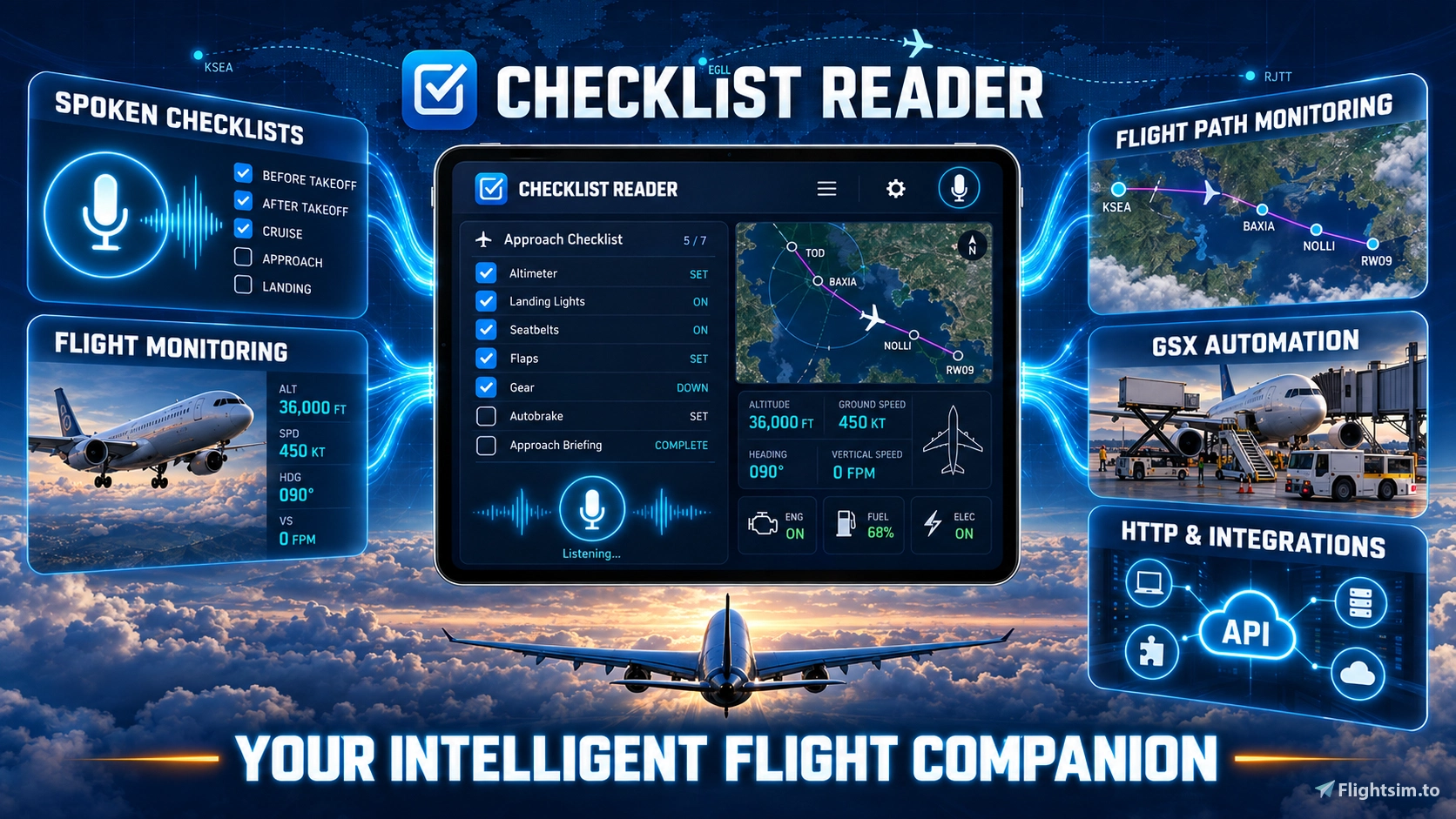
Checklist Reader turns aircraft procedures into interactive conversations. Your virtual copilot reads each item, listens to your response, tracks your progress and lets you pause, resume or repeat a checklist whenever needed.
But it goes far beyond checklists: it can follow your aircraft, flight phase and route, answer spoken questions, monitor important conditions, provide takeoff callouts and accompany sightseeing flights with location-aware narration.
✨ One Copilot for the Entire Flight
🎙️ Run interactive challenge-and-response checklists by voice
📡 Monitor aircraft status, flight phase, route, altitude, speed and hazards
🗺️ Import SimBrief, PLN and MSFS 2024 EFB flight plans and follow them on the moving map
📢 Receive advisory V-speeds, takeoff callouts and spoken simulator information
🌍 Explore more than 240 TourGuides with thousands of location-based narrations
🎛️ Control GSX services and connect Stream Decks, controllers and external tools
✏️ Create and customise your own procedures with the integrated Checklist Editor
🥽 Use the Companion and EFB panels on desktop, cockpit displays and in VR
📚 Almost 500 Aircraft Checklists
Checklist Reader includes a ready-to-use Core Library with 52 checklists.
The optional Checklist Library Extensions expand the complete collection to almost 500 checklists and variants, organised into 56 convenient aircraft bundles.
👉 Download Checklist Reader Library Extensions:
Checklist Reader - Library Extensions - User Content for MSFS | Flightsim.to
The Extensions require Checklist Reader as the main application and may be installed before or after it.
🔒 Local, Private and Flexible
Core features run locally on your PC. No cloud account, subscription or telemetry is required.
Push-to-talk is recommended for reliable recognition in a busy cockpit with radio traffic, engine noise or other voices.
⚙️ Built for Reliability
Behind the visible application are more than 1,200 automated test cases covering checklists, speech processing, simulator data, flight monitoring, navigation, TourGuides, window layouts, updates and recovery scenarios.
Checklist Reader is an actively developed independent community project. Feedback, ideas and bug reports are always welcome.
💬 Community & Support
Discord: https://discord.gg/EchPmVtueY
Videos and tutorials: https://www.youtube.com/@SimFlightChris
Further support: simflightchris@gmail.com
⚠️ Because Checklist Reader interacts with voice input, simulator data and local integrations, some antivirus scanners may display a false-positive warning.
For flight simulation only. Not approved for real-world aviation.
Checklist Reader – Your Voice-Controlled Copilot for MSFS 2024
A voice-controlled virtual copilot for Microsoft Flight Simulator 2024 with interactive checklists, live aircraft and flight-phase monitoring, advisory V-speed callouts, route tracking, and flight-plan support for SimBrief, PLN and the MSFS 2024 EFB. Explore guided tours, use the in-game Companion panel, control GSX by voice, and connect Stream Decks, cockpit hardware and external tools through the open HTTP and webhook interface. In short: a true voice-controlled copilot for your entire flight.




User Reviews
16 reviews
Version History
Checklist Reader – Version 1.0.21.7 A Simulator Status window built around the paper checklist, instrument tiles with a guide to what to say next, the same layout in the Companion panel, a new Community menu, and Checklist Reader on a second PC in your network. For many more aircraft and checklist variants, download the separate Checklist Library Extensions package: 570 checklists in the complete catalog, 54 of them in the Core Library that comes with this setup. -------------------------------------------------- NEW: Simulator Status Built Around The Paper Checklist • The loaded checklist is shown as a printed card in the middle of the window and follows the reader item by item: a new section opens its tab and is scrolled to, the current item is highlighted, finished items are ticked, and skipped or aborted items carry an amber sign. • Each section band says NOW, NEXT, DONE, DONE - n SKIPPED, PAUSED, PAUSED (ATC), RESUME or INTERRUPTED, so the old status line above the tabs is gone. • Your own scrolling is left alone until the reader moves on, and Follow switches the following off. • Values you read back print as a blank to fill in (____), and an item that takes any answer prints as "As required". -------------------------------------------------- NEW: One Row Of Tabs And A Run Bar • Normal, Abnormal and Emergency in their colours, then Awareness, Queries, Commands, GSX and Favorites in grey, each with its count. Ctrl+1 to Ctrl+8 and Ctrl+Tab switch between them. • A dot marks the tab whose section the reader is running, so an emergency checklist that starts is noticed while you look something up. • The old section lists and the help panel are gone. Everything you can say sits on the grey tabs, with topic chips, a star to keep a phrase in Favorites, and Copy Phrase. A- / A+ and Ctrl+mouse wheel size them together with the card. • The run bar above the card carries Mode (Guided or Expert) and Answers (Strict or Any), so the checklist mode can be switched with the card in view (Ctrl+E, Ctrl+R, and under Config > Checklist Mode), plus Follow, Current (Ctrl+G) and the text size. • One search field (Ctrl+F) finds sections and items on the checklist tabs and filters the list on a lookup tab. • A section index beside the card shows what is done, running, stopped or next and jumps there on a click. It hides on a narrow window; Sections (Ctrl+L) keeps it shown or hidden by hand, and a right-click returns it to the automatic rule. -------------------------------------------------- NEW: Setup Card • A card on top holds everything you set before a flight: aircraft, the matching checklist with its Load buttons, aircraft class, flight rules, flight plan and units. • It unfolds by itself while no checklist is loaded or the loaded one does not fit the aircraft, and folds to one line of chips once everything is right. -------------------------------------------------- NEW: Instrument Tiles And The Guide Tile • The right-hand column became instrument tiles: Readiness, Flight Data, Wind & Weather, V-Speeds, Flight Plan, Last Heard, Tour Guide, Monitoring and the new Guide. • Tiles can be removed, dragged into another order, placed right of or below the checklist and brought back from + Tile or Window > Instrument Tiles. Order, position and width are remembered. • A window too narrow for the column puts the tiles below the checklist instead of hiding them, so Readiness and the master switches stay in sight. • The Guide tile tells you what to say next: with no section running it names the next one and the phrases that call it up, while a section runs it shows answer, skip, pause and stop, and while paused "resume" or "continue" in amber. Your hotkeys, a switched-off microphone and push-to-talk are shown where they apply, also without a simulator connection. • The Guide tile appears once in your existing layout and stays closed if you close it. -------------------------------------------------- NEW: Community Menu • A Community menu next to Help in Simulator Status and the Lite window: support the project with PayPal, join the Discord, see all add-ons on flightsim.to, and read the story behind Checklist Reader. • A one-line bar below the menus says what keeping Checklist Reader up to date costs every month. Hide removes it from every open window, and the menu brings it back. -------------------------------------------------- NEW: Simulator On Another PC • Checklist Reader can run on a second PC in your cockpit network while MSFS runs on the main PC. Tick Simulator runs on another PC under Config > Full Configuration... > SimConnect, enter the Simulator PC address and keep the Simulator PC port at 500. • Checklist Reader writes its own SimConnect.cfg and never touches one of yours. It connects as soon as you save, without a restart, and picks the simulator up again a few seconds after it restarts. • On the MSFS PC, SimConnect.xml needs a network entry and the firewall must allow the port. • Save Companion panel for the MSFS PC... saves the in-sim panel as a ready folder for the Community folder over there, and the panel finds Checklist Reader on the other PC by itself. • The automatic V-speeds from the aircraft's performance files still need Checklist Reader on the simulator PC. • Chapter 41 of the manual, Simulator on another PC, walks through the setup in English and German. -------------------------------------------------- IMPROVED: Menus, Paper Checklist Window And Companion Panel • Simulator is now Flight, and the flight map and the tour guide share one Map & Tours menu, which shows a red dot while the flight is recorded and a bullet while the tour guide is on. Every hint in the program that named the old menus follows. • The Paper Checklist window (Flight > Paper Checklist...) shows the same card on a second monitor and follows the reader the same way, with Follow the Reader, Go to Current Item, the Mode menu and the search. Clear Filters clears its search as well. The Lite edition keeps the plain card. • The Companion panel in the simulator shows the same tabs in the same order. Normal, Abnormal and Emergency show the card, which follows the reader in interactive and read-aloud mode, marks skipped items and shows pauses and interrupted runs. • In the Companion, the lookup tabs follow A- / A+ as well, Mode and Answers moved into a run bar above the card, and a Sim/EFB button chooses the flight plan source. The panel follows a resize without lag and follows mode and master switch changes at once. -------------------------------------------------- IMPROVED: Units, Aircraft Class And V-Speeds • Units follow the aircraft or the country. A Ju 52 gets km/h, kilometers, ata and kg/cm², a US-built light aircraft the whole US table, and you choose with one row of switches whether the aircraft or the country leads, or set your own table. • Flight rules and flight plan source use the same kind of switches, and a source without a loaded plan is greyed. • Picking an aircraft class by hand takes effect at once, and the class follows the detected aircraft until you pick one. • Your own V1, VR and V2 are easy to find: click the V-Speeds tile or choose Callouts > V-Speeds (V1 / VR / V2)..., and the rule configuration opens at the right place. • Jet Mode is labelled for what it does, the takeoff roll thresholds, and Enable All Callouts and the turboprop preset no longer switch it on. • A new query answers "Bearing and range to the nearest airfield" with a magnetic bearing. -------------------------------------------------- IMPROVED: Display Scaling And Manual • Windows follow a display scaling change made in Windows Settings while the program is open, without a restart, and the lettering on the annunciator plates grows with them. • The manual describes the new window in English and German, and every menu entry it names was checked against the program. -------------------------------------------------- FIXED • Show Startup Selection Screen in the Full Configuration is saved and loaded again. • Choosing "Windows default" for audio no longer clears the per-application device in the volume mixer at every start, and Quick Configuration names the device the mixer uses. • A model letter after a number, as in T206H, is spoken as part of the name and no longer read as a unit. • The Wind & Weather tile has room for both QNH and OAT lines. • A checklist written for another engine type or engine count no longer counts as fitting the aircraft, even when the name and type code match: the Turbine Duke checklist is no longer accepted for the piston B60 Duke, and the setup card offers the right one. • When the detected aircraft class changes, the monitoring callouts switch to the new class at once instead of keeping the piston or turboprop preset of the checklist loaded before. • Units derived from the loaded checklist and your own unit choice no longer reset a second after the checklist is loaded. -------------------------------------------------- Community & Support The Checklist Reader is an actively evolving project, and feedback is always welcome. Join the community on Discord: https://discord.gg/EchPmVtueY For further support: simflightchris@gmail.com -------------------------------------------------- Disclaimer This release references third-party aircraft, products, developers and manufacturers. Checklist Reader and Checklist Library Extensions are independent projects and are not affiliated with or endorsed by those developers or manufacturers. All checklist content is for flight simulation only and is not approved for real-world aviation.
Log in to join the discussion
Log InComments(377)