
Description
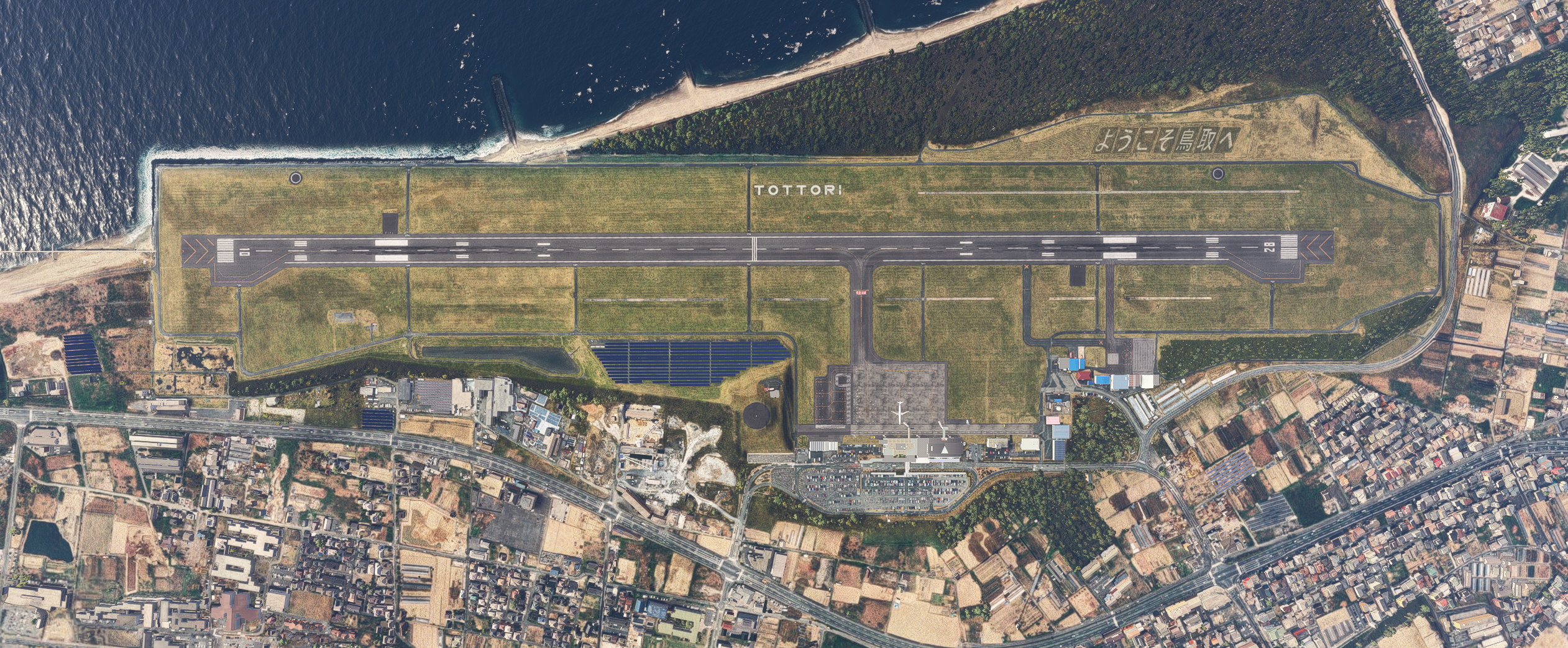
Enhance the TOTTORI SAKYU KONAN AIRPORT released by GATE15SCENERY.
Add 1mDEM to the airport grounds.
Add 2m DEM around the airport.
Add 1mDEM to Tottori Sand Dunes.
Aerial imagery is added.
Overall changes to runway, taxiway, and apron.
Adjusted terminal location and size (but created bumps in connection with jetway).
Replaced jetway from default to custom.
Known issues
Some objects are floating.
Jetway length issues causing problems with connection to door depending on stop location.
There is a version that replaces the short glass jetway included in GSXPro to solve this problem.
If you have GSXPro, you can use this version.
Delete the original RJOR_Scene.bgl and rename RJOR_Scene.fsdt.bgl to RJOR_Scene.bgl.(2020only)
How to use(2020)
Change the file name or priority so that it is loaded after GATE15SCENERY TOTTORI SAKYU KONAN AIRPORT scenery.
How to use(2024)
Download the 2024 version from the download options.
Extract it to the community folder.
Dependencies
Location
RJOR Tottori Airport Enhanced
Enhance your simulation of Tottori Sakyu Konan Airport (RJOR) with this add-on, which includes detailed 1m and 2m Digital Elevation Models (DEM) for the airport grounds and surrounding areas, along with improved aerial imagery. The modification features adjustments to runways, taxiways, and aprons, and introduces a custom jetway, although some known issues with object placements persist. Users are advised to rename files or adjust load priorities to achieve optimal integration with the existing GATE15SCENERY package.


User Reviews
1 reviews
Version History
An update to align the version numbers. No changes.
Related
RJTH Hachijojima Airport Enhanced
Enhance your flying experience with the RJTH Hachijojima Airport add-on, now with improved airport details and elevation accuracy. This update includes changes to runway location, lighting, markings, and parking, as well as additions like approach lights and custom models. Make sure to have World Update 1 Japan installed for full compatibility.
by karuchie
RORS Shimojishima Airport Enhanced
Enhanced version of RORS Shimojijima Airport with fixes and improvements, including updated 3D models and lighting adjustments. Ensure to download additional dependencies for an optimal experience.
by karuchie
RJOA Hiroshima Airport Enhanced
This add-on enhances KAZEs RJOA Hiroshima Airport by correcting misaligned runways, taxiways, and aprons, leading to improved ILS alignment. It replaces the glass jetway with a metal asset and incorporates a 1m DEM across the airport and a 3m DEM in the surrounding area. Additional features include updated taxiway signs, new lighting installations, and adjustments to objects for height and position accuracy. Users are advised to adjust the file priority for proper integration with the existing scenery.
by karuchie

RJCK Kushiro Airport Enhanced
Enhanced version of Kushiro Airport featuring runway and taxiway line changes, updated taxiway lights, and accurate runway slope. Requires additional Japanese airport model library for some objects. Experience fine-tuning of terminal building, apron lights, and more in this detailed add-on.
by karuchie
Log in to join the discussion
Log InComments(5)
over 1 year ago
over 1 year ago
over 1 year ago
If possible, could you also create enhanced mods for Ishii's RJOB (Okayama Airport) and RJOW (Hagi Iwami Airport)?
over 1 year ago
files are located in the rjor-tottori-dem folder.
I was told to rename the files to use GSX pro.
How do I rename the 2 files when they are in the same folder?
They both have the extension bgl as well.
Do I need to delete one or the other?
over 1 year ago