Flightsim.to
    2020 to 2024 Livery Converter - Image 1

    Description

    This product is in an early alpha stage and it's purpose arose from new plane releases such as the ini-A350 which has a native MSFS2024 version that cannot use MSFS2020 liveries. This can also cover any future dual-release planes for both sims or future updates to planes that natively get compiled to 2024. You may have a custom livery for one of these planes that are not yet, or not going to be rebuilt for 2024 and this product can help.


    basic rough draft tutorial:
    Step 1: Build the folder structure per the 2024 paintkit for the desired product. I used the inibuilds A350 as an example, it's paintkit includes different folder structures for each product.

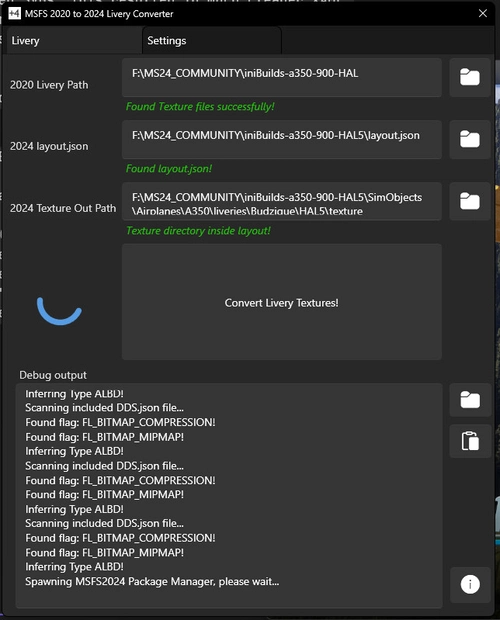
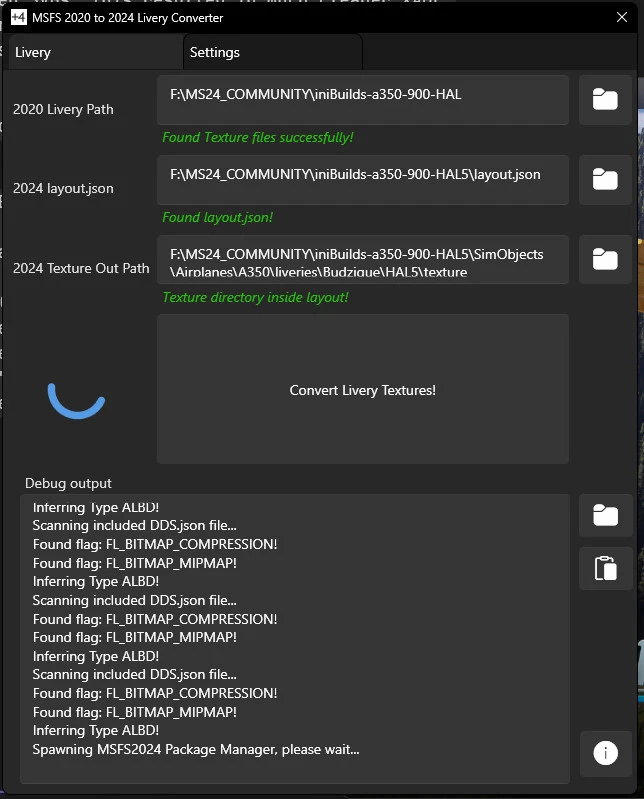
    Step 2: From that folder structure in step one, note the directory for the layout.json and the directory for the texture files themselves and using the [...] button next to the first two fields in LiveryConverter2024.exe insert the folders for each. Example:
    Project Directory: F:\MS24_COMMUNITY\iniBuilds-a350-900-HAL-005
    Texture Directory: F:\MS24_COMMUNITY\iniBuilds-a350-900-HAL-005\SimObjects\Airplanes\A350\liveries\Budzique\iniBuilds-a350-900-HAL-005\texture

    Step 3: using the [...] for the next two fields in LiveryConverter2024.exe insert the path to the MSFS2024 SDK (download using developer tools in MSFS2024) then the path to MSFSLayoutGenerator.exe (Found here). Examples:
    MSFS2024 SDK Directory: C:\MSFS 2024 SDK
    Layout Generator Directory: C:\LG

    Step 4: Select the store which you purchased your game, (Steam or Microsoft Store)

    Step 5: Click the "Upload MSFS 2020 Textures" and browse to the 2020 version of the Livery you're trying to convert and find it's textures, then select all DDS texture files from that 2020 livery and click "Open"

    Step 6: An automated process will convert the DDS files first to PNG using Microsoft's texconv.exe (embedded in this project) followed by using the SDK (which will launch the simulator temporarily to have it convert the PNG files to 2024's native KTX2 texture format), then it will launch MSFSLayoutGenerator.exe to update the layout so your 'Project Folder' can be dropped directly in the Community folder of MSFS 2024 

    once again, it's an early alpha and your results may vary, please use the github page to report any bugs and I will work to address them


    Convert a livery you want from DDS texture format to native KTX2 format

    requirements: MSFSLayoutGenerator, MSFS2024 SDK

    features automatic conversion, layout generation

    Make your project file in the format of the msfs2024 style livery including layout.json and texture folder

    set the relavant paths in LiveryConverter2024 and select the version of MSFS24

    click "upload" on LiveryConverter2024

    select all your images and the process will begin. 

    Work directory is %appdata%\com.budzique.livery-converter.app\ 

    Source Code: https://github.com/jbud/LiveryConverter2024/

    Interaction activity
    DownloadsCommentsSeparate scales for downloads and comments
    Oct 16 Downloads: 8 Comments: 0Oct 17 Downloads: 9 Comments: 0Oct 18 Downloads: 13 Comments: 0Oct 19 Downloads: 15 Comments: 0Oct 20 Downloads: 11 Comments: 0Oct 21 Downloads: 8 Comments: 0Oct 22 Downloads: 6 Comments: 0Oct 23 Downloads: 7 Comments: 0Oct 24 Downloads: 9 Comments: 0Oct 25 Downloads: 9 Comments: 0Oct 26 Downloads: 12 Comments: 0Oct 27 Downloads: 14 Comments: 0Oct 28 Downloads: 12 Comments: 0Oct 29 Downloads: 11 Comments: 1 General: 1Oct 30 Downloads: 9 Comments: 0Oct 31 Downloads: 15 Comments: 0Nov 01 Downloads: 17 Comments: 0Nov 02 Downloads: 3 Comments: 0Nov 03 Downloads: 5 Comments: 0Nov 04 Downloads: 9 Comments: 0Nov 05 Downloads: 7 Comments: 0Nov 06 Downloads: 7 Comments: 0Nov 07 Downloads: 13 Comments: 0Nov 08 Downloads: 5 Comments: 0Nov 09 Downloads: 8 Comments: 0Nov 10 Downloads: 9 Comments: 0Nov 11 Downloads: 9 Comments: 0Nov 12 Downloads: 8 Comments: 0Nov 13 Downloads: 7 Comments: 0Nov 14 Downloads: 3 Comments: 0
    Oct 16Oct 30Nov 14
    278
    Downloads
    1
    Comments
    Last comment 16 days ago
    Creator responds to 8% of comments

    Log in to join the discussion

    Log In

    Comments139

    PacmanPilot·16 days ago
    So if this is not working too well, can anyone post a link to something that does work well?
    Cheers!
    Junglist
    ·about 1 month ago
    Worked great for conversion of SWS's Pc-12 livery. Thanks!
    AdamskiNZ
    ·4 months ago
    Well ... it works for me(!). I only have MS Store 2024, so no confusion with 2020. It converts textures to KTX2 fine, but it'd be great if it could somehow create the 2024 folders/file structure (unless I'm not doing it right). Looking forward to more updates ;)
    Pav500
    ·5 months ago
    This isn't working as intended anymore. Author left it abandoned. Everyone gets the same "fspackagetool.exe failed" error.
    osasich
    ·5 months ago
    poor
    vamonos11
    ·5 months ago
    It says Package validation failed for livery-converter-2024
    Gleb051286
    ·5 months ago
    When I temporarily launch the simulator, it launches msfs2020 instead of msfs2024.
    Aegynx·5 months ago
    error
    kukulcan15·6 months ago
    This is not accurate guys , I would highly suggest liveries to the creators instead and it's more safer, you never know what you going to get downloading this type of "apps"
    DDare·6 months ago
    Pretty sure I di everything right and it said successful conversion but they show up like this in the sim.
    avhi1yan·7 months ago
    what aircrafts do these work for?
    UnitedBill41·7 months ago
    what goes into the layout generator ?? Nothing is being found ??
    Joaogsz
    ·7 months ago
    Se possivel ter algum video tutorial por favor! estou confuso em fazer tudo isso.
    zino_
    ·7 months ago
    doesnt work, same error as everyone else
    MintTablett·7 months ago
    Add a demo video if possible. Instructions are quite unclear since the updates.
    D3V1L0M3N·8 months ago
    Unfortunately doesn't work with the Steam version. As others have discovered you receive the " fspackagetool.exe failed" error. There's a GitHub issue open regarding it that remains unresolved to this day. None of the so-called "work-arounds" people suggest actually work.
    Shand359·8 months ago
    Ive tried this numerous times. Only the Tail and the Wings files convert and actually work. The 3 fuselage sections always remain pink...
    FavianAviation·8 months ago
    Can't find msfslayoutgenerator.exe because it only supports folders so the .exe file is not there, helpp
    MSFS 2020MSFS 2024

    2020 to 2024 Livery Converter

    The 2020 to 2024 Livery Converter is a tool designed to facilitate the conversion of aircraft liveries from DDS texture format to the native KTX2 format used in Microsoft Flight Simulator 2024. It features automatic conversion and layout generation, enabling users to create project files that adhere to the MSFS2024 standards, including layout.json and texture folders. Users will need MSFSLayoutGenerator and the MSFS2024 SDK, and can manage their conversion process through a user-friendly interface.


    Downloads10K
    Version0.2.1
    File Size2.67 MB
    Published1 year ago
    Updated1 year ago
    Classification
    Utilities3.9 (31)

    User Reviews

    3.9

    31 reviews

    5
    65%
    4
    6%
    3
    6%
    2
    0%
    1
    23%

    Version History

    - Add BuilderLogError.txt opener to provide info on failures for Steam versions (Complete)
    Featured in Collections(1)

    Related