
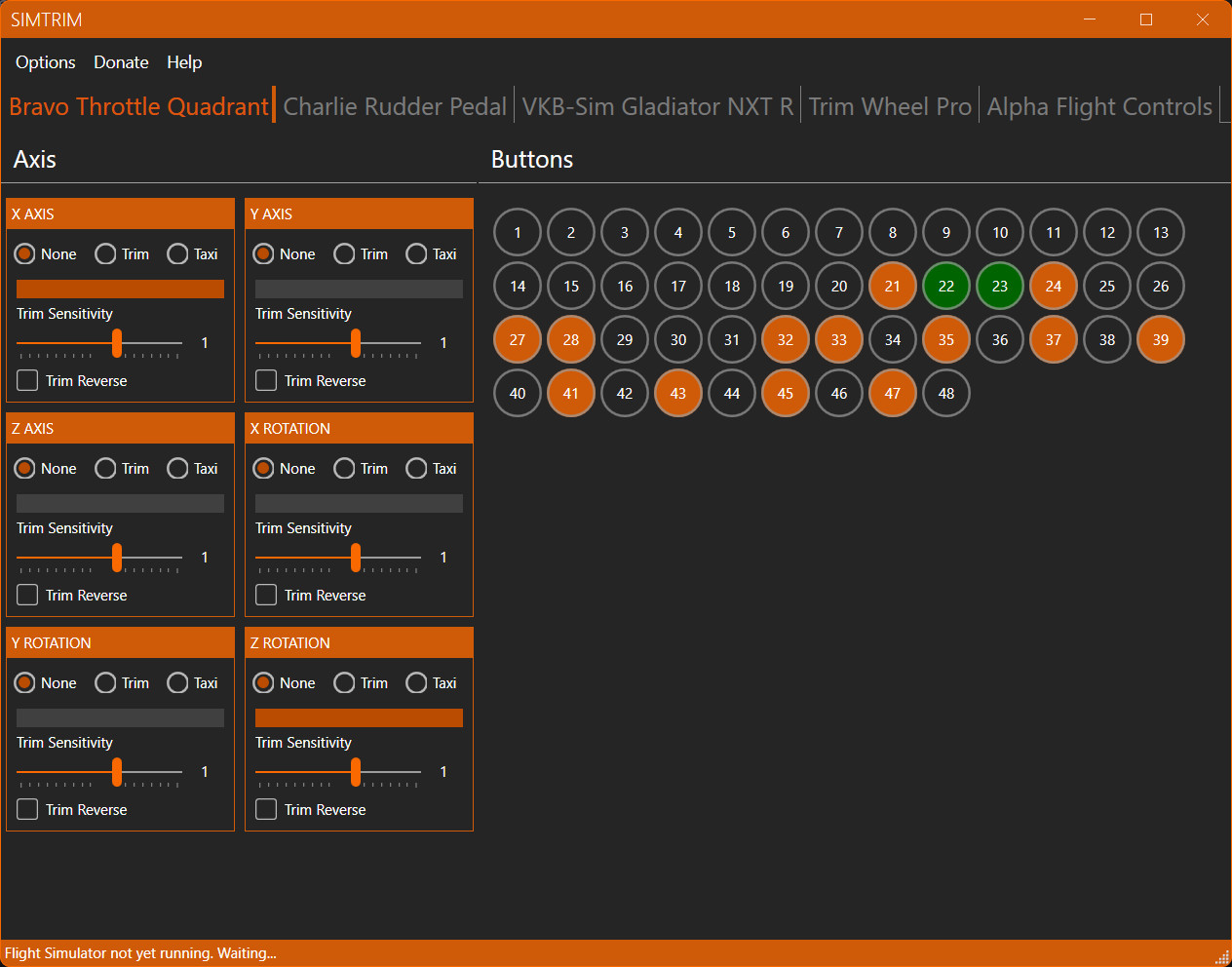
Description
Do you have a nice analog trim wheel and want to use it in flight simulator? Don’t feel it's an option because you get an obtrusive “snapping” problem just after takeoff or when autopilot is switched off? SimTrim is designed to eliminate this problem by synchronizing your physical trim wheel with the virtual one. So, no more “snapping” problem; you can finally use your accurate and precise analog trim wheel as intended.
As of version 1.3 there is support for digital trim wheels such as the popular wheel on the Honeycomb Bravo throttle quadrant. Now, you can set any value sent to the running sim you like. Effectively letting you change your digital trim wheel sensitivity to your own preference.
Also introduced in 1.3 is the on-ground rudder control option. This lets you steer with your yoke or joystick to taxi/take off/land without rudder pedals. When you take off, the rudder is disabled automatically, meaning you can continue to fly as usual with only your ailerons controlled by your yoke/joystick again. Land, and rudder control is enabled again automatically. This is different from the rudder assist option in MSFS, which also aids you in countering crosswind and p-factor and helps keep you level in flight.
SimTrim is a separate application running side by side with MSFS, so changes and adjustments can be made easily mid-flight. Is the trim wheel not sensitive enough? No problem; just move the sensitivity slider until you are happy with the result, all without escaping or pausing your flight.
SimTrim was designed for msfs2020, but I have recently tested it with msfs2024 and can confirm it works flawlessly.
Links:
SimTrim – The main page on my website
Discord – A discord invite so you can join the community, discussing SimTrim
Resources – A page providing a direct download to the SimTrim MSI install file, amongst other resources and downloads.
Note: You may encounter a Windows Defender Smartscreen notification during the download and installation of SimTrim. To proceed, select 'More info' and then choose 'Run anyway.'
Although the file is digitally signed, it may take some time for Microsoft to recognize it as safe. Please be assured that the file has undergone comprehensive testing and is verified to be secure.
SimTrim - Synchronising Your Analog Elevator Trim Wheel
SimTrim is an add-on designed for Microsoft Flight Simulator that synchronizes your analog elevator trim wheel with the virtual trim controls, effectively eliminating the "snapping" issue experienced after takeoff or when disengaging autopilot. This tool allows for precise trim adjustments, enhancing your control over aircraft performance during flight. You can now use your yoke or joystick to control the rudder while on the ground. Digital trim wheels are now also supported.

Supporters

User Reviews
8 reviews
Version History
This update centers on automatic checking for newly added controllers. • added automatic detection, adding and removing joysticks • fixed bug where an exception was thrown if selecting a controller we unplugged • fixed bug where a newly attached controller was not added to the active list and hence is ignored in the sim • fixed bug where an exception is thrown if an active controller is disconnected while the sim is running • removed the no longer needed menu option to check joysticks manually In this update your controller is added and set up as soon as it's attached/powered on, and without any intervention by you, which is quite convenient.
Log in to join the discussion
Log InComments(79)
about 1 month ago
7 months ago
7 months ago
7 months ago
Thank you!
10 months ago
10 months ago
10 months ago
Thank you !
11 months ago
11 months ago
11 months ago
12 months ago
about 1 year ago
Have used vjoy and FSUIPC's workaround, both much too complicated for my taste.
Roland
about 1 year ago
about 1 year ago
Thanks for explanations etc /functioning of sim trim, wondered if you could assist me, I am flying the PMDG dc6 and have my elevator trim wheel assigned to give elevator nose up down control , movement ob the trim wheel on my honeycombe throttle moves the in sim trim wheel the trim wheel shows up as bottons 22.23 in the sim trim menue buttons greenflicker to orange when wheel rotated momentarily.should I have done any other actions in setting up the s/ware?. In Sim the same buttons show in the A/C trmming menue ?.
about 1 year ago
over 1 year ago
over 1 year ago
over 1 year ago
over 1 year ago