
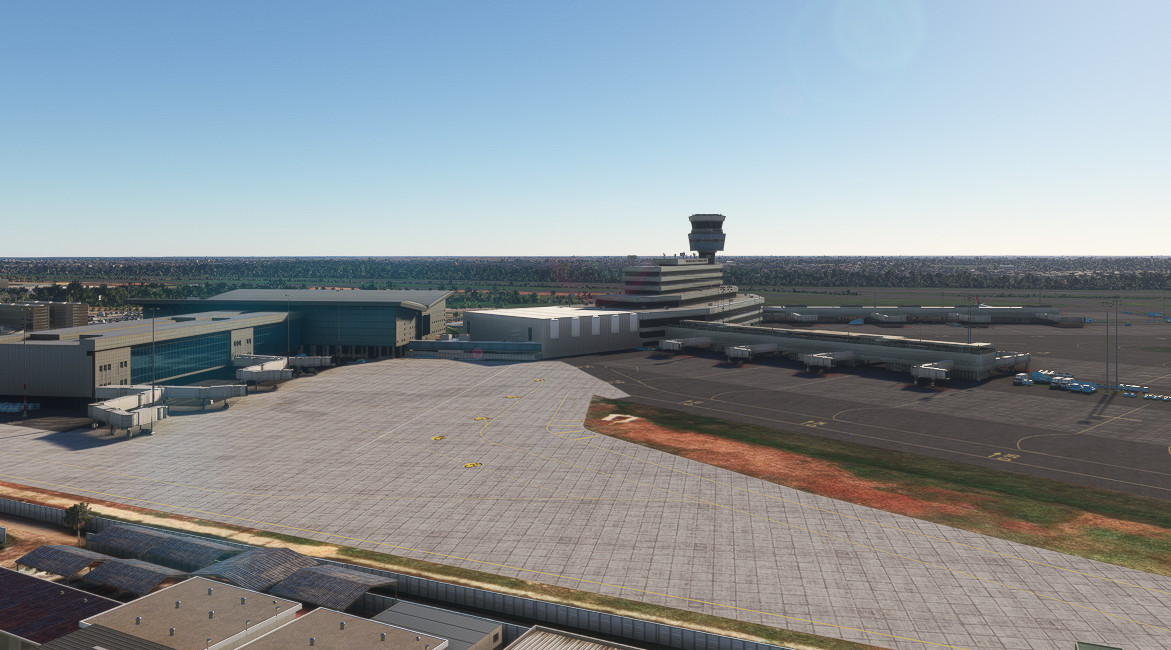
Description
Hello dear flightsimmers,
This is my first addon. It is an enhancement of esosae's Lagos Airport scenery, which sadly won't be getting any updates anymore. I looked at the comments under the original scenery and tried my best to implement your wishes.
I hope you enjoy my enhancement of esosae's scenery.
HAPPY FLYING!
YOU NEED TO HAVE THE ORIGINAL VERSION OF esosae INSTALLED FOR THIS ADDON TO WORK
Since the static jetways are an integrated part of the terminal I sadly can't remove them without removing the entire terminal. I only have a low resolution version of the terminal without the jetways. Since the original creator sadly lost all the files, this is unfortunately all I can work with at the moment.
In the future, I may create a custom international terminal, but since I am really new to blender that will most definitely take time. I know this is not the prettiest solution, but it is in my opinion better to make the jetways functional, than to have static jetways that clip into the stairs while you are boarding your plane.
(And it is the easiest for me at the moment since I can't model a big terminal just yet) (:
THE SCENERY IS NOW OFFICIALLY COMPATIBLE WITH MSFS 2024!
Features:
- close to real life taxiway layout and markings created with reference to the newest satellite imagery
- close to real life ground textures created with reference to the newest satellite imagery
- all gates on the international and domestic terminals have been newly placed (some may be a bit misaligned, if so, please let me know) and freed from the static aircraft, so they are usable for Vatsim
- removed the static jetways and replaced them with the standard MSFS ones, so they are usable
- newly added approach and center line lighting on runway 18L, which was missing in the original scenery
- added taxiway edge lights to taxiway B
- details like ILS antennas and construction site for the expansion of the cargo apron
A GSX-Profile is now also included. It is still in development, so if you see any bugs, please tell me.
It features custom pushback and custom parking positions.
KNOWN ISSUES:
The parking stands were aligned with the PMDG 737. That means the gates for the heavy planes are misaligned. This will hopefully be fixed soon.
Some cars are standing on the roads at the moment, which doesnt look really good.
ToDo-List:
- further work on the ground textures and markings
- add the GA aprons
- terraforming (especially the western part on taxiway F leading up to the terminal, which is very steep)
TO BE ABLE TO SEE THE CONSTRUCTION EQUIPMENT AND OTHER OBJECTS YOU NEED TO INSTALL THE
Emerald Object Library
and
EDHK Lights & Objects Developers Pack
CONTENT FROM PREMIUM AND PREMIUM DELUXE EDITIONS IS NOT USED
PATCHNOTES
VERSION 0.6
- touchdown markings on 18L/36R are now showing correctly
- added some new markings around the aprons
VERSION 0.7
- added presidential apron and military apron
- added some more details to the taxiways
- small elevation tweaks
- early version of a GSX profile is now included
Thanks to Liron for doing that
VERSION 0.8
- added helicopter apron
- added ground textures and objects to the helicopter and GA area on the east side of the airport
- added a parking spot to the military apron
VERSION 0.85
- fixed buildings on taxiways and painted gate numbers
VERSION 0.9
- fixed ground markings AGAIN
- evicted more houses on the airport area
- moved the a345 from the compass calibration to its last resting place :(
- added some solar panels here and there
VERSION 1.0
- finally fixed the ground markings
This update marks the end of 2020 for me. I have now fully switched to 2024 and will make my sceneries compatible for it. It was important for me to update it one last time, so the scenery is in a good shape for 2020.
THE FOLLOWING UPDATES ARE FOR 2024 ONLY. DO NOT INSTALL IF YOU ARE ON 2020!!!
VERSION 1.1
- first native 2024 version
- removed centerline lights from runway 18R
- fixed approaches and departures not loading because I did something stupid last update apparently
Dependencies
Frequently Asked Questions
Location
DNMM - Lagos Murtala Mohammed Airport - Enhancement
The DNMM - Lagos Murtala Mohammed Airport Enhancement adds significant improvements to esosaes original airport scenery, which is no longer receiving updates. This add-on includes a more accurate taxiway layout, updated ground textures, and replaces static jetways with functional ones, enhancing usability for online flight platforms. Additional features include lighting improvements on the runway and new ground details, with a roadmap for future enhancements still in development.


User Reviews
3 reviews
Version History
VERSION 1.1 - first native 2024 version - removed centerline lights from runway 18R - fixed approaches and departures not loading because I did something stupid last update apparently


Log in to join the discussion
Log InComments(47)
4 months ago
2 months ago
4 months ago
7 months ago
7 months ago
7 months ago
7 months ago
7 months ago
8 months ago
Now we will just be having static aircrafts and dead airport that looks like it was haunted. :(
If there is a way you can make that version available for 2020 players to download, please do it. Otherwise kindly make v1.1 compatible with 2020 as well.
We appreciate your relentless efforts nonetheless
8 months ago
8 months ago
I want to use this scenery in MSFS2020 too.
8 months ago
8 months ago
9 months ago
9 months ago
9 months ago
Just wanted to ask if you noticed AI lands at the airport but never takes off. Not even request for departure or pushback, they just disappear from the gate and appear a few miles later at climb altitude?
9 months ago
9 months ago
9 months ago
Can anyone confirm that you see the airport when added to the community folder? It does not show the buildings I see in the pics, but rather some simpler model like generic airports.
I have uninstalled it for now. I use MSFS2024
Thanks
9 months ago
12 months ago
EDIT: I have been advised of a fix for the issue. I will fix the markings with the next update. Sadly, there isn't a lot of free time at the moment. I am also slowly moving to MSFS24 which means the support for 2020 will probably be dropped in a few months and the airport will be made compatible with msfs24.