
Description
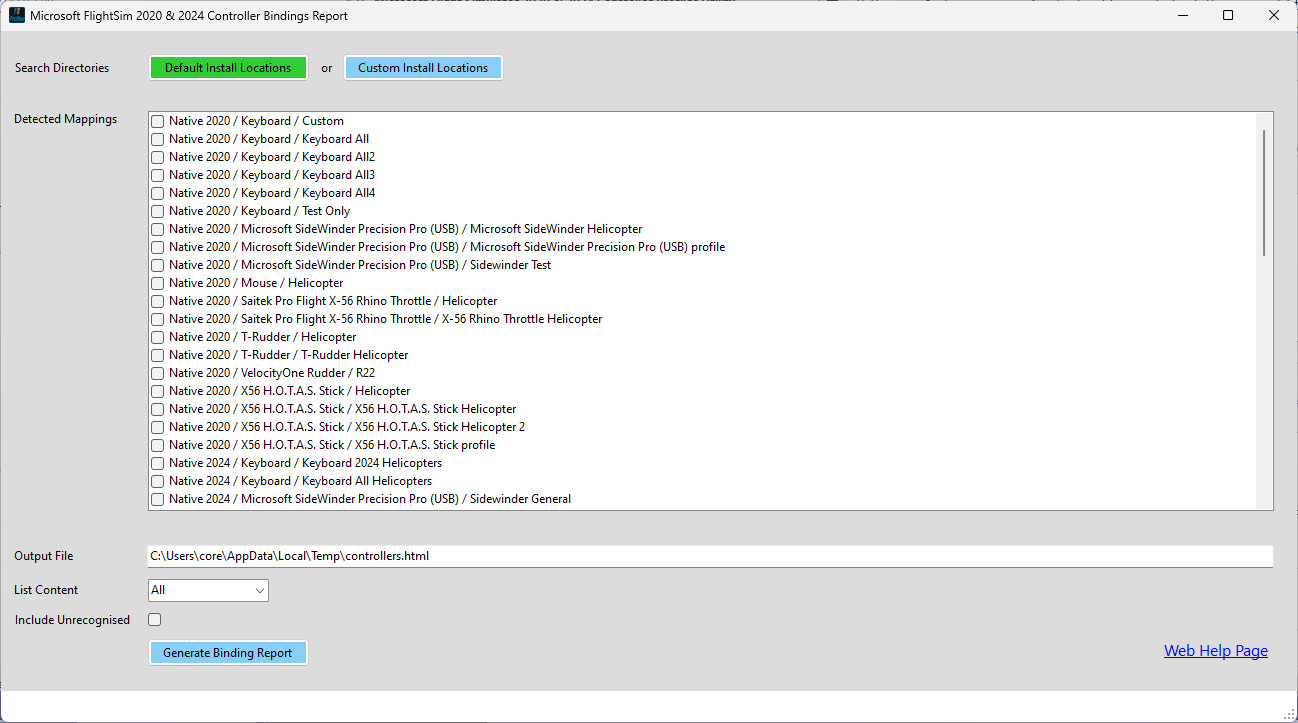
FSProfiles is a utility to generate an html formatted report of controller bindings. It can be used with both native Windows and Steam installs. XBox is not supported.
You can use it to select multiple controller profiles (e.g. Mouse, Flight Stick, Flight Throttle and Rudder Pedals), and display an HTML formatted document showing each available control binding, and the controller & input bound to it.
Note you can choose to show All, Assigned or New controller bindings. These correspond to the binding options filter in FS2020. FS2024 has a similar filter, where "None" corresponds to "All" in FS2020, but there is no equivalent to the "New" option. Note that the "Essential" filter in both FS versions is not supported by FSProfiles, as it is not really necessary for the purposes of this program.
Once downloaded, unzip the file and run the enclosed Windows installer (*.msi) file.
Please note the utility will require installing the .Net 8 runtime if is not already on your system (the install will prompt for this if needed).
Full source code for the utility is avaiable here: https://github.com/iadarroch/FSProfiles
FSProfiles
FSProfiles is a utility designed to create HTML reports detailing the bindings of various controllers used in Microsoft Flight Simulator. It allows users to select multiple profiles, including devices like mouse, flight stick, throttle, and rudder pedals, and displays a comprehensive document showing each control binding along with the associated input devices. The tool has been tested on both native Windows desktop and Steam installations for FS2020 and FS2024. XBox installs are not supported.


User Reviews
7 reviews
Version History
Adds support for automatic saving of custom paths, so they do not have to be re-entered the next time the program runs.
Log in to join the discussion
Log InComments(39)
about 1 year ago
Profile File: C:\Program Files (x86)\Steam\userdata\xxx\yyy\remote\inputprofile_zzz
There is an error in XML document (1, 448).
The input string '0.020000' was not in a correct format.
Profile File: C:\Program Files (x86)\Steam\userdata\xxx\yyy\remote\inputprofile_zzz
There is an error in XML document (1, 463).
The input string '1.000000' was not in a correct format.
over 1 year ago
However, every time I start the programme I have to enter the path again because all the path details are reset! Is the input not saved ?
Am I doing something wrong ?
over 1 year ago
about 1 year ago
over 1 year ago
over 1 year ago
One thing I think is missing, (or it's my knowledge that is,) is the link between an aircraft the device and the profile. The report doesn't identify the aircraft, only the device to profile relationship.
over 1 year ago
over 1 year ago
FWIW, I normally include the profile type in the name, which makes it easy to identify the profile type, - e.g.
"Keyboard 2024 General" (all aircraft)
"Keyboard 2024 Helicopters" (all helicopters)
"Keyboard 2024 H125" (specifically H125)
over 1 year ago
over 1 year ago
over 1 year ago
For your consideration: it would be great to have a compare function to look at two selected profiles and highlight/show the differences between the two.
Thank you again for your time and effort to make this available for the Community. Greatly appreciated.
over 1 year ago
over 1 year ago
over 1 year ago
Thanks
over 1 year ago
Or thoughts from other users?
over 1 year ago
over 1 year ago
This version locates the file containing the error (see attached image); it launches the application excluding the corrupted file (not a problem for me, it's the DC 3 settings under FS2020). The report generated seems very complex (very large and very long table containing a lot of empty boxes); I'll look at it when I get back; I'll be away for about ten days.
Many thanks for the help and best wishes for 2025.
*** Translated with www.DeepL.com/Translator (free version) ***
Marco
over 1 year ago
BTW, is there any way you can share the offending DC3 profile, so that I can investigate what is wrong with it?