
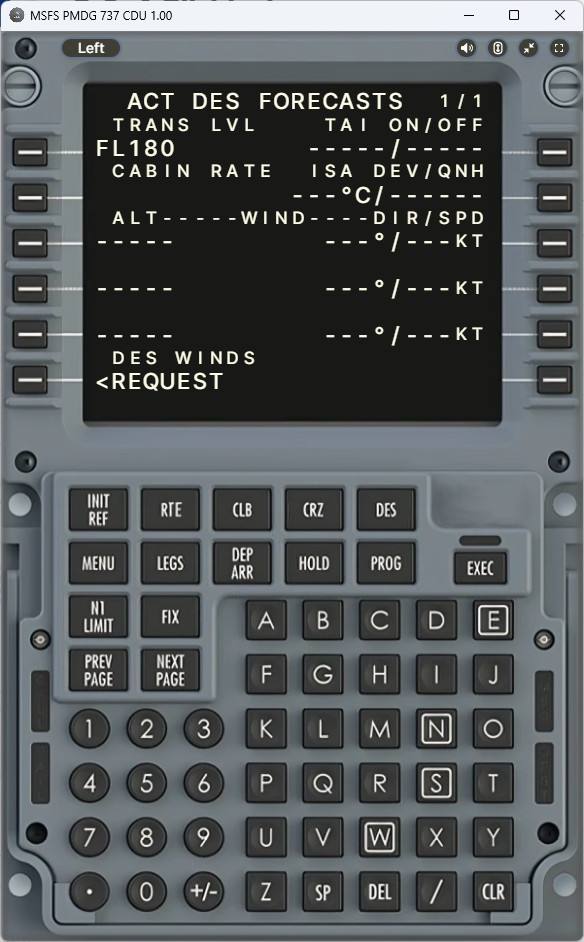
Description
ANNOUNCEMENT
Due to lack of time, I've decided to focus on updating the combined verion app for now. Once the development stabilizes I'll reflect all updates on the individual apps then.
DESCRIPTION
This is a web based CDU server/client application to be used with the PMDG 737 variants for MSFS. It is still in Alpha stage and only supports windows users.
* if you have PMDG 777 as well, you are better of using the combined version of the app :PMDG MSFS CDU
App features includes:
- Automtic ini file detection and modification
- CDU functionallity including all input, annunciators
- Keyboard input on PC
- Left, Right CDU switch
- Full Screen, Scroll Lock, Window Maximize toggles
- Long press function
- ambient light, back light control
INSTRUCTION
Download, unzip and run the installer.
The app should run right after installation and will try to detect and suggest modification of ini file if required (this is still experimental and may not work, please do share how it went in the comments!)
The window that opens on your PC should be kept open as it acts as the server, however you do not have to connect it if you are not gonna be using it on pc, and just keep it minimized.
Open any browsers (chrome preferrably) on any devices connected to the local network and enter the address shown on the bottom of the PC's app window.
Connect and enjoy
INI FILE MODIFICATION
If the ini file automatic detection / modification has not been successful, ensure that the following file includes these lines manually.
File: Your_Installation_Folder\Packages\pmdg-aircraft-738\work\737_Options.ini >>> for 738 users
MS Store Copy
For users who are using MSFS copy from MS store, Look for the following path
[Drive Letter]:\WpSystem\[Long cryptic serial]\1001\AppData\Local\Packages\Microsoft.FlightSimulator_8wekyb3d8bbwe\LocalState\packages\pmdg-aircraft-77w\work
Lines to be included:
[SDK]
EnableCDUBroadcast.1=1
EnableDataBroadcast=1
EnableCDUBroadcast.0=1
Also, if the automatic ini modification is problematic by any chance, there's a backup of the original ini file (737_Options.ini.bak) automatically created in the folder which you can rename to revert the modifications.
DISCLAIMER
The app complies with the PMDG SDK requirements and was not created by copying someone else's hard work.
The entire functionality was coded one by one by myself and features were added progressively with valuable feedback from the testers.
Resources used were: node-simconnect examples, official PMDG SDK, manual and examples.
The app however lacks performance and may lack functions that other existing products or products to be released.
I'm also aware of other similar paywares and I deem those to be of commercial grades but not mine hence it is released as a freeware.
CREDIT
huge thanks to EvanAR who made the project possible with his awsome node-simconnect library and starter examples.
https://github.com/EvenAR/node-simconnect
And thanks to kmturley for the amazing starter template making my project possible to be running in less than a day!
https://github.com/kmturley/electron-server
PMDG 737 CDU
A web-based CDU server/client application designed to enhance the PMDG 737 experience in MSFS. Features automatic ini file detection and modification, CDU functionality, keyboard input, and more. Still in Alpha stage and currently only supported on Windows. Instructions provided for installation and connection, with credits to the developers for their contributions.


Supporters

User Reviews
14 reviews
Version History
- Fixed Ip Address not shown bug - Added ambient / back light control - Grouped and moved configs to header box
Log in to join the discussion
Log InComments(32)
3 months ago
3 months ago
about 5 hours ago
5 months ago
5 months ago
7 months ago
8 months ago
8 months ago
about 1 year ago
about 1 year ago
about 1 year ago
Do you plan same for the FBW A320 or Fenix? Would be phantastic. !
Regards Tom
about 1 year ago
To use cdu on external tablet .
you need to open port 3000 on defender.
go to windows: control panel / system and security/ windows defender /advance parameters/ inboud rule......than
create new rule / port/ TCP /port 3000/.....
create new rule / port/ UDC /port 3000/.....
you do a same thing for outbout rule
once you finish open browser : http://ip adress :3000
over 1 year ago
over 1 year ago
about 1 year ago
you need to open port 3000 on defender.
go to windows: control panel / system and security/ windows defender /advance parameters/ inboud rule......than
create new rule / port/ TCP /port 3000/.....
create new rule / port/ UDC /port 3000/.....
you do a same thing for outbout rule
once you finish open browser : http://ip adresse :3000
almost 2 years ago
I'm starting to think that perhaps the previous version had been cached somehow and it was unncached just now after 3 months and it now shows the "Show Config" hidden menu which wasn't there before. Which I don't like because it makes it a pain to switch between left/right CDUs and when I'm minimizing the browser in the tablet or switching apps, I have to go through the hidden menu again to re-enable full screen etc. What used to be a one-click process, now takes more clicks.
But the browser window doesn't seem to have any cookies or anything obvious that's either cached or stored, so I'm baffled why this changed all of a sudden.
about 2 years ago
A320 mayby?
about 2 years ago
Many thanks
about 2 years ago
about 2 years ago