
Flightsim.to
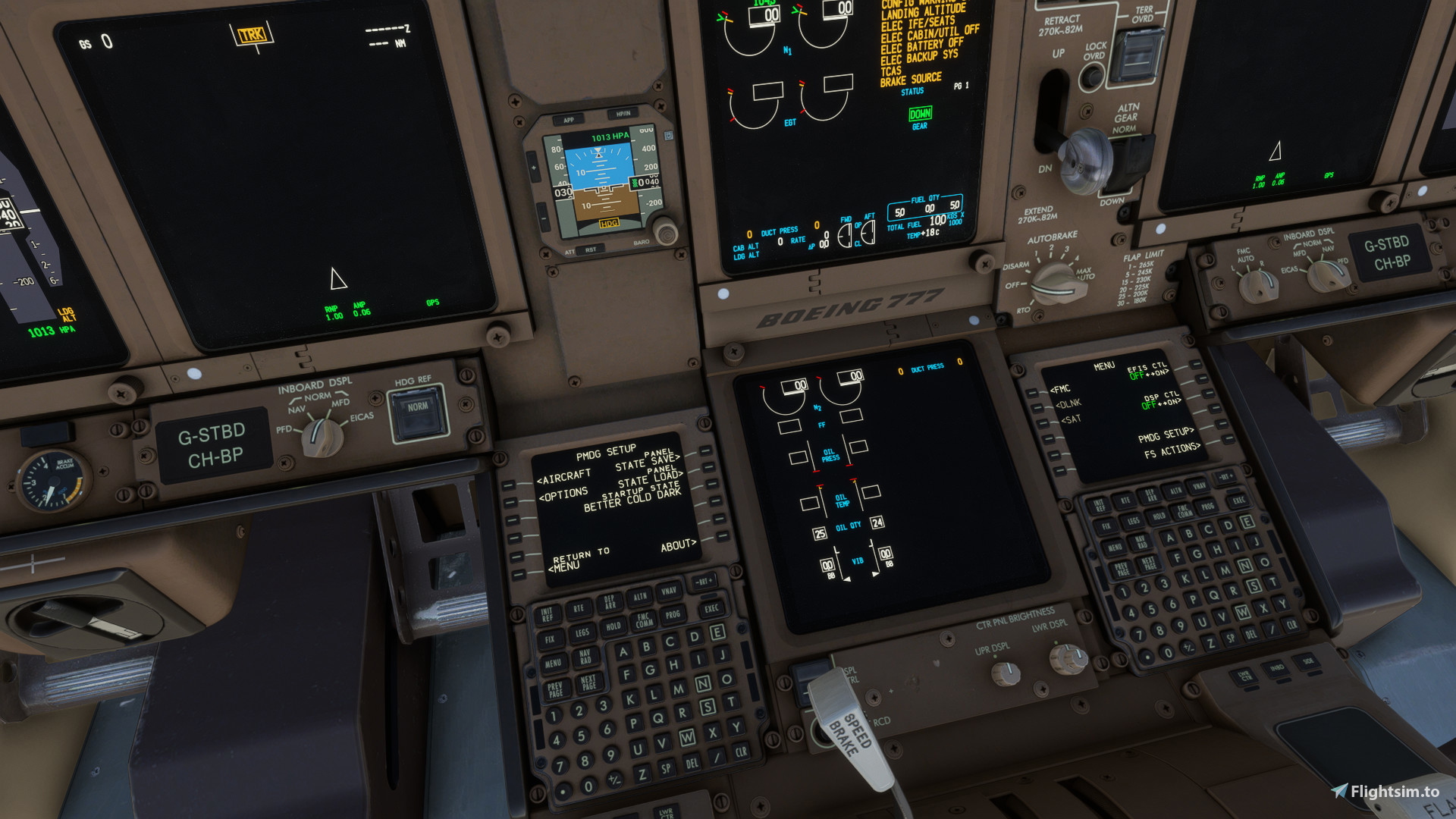
    Better Cold and Dark for the PMDG 777-300er - Image 1

    Description

    Description:

    I found the PMDG 777-300er has too many switches already in the right place for the flight. However, I like flicking buttons so I have changed the startup state so that we pilots can click a few more buttons. I have tried to make it according to checklists to make it as realistic as possible. If you have any suggestions please let me know! 

    P.S. Regarding the lights please make sure you turn up the master brightness first which is on the overhead on the lighting panel. This will then allow you to have a base lighting value which you can then alter using the respective knobs for different areas.


    How to install:

    1. Download the file

    2. Unzip the folder

    3. Find the panel state folder for the PMDG 777-300er:

    Microsoft store version

    C:\Users\(username)\AppData\Local\Packages\Microsoft.FlightSimulator_8wekyb3d8bbwe\LocalState\packages\pmdg-aircraft-77w\work\PanelState

    Steam Version

    C:\Users\(username)\AppData\Roaming\Microsoft Flight Simulator\Packages\pmdg-aircraft-77w\work\PanelState

    4. Copy the .FMC and .SAV files into the folder

    5. Load up Microsoft Flight Simulator and into the 777

    To load the panel state

    - Go to the FMS (you may need to turn on the ground power) and select PMDG setup

    -  Select panel state load and click on 'Better Cold Dark' and execute

    To load into this panel state by default

    - Go to the FMS (you may need to turn on the ground power) and select PMDG setup

    - Select startup state and click on 'Better Cold Dark' and execute


    What does it change:

    - Parking Brake SET

    - APU GEN OFF

    - Backup GENS OFF

    - No Smoking sign OFF

    - Anti-Ice OFF

    - Packs OFF

    - APU / Engine Bleed Air OFF

    - Transponder OFF

    - squawk 2000

    - Thrust ASYM COMP OFF

    - Pressure setting HPA

    - Altitude increment 1000 feet

    - Generators OFF

    - Nav light OFF

    - Recirc fans OFF

    Interaction activity
    DownloadsCommentsSeparate scales for downloads and comments
    Oct 22 Downloads: 0 Comments: 0Oct 23 Downloads: 0 Comments: 0Oct 24 Downloads: 0 Comments: 0Oct 25 Downloads: 0 Comments: 0Oct 26 Downloads: 1 Comments: 0Oct 27 Downloads: 0 Comments: 0Oct 28 Downloads: 0 Comments: 0Oct 29 Downloads: 0 Comments: 0Oct 30 Downloads: 2 Comments: 0Oct 31 Downloads: 1 Comments: 0Nov 01 Downloads: 0 Comments: 0Nov 02 Downloads: 0 Comments: 0Nov 03 Downloads: 1 Comments: 0Nov 04 Downloads: 1 Comments: 0Nov 05 Downloads: 0 Comments: 0Nov 06 Downloads: 1 Comments: 0Nov 07 Downloads: 1 Comments: 0Nov 08 Downloads: 1 Comments: 0Nov 09 Downloads: 1 Comments: 0Nov 10 Downloads: 0 Comments: 0Nov 11 Downloads: 1 Comments: 0Nov 12 Downloads: 0 Comments: 0Nov 13 Downloads: 1 Comments: 0Nov 14 Downloads: 0 Comments: 0Nov 15 Downloads: 0 Comments: 0Nov 16 Downloads: 0 Comments: 0Nov 17 Downloads: 0 Comments: 0Nov 18 Downloads: 0 Comments: 0Nov 19 Downloads: 0 Comments: 0Nov 20 Downloads: 0 Comments: 0
    Oct 22Nov 05Nov 20
    12
    Downloads
    0
    Comments
    Last comment 120 days ago
    Creator responds to 53% of comments

    Log in to join the discussion

    Log In

    Comments33

    lilith1911
    ·4 months ago
    It's lovely! Really helped me out, I haven't encountered any bug yet, so far so good. Just one little thing: Could you please make an update to completely turn off all buttons? There are still some small, "unimportant" buttons that are left on when the aircraft is in the cold and dark state. I know it's quite silly of me, but it would make the add-on much more realistic.
    PILOTEB777·7 months ago
    can you make 2024 version pls
    finnalpha·over 1 year ago
    Hi there, are you going to bring this great enhancement to the -200ER and -F as well?
    BattleOverlord·over 1 year ago
    Is there any tutorial about when I should turn ON all these things which are turned off in this panel state? I understand that most of the buttons are "turning them ON" and nothing is going to happen, but for example the apu bleed, packs, recirc fans, backup gens? Thanks.
    Grim2988·almost 2 years ago
    Can you make a 777f version? Would be much appreciated.
    capt_adz125
    ·about 2 years ago
    For some reason the wheels glow a slight orange showing pixelated orange specks on the wheels. This is due to overheating which could be because of the glitch where the plane is on for a split second and then reverts to this cold and dark. This happens all when the plane spawns in. Please fix or this would be a 5 star.
    Viserion·over 2 years ago
    Does this work with the latest version 2.0.41 coz everytime I select this option, the plane loads then coz into cold dark again. Or is that what is should do?
    jeffvlahos
    ·over 2 years ago
    Thanks for your work on this. I use InHg and was wondering if you'd be willing to support creating an inHg file for future releases in addition to the HPA version (since that's default in U.S.). I found the settings and was able to change it for myself but I'll 1have to remember to go in and update that for any future releases. I also was initially confused by the master brightness and thought it was a bug at first, so would recommend adding a note in the description to reduce confusion. Thanks again!
    SylentPGAuthor·over 2 years ago
    Hello, thank you for the feedback 100% I will make a InHG
    version when I’m next online. I will also change the description I have had a few issues regarding master brightness - I may change it to making each individual panel light dark instead of the master brightness for ease!
    SylentPGAuthor·over 2 years ago
    Hiya, I have made one compatible with INhg however I don't see a way to add a secondary file. I have no idea why you would know as the consumer but if you do know how to upload 2 downloads here that would be great!


    Bkray1·over 2 years ago
    Hi, I tried using this panel state with GSX and for whatever reason, if I have this Panel state set as default and load the 777 tutorial flight, GSX menu just says Loading please wait and spins forever. If I switch the load state to COLDandDARK or ColdandDarkGPU, GSX does not appear to have issues. Any ideas on what would cause that?
    SylentPGAuthor·over 2 years ago
    Hmm, this is interesting. I use GSX and have no had any issues what so ever, maybe try restarting the coutal. I will try and replicate this issue when I'm next on the sim - can you confirm what you mean about the tutorial flight?
    Bkray1·over 2 years ago
    Hi. Yes, from chapter 4 of the tutorial (https://777.pmdg.com/tutorial-flight/#/lessons/bpczZU1WNaE4llriB8j8X2mj_24jDNkB), when you load the following: "Load the Haneda Tutorial Start flight file using the standard MSFS Flight load options from the \Community\pmdg-aircraft-77w\Config\Flights folder". Once I load that and try and start from the Better cold and dark, GSX just spins and spins. If I load with cold and dark gpu, it has no issues. I have read that there are a lot of issues with the 777 and GSX as all of the updates have not yet trickled out. But I have no idea what is happening with this load state vs the other one.
    SylentPGAuthor·over 2 years ago
    Okay thank you for the feedback that does seem weird. I’ll have a look at your specific situation when I am next on the sim, hopefully within the next 24 hours. As I say in been using GSX on normal flights with the 777 just fine so definitely a weird one. Hopefully I can solve this issue and get back to you :)
    DDoBaGi·over 2 years ago
    I love this tweak so much.
    Can you recommend a checklist that works well with this tweak?
    SylentPGAuthor·over 2 years ago
    Thank you very much! The best checklist I have found is British Avgeek's:
    https://flightsim.to/file/76566/osprey-airways-pmdg-777-series-checklist
    MSFS 2020MSFS 2024

    Better Cold and Dark for the PMDG 777-300er

    Enhance your PMDG 777-300er experience with this mod that adjusts the startup state to allow for more button-clicking simulation. Through realistic checklist-inspired changes, from parking brake settings to lighting adjustments, immerse yourself in a detailed cold and dark cockpit environment for a more authentic flight experience. Follow simple installation instructions and share feedback for further improvements within the community.
    Downloads3K
    Version1.3
    File Size13.99 KB
    Published2 years ago
    Updated2 years ago

    User Reviews

    4.8

    6 reviews

    5
    83%
    4
    17%
    3
    0%
    2
    0%
    1
    0%

    Version History

    Fixed issues with doors being opened Pannel brightness off on startup