
Description
Small utility Application I wrote as a learning project for learning the programming language Rust.
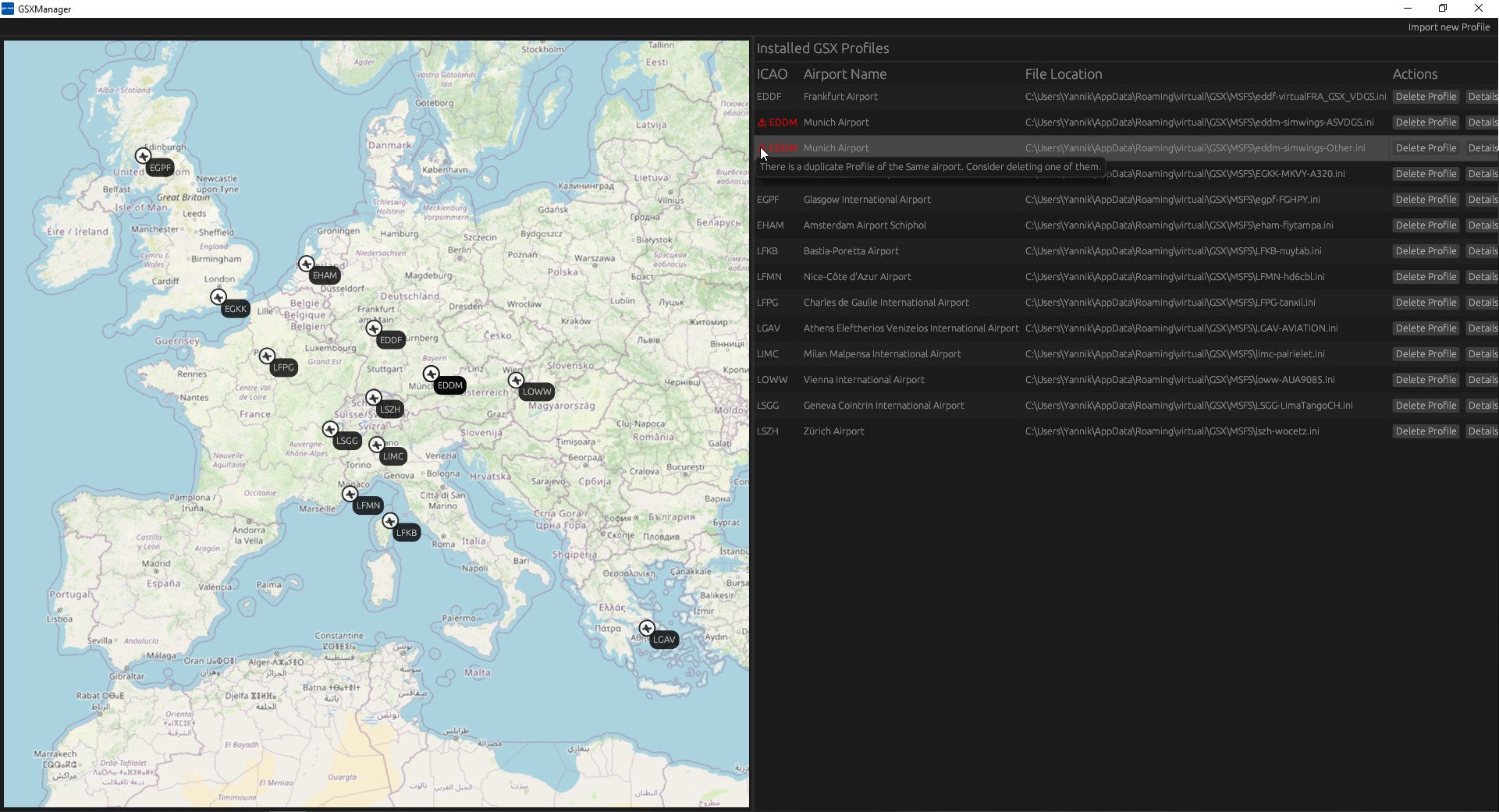
GSXManager allows you to manage your installed GSX-Profiles. At the moment the following features are implemented:
- Import GSX Profiles (.ini-File as well as its associated .py-File)
- Delete Profiles
- Display your installed profiles on the world map
- Display the profiles sections/positions including their associated positions (pushback) on the world map
- Show you an error if you have multiple profiles for the same airport installed
If you have any features that you would like to see implemented, let me know in the Comments and I'll try to implement it.
Also if there are any crashes or problems, just let me know. The Application creates a "gsxman.log"-File next to the Exe, on first start that you can send me together with your error report.
GSXManager
GSXManager is a utility application designed for managing installed GSX Profiles. Features include importing profiles, deleting profiles, displaying installed profiles on a world map, and detecting duplicate profiles for the same airport. Users can provide feedback for potential new features or report issues for improvements.


User Reviews
5 reviews
Version History
Updated Release with some fixes and new features: - Ability to add Notes to profiles and preview them on the map - Ability to import Zip-Files directly - 2 New buttons on Overview-Page: Refresh Profiles, Show Profile on Map
Log in to join the discussion
Log InComments(15)
over 1 year ago
I understand that could be static aircraft as well. And if both an Asobo and addon scenery version is conflicting . But I wonder. Are there two sources for GSX profiles, or actually three the Asobo Official OneStore?
The AppData Virtuali GSX MSFS folder and the individual scenery folders which have GSX profiles in them?
Or is it only the AppData Virtuali GSX MSFS folder that is used by the sim?
Do this program scan both folders for finding conflicting GSX files?
about 2 years ago
over 2 years ago
It would be nice to be able to have a tick box or similar to mark payware airports,perhaps a different label colour too.
The import from zip is great, quite a few dwnloads are in RAR files though which the app doesn't see.
Perhaps an option to add a circle at an airport on the map, where you have a airport but no GSX profile to go with it.
Thanks
over 2 years ago
over 2 years ago
This comment has been deleted
over 2 years ago
One question. The application creates always two files on my desktop (gsxman and gsxman_userdata.json). Would it be possible that these files are stored anywhere else instead directly on my desktop?
over 2 years ago
over 2 years ago
over 2 years ago
over 2 years ago
this is really useful app thanks!
over 2 years ago
Love the app, it has a lot of potential. In addition to the suggestions from other users, is it possible to add ...
- installed date
- Creator
- Notes
over 2 years ago
Thank you guys so much for the positive reviews and your feedback. I really like your guys' ideas and will try to implement them as soon as possible.
over 2 years ago
over 2 years ago
But great start!
over 2 years ago
Five ideas for improvement:
- Once the user clicks on a profile on the map, pull up the "Details" in the right panel. At the moment it only selects the profile, but doesn't scroll down to it.
- When the window isn't maximized, the "Delete Profile" and "Details" buttons are hidden. Make these buttons stick to the right however small the window is.
- Add a search field where you type the ICAO and it pulls up the GSX profile.
- When clicking on "Import New Profile", the program only lets me see and import .ini files, it would be great if it could see and unzip archives as well.
- I am very spoiled and only fly to places where there is a good GSX profile. I am a GSX profile creator and keep a database of all installed profiles in Google Earth where I also note down whether something needs to be fixed/improved. I also often insert who made a particular scenery together with the runway lengths, just to be able to better prepare for my next flight. Like that: https://imgur.com/a/agEHJjB It would be absolutely fantastic if you could let users add their notes to the database of profiles. Then I could ditch Google Earth altogether.
Top marks, ItsMeNiV! This is a wonderful piece of software with lots of potential.