
Description
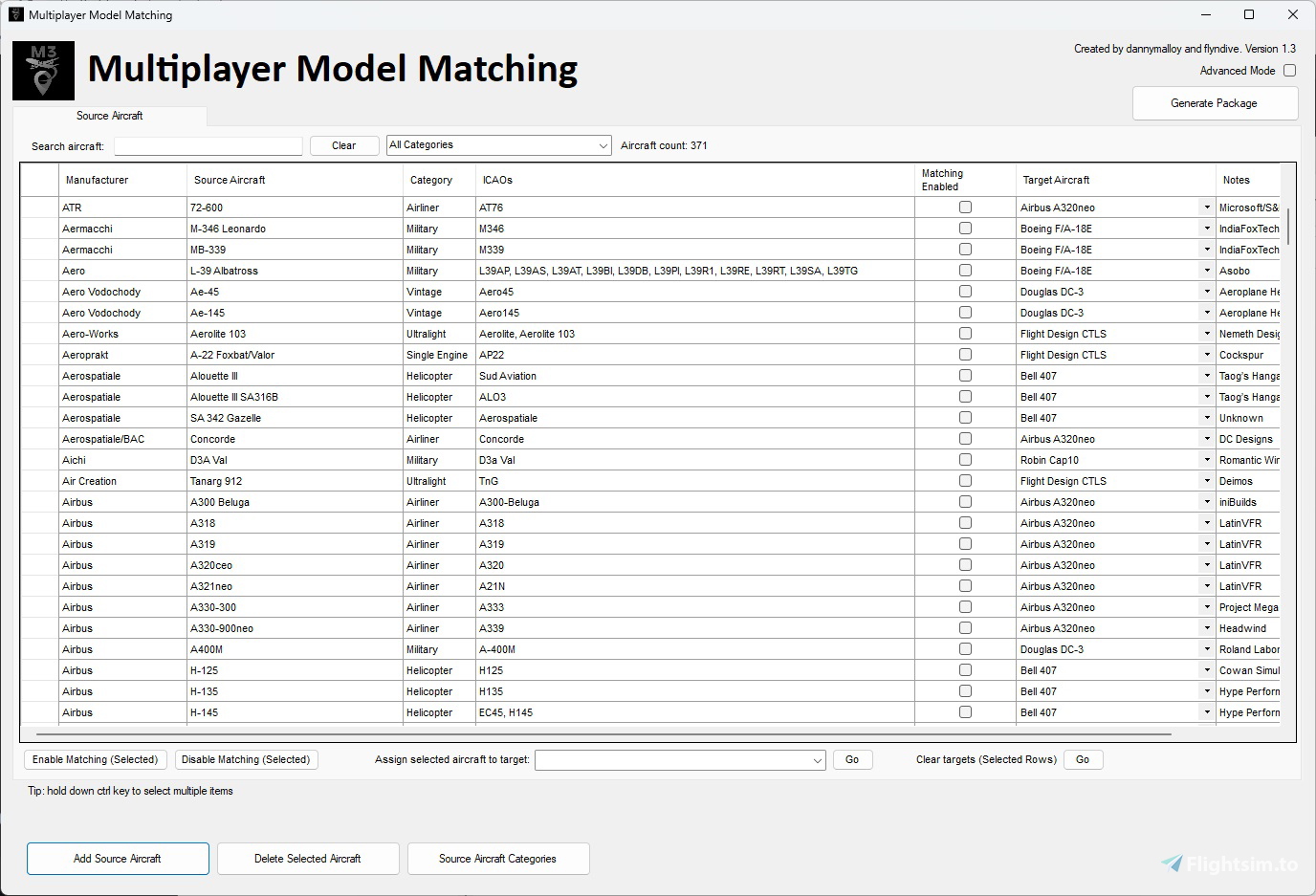
Multiplayer Model Matching (M3) is a freeware configuration utility app for MSFS that offers two major features:
1) First, it generates a single package of small aircraft configuration files which, when placed in the Community folder, redirects multiplayer aircraft models you DON’T have installed to similar ones you DO have installed. So, for example, you can make a Kitfox (if you don't have it installed) look like the DHC2 Beaver instead of the generic Bonanza (for example).
2) Second, it updates the MSFS ICAO Aircraft Designator database to include all necessary ICAO designators. This allows you to see an aircraft you own, or a closely matched aircraft, even if you don’t have the livery installed.
Objective:
Eliminate or reduce the number of multiplayer generic aircraft you see while playing MSFS. Overall, M3 should provide a vastly improved multiplayer experience!
Installation:
Extract the folder "MMM_V1_4_1" into a file location of your choice and run the MultiplayerModelMatching.exe executable. Make sure to read the M3 User Guide for detailed instructions how to use the app.
First steps for using M3:
1. Review the list of Source Aircraft
2. Enable Target Matching for those aircraft you don't have installed
3. Generate the Package
4. Copy Package into the Community Folder
5. Start MSFS
Expectations:
M3 should eliminate at least 90% of the generic multiplayer aircraft seen while playing MSFS. You'll still see generic aircraft sometimes due to MSFS’s inherent multiplayer issues which M3 will not be able to address. Also, it’s important that M3 is configured correctly to reduce the likelihood of seeing generic multiplayer aircraft.
Developers:
- dannymalloy
- flyndive
Distribution:
M3 is FREEWARE and only available for download at flightsim.to. Redistribution of this addon is EXPRESSLY FORBIDDEN.
Appreciation:
Huge shout-out to all of our Beta testers and those who provided direct feedback over the course of development. This product would not have been realized without the help of many dedicated MSFS users!
Frequently Asked Questions:
Q: How does MSFS match multiplayer aircraft in the game?
A: MSFS first checks the Livery name of the Multiplayer aircraft and looks for a match to a livery that the user possesses. (A livery is a variant of a specific aircraft, typically a paint scheme.) If this check fails, then it checks against the ICAO aircraft designator for a match. If this last check fails, then a generic aircraft is shown.
Q: What is a Source Aircraft? What is a Target Aircraft?
A: Source Aircraft are aircraft that you don't have installed and you want to match to something (rather than having the generic aircraft appear in its place). Essentially, Source Aircraft are what you see OTHER people in the game flying, but you don't own. Target Aircraft are aircraft that you have installed and have been configured in the tool to allow you to match to. So, you match a Source Aircraft (what you don't have) to a Target Aircraft (what you do have).
Q: What's a good approach for using M3 for the first time?
A: If you don't have many aircraft installed, the best approach would be to select all Source Aircraft (select a cell and hit +A to select all rows), and enable matching for everything (click on the Enable Matching button). Then, go down the list (or use the search bar) to find aircraft you own and uncheck them for matching. Finally, generate the package, copy to your Community folder, and run MSFS. On the other hand, If you own a lot of aircraft, then don't select all. Just go one-by-one and enable them as you go.
Q: Why should I use M3 even if I don't plan on using the model matching feature?
A: Besides model matching, M3 updates the MSFS ICAO aircraft designator database. This eliminates seeing a Bonanza (as an example) when someone comes into your view with a custom livery for a plane you already have installed.
Q: Does M3 need to run in the background when I run MSFS?
A: No, it doesn't. Once the package is created, M3 can be closed.
Q: Does M3 save my settings if I close the program?
A: Yes, M3 provides persistent saving of changes you make (i.e. Enabling/disabling aircraft, Adding Source Aircraft, etc.).
Q: Does using a M3 package take up more system resources or add time to load MSFS?
A: For load times, there will be a slightly longer load time due to the aircraft configuration files being read by MSFS to construct its internal databases. The overall footprint on disk remains very small due to M3 using existing model and texture data.
Q: Sometimes MSFS starts up momentarily when I hit "Generate Package", but most times it doesn't. Why is that?
A: MSFS starts up (briefly) only when a new ICAO has been added to a new or existing Source Aircraft. A command window will open and MSFS needs to run momentarily in order to rebuild the ICAO database. This might take 10-15 seconds to complete. Most of the time, MSFS will not need to be accessed and the Package generation time will be relatively short.
Q: Can I add a target aircraft that is purchased from the marketplace?
A: Unfortunately, a lot of the aircraft you purchase from the marketplace have certain files that are encrypted and therefore cannot be used within M3. This is not the case for all marketplace aircraft though so it is worth checking whether the files required for M3 are accessible on an aircraft by aircraft basis.
Q: I already have M3 installed, can I update the source aircraft list without waiting for a new M3 version to come out?
A: Yes you can. An updated source aircraft .mmms file can be downloaded using the link below. Once downloaded, enable advanced mode and click on the "Import Source Aircraft" button. You should be able to import new source aircraft from here.
https://flightsim.to/file/67056/multiplayer-model-matching-m3-source-aircraft-update-file
It is recommended you subscribe to this update page so you are notified when new aircraft have been added.
Multiplayer Model Matching (M3)
Enhance your multiplayer experience in MSFS with Multiplayer Model Matching (M3) - a versatile freeware utility app that redirects generic aircraft models to ones you have installed and updates the ICAO database. Eliminate up to 90% of generic multiplayer aircraft, ensuring a more immersive multiplayer environment. Developed by dannymalloy and flyndive, M3 is a must-have tool available exclusively on flightsim.to for all MSFS users.




User Reviews
38 reviews
Version History
Updated the base install with latest aircraft. This update is intended for new users only. Existing users of 1.4.2 are not required to download this version again. They should use the link provided in the very last F.A.Q. in order to update their list of source aircraft. The link will download an MMMS file that you can import within the application using Advanced Mode. This import file is updated regularly (courtesy of flyndive!) so please feel free to download every so often to keep your source aircraft up to date!



Log in to join the discussion
Log InComments(168)
about 4 hours ago
2 months ago
3 months ago
9 months ago
over 1 year ago
over 1 year ago
over 1 year ago
over 1 year ago
over 1 year ago
over 1 year ago
almost 2 years ago
I looked through the generated files to see if there was information in those that I could reverse engineer into my aircraft. I saw the Icao type designators and changed mine to those, "Strike Eagle" or "F16" for example, but other users still see me as that damn yellow Bonanza!
almost 2 years ago
almost 2 years ago
Of course, from my perspective, everything is great and everybody is lovely Iris F-15s, it's just if I'm on a live stream etc.
over 2 years ago
over 2 years ago
I have just gone through some extensive testing with flyndive and can confirm this addon still works in SU15.
Please check that you have the option of Traffic Variety set to Ultra for the models to be loaded correctly.
Cheers
Dan
over 2 years ago