
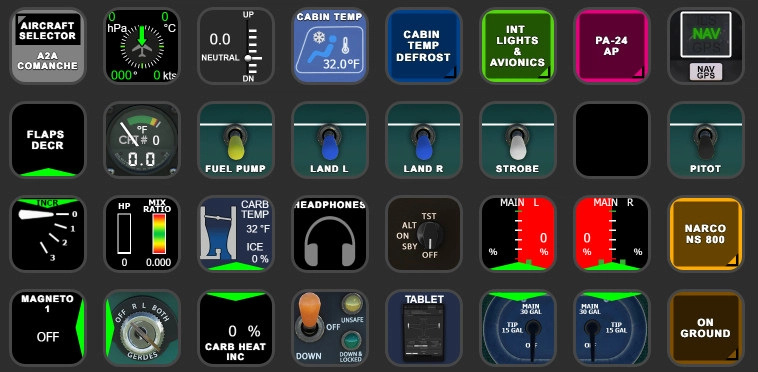
Description
A2A Comanche PA-24 StreamDeck XL & PLUS profile and AAO Scripts
by Guenseli
You need LORBYs AAO and its StreamDeck Plugin to run this StreamDeck profile.
ATTENTION!
PLEASE READ CAREFULLY!
- When you import SD profiles, make sure to delete the old ones, otherwise you'll get profile copies.
- Make sure to always have the latest Elgato StreamDeck, AAO and AAO StreamDeck plugin versions!
- I just create the SD profiles! For any connection issues, SD plugin not working, Buttons show "?" or nothing, no reaction of the SD etc., please contact the developer of AAO! And please read the AAO Manual or the short Troubleshooting PDF
- It is - as the title says - just for the StreamDeck XL (!). Please do not ask for a 15 button conversion. This will not happen as this will more than double the amount of development and support for me as I do not have a 15 button SD. Sorry.
- Please ask if you want to use parts of my SD profiles, icons or AAO scripts or whatever! And please ask everytime you start a new project! You have to credit and link me in your description! If you use my work, you are then not allowed to beg for own donations!
Installation:
Install the SD XL profile by double clicking at A2A Comanche.streamDeckProfile
Install the SD PLUS profile by double clicking at PLUS A2A PA-24.streamDeckProfile
Import the AAO script A2A Comanche_Scripts.xml according to the AAO manual
You can use the AAO scripts of course for other hardware, too!
Donations are welcome!!! it is a lot, really a lot of work, and some donations make future projects easier ;) thx!
If you want to donate directly as friend without a PayPal fee, then use this adress, please: www.paypal.com/paypalme/GuenterSteiner
A2A Comanche PA-24 StreamDeck XL & PLUS profile and AAO Scripts
Enhance your A2A Comanche PA-24 experience with this StreamDeck XL & PLUS profile along with AAO Scripts by Guenseli. Ensure you have LORBYs AAO and its StreamDeck Plugin for full functionality. Follow the instructions for seamless installation and enjoy improved cockpit interaction. Donations are appreciated for the effort put into this project.

Supporters

User Reviews
6 reviews
Version History
I reworked nearly every button the last weeks, so maybe some bugs are in it now. Please report. NS 800 is new Cabin Temp Gauge like in the Aerostar Several improvements Version for MSFS could still be downloaded. Can't say if MSFS2024 version works in every aspect with the MSFS2020 one
Related
FENIX A3XX AAO Scripts & StreamDeck XL & PLUS Profile
Customize your Microsoft Flight Simulator experience with FENIX A320 AAO Scripts & StreamDeck XL Profile by Guenseli. This add-on offers a seamless integration with LORBYs AAO and StreamDeck Plugin for optimal performance. Explore the detailed installation instructions for enhanced functionality with a VRInsight MCP Combo II. Elevate your simulation setup with this meticulously crafted add-on.
by Guenseli
Icon Pack for Elgato StreamDeck
A collection of over 3500 icons designed for Elgato StreamDeck and similar devices, created by Guenseli. Ideal for personal use with a disclaimer against commercial usage. Icons are detailed and diverse, providing a variety of options for customization. Credits required if used in public projects, with a suggestion for donations to support the creators work.
by Guenseli
PMDG 737 AAO Scripts & StreamDeck XL & PLUS Profile
Enhance your PMDG 737 experience with the PMDG 737 AAO Scripts & StreamDeck XL & PLUS Profile by Guenseli. Make sure to update your Elgato Software to version 6.0 or higher for compatibility. This profile is specifically designed for the StreamDeck XL and requires LORBYs AAO and its StreamDeck Plugin to run smoothly. Get ready to elevate your cockpit with this detailed and user-friendly add-on.
by Guenseli
FBW A320 AAO Scripts & StreamDeck XL & PLUS profile and MCP Combo template
Enhance your FBW A320 experience with tested AAO Scripts and StreamDeck profiles for XL & PLUS versions. Ensure to delete old profiles before import and always use the latest plugin versions for seamless integration. Contact AAO developer for any connection issues and give credit if using parts of these profiles in your projects. Install scripts and profiles for an immersive flight simulation experience.
by Guenseli
Log in to join the discussion
Log InComments(58)
9 months ago
- upgrade streamdeck app 6.8 -> 7.1.1 (profiles wont load, otherwise)
- upgrade FS2020 (for FS2024) -> native FS2024
The icons looking really great for streamdeck XL. You are an artist :)
Love the Comanche and will try this new streamdeck profile tomorrow.
Thanks for all efforts on this profile.
9 months ago
Elgato StreamDeck
AxisAndOHs
AxisAndOHs StreamDeck plugin
9 months ago
9 months ago
Your latest update seems to work great on the native MSFS 2024 A2A PA-24 version.
Just flew from L70 - KOKB , two really great airports by Vincent Bazillio, and all was working fine.
Top.
Greetings, Harald
11 months ago
Great profile overall — everything works perfectly. However, when I try to rotate either the heading or course knob using my Stream Deck setup, it only changes in 5° increments and then stops. It doesn’t continue to rotate smoothly or adjust continuously while I hold the button.
Is there a way to make the adjustment continuous when the button is held or rotated? Any tips on configuration or scripting in AAO would be appreciated.
Thanks!
11 months ago
If I press the HDG button it is increasing in 1 step, holding it down it moves in 10 steps.
CRS also work as it should.
Please drop me a PM for further assistance, otherwise I will miss your reply here
over 1 year ago
over 1 year ago
You can't interchange them.
And no, PLUS does not contain the same functions as the XL
over 1 year ago
over 1 year ago
Today, adding A2A Comanche to my fleet and you have a beautiful profile that I can use.
Again, many many thanks for sharing these with the community.
over 1 year ago
almost 2 years ago
The combo PitotTubeCover and TieDowns button changes its icon if I toggle both on or off using the A2A tablet but pushing the Stream Deck button wasn't toggling the state. By changing the Key down event I could get it to do one or the other but not both. I moved the TieDowns toggle to the Key Up event while leaving PitotTubeCover on key down and both the tie downs and pitot cover state toggle successfully on a key down / up of the button.
The other button is the AVIO DME Toggle. If I rotate the switch using the mouse in the sim the Stream Deck button icon updates to show the correct position of the rotary switch.
Pushing the Stream Deck button does not turn the rotary switch in the sim aircraft though.
Opening the AAO Script Editor and using the test button for the "AVIO DME TOGGLE" script does not affect the DME switch position in the sim either.
It doesn't seem to like something about the script as written.
"0 1 2 3 4 5 4 3 2 1 (L:DmeFunction, Number) (L:A2ACom1DmeMode)
10 iseq (>B:Radio_Event_DME_6State_Set) (>L:A2ACom1DmeMode)"
Or its possibly sim issue or something in AAO that is preventing this script from working?
almost 2 years ago
about 2 years ago
Was macht das Icon "Trim", das ist nichts hinterlegt.
Danke sehr!
over 2 years ago
I've been using this Stream Deck Plus profile for awhile now with the A2A Comanche and its great. A few weeks ago I updated the Comanche to v1.6.1 and the Stream Deck software to 6.6.1 After these updates I'm no longer able to adjust the heading bug from the Stream Deck. I've tried with both the Plus profile using the rotary dial and the XL profile buttons. The CRS adjustment knob still works fine as does the rest of the profile and its only the heading adjust that has stopped working.
If I adjust the heading bug with my mouse in the sim it works and I can see the heading degrees changing on the Plus display but when adjusting from the dial on the Stream Deck the heading bug and the indicated heading on the Plus will not change. When I watch the script processing from AAO I can see the knob is generating the B:Knob_Default_Toto_Inc and Dec commands but the sim isn't responding and moving the heading bug. I've also made sure I'm running the latest version of AAO and the current AAO plugin for Stream Deck
I posted on the A2A forums and Nick has indicated there were no code changes to the heading adjustment in the latest release. I'm not sure where to go from here to troubleshoot this issue and hoping you can help to resolve?
Thanks!
over 2 years ago
I just checked everything, XL and PLUS and it is working as it should here.
Are you sure you haven't accidently switched the HDG knob to dial just the card?
I have no idea, sorry
about 2 years ago
almost 2 years ago
I am also having this problem with the heading adjust.
Strangely I can change the heading with the rotary dial on the honeycomb bravo
Best wishes. Bob
over 1 year ago
still K:
over 2 years ago