

Description
Your operational flight plan, one click away. In the sim, on the web and on your phone.
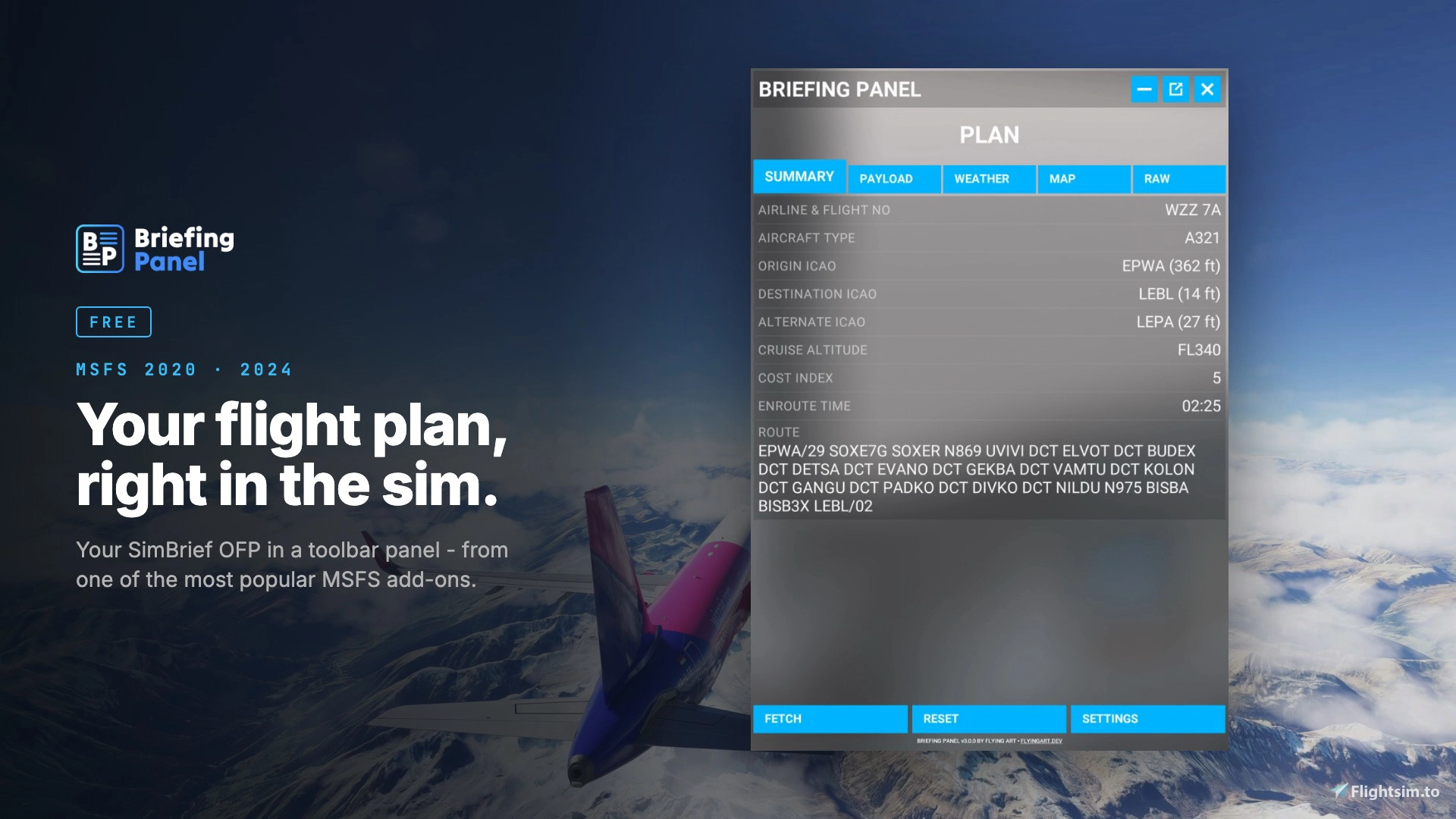
Briefing Panel is one of the most popular MSFS add-ons. It puts your SimBrief OFP into a clean panel inside the Microsoft Flight Simulator toolbar. You get fuel, weights, weather, route and map without alt-tabbing and without scrolling through a PDF.
Features
- SimBrief, one click away - enter your SimBrief username once and fetch your latest OFP from the toolbar, the web or your phone.
- Fuel and weights - block fuel, reserves, ZFW, TOW and payload from your OFP.
- Route map - your route and every fix on a fast map made for the sim, with openAIP airspaces, airports and navaids, and your live aircraft position.
- Plan weather - METAR and TAF from your OFP.
- VATSIM ATC - see the online controllers along your route with their frequencies.
- Web panel - the same plan at briefing.flyingart.dev.
- Second screen - pair your phone or tablet with a 6-digit PIN. You do not type a password on the device.
- Always in sync - your plan and settings show on every device at the same time.
- Install once - the plugin updates itself automatically.
Join my Discord to Report bugs & send ideas 😍
https://discord.gg/pmAtpESgbH
Please consider donation - it helps a lot! 🔥 Thank you! ❤️
Enjoy!
Briefing Panel
Your SimBrief flight plan in the MSFS toolbar, on the web and on your phone. Fuel, weights, weather, route map with airspaces. Free for MSFS 2020 and 2024.
Starred
Hand-picked by our team — this addon significantly enhances the MSFS experience and is a must-have for your setup.


Supporters

kareem
$50

akflyus
$20
Simpil165
$20
AJms6
$20
normanh2
$15
Oscar007
$15

Flys787
$10
Erjalisco
$10
Kagami2600
$10
stingyearth84
$10
mroots
$10
meneo0483
$10
$10
UnsafeAtAnySpeed
$10
gruesen
$10
gilbertjus1
$10
oberon27
$5
fziker
$5

chelo832
$5
tshoss
$5
CombatBoss
$5
Pablo68
$5
MBGoofy
$5
jwl_246
$5

wcmack46
$5
wcmack46
$5
scoeva
$5
wcmack46
$5
remmet
$5
bubi.de
$5
JWoodard
$5
RRW
$5
PinnaclePilot
$5
AVFPILOT
$5
fscoen
$5
hud11
$5
tmob71
$5
GRW
$5
pete0388
$5
tylivbela
$5
abon237
$5
Okino
$5
RonFrayne
$5

PatriotSix
$5
juppee
$5
gporzio
$5

slapstock
$3

roccojakob
$3
dvf757
$2
walty369
$2
dedalos66
$1
3dpills
$1
Courtjus25
$1
User Reviews
141 reviews
Version History
A complete rebuild. Briefing Panel is now a platform: toolbar, web and mobile, connected to one account. # New Web panel at briefing.flyingart.dev - fetch plans and manage your account. Briefing Panel account with real-time sync of plans and settings between all devices. iOS app (Android coming soon). Pair a phone or tablet with a 6-digit PIN. Over-the-air updates - the plugin downloads new versions by itself. You install it only once. Briefing Panel Pro (one-time purchase): layout profiles per aircraft, live weather, runway wind and TAF timeline, scratchpad and notepad, COM tuning from VATSIM ATC, live position on web and mobile, and toolbar themes. # Improved New map tiles made for the sim browser: faster and the same on every device. openAIP airspaces, airports and navaids are built in. You do not need your own openAIP key anymore. New layout engine: pages are flexible grids of data fields and widgets. VATSIM ATC: online controllers along your route, grouped by station. # Removed The "OpenAIP key" setting. Map data now comes from the Briefing Panel server.
Featured in Collections(2)




Related

LiftBox
LiftBox is a software add-on designed to enhance realism in your flight simulator experience. It allows you to control various functions in the simulator directly from your mobile device or tablet using switches, buttons, and virtual knobs. With features like dual push-pull knob handling and open-source aircraft configuration, SimBox offers a customizable and immersive flying experience. You can manage autopilot, lights, radio, transponder, and more with this FPS-friendly tool.
by FlyingArt

Cabby - Virtual Cabin Crew Powered By AI
Cabby is an AI-powered add-on for Microsoft Flight Simulator that enhances flight experiences with dynamic cabin announcements and multilingual voice support. It simulates a realistic passenger cabin environment, adapting announcements based on live flight data and unique passenger characteristics. Features include 3D spatial audio, custom announcement packs, and integration with GSX for seamless boarding notifications. Users can tailor their in-flight experience with personalized details and interactive passenger simulations.
by FlyingArt

Cabby & Soft Brake - Passengers experience bundle
The Cabby & Soft Brake add-on enhances the passenger experience within Microsoft Flight Simulator by providing realistic cabin sounds and smoother braking mechanics. This bundle aims to create a more immersive flight environment for both virtual pilots and their passengers. Key features include detailed auditory elements that mimic real-world aircraft operations and improved braking behavior for a more authentic feel during landings. Ideal for those seeking to elevate their in-flight experience.
by FlyingArt

Briefing Panel PRO
Briefing Panel PRO enhances Microsoft Flight Simulator by allowing users to customize briefing panels for each aircraft using over 200 data fields and widgets. It offers live weather updates, runway wind forecasts, synced cross-device notes, and one-click radio tuning based on VATSIM ATC. The add-on includes live aircraft tracking on web and mobile and supports multiple toolbar themes. All features are unlocked with a one-time purchase and no subscription is required.
by FlyingArt
Log in to join the discussion
Log InComments(350)
about 3 hours ago
9 days ago
10 days ago
10 days ago
Thanks!!
10 days ago
9 days ago
9 days ago
14 days ago
14 days ago
13 days ago
13 days ago
https://briefing.flyingart.dev/
13 days ago
13 days ago
14 days ago
14 days ago
14 days ago
Look here: https://dispatch.simbrief.com/account - Alias (username)
14 days ago
15 days ago
16 days ago
With respect
19 days ago