

Description
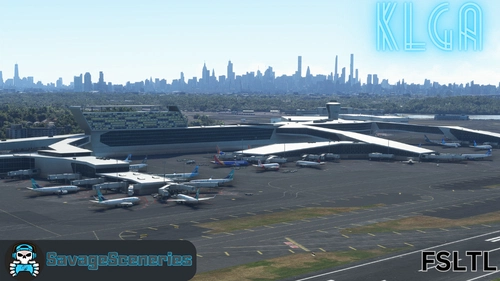
This is the full airport. All of the changes made in the updated_taxiway_network are included. All buildings done except the those in place of the old American Airlines hangars.
This scenery is not an exact replica, but IMO, better than the default and far from being perfect.
Known issues:
- The jetway bug. Sometimes jetways are separated into several parts. I researched this on the web and discovered that
other users and scenery packages are having the same problem. This has been reported to Asobo, but don't expect a fix
anytime soon.
klga-laguardia v1.0.32
- Removed parked cars that was half inside buildings
- Added a few aprons
- Added more pole lights in front of terminal-B
- Added polygons to remove protruding objects in the water near the 22 end tressel
- Corrected LOD's on some models
- Welcome To NY redone with better angle
- Added doors at Stairs terminal-b
- Taxiway revised to prevent AI from using rwy 31 to taxi. There are still problems when rwy 22
is in use.
klga-laguardia v1.0.33
- Added American Airlines Hangars.
klga-laguardia v1.0.34
- The incorrect file was uploaded for v1.0.33. Here is the correct file.
Update 10/22/22
- I'm looking into a way to fix the double Rikers Island bridge when using RKBRIDGER addon. I am looking into the exclusion rectangle, and will post an update as soon as I find a fix. Also will try to add gate assignments using ADE. For those haing problems unzipping the file, Email me and I can send you a link to get it from my Google drive.
klga-laguardia v1.0.35
- Double Rikers Islaned Bridge when using the RKBRIDGER addon. I tried the exclusion rectangle and it didn't work. I think it will only exclude default scenery objects. Unable to exclude objects from other addons.
- I am including two BGL files with this release - one with the Rikers Island Bridge (the default) and one without.
Both files are located here --> klga-laguardia/scenery/klga-laguardia/klga-modelLib.BGL and klga-modelLib.no-RIB - If you want the scenery without the bridge - rename klga-modelLib.BGL to klga-modelLib.RIB and klga-modelLib.no-RIB to klga-modelLib.BGL.
- Issues with RKBRIDGER addon are the bridge is too low and the jetty from my scenery goes thru it.
- Removed spikes in water near approach end of runway 31
ALL parking except the ramps includes Airline Parking Codes as follows:
Terminal A
JBU,NKS
Terminal B
JBU,AAL,ACA,SWA,UAL,EGF,ENF,SKW,ENY,RPA
Terminal C
DAL,FFT,NKS,WJA,EDV,ASQ
Terminal D
DAL,FFT,NKS,WJA,EDV,ASQ
The parking codes are somewhat working. Some planes are using ramp parking, and parking anywhere. Maybe missing atc_parking_codes or atc_parking_types line from aircraft.cfg. I may have missed a regional airline code. I also have AIG installed.
Here is link with a list off the Airlines and terminals. Does not include Delta, United and American regional airlines, but I have icluded them in the parking codes: https://upgradedpoints.com/travel/airports/laguardia-lga-airport/
Parking problems resovled by removing AIG.
klga-laguardia v1.0.36
- Fixed atc_parking_codes to work with AIG installed. Their fix for regional airlines code is to use DALX for Delta, AALX for American and UALX for United. This is easier than trying to keep up with the codes every time the carriers change.
- NO MORE UPDATES TODAY
Location
KLGA - LaGuardia Full Airport
Enhanced version of KLGA LaGuardia Airport featuring updated taxiway network and detailed buildings, with ongoing improvements and adjustments to enhance realism and functionality. Includes fixes for jetway bugs and issues with scenery and addon compatibility. Detailed parking assignments for terminals A, B, C, and D, providing a more immersive flying experience at this busy airport hub.


Supporters
User Reviews
56 reviews
Version History
KLGA_LaGuardia_Full_Airport_v1.0.62 Updated ramp/taxiway textures so they don't look so new Fixed texture on terminal B ================= To install - This scenery is just one package that works in both sims. Delete the LGA scenery from FS20 and FS24 community folders Expand the archive Copy zzz-airport-klga-LaGuardia to the FS2020/FS2024 community folder
Featured in Collections(1)
Related
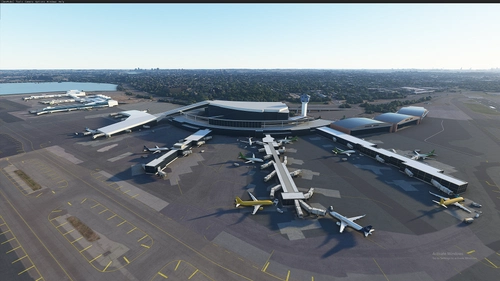
KLGA LaGuardia Airport + NYC Bridge Improvement v1.8
Enhance your New York flying experience with this detailed add-on featuring the upgraded KLGA LaGuardia Airport and iconic bridges across the city. Discover improvements to major bridges like Verrezzano-Narrows, George Washington, and more. Explore the Big Apple from a whole new perspective with this comprehensive package.
by srinivasman
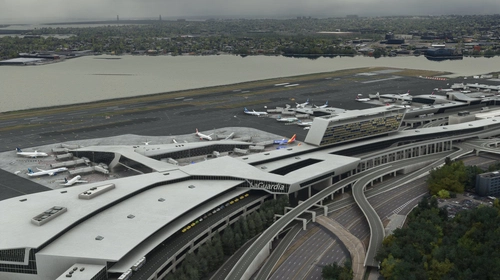
KLGA Static Aircraft
Enhance your virtual airport experience with the KLGA Static Aircraft add-on from SavageSceneries. This add-on includes static aircraft and extra ground equipment for a more realistic environment. Please note it is designed to work with the FEELTHERE payware airport and requires the Latinvfr static aircraft add-on. Simply drag and drop the file into your community folder to enjoy this enhancement.
by SavageSceneries
![KLGA FSLTL Static Aircraft [MKStudios]](https://cdn.flightsim.to/images/26/klga-fsltl-static-aircraft-mkstudios-27326-1713372263-eO9zS.jpg?width=500)
KLGA FSLTL Static Aircraft [MKStudios]
Enhance your KLGA experience with FSLTL Static Aircraft add-on from SavageSceneries. This pack includes static aircraft and extras designed to complement the MKStudios payware airport. Switch to FSLTL models for improved visuals without FPS impact. Make sure to have FSLTL base package installed for compatibility.
by SavageSceneries
KLGA FSLTL Static Aircraft
Enhance your KLGA experience with this add-on featuring static aircraft and extras designed for the FeelThere payware airport, compatible with the FBW FSLTL base package. Switching to FSLTL models offers improved visuals without FPS impact, providing a more immersive airport environment. Make sure to follow installation instructions and consider supporting the creator for future updates and conversions.
by SavageSceneries
Log in to join the discussion
Log InComments(251)
about 1 month ago
about 1 month ago
about 2 months ago
about 2 months ago
4 months ago
6 months ago
The sim handles ILS without the need to have the ILS info included in the scenery bgl. The reason I had included the ILS info in the scenery bgl is when the sim was first released the heading for all of the ILS's was wrong. I removed the ILS info from my scenery in v1.0.60 and this seems to have broken all ILS's. I ran a debug on v1.0.60 and none of the ILS's are shown. I ran a debug on the default KLGA and rwy 04 ILS is not listed. When I added the ILS info back to my scenery and ran debug, all but rwy 04 ILS show up. I am sending you a test package for fs2020, but can be used in fs2024, to see if you can find the ILS for all rwys. If this work, I will publish v1.0.61 fo all. I'm not sure if I need to do a fresh install of FS2020 or I may have found a bug around KLGA. I have attached two pics of the debug sessions. ILS's are the large green arrow heads.
6 months ago
6 months ago
6 months ago
6 months ago
6 months ago
6 months ago
6 months ago
7 months ago
7 months ago
10 months ago
10 months ago