
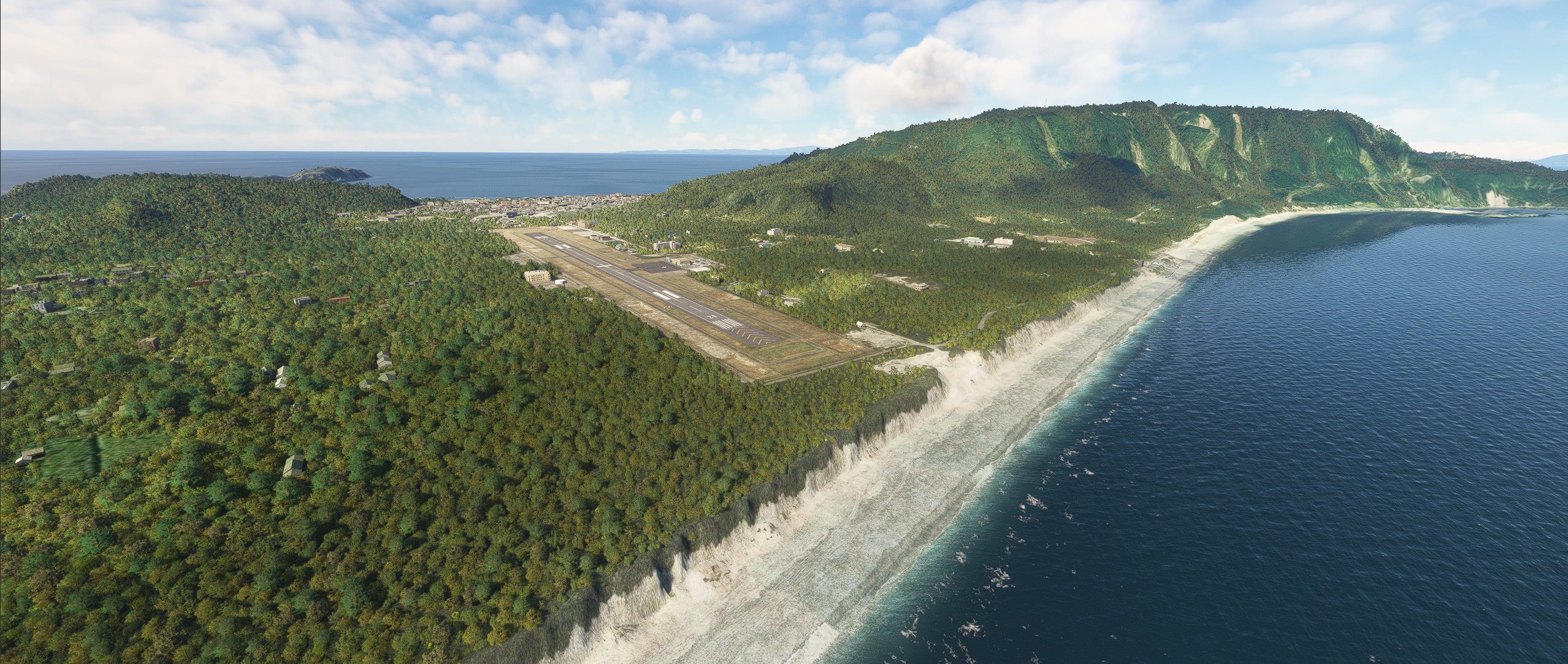
Description
RJAN Niijima Airport
Runway, taxiway and apron improvements.
Building remains autogen.
No plans to change the terminal building or other buildings.
Changed location of runway and VASI.
Changed the lighting on the runway.
Changed the lines of the taxiway and apron.
Addition fencing to enclose the airport.
Addition of missing RNAV Arrival route.
Elevation changes to some airport property elevations.
Add two heliports located near the airport.
Addition 1mDEM and 3mDEM.
When using Navigraph
Delete the file "RJAN_Navdata.bgl".
Dependencies
Location
RJAN Niijima Airport
Enhance your flight experience at RJAN Niijima Airport with runway and taxiway improvements, updated lighting, and added fencing. This add-on also includes changes to runway location, VASI, taxiway lines, and apron layout, as well as two heliports near the airport.


User Reviews
3 reviews
Version History
Changed the way terrain is processed. The center of the runway is bulging like in reality. Changed the texture of the runway and taxiway. Added an object to the water treatment center next to the airport. Compatible with 2024.
Related
RJTH Hachijojima Airport Enhanced
Enhance your flying experience with the RJTH Hachijojima Airport add-on, now with improved airport details and elevation accuracy. This update includes changes to runway location, lighting, markings, and parking, as well as additions like approach lights and custom models. Make sure to have World Update 1 Japan installed for full compatibility.
by karuchie
RORS Shimojishima Airport Enhanced
Enhanced version of RORS Shimojijima Airport with fixes and improvements, including updated 3D models and lighting adjustments. Ensure to download additional dependencies for an optimal experience.
by karuchie
RJOA Hiroshima Airport Enhanced
This add-on enhances KAZEs RJOA Hiroshima Airport by correcting misaligned runways, taxiways, and aprons, leading to improved ILS alignment. It replaces the glass jetway with a metal asset and incorporates a 1m DEM across the airport and a 3m DEM in the surrounding area. Additional features include updated taxiway signs, new lighting installations, and adjustments to objects for height and position accuracy. Users are advised to adjust the file priority for proper integration with the existing scenery.
by karuchie

RJCK Kushiro Airport Enhanced
Enhanced version of Kushiro Airport featuring runway and taxiway line changes, updated taxiway lights, and accurate runway slope. Requires additional Japanese airport model library for some objects. Experience fine-tuning of terminal building, apron lights, and more in this detailed add-on.
by karuchie
Log in to join the discussion
Log InComments(9)
2 months ago
about 1 year ago
over 2 years ago
almost 3 years ago
https://secure.simmarket.com/mfsg-nijima-airport-2018-fsx-p3d-fs2004.phtml
almost 3 years ago
試しにMFSGのRJANを購入してみましたが、パッケージにはターミナルビルと隣の消防署、車庫、
滑走路挟んで反対側の水処理センターの建物しか含まれていませんでした。
almost 3 years ago
over 3 years ago
新島ヘリパッドは離着陸ができ、ヘリパッド1と3は夜間照明があり、MSFSのワールドマップに反映しているので、ヘリコプターで飛ぶのが楽しいです。
The Niijima helipad can take off and land, and helipads 1 and 3 have night lighting, which is reflected on the MSFS world map, so flying by helicopter is fun.
over 3 years ago
RNAV と SIDが追加されIFR での飛行が楽しく出来ます。ありがとうございます。
欲を言えばRWY29の樹木を低くして頂くとありがたいです。
リトルナブマップ平面図に地形を再現して頂ければ飛行計画時に参照物がわかります。
RNAV and SID are added to make flying in IFR fun. Thank you very much.
I would appreciate it if you could lower the trees of RWY29.
If you can reproduce the terrain on the Little Nab Map floor plan, you can see the reference when planning the flight.
almost 4 years ago
Nice work..love these remote airports!