
Description
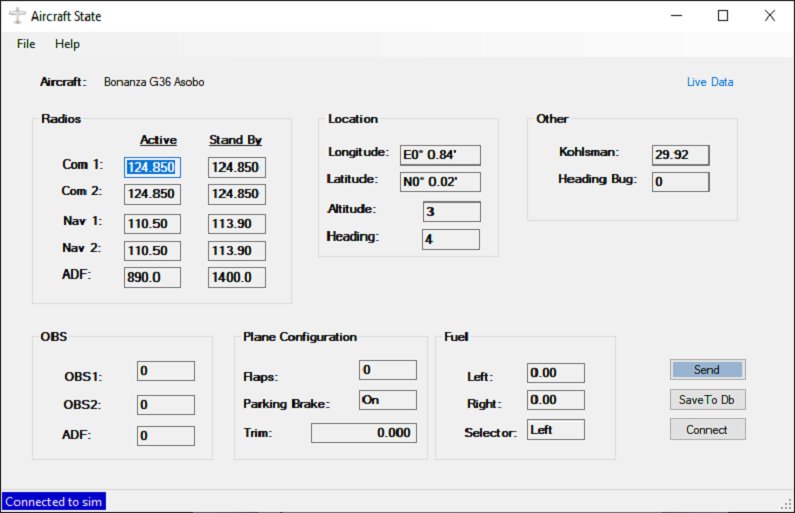
This application was created to save the state of an aircraft in MSFS 2020 in order for it to be restored for the next flight allowing the user to begin where they left off. It will capture and reset the following data:
- Com 1 and 2, Active and Standby frequencies
- Nav 1 and 2, Active and Standby frequencies
- Adf Active and Standby frequencies
- OBS 1 and 2 setting
- ADR Card Setting
- Fuel amount (gallons) in left and righ tanks
- Fuel Selector switch setting
- Trim Setting
- Aircraft Location (Lat/Long)
- Aircraft Alititude
- Aircraft Heading
- Kohlsman (Barometer) Setting
- Heading Bug Indicator
- Flaps configuration
- Parking Break On/Off
Additional optional settings:
- Master Battery
- Master Alternator
- Avionics Master
- Nav Lights
- Beacon Light
- Landing Light
- Taxi Light
- Strobe Light
- Panel Lights
- Cabin Lights
- Logo Lights
- Wing Lights
- Recognition Lights
The data will be saved for each plane as defined by the plane Title from the aircraft.cfg file.
To install just unzip to any desired folder. Run by clicking on AircraftState.exe
I wrote this application for my own use as I like to continue my flights from one place to another with different planes on different routes as well as to learn the SimConnect interface. If time permits or I move into more complex aircraft I may add more data, but I don't have a lot of free time and prefer to spend it flying rather than coding. Even in its current limited state, I have found it very useful and thought others might as well. The application has been tested with the Steam Version of the Cessna 172 and the plane Bonanza G36. It should work with any GA aircraft without issues. I do not fly airliners and no testing has been done in this area, but for the given data, it should work.
AircraftState
Save and restore your aircrafts state in Microsoft Flight Simulator 2020 with AircraftState. This application captures and resets various data such as frequencies, fuel amount, trim settings, and more, allowing you to continue your flights right where you left off. Compatible with GA aircraft, AircraftState is a handy tool for simmers looking to streamline their simulation experience.



User Reviews
11 reviews
Version History
Add new fields: Battery Volts Rudder Trim Aileron Trim
Log in to join the discussion
Log InComments(46)
4 months ago
3 months ago
about 1 year ago
over 1 year ago
over 1 year ago
over 1 year ago
The activated lights should remain on even if the battery is off, it would also be necessary to add the richness adjustment, trottle and the propeller.
over 1 year ago
over 1 year ago
over 1 year ago
over 2 years ago
over 2 years ago
Too bad, as it's exactly what i wanted.
about 3 years ago
about 3 years ago
almost 3 years ago
I have seen in some instances where you need to turn the radios on first, before sending.
over 2 years ago
about 3 years ago
Another parameter I should have loved : day and time of the day saved too. Don't know if it is possible
Last but not least : it seems not recommended to begin a flight anywhere before "send to sim", It seems that altitude is not saved so the difference make a crash of the plane at loading...
over 3 years ago
I think I need this but need a little more direction as to how to run the software and when, is this integrated in the game tool bar or run outside the sim? I have an issue after I save my flights and then reload them from the .FLT in game, the tool menu is never available and other things don't work. I'd love to save the plane state with fuel etc, like what looks like your program does, so Im very excited to give this a try.
Right now, Im landed in the water in my Kodiak 100 Float version, next to one of the Hawaiian islands. I just downloaded you program but have not installed it yet. Does it have an installer or do I just run it from anywhere? Do I put it in my community folder? Can I use it on my current last saved flight, or should I start new?
So I landed the plane, and powered down the engines and avionics. Is this when i run the Save to Sim? Do I also save the flight in MSFS? Then when I start playing again, what is the process? Do I load the MSFS save or Do I need to load into the world somewhere and then run Send to Sim? Sorry for all the questions. I couldn't get any detailed instructions from the Help file, sorry.
about 3 years ago
The program doesn't have an installer, and should be extracted to any folder wherever you want. I personally have an MSFS Tools folder (NOT in the community folder, outside of it, could be anywhere) where I have this extracted. You then run the EXE at any point. It should auto-connect to the sim, but you can always click Reconnect of it disconnects for any reason.
When you're done flying, you can then click Save to DB. This will save all of the state information including location to the database, for this specific aircraft. You can actually click Save to DB while in flight, or even turn auto save to db on in the settings if you want it to save automatically.
Next time you run the sim and want to pick back up, you'll load into the aircraft and click Send To Sim.