
Description
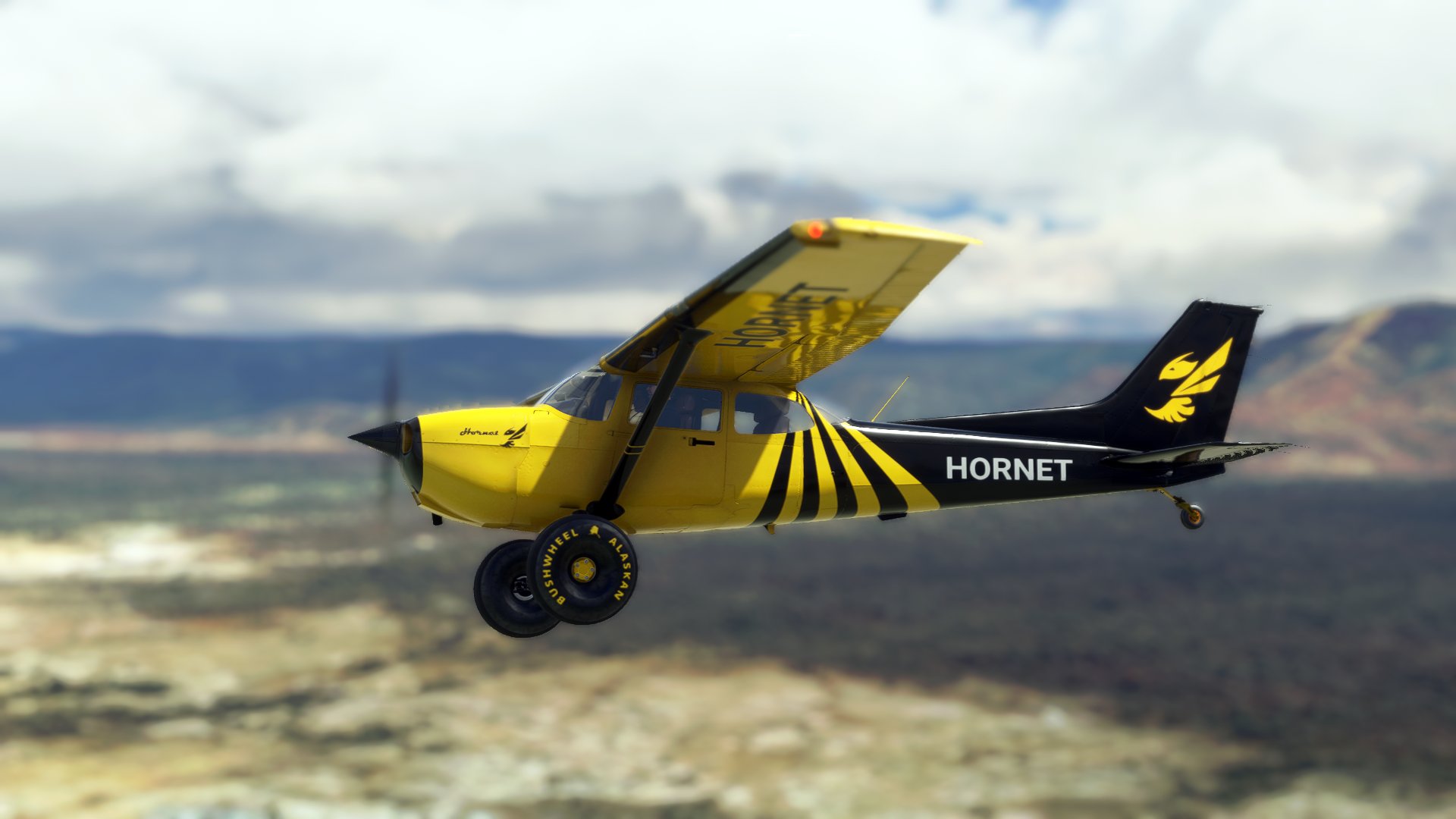
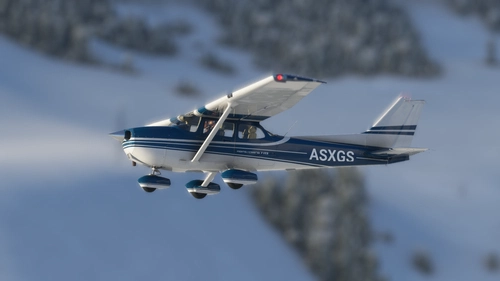
The Hornet Livery for the Asobo X-Cub we all know from the Sim Update 5 loading screen is now also available for the bagolu Cessna 172 Taildragger
This is a community folder ready livery for the Cessna 172 Taildrager by bagolu.
In order to run this livery you need to have the latest version of bagolus C172 Taildragger installed.
If you like or don't like my liveries, feel free to tell me so down bellow in the comments sections. I appreciate every rating and comment.
bagolu C172 Taildragger Hornet Livery
A community-made Hornet livery for the Cessna 172 Taildragger by bagolu. This livery, originally from the X-Cub, is now compatible with the C172 Taildragger model. Simply install the latest version of the C172 Taildragger by bagolu to enjoy this new livery in your flights. Share your feedback in the comments section to support the creator.


User Reviews
3 reviews
Version History
- Updated for newest update of the fantastic "Bagolu 172 Taildragger" https://flightsim.to/file/12978/cessna-172-tail-dragger - Removed G1000 version since this is no longer available in the base download - Removed default classic version since this is no more available in the base download
Related
Asobo Cessna 172 SWISS Flying Club HB-CQM (G1000)
Fly in style with the Asobo Cessna 172 SWISS Flying Club HB-CQM (G1000) livery, inspired by a real-world aircraft. View the stunning livery in action on YouTube and marvel at its accurate representation in Microsoft Flight Simulator.
by ANN0V
Asobo Cessna 172 Reims - 4 Colors (G1000)
Four vibrant color options for the Asobo Cessna 172 G1000, including green, blue, red, and brown. Choose to download all colors at once or individually to customize your flying experience in Microsoft Flight Simulator. Simply extract the files into your community folder and enjoy!
by ANN0V
Asobo Cessna 172 N12860 (Classic)
A new version of the Cessna Skayhawk 172 N12860 livery is available for download, featuring a beautifully crafted interior created by whiskytango208. This release includes two files - the regular livery with the default Cessna classic interior and the updated version with the new interior design. Both liveries can be downloaded separately for individual use. Credits to whiskytango208 for the stunning interior work.
by ANN0V
Asobo Cessna 172 Reims - 4 Colors (Classic)
Enhance your Cessna 172 experience with this add-on featuring 4 classic colors: green, blue, red, and brown. Simply download the main zip file to access all 4 liveries or choose to download each color separately. Extract the files into your community folder and enjoy your flights!
by ANN0V
Log in to join the discussion
Log InComments(19)
over 2 years ago
over 2 years ago
almost 5 years ago
I'm getting pink windows when zooming out far with the drone camera?
almost 5 years ago
hello
Thanks for the report. Unfortunately i can not reproduce this issue. I was just now zooming out untill i did not even see the plane anymore but no pink winows. on what model this happens? G1000 or Classic? are you sure you have the latest version of the base model installed?
almost 5 years ago
Sorry for the late reply. Try it at night. Its the G1000.
almost 5 years ago
G1000
almost 5 years ago
I ll check
almost 5 years ago
allright that helped. i see it now. but you have to zoom out very far. could not identify what part of the plane looses textures. I belive is the interior that gets the lovely pink texture.
I have to say there is nothing i can do about this. It also happens with the default textures. So this is a issue in the base model. Eventually even an issue that can only be solved by asobo.
I will have a chat with bagolu to see if he can find out something. I hope you agree with that it really is a minor issue.
Thanks a lot for the report. Hope we can do something about it.
almost 5 years ago
Yeah this all started after SU5 if im not mistaken. I wrote an article to fix some aircraft on msfs community forums. It goes about fallbacks in the texture.cfg folder and yes the mod's included liveries also suffer the same. Hope we all get this sorted.
almost 5 years ago
Nevermind I fixed it. Edit your texture.cfg file to this:
[fltsim]
fallback.1=..\..\bagolu-c172-taildragger-g1000\texture
fallback.2=..\..\..\..\texture\
fallback.3=..\..\..\..\texture\Gauges
fallback.4=..\..\..\..\texture\AS1000
fallback.5=..\..\..\..\texture\detailMap
fallback.6=..\..\..\..\texture\Glass
fallback.7=..\..\..\..\texture\Planes_Generic
fallback.8=..\..\Asobo_C172sp_AS1000\texture\
and then regenerate your layout.json file with MSFSLayoutGenerator.exe to update the .json
almost 5 years ago
interesting! i thought i had the planes generic fallback allready in there since SU5.
but i guess i was wrong. thanks mate. i'll update it soon.
almost 5 years ago
Good with up6 no problem
Bon avec up 6 pas de soucis
almost 5 years ago
Thank you for letting me know! ;)
almost 5 years ago
Small question, is the same livery for Bagotu C172 G 1000 Bush kit ( the 3 wheels) exist or it 'll never be done ?
almost 5 years ago
i dont think i will ever do it for the bush kit. But you can easy convert it your self. is not too hard.
about 5 years ago
My favorite Livery and awesome work as always. I use it on all the planes where it is available 😁👍🏻
about 5 years ago
greate! ;) Thanks for your comment. Glad you like it and thanks for the idea to also create it for the Husky
about 5 years ago
THX a lot i love it
about 5 years ago
Thank you Sir. Glad you like it 😉