
Flightsim.to
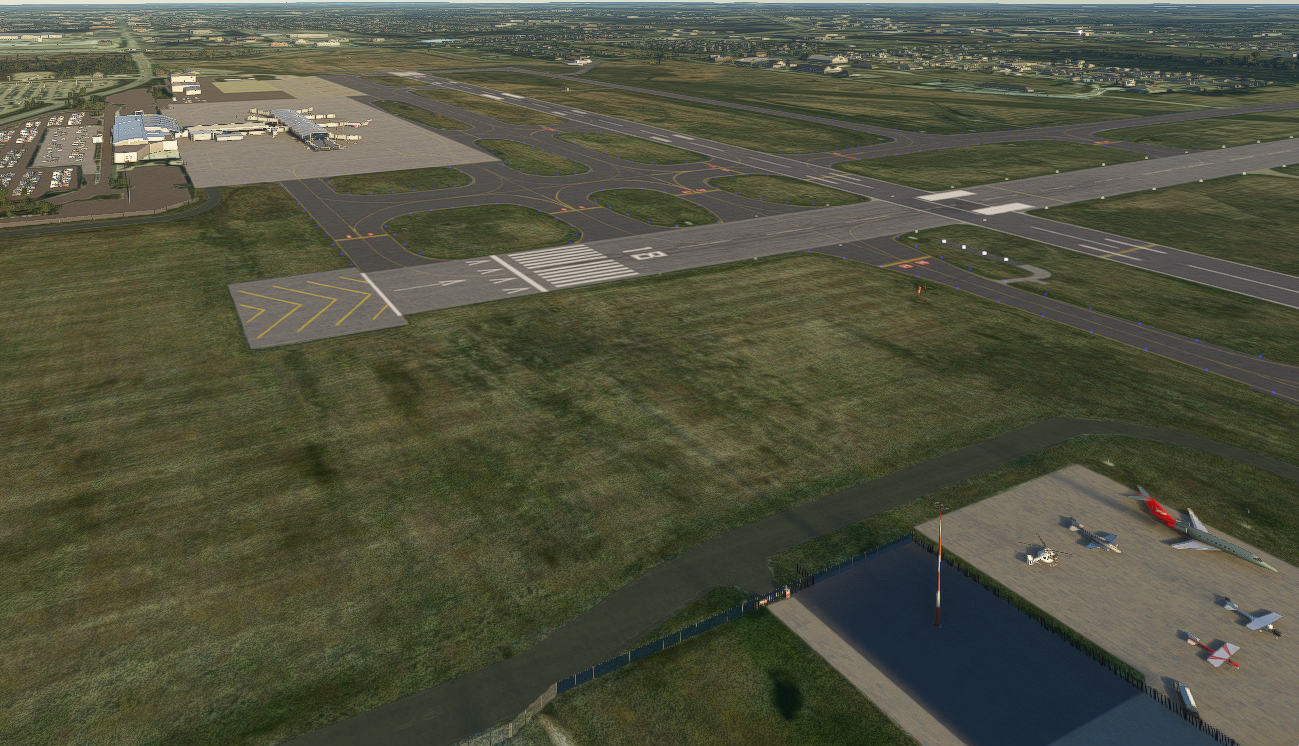
    Flint Bishop International Airport KFNT - Image 1

    Description

    Flint Bishop international airport.  A class-Charlie airport located in Flint Michigan.  The default airport was flat and even lacking autogen.

    Added/fixed all the taxiway signs, pulled all the taxi lights off the taxiways, aprons, runways.

    Updated runway lights to reflect what they are IRL

    Created areas - Golf Tees GA hangars, Gargo Ramp, North FBO, Terminal, Crosswinds, De-ice pad, Maintenance facility, VORTAC, list goes on..

    Comments(22)

    Log in to join the discussion

    Log In
    G

    over 2 years ago

    Main terminal doesn't show.. otherwise great.. but the terminal is the main thing so it's hard to give it any more than two stars. Was an asset from a handcrafted airport used for the main terminal??
    j

    over 2 years ago

    same here
    j

    over 2 years ago

    gates are still missing
    f

    about 4 years ago

    Needs an update for WU9, most buildings are missing.

    n

    over 2 years ago

    Seconded, but an update won't be happening. Maybe the stock scenery is better at this point.
    G

    about 4 years ago

    Wow! Can't thank you enough for this amazing re-creation of my hometown airport. We were all bummed I'm sure to see no terminal upon release of MSFS 2020 for KFNT. I'm just blown away at how good you made this look. Thanks a million!!!

    T

    over 4 years ago

    Hello, I have been using this nonstop since you made it but I've been noticing an issue at night where all the runway, taxi, and papi lights floating and it completely throws me off even though I'm used to it at this point. I don't know if this is something that can be fixed, just an issue I get when shoot approaches at night.

    1

    over 4 years ago

    Such a huge improvement over the default, much appreciated! Having been there several times, it's a really good modeling. My only one comment is that the jetway size to the height of the exterior walls in the gate area is off. It's a rather high ceiling, double or more than double that of the jetway height.

    J

    about 5 years ago

    Hey Ryan for some reason the runway spawn points seem to be putting me in the wrong runway. For example spawning on runway 27 puts me on 18 and spawning on 36 puts me on 9. Can you look into this? I got the wrong vectors from ATC today and that's how I figured it out after testing the different runway spawn points.


    Thanks,

    Jonathan

    d

    about 5 years ago

    my download is missing the terminal. The jetways are there just connected to nothing. Did something change since the last MS update? There are two files in my download. Deadbuilding.bgl and RE_FNT.bgl. Anyone know what the issue might be?
    r
    ryan67Author

    about 5 years ago

    Hi Dave, I just updated my secondary PC with the latest sim version, my terminal is showing. What you're describing sounds like the default airport is back. Did you get yours working?
    c

    about 5 years ago

    I can confirm I have no terminal as well. The rest of the airport looks great and is definitely updated! Just missing the terminal.
    d

    about 5 years ago

    I have not. I am wondering if something happened with one of the updates maybe?
    r
    ryan67Author

    about 5 years ago

    easiest thing to do would be to remove, load in, and then re-install and load back in..
    f

    about 5 years ago

    You're selling yourself short with the screenshots. The terminal is pretty convincing and looks good day and night even if it only used objects from the game. It's so much better than default buildings and I'd be happy to see more internationals get this treatment if they're not significant enough to get the payware treatment.
    G

    about 5 years ago

    THANK YOU...THANK YOU, and THANK YOU!

    I had a ticket in for KFNT since release...nothing but crickets! This is a (well, was pre C19) a very busy airport with important direct flights to two destinations in Florida!
    Post Edit... "You NAILED it! That is as real Flint Bishop, that I can imagine!. It was fantastic coming in over I-75 as I have flown so many times...Bravo!
    T

    about 5 years ago

    I KNOW!!! All we need now is custom libraries for it to make it payware quality... IF IT CAN GET ANY BETTER!! Thank you ryan67 for this!
    T

    about 5 years ago

    YESS THANK YOU!! KFNT is my home airport and it was sad to see literally nothing there. Thank you for this, It will get used a lot and I'll make sure to 5 star when I can!
    P

    about 5 years ago

    Such a great improvement over the default, much appreciated! The only thing that caught my eye was the control tower is missing the window textures, there is a void of nothingness haha. Just the base of the tower and then a floating roof. Other than that it looks great and I will use it often!
    -Andrew from A2
    r
    ryan67Author

    about 5 years ago

    I have only used asobo's default objects, but as soon as I pick up some libraries that contain towers I can use then I will get it fixed.. if you know of any please let me know!
    MSFS 2020MSFS 2024

    Flint Bishop International Airport KFNT

    Discover an enhanced version of Flint Bishop International Airport (KFNT), a class-Charlie airport in Flint, Michigan. This add-on addresses the lack of detail in the default airport by adding and fixing taxiway signs, updating runway lights, and creating various new areas such as GA hangars, FBOs, and maintenance facilities.

    Downloads2K
    Version1.0.1
    File Size48.25 KB
    Published5 years ago
    Updated5 years ago

    User Reviews

    4.4

    6 reviews

    5
    67%
    4
    0%
    3
    0%
    2
    17%
    1
    0%

    More Information

    Simulator
    MSFS2020
    CategoryAirports
    Sub-CategoryIntl. Airports
    ICAOKFNT

    Version History

    fixed papi angle on 9