
Description
🧭 FR24 → SimBrief · Version: 4.3 · Developer: aguyfromZRH and Claude
✈️ Description
FR24 to SimBrief is a desktop tool for flight simulator pilots. Paste a FlightRadar24 flight link or type an ICAO callsign — the app fetches all real-world data and opens SimBrief with everything pre-filled. One click. Done.
🆕 New in v4.3
- 🛬 Arrivals board — new sidebar entry below the departures board: the next arrivals of any airport with origin, aircraft, arrival gate and status (landed, delayed …). Origin filter, top origins and the dice work just like on the departures board.
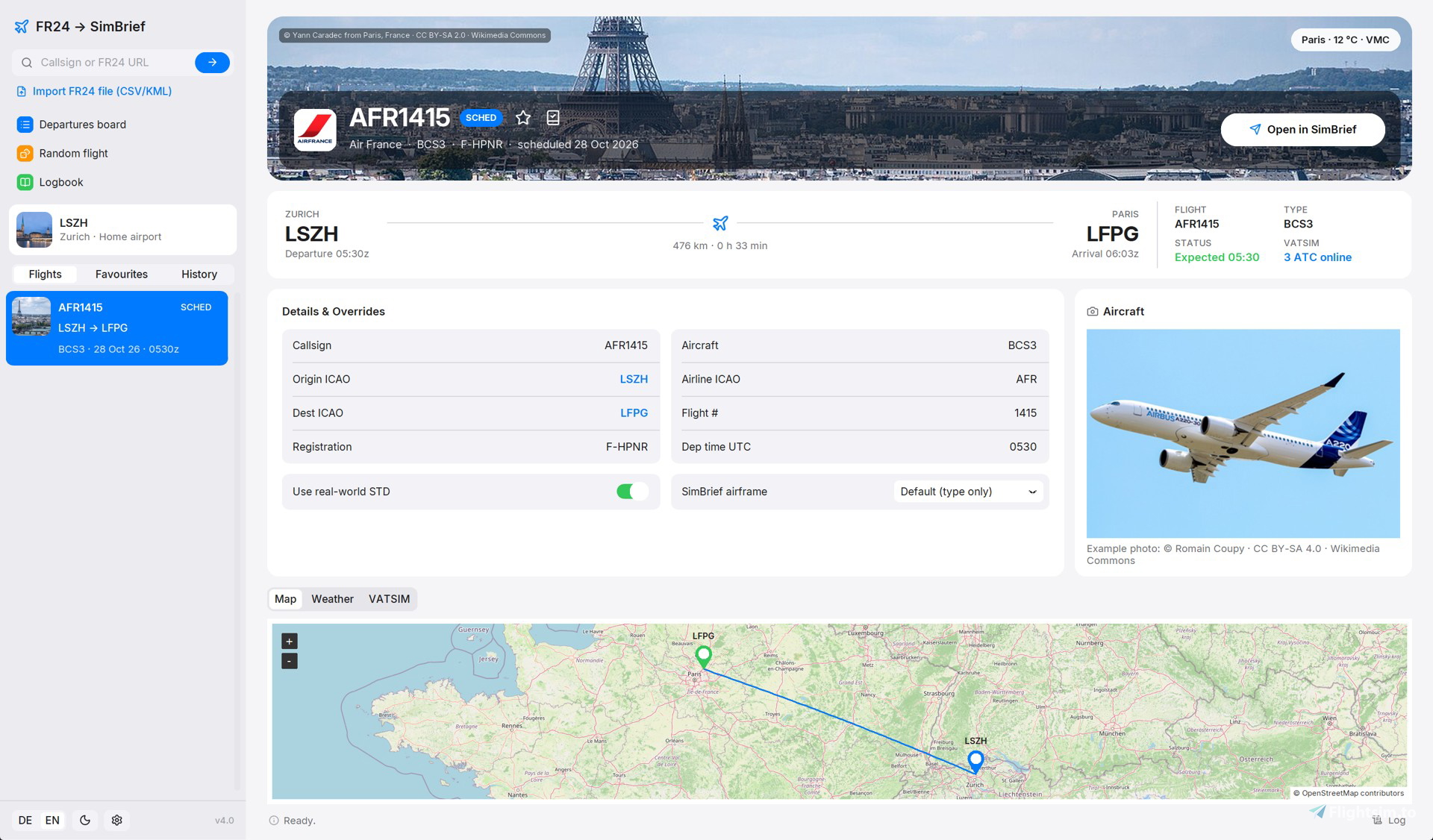
- 🚪 Gates — the boarding pass shows terminal and gate at departure and arrival (for flown, live and soon departing flights).
- 🔤 ICAO sorting — the destination / origin filter list is now sorted by ICAO code.
📆 New in v4.2
- 📆 Other days — lists the same flight number from 3 days ago to 3 days ahead and opens the latest flown one with all its details — also from the departures board.
- 🛬 Aircraft from last flight — a scheduled flight without registration gets registration and aircraft type of the latest flown flight with the same flight number.
📅 New in v4.1
- 📅 ±3 days — search a flight and get every flight of that flight number from 3 days ago to 3 days ahead — flown, in the air and scheduled. Today’s flight is selected automatically.
- 🔢 Flight numbers — type the flight number from your ticket (LX8, LH400) or the callsign (SWR8T) — both work now.
- 🧭 Destination & airline filters — on the departures board, next to the aircraft type filter: tick destinations and airlines, with search and flight counts. The filters work together and the random flight uses them too.
- 🔧 Fixed — the search only found flights in the air, because FlightRadar24 changed its flight list.
🎨 New in v4.0 — “Terminal Lounge” design
- 🏙 Destination photo — the city you are flying to, large on top of the flight — with callsign, airline, weather and the “Open in SimBrief” button right on the photo.
- 🎫 Boarding pass — route with city names, times (UTC) and gate, distance and flight time, plus flight number, type, status (e.g. delayed) and VATSIM ATC at a glance.
- 🛫 Departures board — the next departures of any airport, like the board in the terminal: destination photos, airline logos, gate and coloured status. Click a flight to load it.
- ✈️ Aircraft type filter — show only the aircraft you fly — type ICAO codes (A320, B78*), click the type chips or tick them in the “Select types” list.
- 🎲 Random flight — can’t decide where to fly? Roll a real departure from your home airport in the next three hours that matches your type filter.
- 📖 Logbook — log flights as flown and collect your destinations as photo “stamps”, with flights, kilometres, block time, top airlines — by month, year or all time.
- 🛠 SimBrief airframes — save your SimBrief airframes once (Internal ID) — the matching one is used automatically, with your weights and fuel factor.
- 🔔 Update hint — the app tells you when a new version is on flightsim.to (once a day, can be switched off).
- 🖱 Drag & drop — drag FR24 CSV / KML exports into the window to import them.
- 🪟 Window — opens centred instead of full screen and remembers its size and position.
✨ Also included since v3.0
- 📂 FR24 CSV / KML import — load flights you exported from FlightRadar24, with the flown track on the map.
- ⭐ Favourites & history — keep flights and find your recent searches again with one click.
- 📡 VATSIM — online ATC with frequencies and ATIS, VATSIM traffic on your route and a callsign check.
- 📸 Aircraft photos — a real photo of the exact aircraft by registration (planespotters.net, photographer credited).
- 🌍 German / English — switch the whole app instantly. Light and dark mode.
💻 Features
- Live, flown and scheduled flights (±3 days) by callsign or flight number
- Departures board for any airport with aircraft type, destination and airline filters
- Random flight from your home airport
- Destination photos, boarding pass and interactive map
- Logbook with statistics
- Import FR24 CSV / KML exports
- SimBrief airframes
- Live VATSIM ATC, traffic and callsign check
- METAR & TAF weather, colour-coded VMC / MVFR / IFR / LIFR
- 993 airline logos included in the installer
- Every value editable before sending to SimBrief
- German & English · Light & Dark mode
- No Python, no dependencies, no admin rights
⚙️ Installation Run FR24toSimBrief_v4.2.1_Setup.msi · choose a folder · click Install · done. Older versions are replaced automatically. The ZIP also contains the user manual (PDF) and a readme.
🧠 Usage Enter a callsign (SWR8T) or flight number (LX8), paste a FR24 URL or open the departures board → select the flight → check the details → Open in SimBrief.
💡 Search by ICAO callsign (SWR8T) or flight number (LX8) — or paste a FR24 URL.
💬 Credits Developer: Ralf (aguyfromZRH) · Code: Claude (Anthropic) · Thanks: Daveblackuk 🙏 Logos: sexym0nk3y/airline-logos · Maps: © OpenStreetMap contributors · Weather: aviationweather.gov · Aircraft photos: © their photographers via planespotters.net · City photos: Wikimedia Commons (photographer shown on each photo) · Places: Wikidata · ATC data: VATSIM · Typeface: Inter (SIL OFL) · Icons: Lucide (ISC)
📺 twitch.tv/aguyfromZRH
FR24 to SimBrief
Turn any real-world flight into a ready-to-go SimBrief flight plan. Type a callsign or flight number, paste a FlightRadar24 link or pick a flight from the departures board of any airport — the app fills in airline, aircraft, registration, route and departure time and opens SimBrief. Flights from 3 days ago to 3 days ahead, destination photos and a boarding pass, a departures board with type, destination and airline filters, random flights, a logbook and SimBrief airframes. No Python, no setup — install and fly.


User Reviews
6 reviews
Version History
v4.3 - thanks for the ideas on flightsim.to! - NEW: Arrivals board - new sidebar entry below the departures board. Shows the next arrivals of any airport with origin, aircraft, arrival gate and status (landed, delayed...). Origin filter, top origins and the dice work like on the departures board; each board keeps its own airport and filters. - NEW: Gates - the boarding pass shows terminal and gate at departure and arrival (when FR24 knows them: flown, live and soon departing flights). - Destination / origin filter list is now sorted by ICAO code.
Log in to join the discussion
Log InComments(35)
1 day ago
Would be nice if you added an option to get into a historical flight with the same flight number from a flight chosen (so if you choose a scheduled flight with missing data you could get the same flight with all details from a historical one)
1 day ago
Above "Details & Overrides" there are now two buttons:
• Other days — lists the same flight number from 3 days ago to 3 days ahead and opens the latest flown one with all its details (works from the departures board too).
• Aircraft from last flight — fills a scheduled flight's missing registration and aircraft type from the latest flown flight with the same flight number. Date and time of your scheduled flight stay as they are.
Since v4.1 a search also lists all flights from 3 days ago to 3 days ahead, so you can click straight into a flown one there as well.
Happy flying! ✈️
about 16 hours ago
I'd also love to see the depature and arrival gates in the flight details screen
and an option for arrivals to the home airport
about 5 hours ago
• Gates: the boarding pass in the flight details now shows terminal and gate for departure and arrival, e.g. "Departure 03:15z · T1 · Gate 37" / "Arrival 14:32z · T2 · Gate E34". FR24 only knows gates for flights that have flown, are in the air or are about to leave, so flights far in the future don't have them yet.
• Arrivals: there's a new "Arrivals board" in the sidebar, right below the departures board. It works for any airport, not just your home airport, and shows origin, aircraft, arrival gate and status. Filters and the random flight dice work there too, so you can roll a real flight into your home airport.
Keep the ideas coming! ✈️
18 days ago
Pretty impressive project.
18 days ago
Yes — indirectly. FR24 to SimBrief fills in and opens SimBrief for you. Once you generate your OFP there, FSHud picks up the flight plan from SimBrief as usual (via its SimBrief import). So the workflow is: select your FR24 flight in the app → generate the OFP in SimBrief → load it in FSHud. There’s no direct FSHud integration, but none is needed since everything runs through SimBrief.
Happy flying!
about 1 month ago
3 months ago
2 months ago
4 months ago
4 months ago
thank you
6 months ago
6 months ago
6 months ago
edit:
the mistake was on my site. uploaded new file
6 months ago
10 months ago
ev. gibts da ja in Zukunft eine möglichkeit.
GUI ist eigentlich gut, bisschen Farbe wäre noch eine Idee für zukünftige Releases...
Super Idee!
3 days ago
Mit v3.1 kannst du CSV- und KML-Dateien von FR24 importieren. Klick links in der Seitenleiste auf «Import» und wähle eine oder mehrere Dateien aus. Die App erkennt Abflug- und Zielflughafen selbst und zeichnet die geflogene Strecke auf die Karte. Danach kannst du den Flug wie gewohnt an SimBrief schicken.
Auch dein Wunsch nach mehr Farbe ist erfüllt: Seit v3.0 hat die App ein neues Design.
Falls eine deiner alten Dateien nicht sauber eingelesen wird, schreib mir gerne hier. Dann schaue ich mir das an.
Danke für die Idee und viel Spass beim Nachfliegen! ✈️