
Description
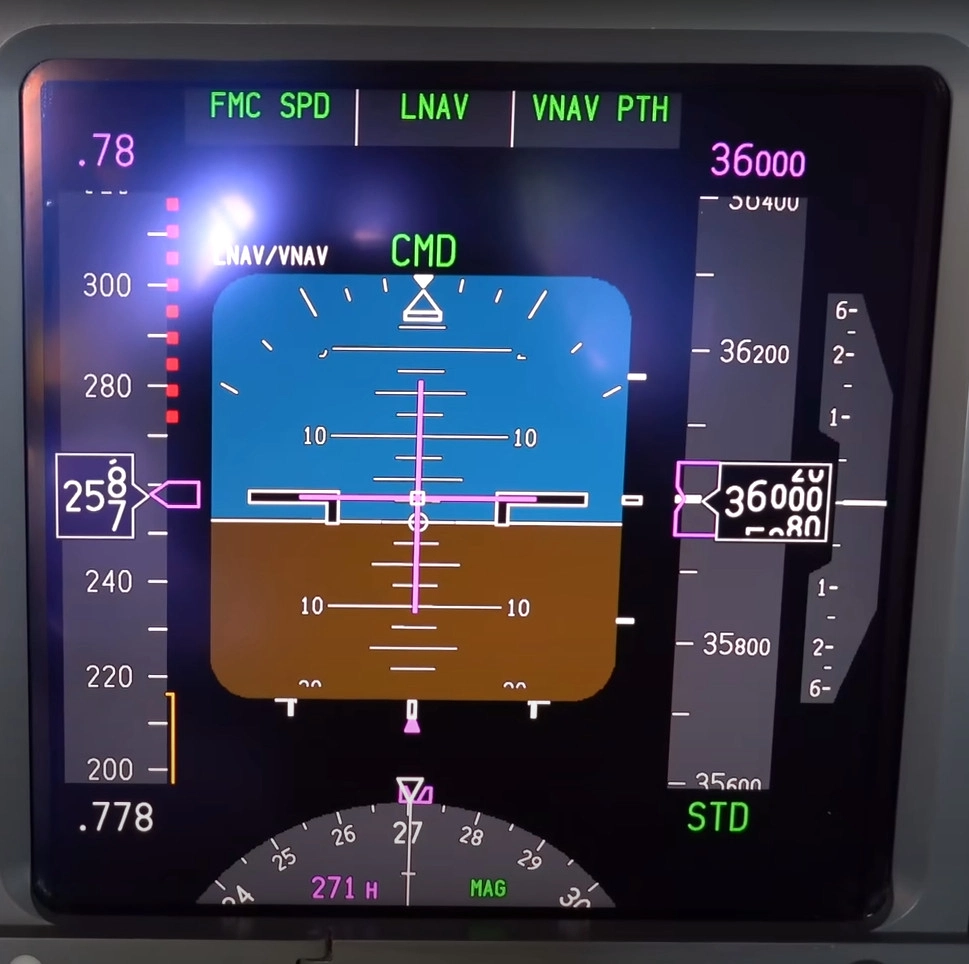
Realistic PFD Colors For The PMDG 737 Series
If there is anything I need to change, please let me know in the comments.
If you use Reshade, PDF colors may change slightly.
The Installation Guide is in the ZIP file.
MSFS 2020MSFS 2024
PMDG 737 Realistic PFD Colors
This add-on provides realistic PFD (Primary Flight Display) colors specifically for the PMDG 737 series in Microsoft Flight Simulator. Included is an installation guide to assist users in implementing the changes. Feedback is encouraged through comments for further improvements.
Downloads1K
Version1.0
File Size3.07 MB
Published1 year ago
Updated8 months ago

Version History
The colors changed slightly.
Log in to join the discussion
Log InComments(4)
about 1 year ago
about 1 year ago
about 1 year ago
😉
I've asked ChatGPT but the nonsense came back with an answer that the colours are imbedded in the panel files and you will not see any change... and I know this is wrong.
about 1 year ago