
Description
OVERVIEW
========
These training flights are based on the flying exercises, from Jeff Van West book:
"Microsoft Flight Simulator X for Pilots - Real World Training, Wiley" .
MSFS-RWT Multilingual Real World Flight Training covers:
---------------------------------------------
- Sport Pilot License: Chapter 2 thru Chapter 9 (23 missions).
- Private Pilot License: Chapter 10 thru Chapter 14 (9 missions).
- Instrument Rating: Chapter 15 thru Chapter 20 (43 missions).
- Commercial Pilot License: Chapter 21 thru Chapter 29, plus the two Bonus Chapters (29 missions).
MSFS-RWT Training Documentation:
-------------------------------
- Quick intro to the mission describing what the exercise or mission is.
- Reference to the Kindle book location for each mission.
- Mission's Browser window: Access pictures and charts pertinent to the mission.
- Flight Performance profiles are available for all proposed aircrafts.
- Flight Plan Map, showing Approach pattern.
- NavLog Summary table where appropriate.
- Flight Book with Navigation data.
- Scenario's Browser window: Display detailed step by step scenarios for the mission.
- Mission's Flight Log window:
- Link to the FlightLog Application documentation.
- Link to the E6BX Online ToolBox Site.
- Link to MSFS2024 Flight Planning and Charts Site.
- The documentation is common to both the MSFS2020 and MSFS2024 version.
MSFS-RWT Packages Files:
-----------------------
- Ready to be copied to the Community Folder.
- Navlog is populated with a detailed step by step scenario for the mission (Not yet supported by MSFS2024).
- All Navlog Scenarios are multilingual.
- Flight Training Run are are regrouped into two SubGroups:
- Using the default aircraft.
- Using the aircraft from the book or an alternate aircraft.
- Custom Reward Screen displayed at completion (Not yet supported by MSFS2024).
- Flight plan is provided and loaded.
- Departure (Airport or Airborne) and Destination are set.
- Weather conditions are set.
- Date and Time are set.
- Fuel and Payload are set.
- Aircraft failures are simulated when appropriate for the exercise.
- Waypoint and airport pictures are available with the Navlog.
MSFS-RWT FlightLog Application
--------------------------------------------
Now replaced by: https://flightsim.to/file/100693/rwt-flightlog-monitoring-tool#google_vignette
- Automatically get and Monitor Flight Run information from MSFS.
- All MSFS Flight Activity can be monitored and added to the FlightLog Database.
- Comments and Self Evaluation can be added to the Flight Run Log.
- Multi Gamers support.
- Flight Run Log Admin.
- New Flight Run can be added manually to the Flight Log.
- Existing Flight Run can be updated or deleted.
- Export/Import of the Flight Run Table.
- Backup/Restore of the FlightLog Database.
- Flight Run Report
- Average Flight Time for a Flight Number (RWT000,...).
- Total Flight Time for a Flight Number (RWT000,...).
For Flying Lessons Among Others:
-------------------------------
- Microsoft Flight Simulator X for Pilots - Real World Training, by Jeff Van West, a Wiley Book.
- Airplane Flying Handbook (FAA-H-8083-3C).
- Pilot's Handbook of Aeronautical Knowledge (FAA-H-8083-25B).
- Instrument Procedures Handbook (FAA-H-8083-16B).
I would like to thank Jeff Van West, one of the author of the book, and Wiley for their permission to repackage
and freely distribute the material, still available for download from their book web site.
FS-RWT Discord Server: MSFS-RWT Support (Email me to get access).
Copyright 2022,2023,2024,2025 by Gilbert Laprise (FsxRwt) - fsx.rwt@gmail.com
--------------------------------------------------------------------------------------------------------------------------------------
INSTALLATION AND SUPPORT
========================
MSFS-RWT-2024 Distribution
---------------------
- MSFS-RWT-2024_ChangeLog_ReadMe_v5-1-1.zip: Change Log and ReadMe files.
- MSFS-RWT-2024_Change-Log.txt: Provide a cumulative log in the changes to this package.
- MSFS-RWT-2024_Copyright.txt: Copyright license.
- ReadMe.txt: Provide installation instruction and an overview of the package.
- MSFS-RWT-S0_Main-and-Doc_v5-1-1.zip:
- MSFS-RWT_Doc folder: contains all the documentation. Must be installed.
- MSFS-RWT-2024_S1-Sport-Pilot_v5-1-1.zip: Sport Pilot Training Missions.
- MSFS-RWT-2024_S2-Private-Pilot_v5-1-1.zip: Private Pilot Training Missions.
- MSFS-RWT-2024_S3-Instrument-Rating_v5-1-1.zip: Instrument Rating Training Missions.
- MSFS-RWT-2024_S4-Commercial-License_v5-1-1.zip: Commercial License Training Missions.
- MSFS-RWT_Flight-Log_Appl_v5-0-0.zip: FlightLog Installation.
Now replaced by: https://flightsim.to/file/100693/rwt-flightlog-monitoring-tool#google_vignette
- MSFS-RWT_FlightLog-Application folder: contains FlightLog Installation file.
- MSFS-RWT_FlightLog-DB-Update folder: contains FlightLog Database Tables Update files.
- This distribution completely replace all previously installed base and upgrade.
- You have the option to download and install only one, or up to four Training Sessions: S1, S2, S3, and/or S4.
- The Flight Log Application is also optional and has not changed from v5-0-0.
MSFS-RWT-2024 Installation
---------------------
1. Unzip MSFS-RWT-2024_ChangeLog_ReadMe_v5-1-1.zip (Main):
- MSFS-RWT-2024_Changes-Log.txt file: detailed description of the changes with each release.
- MSFS-RWT-2024_Copyright.txt: Copyright license.
- ReadMe.txt file: installation instruction and package overview
2. Unzip MSFS-RWT_S0-Main-and-Doc_v5-1-1.zip. into a directory (folder) other than the Community folder:
- The MSFS-RWT_Doc folder, and its sub-folder, contains all the documentation.
- Open file: "...\MSFS-RWT_S0-Main-and-Doc_v5-1-1\MSFS-RWT_Doc\MSFS-RWT_Read-Me.htm".
- A table, under the Missions Tab, provides access to the documentation for each Mission.
3. Unzip MSFS-RWT-2024_S1-Sport-Pilot_v5-1-1.zip into a directory (folder) other than the Community folder.
- Removed the previous Sport Pilot Missions from your MSFS Community folder.
- copy the CONTENT of "...\MSFS-RWT-2024_S1-Sport-Pilot_v5-1-1\" into your MSFS Community Folder.
4. Unzip MSFS-RWT-2024_S2-Private-Pilot_v5-1-1.zip into a directory (folder) other than the Community folder.
- Removed the previous Private Pilot Missions from your MSFS Community folder.
- copy the CONTENT of "...\MSFS-RWT-2024_S2-Private-Pilot_v5-1-1\" into your MSFS Community Folder.
5. Unzip MSFS-RWT-2024_S3-Instrument-Rating_v5-1-1.zip into a directory (folder) other than the Community folder.
- Removed the previous Instrument-Rating Missions from your MSFS Community folder.
- copy the CONTENT of "...\MSFS-RWT-2024_S3-Instrument-Rating_v5-1-1\" into your MSFS Community Folder.
6. Unzip MSFS-RWT-2024_S4-Commercial-License_v5-1-1.zip into a directory (folder) other than the Community folder.
- Removed the previous Commercial License Missions from your MSFS Community folder.
- copy the CONTENT of "...\MSFS-RWT-2024_S4-Commercial-License_v5-1-1\" into your MSFS Community Folder.
7. Unzip MSFS-RWT_Flight-Log_Appl_v5-0-0.zip into a directory (folder) other than the Community folder.
Note: If you have already installed v5-0-0, there is no need to reinstall. The application is the same in this distribution,
Now replaced by: https://flightsim.to/file/100693/rwt-flightlog-monitoring-tool#google_vignette
1. EXISTING USERS: Backup your FlightLog Database or Export your FlightLog Data,
before installing the FlightLog application.
2. NEW USERS: Execute the " ...\MSFS-RWT_FlightLog-Appl\FlightLogInstall.exe".
3. ALL USERS: Start " ...\FlightLog.exe" The FlightLog Application.
4. NEW USERS: Login using MSFS as the GamerTag.
5. NEW USERS: Fill out your GamerTag and Gamer information.
6. NEW USERS: Push the Add button.
7. ALL USERS: Login using your GamerTag ID.
8. ALL USERS: Push the Log Maint Button.
9. ALL USERS: Push the Import Log Button.
10. ALL USERS: Select successively: "Flight-Run_v5-0-0.csv", "Mission_v5-0-0.csv", and "Aircraft_v5-0-0.csv".
from " ...\MSFS-RWT_FlightLog-DB-Update.
Note: The FlightLog Database Tables update is necessary to support the new Flight Number prefix
for MFSF-RWT Missions, and MSFS Activities.
========================================================================================================================
MSFS-RWT - Flying the Missions
------------------------------
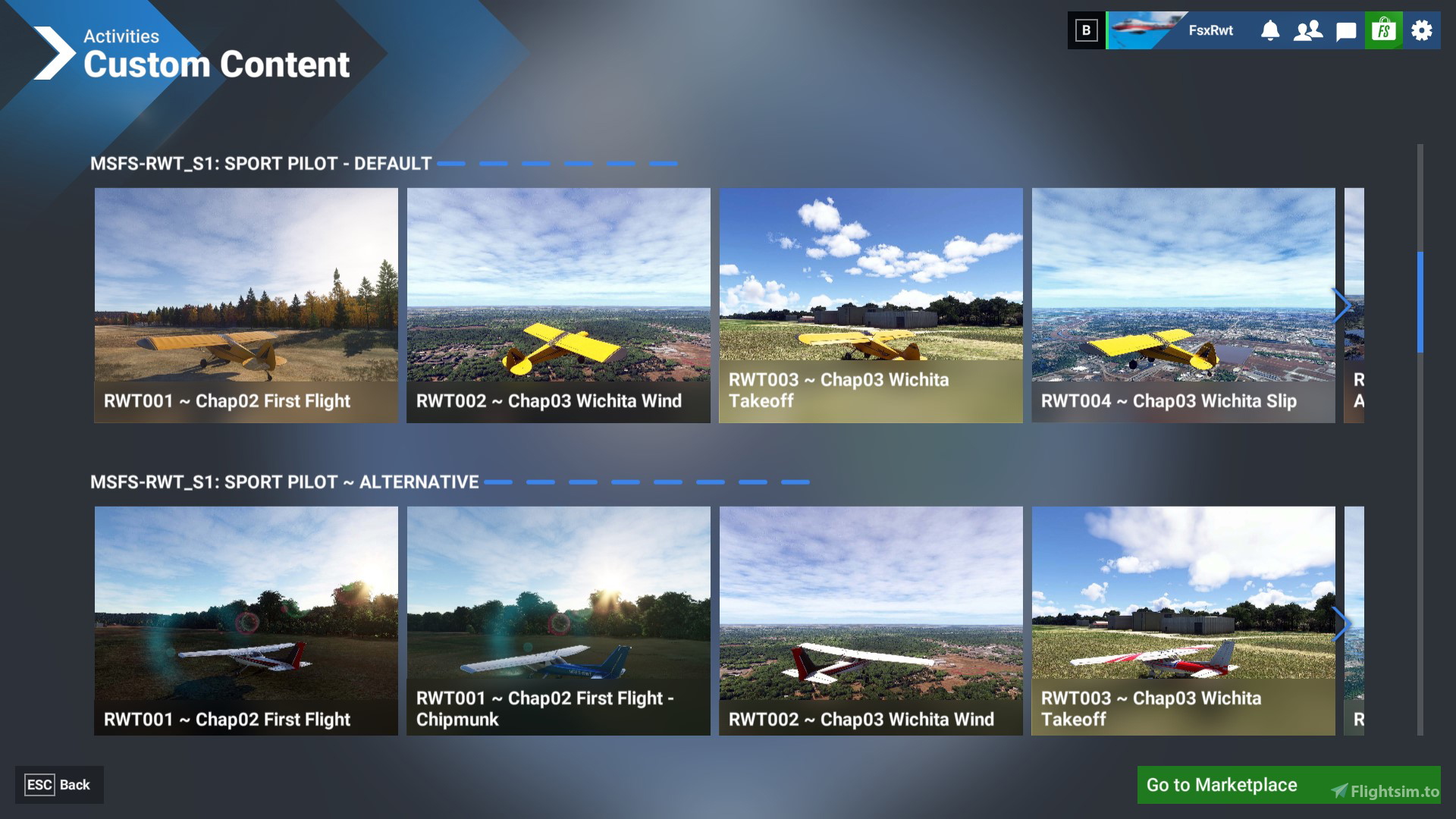
1. MSFS2024 Restrictions: Read the Flying Tips section at the end of the Reference Tab page.
2. Start MSFS.
3. Select "ACTIVITIES".
4. Select "CUSTOM CONTENT".
5. Browse to MSFS-RWT_Sn: session name" - "Default or Book's Aircraft" Group that you want.
6. Select the flight "RWTnnn..." that you want to fly.
7. Select "FLY".
8. Select "READY TO FLY".
9. For Airborne Mission get ready to hit Pause (orient yourself and adjust your flight controls).
MSFS-RWT - Monitoring your Flight Run
-----------------------------------------------
1. Start the FlightLog Application.
2. Login using your MSFS GamerTag.
3. Push the MSFSConnect button twice to connect to MSFS.
4. Push the Start Flying button to start Monitoring your flight Run.
5. Push the Stop Flying button to stop Monitoring your flight Run.
6. Push the Disconnect button to disconnect from MSFS.
7. Update the Self-Evaluation Scores and Comment.
8. Push the Save Flight button to Log your Flight Run into the FlightLog database.
9. Or,Push the Drop Flight button if you don't want to Log your Flight Run.
10. Repeat the above sequence for the next flight run after loading it.
MSFS-RWT - Mission Documentation
-----------------------------------------------
- The Navlog should open automatically. If not already visible, open it.
- Detailed step by step scenario of the mission is presented in the NavLog.
- Flight Book with Navigation data is available in the documentation.
- Scenario flight performance data is for the base aircraft of the Mission. If you fly another aircraft,
make sure that you use their performance profile, available with the documentation.
- MSFS-RWT Documentation Mission's Browser display the Charts and Maps required for the Mission.
MSFS-RWT Support and User,s Feedback
------------------------------------
- "FS-RWT Mess" Discord Server (send me an Email to get an invitation).
- Email: fsx.rwt@gmail.com.
=====================================================================================
Frequently Asked Questions
MSFS-RWT-2024 : Multilingual Real World Training Missions
MSFS-RWT-2024 offers a comprehensive range of multilingual training missions designed for Microsoft Flight Simulator, adapted from Jeff Van Wests book on real-world pilot training. The add-on includes exercises for multiple pilot licenses—Sport, Private, Instrument, and Commercial—encompassing a total of 104 missions. It features detailed documentation, including flight plans, performance profiles, and interactive tools for mission management. This utility enhances the flight training experience for both new and experienced pilots.


User Reviews
1 reviews
Version History
Documentation update for v6.0.0
Related
MSFS-RWT-2020 : Multilingual Real World Training Missions
Multilingual Real World Training Missions based on flying exercises from Jeff Van Wests book, providing missions for Sport, Private, Instrument, and Commercial Pilot Licenses. Included documentation, flight profiles, mission scenarios, and more, with support for multiple aircraft. Additionally, a FlightLog Application tracks and monitors flight activities. Fly missions, monitor flight runs, and access detailed mission documentation. Contact for support and user feedback.
by FsxRwt (Gilbert Laprise)

TdF-2025: Tour de France 2025 (FsxRwt)
Experience the Tour de France 2025 through a series of flight missions that cover all 21 stages of the iconic cycling event. This add-on allows users to explore the French landscapes while flying selected aircraft, complete with live weather and guided navigation. Additional features include comprehensive documentation, flight plans, and support for MSFS2020 and MSFS2024. Enjoy a unique perspective on the Tour as you follow the bike route for each stage and complete bonus IFR missions.
by fsx_rwt

TdF-2024 : Tour de France 2024 (FsxRwt)
Experience the thrill of flying over the course of the Tour de France 2024 with this add-on, covering all 21 stages with live weather and detailed navigation logs. Choose from three different aircraft for each stage and immerse yourself in the world of this iconic cycling event. Future upgrades are planned to enhance your virtual Tour de France experience.
by fsx_rwt

Tour de France 2023 (FsxRwt)
Each bushtrip represent a leg or a day in the Tour de France, so you might want to follow the sequence. For each Leg or day, you have the choice of flying either the Cessna 175 G1000 or the Cabri G2. To fly another aircraft you will have to load it under the developer mode.
by fsx_rwt
Log in to join the discussion
Log InComments(34)
about 1 month ago
5 days ago
Yes this is how it works. It is a free learning environment with self evaluation. If I find an easy way to provide interaction as an option, I might consider doing it for the first few Sport Pilot Missions.
It is easy to do for a Bushtrip, since the logic is very linear and you don't really need feedback from the flightsim Pilot. However like any learning, learning to fly is a very iterative process, where people have different aptitudes and expectations. Some Pilot just want to pass thru all exercises and land even if they did badly on some of the exercises. while others will want to repeat a particular exercise until they feel expert and ship the rest. To provide just in time instruction and feedback aong with user interaction in a very iterative environment requires a lot of logic and is very difficult to keep the free learning environment. So consider it under evaluation for the moment.
In the mean time you get a free learning environment with self evaluation. You can repeat these exercises dozen of times, without having this guy repeating the same instructions everytime, even though you know them already. If you forgot a step you have the Navlog to remind you. You also have all the reference charts necessary.
It is not because you have been able to land the aircraft once that you are ready for the next step. Maybe you are a perfectionist and want to practice until you get a perfectly smooth landing. You are the judge of your performance.
Or you just want to practice step4 without having to repeat all previous step. For example I comeback often to the first Mission, RWT001, when I switch to a new aircraft, to build the FLight Performance profile, and become comfortable in the new aircraft. Some flight simmer use the Instrument Rating mission as a refresher before a schedule IFR flight.
The most important thing to improve is to develop muscle memory, so that you take action without consciensously think about it. This come only with numerous repetitions. After a few years of driving a car you don`t think all the time about looking in the rear mirror, or how much pressure to put on the break, etc you just do it instinctively and that came with repetition.
The whole idea is to provide a training enviroment without any constraint, as much as possible, but with all the information easily available if needed. Your Flight Instructor is the referenced book, I provide the training environment and step by instep instructions based on the book. And it is free.
I hope you find it useful, have a good flight.
about 2 months ago
2 months ago
6 months ago
6 months ago
8 months ago
8 months ago
Thanks for the feedback, it is much appreciated.
Gilbert
8 months ago
OK, so where is the scenarios tab? Is it in the NAV Log?
8 months ago
MSFS-RWT_S0-Main-and-Doc_v5-1-1.zip
Once unzipped,
1) open the "MSFS-RWT_Read-Me.htm" in the "MSFS-RWT_Doc" folder.
2) click on the Mission Tab
3) Select your Mission
4) Push on the Scenario Browser Button
You will then see the scenario for this mission. Same info than in the MSFS2020 Navlog.
However if you have access to MSFS2020 I would recommend to use it instead of MSFS2024. Less chance of having problems with Bushtrip
8 months ago
Steve Gilmore
8 months ago
So how do you get the lessons to appear on the screen when you are flying?
8 months ago
So for MSFS2024 you have to use the documentation. Under the scenarios tab you will get the same step by step info that you get in the MSFS2020 Navlog.
Hopefully when Miscosoft/Asobo enable Custom Bushtrip, they will also enable Custom Navlog. Currently it is not possible to modify the Navlog.
Don't hesitate to send me an email if you have more questions.
Have a good flight,
Gilbert
8 months ago
So I can not import the files that I need to.
Can anyone please help.
I have used AI to get answers, but nothing helps.
Everything works in MSFS 2020 but not in MSFS 2024.
8 months ago
First I need a few answers before I can help you:
1) Are you using the version included with MSFS-RWT (Obsolete), has been replace by a new version:
https://flightsim.to/file/100693/rwt-flightlog-monitoring-tool
2) What are you trying to import : Exported MSFS-RWT flight run or MSFS2020 Log file?
I just check the new flightlog application and the Export/Import/Backup/Restore buttons are always actives.
3) Please provide me the sequence of event so that I can help you.
Gilbert
8 months ago
I will try file/100693 and let you know what happens.
Thank you for your response.
I downloaded and installed the new log.exe. But I am still doing something wrong.
I get an error when I click the add button. So I press the update and I guess it worked.
But then you say log in again. The same screen appears to add or update. It looks the same. No log maintenance or import log buttons appear.
Guess I am too dumb to figure this out.
Actually, I have no files to download. I just thought I had to have the log thing all set up before anything would work.
10 months ago
https://flightsim.to/file/100693/rwt-flightlog-monitoring-tool#google_vignette
Users can document their flight phases using a structured scratchpad, perform self-evaluations, and track their flight progress.
The tool features automatic logging of MSFS activities and offers multiple functionalities such as weather updates, flight run management, and detailed reports on flight performance.
This tool replace the FlighLog application that was distributed with MSFS2020-RWT .
Future updates aim to broaden compatibility with additional flight simulation platforms.
10 months ago
I downloaded and installed the Flight Log Appl from this page, but in Help->About, it shows version 4.2. Is that correct? It looks different from your screenshot
In this version, I can't use MSFS-RWT missions. When I set any mission from the list it swich back to FLT000
Need assist
10 months ago
When you connect to MSFS and start a RWT missions, the application detect that, it is a RWT-Mission, the flight number of that Mission, and fill out the Mission description based on the Flight number. You can't change it yourself. While connected this information is updated every second.
You must then disconnect from MSFS before updating you scores and comment. If you terminate the mission before disconnecting. the application will detect that you are not running an RWT-Mission anymore, but some MSFS Activity, and will default to FLT000 or whatever your Flight Number is.
The new FlightLog application, now name RWT-FlightLog will be distributed separately from RWT and will support multi-FlightSim platform including FSX. You will be able to import your Flight Run for the original application. By the way it includes a pre-formatted Scratchpad that you can use to take notes during all phases of a flight. The new version should be available for Christmas.
I hope this solve you problem, if not please let me know and we will find a way around. Have a good flight.
11 months ago
===================
Just added a Patch file that provide a mean to correct errors in the distribution ,without having to download the whole package. The first patch correct the following error:
Commercial-License_v5-1-1_20251029_15-35zulu
--------------------------------------------
- This patch is necessary only for download prior to: 2025-10-29_15:35 zulu time
- The patch is now part of: MSFS-RWT-2024_S4-Commercial-License_v5-1-1
- "RWT100 ~ ChapBC2 Training" & "RWT101 ~ ChapBC2 Line Check" "Airbus A320 Neo" name was in error.
Patch install
-------------
- unzip MSFS-RWT-2024_Patch into into a directory (folder) other than the Community folder.
- copy/replace the CONTENT of "...\MSFS-RWT-2024_Patch\Commercial-License_v5-1-1_20251029_15-35zulu\" into your MSFS2024 Community Folder.