

Description
✈️ Checklist Reader
Your Voice-Controlled Copilot for Microsoft Flight Simulator 2024
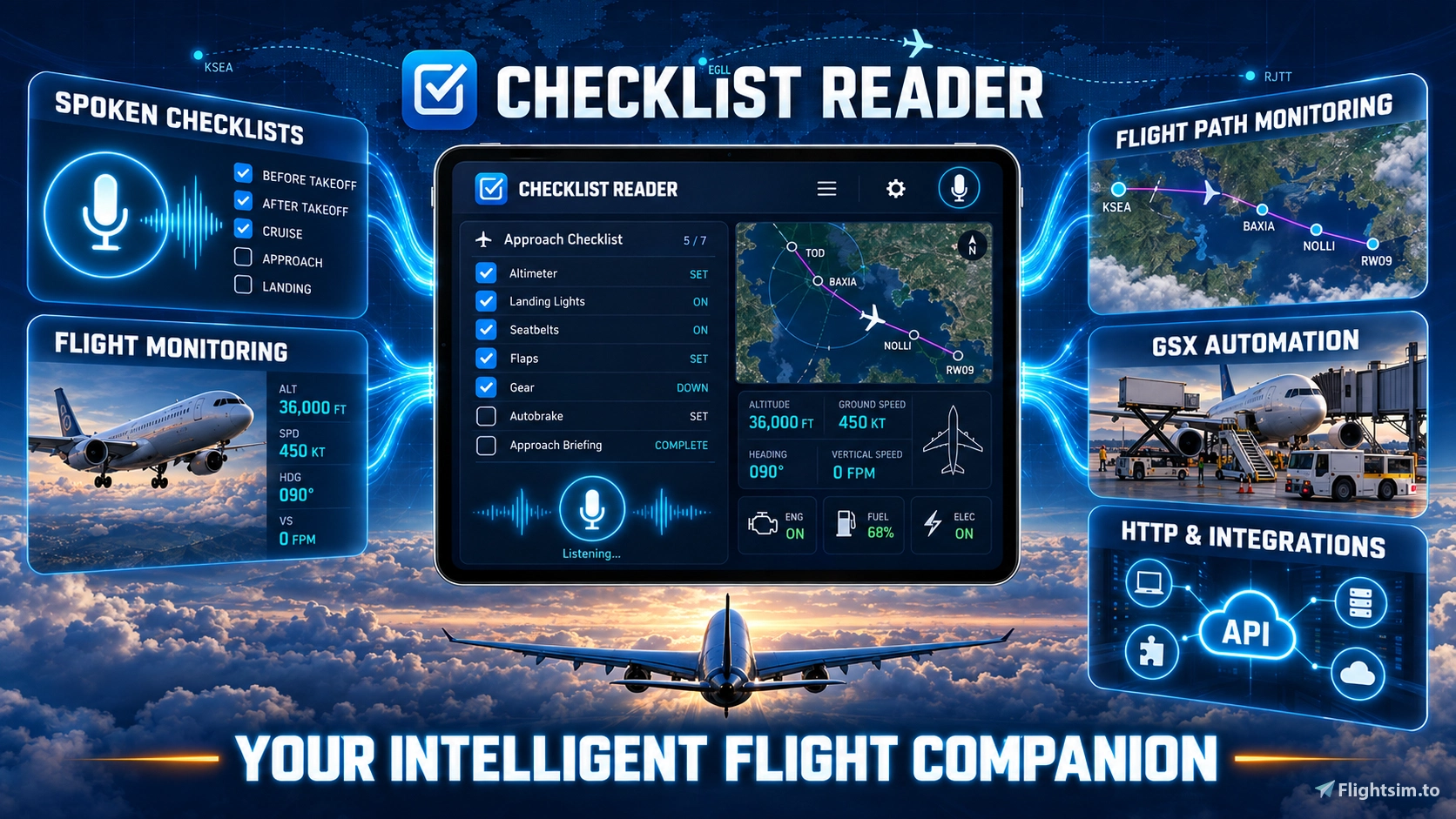
Checklist Reader turns aircraft procedures into interactive conversations. Your virtual copilot reads each item, listens to your response, tracks your progress and lets you pause, resume or repeat a checklist whenever needed.
But it goes far beyond checklists: it can follow your aircraft, flight phase and route, answer spoken questions, monitor important conditions, provide takeoff callouts and accompany sightseeing flights with location-aware narration.
✨ One Copilot for the Entire Flight
🎙️ Run interactive challenge-and-response checklists by voice
📡 Monitor aircraft status, flight phase, route, altitude, speed and hazards
🗺️ Import SimBrief, PLN and MSFS 2024 EFB flight plans and follow them on the moving map
📢 Receive advisory V-speeds, takeoff callouts and spoken simulator information
🌍 Explore more than 240 TourGuides with thousands of location-based narrations
🎛️ Control GSX services and connect Stream Decks, controllers and external tools
✏️ Create and customise your own procedures with the integrated Checklist Editor
🥽 Use the Companion and EFB panels on desktop, cockpit displays and in VR
📚 Almost 500 Aircraft Checklists
Checklist Reader includes a ready-to-use Core Library with 52 checklists.
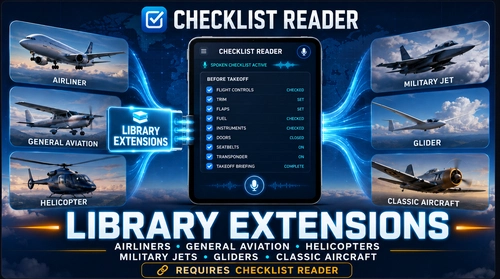
The optional Checklist Library Extensions expand the complete collection to almost 500 checklists and variants, organised into 56 convenient aircraft bundles.
👉 Download Checklist Reader Library Extensions:
Checklist Reader - Library Extensions - User Content for MSFS | Flightsim.to
The Extensions require Checklist Reader as the main application and may be installed before or after it.
🔒 Local, Private and Flexible
Core features run locally on your PC. No cloud account, subscription or telemetry is required.
Push-to-talk is recommended for reliable recognition in a busy cockpit with radio traffic, engine noise or other voices.
⚙️ Built for Reliability
Behind the visible application are more than 1,200 automated test cases covering checklists, speech processing, simulator data, flight monitoring, navigation, TourGuides, window layouts, updates and recovery scenarios.
Checklist Reader is an actively developed independent community project. Feedback, ideas and bug reports are always welcome.
💬 Community & Support
Discord: https://discord.gg/EchPmVtueY
Videos and tutorials: https://www.youtube.com/@SimFlightChris
Further support: simflightchris@gmail.com
⚠️ Because Checklist Reader interacts with voice input, simulator data and local integrations, some antivirus scanners may display a false-positive warning.
For flight simulation only. Not approved for real-world aviation.
Checklist Reader – Your Voice-Controlled Copilot for MSFS 2024
A voice-controlled virtual copilot for Microsoft Flight Simulator 2024 with interactive checklists, live aircraft and flight-phase monitoring, advisory V-speed callouts, route tracking, and flight-plan support for SimBrief, PLN and the MSFS 2024 EFB. Explore guided tours, use the in-game Companion panel, control GSX by voice, and connect Stream Decks, cockpit hardware and external tools through the open HTTP and webhook interface. In short: a true voice-controlled copilot for your entire flight.



User Reviews
16 reviews
Version History
Checklist Reader – Version 1.0.20.18 The right checklist for every aircraft variant, flight monitoring that reads the loaded checklist, and altitude callouts that name their target. For many more aircraft and checklist variants, download the separate Checklist Library Extensions package: 562 checklists in the complete catalog, 54 of them in the Core Library that comes with this setup. -------------------------------------------------- NEW: Wrong Checklist Impossible To Miss • Simulator Status shows the aircraft name in bold, with a Checklists button beside it that drops down every matching checklist. • While the loaded checklist belongs to another aircraft, a warning line appears with up to three Load buttons for the best matches and Other checklist... for the full selection. • When several checklists fit, the spoken remark points to the Simulator Status window. -------------------------------------------------- NEW: Checklists For Every Undercarriage • Checklist detection tells wheels, floats, amphibian floats and skis apart. After switching from the Carenado CT206G Amphibian to the CT206G Cargo Tundra, the reader kept offering the amphibian checklist and called the loaded Cargo Pack the wrong one. • The variant comes from the aircraft title and from the simulator's float and wheel information. A checklist for another undercarriage is listed below a separator, never offered with one click, and counts as the wrong checklist. • A checklist you chose for one variant no longer jumps to its siblings. • The Checklists list shows every checklist of the identified aircraft family, so all variants of an aircraft appear together. -------------------------------------------------- NEW: Monitoring That Reads The Loaded Checklist • Class presets switch warnings for a whole class, but some aircraft differ from it - and their checklists say so. "Speed brakes: Retracted" arms the speedbrake warning on the Lancair Legacy, "External power" the ground power warning on the Baron, "Hydraulic pressure" the hydraulics scan on the DC-3. A checklist that does not mention a system changes nothing. • Sailplanes and motor gliders whose checklist names airbrakes (ASK 21, Discus-2c, LS8, Stemme S12, DG-808S, Pipistrel Virus) are warned about open airbrakes from taxi to the initial climb, not while parked. • The monitoring configuration marks every switch the checklist set, and a new Automatic tab lists what was switched automatically for the current aircraft and checklist, with the checklist item behind each change. The support package includes this overview. -------------------------------------------------- IMPROVED: Hydraulic Pressure And Speedbrake Warnings • Hydraulic pressure is judged per aircraft. Jets and turboprops keep their 1000 psi limit; every other aircraft is compared with the pressure it has shown on this flight, so helicopters and older piston aircraft with 500 to 1000 psi systems are no longer reported low. • The hydraulic pump switch is only reported on jets and turboprops, where the simulator defines it reliably. • Turboprops no longer get the speedbrake warning by default, like piston aircraft. An aircraft that does have speed brakes gets it back from its checklist. -------------------------------------------------- IMPROVED: Altitude Callouts • The altitude alerter names the target: "Approaching 9000" instead of a bare "Approaching", which right after takeoff sounded like the approach to land. • The manual now describes correctly when "Approaching" and "Level" are called. -------------------------------------------------- IMPROVED: Settings And Manual • The Simulator Status settings menu keeps only switches that act on the running checklist. Compact Checklist Output, which only ever set the layout of the rewritten checklist copies, moved to Full Configuration > Advanced as Compact Checklist Files. • The tooltips of Simple Checklist Phrases and Verbose Output now say what the switches really do. • The flight monitoring and aircraft system monitoring chapters of the manual are updated in English and German. -------------------------------------------------- FIXED • The Checklist Reader icon in the simulator toolbar keeps its contrast when the pointer is over it. -------------------------------------------------- Community & Support The Checklist Reader is an actively evolving project, and feedback is always welcome. Join the community on Discord: https://discord.gg/EchPmVtueY For further support: simflightchris@gmail.com -------------------------------------------------- Disclaimer This release references third-party aircraft, products, developers and manufacturers. Checklist Reader and Checklist Library Extensions are independent projects and are not affiliated with or endorsed by those developers or manufacturers. All checklist content is for flight simulation only and is not approved for real-world aviation.
Log in to join the discussion
Log InComments(362)
about 5 hours ago
Some bugs and requests.
Major issue. Window's audio output setting isn't saved anymore -> unable to stream/record the output.
Jet mode is enabled for my Duke checklists even though it is disabled in menus. Automatic tab shows models as jets. How do I change these?
I'd like to have option for enabling custom Vr for every model.
The weather report gives too detailed numbers, such as knots with decimals.
Furthermore, in NA, altimeter setting is reported in hPa.
I'd like to have a "bearing and range to nearest airfield" request.
1.0.20.18
1 day ago
👉 The reader now tells wheels, floats, amphibian floats and skis apart and offers the checklist for the variant you fly.
🛠️ Flight monitoring follows the loaded checklist, and the altitude alerter says "Approaching 9000" instead of a bare "Approaching".
💬 Questions and feedback: https://discord.gg/EchPmVtueY
5 days ago
🌊 Highlights: amphibians that know land from water, and no more false "No generator is online" warnings.
👉 New in the Extensions: an Air Racing Bundle for the L-39, Mustang, T-6 and Pitts racing classes.
💬 Questions and feedback: https://discord.gg/EchPmVtueY
8 days ago
Sarah reads the checklist items, Adam answers—a simulated crew dialogue.
Then it’s your turn: switch to interactive mode and answer Sarah yourself.
The Companion follows the checklist section directly inside MSFS 2024.
A third voice, River, is available for TourGuide narration.
Which mode would you choose? ✈️
🇩🇪 Zwei Stimmen – oder deine? 🎙️ Neues Checklist-Reader-Video!
Sarah liest die Checklistenpunkte, Adam antwortet – ein simulierter Crew-Dialog.
Dann bist du dran: Im interaktiven Modus beantwortest du Sarahs Fragen selbst.
Der Companion zeigt den aktuellen Checklistenabschnitt direkt im MSFS 2024.
Als dritte Stimme steht River für die TourGuide-Erzählungen bereit.
Welchen Modus würdest du wählen? ✈️
▶️ https://youtube.com/shorts/WE36OxKCEqc
11 days ago
🔊 Hearing small crackles or short dropouts in the voice? Just download 1.0.20.2 again and install it over your current version.
✨ Neural voices now play every line in one piece – crystal clear, no more scratches.
🇩🇪 Checklist Reader 1.0.20.2 – ein stilles Fix-Update
🔊 Ihr hört kleine Kratzer oder kurze Aussetzer in der Stimme? Dann ladet 1.0.20.2 einfach noch einmal herunter und installiert sie über die vorhandene Version.
✨ Neuronale Stimmen spielen jeden Satz jetzt am Stück ab – glasklar und ohne Kratzer.
11 days ago
🇬🇧 A quick flight with Sarah 🎙️✈️
For this little showcase, Sarah joins me in the Cessna 414 at Princess Juliana — one of our new Kokoro neural voices.
During takeoff, she provides the callouts while Checklist Reader monitors the flight in the background.
Once airborne, I ask for the After Takeoff checklist. Sarah reads the items, I do the checks and answer by voice.
A familiar workflow, with a new voice in the cockpit. Have a listen — how do you like Sarah?
🇩🇪 Eine kleine Runde mit Sarah 🎙️✈️
Für diesen kurzen Showcase begleitet mich Sarah in der Cessna 414 ab Princess Juliana — eine unserer neuen neuronalen Kokoro-Stimmen.
Beim Start übernimmt sie die Callouts, während Checklist Reader im Hintergrund den Flug überwacht.
Nach dem Abheben rufe ich die After-Takeoff-Checkliste auf. Sarah liest die Punkte vor, ich arbeite sie ab und antworte per Sprache.
Ein vertrauter Ablauf mit einer neuen Stimme im Cockpit. Hört mal rein — wie gefällt euch Sarah?
12 days ago
🎙️ Highlights: trainable speech recognition with "Did you mean …?" and settings that apply live while the checklist keeps running.
👉 230 checklists now read one flight phase per section – 216 in the Extensions, 14 in the Core Library. Items and wording are unchanged.
💬 Questions and feedback: https://discord.gg/EchPmVtueY
16 days ago
Join the Discord for new ideas, screenshots and early previews, long before release.
Open Channels & Roles at the top left and choose “Yes, keep me posted” to get the Dev Updates role.
I’ll only ping you for the highlights. You can opt out the same way at any time.
🇩🇪 Du willst sehen, was als Nächstes für Checklist Reader kommt?
Im Discord gibt’s neue Ideen, Screenshots und erste Einblicke – lange vor dem Release.
Öffne oben links Channels & Roles und wähle „Ja, haltet mich auf dem Laufenden“, um die Rolle Dev Updates zu bekommen.
Ich benachrichtige dich nur bei den Highlights. Du kannst dich jederzeit auf demselben Weg wieder abmelden.
👉 https://discord.gg/EchPmVtueY
22 days ago
🎙️ New Tutorial: Kokoro Voices for Checklist Reader
Learn how to download, preview and select Kokoro voices, prepare them for aircraft checklists and TourGuides, and run the voice processing conveniently in the background.
👉 Watch the tutorial here:
https://youtu.be/Q6T87Ny2YBk
✈️ Enjoy the new voices and happy landings!
🇩🇪 DEUTSCH
🎙️ Neues Tutorial: Kokoro-Stimmen für den Checklist Reader
Erfahre, wie du Kokoro-Stimmen herunterlädst, vorhörst und auswählst, für Flugzeug-Checklisten und TourGuides aufbereitest und die Verarbeitung bequem im Hintergrund ausführst.
👉 Hier geht es zum Tutorial:
https://youtu.be/Q6T87Ny2YBk
✈️ Viel Spaß mit den neuen Stimmen und Happy Landings!
22 days ago
Checklist Reader 1.0.19.0 is out! ✈️
What's new:
🗣️ Natural neural voices that prepare speech in the background and survive updates
🧭 TourGuides now prepare upcoming sights, plus 17 new tours
🖥️ A cockpit-style flight display, better scaling on mixed monitors, and many fixes
🛡️ A word about antivirus warnings:
A few smaller scanners (Huorong, MaxSecure, Deep Instinct) currently flag this version. This is a false positive. The new neural voices let the program download their voice files (about 115 MB), and some scanners treat any program that downloads files as suspicious. The download only starts when you click it, and every file is checked against a fixed fingerprint. Microsoft Defender, Kaspersky, ESET, Bitdefender and all other major scanners report the release as clean.
The vendors have been informed about the false positives, and we expect the warnings to disappear with their next updates. No need to report them to me. Thank you! 🙏
🌐 DEUTSCH
Checklist Reader 1.0.19.0 ist da! ✈️
Was ist neu:
🗣️ Natürliche neuronale Stimmen, die Sprache im Hintergrund vorbereiten und Updates überstehen
🧭 TourGuides bereiten kommende Sehenswürdigkeiten vor, dazu 17 neue Touren
🖥️ Eine Flugdaten-Anzeige im Cockpit-Stil, bessere Skalierung auf mehreren Monitoren und viele Korrekturen
🛡️ Ein Wort zu Virenwarnungen:
Einige kleinere Scanner (Huorong, MaxSecure, Deep Instinct) melden diese Version derzeit. Das ist ein Fehlalarm. Mit den neuen Stimmen lädt das Programm deren Sprachdateien herunter (rund 115 MB), und manche Scanner halten jedes Programm, das Dateien nachlädt, grundsätzlich für verdächtig. Der Download startet nur auf deinen Klick, und jede Datei wird über einen festen Fingerabdruck geprüft. Microsoft Defender, Kaspersky, ESET, Bitdefender und alle anderen großen Scanner melden die Version als sauber.
Die Hersteller sind über die Fehlalarme informiert, und wir gehen davon aus, dass die Warnungen mit ihren nächsten Updates verschwinden. Du musst sie mir also nicht extra melden. Danke! 🙏
25 days ago
Checklist Reader now speaks with new local Kokoro neural voices! Watch “Heart” guide a sightseeing flight over Munich in the Dornier 228
https://youtu.be/yvtNmrDwYNc
25 days ago
The next Checklist Reader update introduces an entirely new neural speech engine. Compared with the classic Windows SAPI voices, the new voices sound significantly more natural, clearer, and much less robotic — bringing spoken checklists to a whole new level.
You will be able to choose from a wide range of voices, with helpful details such as accent, gender, and quality rating shown directly in the voice selection.
The neural voice pack is optional and will only be downloaded when you choose to install it. The familiar Windows voices will, of course, remain available.
We can’t wait for you to hear the difference! 🎧✈️
👉 If you want to have a listen, you can check out samples on Discord.
https://discord.gg/EchPmVtueY
28 days ago
Windows also follow monitor scaling now, so a window moved to a differently scaled screen stays usable.
Questions, ideas or bug reports are always welcome on Discord: https://discord.gg/EchPmVtueY
30 days ago
Checklist Reader includes a ready-to-use Core Library for hundreds of additional aircraft checklists!
👉 Download Checklist Reader Library Extensions!
about 1 month ago
214 ready-made MSFS 2024 flight plans (PLN, Little Navmap format) for our TourGuide sightseeing tours are now available - one file per region, 53 regions so far and growing.
Drop the file into your flight plan folder (or load it in-sim), then activate the matching TourGuide tour in Checklist Reader - it narrates automatically as you fly past each sight.
- Italy - Sardinia - Cagliari - City Update 16 (15.2 NM)
- Portugal - Porto District - Porto - City Update 7 (15.2 NM)
- USA - National Parks - Acadia (15.3 NM)
- French Polynesia - Tahiti - Longitude and Navigation (15.9 NM)
- USA - California - Santa Barbara - City Update 13 (16.3 NM)
- United Kingdom - England - Sunderland - World Update 17 (16.5 NM)
... and many more.
👋 Join our Discord and grab the download in the pinned channel: https://discord.gg/EchPmVtueY
Sim use only - not for real-world navigation.
about 1 month ago
I do my best to release Checklist Reader as reliably and error-free as possible. However, due to the program’s complexity, it is impossible to test every conceivable situation and system configuration.
If you encounter a problem, please open “Help → Create Support Package…” and send the created package to me by email or via Discord. It contains valuable diagnostic information that allows me to quickly analyze what happened and provide targeted assistance.
[DEUTSCH] Probleme mit Checklist Reader?
Ich bemühe mich, Checklist Reader so zuverlässig und fehlerfrei wie möglich auszuliefern. Aufgrund der Komplexität des Programms ist es jedoch unmöglich, jede denkbare Situation und Systemkonfiguration zu testen.
Sollte ein Problem auftreten, öffne bitte „Help → Create Support Package…“ und schicke mir das erstellte Paket per E-Mail oder über Discord. Es enthält wichtige Diagnoseinformationen, mit denen ich schnell analysieren kann, was passiert ist, und gezielt weiterhelfen kann.
about 1 month ago
📦 All aircraft bundles are now combined in one convenient package: Checklist Library Extensions v1.0.6.
✈️ Hundreds of additional aircraft checklists and variants
📚 Conveniently organised into selectable aircraft bundles
🔄 Regularly updated with new aircraft and improved procedures
📥 Download: https://flightsim.to/addon/114714/checklist-reader-library-extensions
ℹ️ If you are looking for one of the previous individual bundle downloads, you will now find it inside the Library Extensions package.
Checklist Reader is requires Checklist Reader as the main application.
Have fun flying — and thank you for your support! 🛫