
Flightsim.to
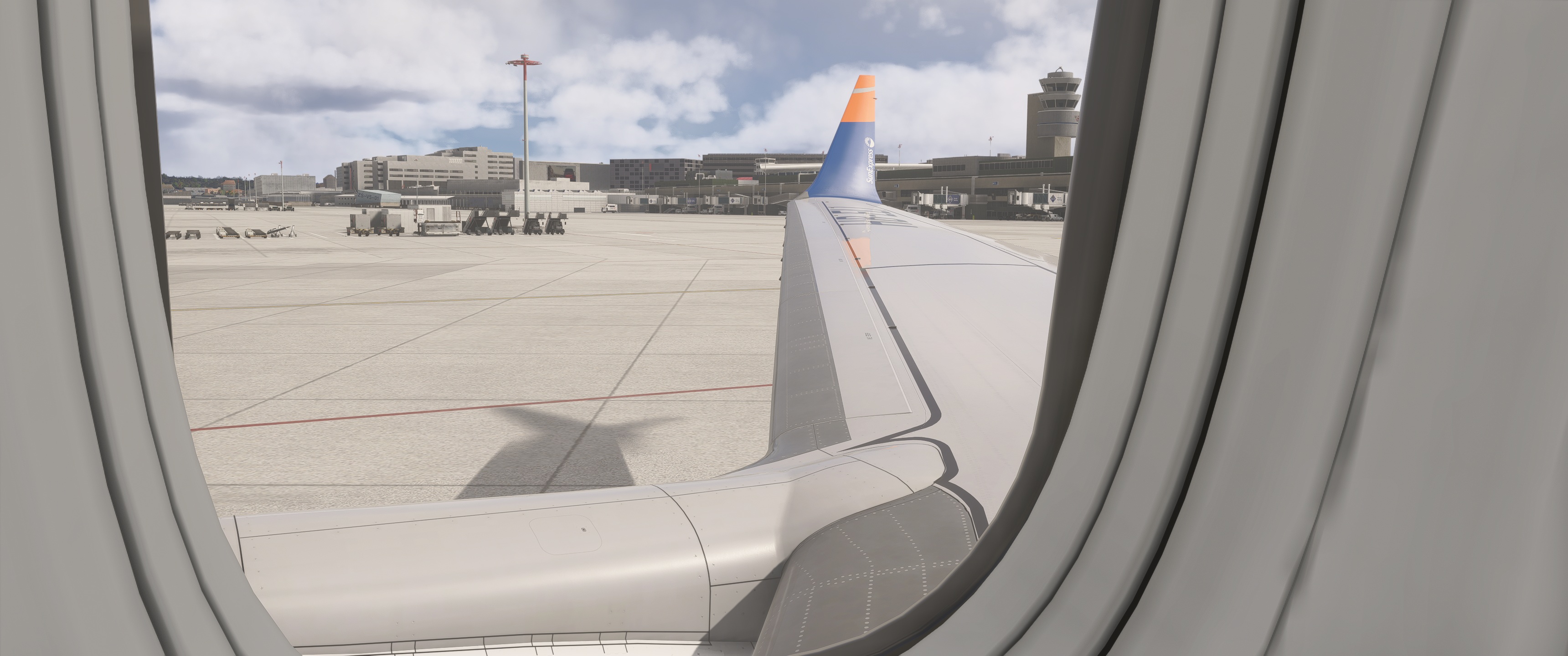
    Exterior views (wing views) for Asobo B 737 Max 8 - Image 1

    Description

    Wingvievs for Asobo B 737 Max 8
    Keyboard commands:

    Alt + 1
    Alt + 2
    Alt + 3
    Alt + 4
    Alt + 5
    Alt + 6
    Alt + 7
    Alt + 8

    If necessary, change or adjust the key command settings in MSFS 2024.
    Installation path: C:\Users\XXXXX\AppData\Local\Packages\Microsoft.Limitless_8wekyb3d8bbwe\LocalCache\SimObjects\Airplanes\asobo_b737max\presets\asobo\b737max8_passengers\config

    Comments(34)

    Log in to join the discussion

    Log In
    E

    about 8 hours ago

    May i ask on which keyboard shortcut i need to change ingame?
    M

    7 months ago

    Thanks, but it doesn`t work for me.

    C:\Users\Toni\AppData\Local\Packages\Microsoft.Limitless_8wekyb3d8bbwe\LocalCache\SimObjects\Airplanes\asobo_b737max\presets\asobo\b737max8_passengers\config
    p

    3 months ago

    Hello.
    The path is correct. Have you adjusted the keyboard shortcuts in the MSFS 2024 settings? It should work after that.
    m

    10 months ago

    is this for steam edition or de Microsoft store edition ?
    p

    10 months ago

    It is for both versions. Please note that camera.cfg must be copied to the correct folder depending on the MSFS2024 version.
    k

    12 months ago

    ok i did that now what?
    p

    12 months ago

    If you have copied the cameras.cfg into the correct folder (as described below), you can select the views with ALT+ the corresponding number.
    p

    12 months ago

    It is important that you change the keyboard shortcuts for the views. In my case, they are the same as for MSFS 2020
    p

    12 months ago

    If necessary, change or adjust the key command settings in MSFS 2024
    L

    12 months ago

    its not working :(
    p

    12 months ago

    If you have copied the cameras.cfg into the correct folder (as described below), you can select the views with ALT+ the corresponding number and it works
    p

    12 months ago

    If necessary, change or adjust the key command settings in MSFS 2024.
    G

    12 months ago

    In which folder to put the file?
    p

    12 months ago

    See the instruction in the describtion
    --> Put the file in: C:\Users\XXXXX\AppData\Roaming\Microsoft Flight Simulator2024\SimObjects\Airplanes\asobo_b737max\presets\asobo\b737max8_passengers\config
    k

    12 months ago

    after you install do you have to do anything else except put into community folder?
    p

    12 months ago

    Do not put the file in the community folder.
    The path is: C:\Users\XXXXX\AppData\Roaming\Microsoft Flight Simulator 2024\SimObjects\Airplanes\asobo_b737max\presets\asobo\b737max8_passengers\config
    MSFS 2020MSFS 2024

    Exterior views (wing views) for Asobo B 737 Max 8

    This add-on provides predefined exterior wing views for the Asobo B 737 Max 8 in Microsoft Flight Simulator. Users can access various viewpoints using designated keyboard commands, allowing for enhanced observation of the aircrafts exterior. Installation instructions and a default path for configuration are included. Adjustments may be required in the MSFS 2024 settings to fit individual preferences.


    Downloads2K
    Version1.1
    File Size1.1 KB
    Published1 year ago
    Updated3 months ago

    User Reviews

    5.0

    2 reviews

    5
    100%
    4
    0%
    3
    0%
    2
    0%
    1
    0%

    More Information

    Simulator
    MSFS2024
    Sub-CategoryBoeing 737 MAX 8
    Affiliation
    Boeing 737 MAX 8

    Version History

    Here is a new version of Wing-View. The perspective has been improved because the zoom has been adjusted accordingly.