
![[A32NX] PW & LEAP Engine Texture - Image 1](https://cdn.flightsim.to/images/27/improved-engine-texture-for-the-fbw-a32x-839363-1739792667-WvO2K.jpg)
Description
Extract and Paste into Community Folder directly.
[A32NX] PW & LEAP Engine Texture
This add-on provides an improved engine texture for the Freeware FlyByWire A32NX aircraft in Microsoft Flight Simulator. Users can enhance the visual quality of engine details by extracting and pasting the texture files directly into their Community Folder. This modification aims to enhance the realism of the A32NX experience.


User Reviews
3 reviews
Version History
- Blur Fixed.
Related
![[A32NX] Etihad Airways Manchester City Livery | 4k](https://cdn.flightsim.to/images/27/manchester-city-livery-for-fbw-a32x-839363-1726145523-kEy74.jpg?width=500)
[A32NX] Etihad Airways Manchester City Livery | 4k
This add-on features a custom livery for the FlyByWire A32NX aircraft in Microsoft Flight Simulator, themed after Manchester City Football Club. The design incorporates the clubs colors and emblem, providing a unique visual for fans and aviation enthusiasts alike. Install this livery to enhance your flying experience with a touch of football pride. Compatible with the latest version of the FBW A32X.
by RedXSim
![[A32NX] A320neo Better Eng Fan Texture](https://cdn.flightsim.to/images/27/a320neo-better-eng-fan-texture-839363-1744637677-sjZDT.jpg?width=500)
[A32NX] A320neo Better Eng Fan Texture
This add-on provides enhanced engine fan textures for the A320neo in Microsoft Flight Simulator, specifically designed for use with the A32NX mod. Users will need to extract and paste four replacement files into their Community Folder for installation.
by RedXSim
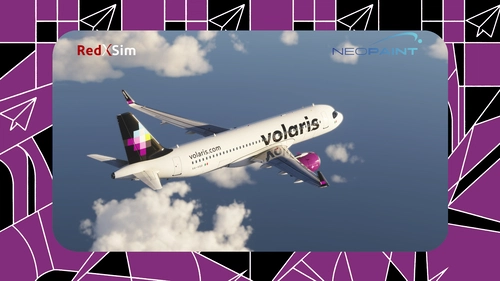
Volaris XA-VSD for FBW A320neo | 8k
This add-on features an 8K resolution Volaris XA-VSD livery for the FBW A320neo in Microsoft Flight Simulator. The livery accurately represents the real-world Volaris aircraft. Installation is completed by placing the extracted folder into the Community folder. Designed for use with the FlyByWire A320neo mod.
by RedXSim
![[A32NX] Special Livery I (Abu Al Nafut) | 4K](https://cdn.flightsim.to/images/27/special-livery-i-abu-al-nafut-839363-1729109955-vcwuV.jpg?width=500)
[A32NX] Special Livery I (Abu Al Nafut) | 4K
This add-on features a special livery for the A32NX aircraft, showcasing the design "Abu Al Nafut" in high-quality 4K resolution. It is the creators first special livery release, reflecting a unique aesthetic for users to enjoy. For any suggestions or feedback, the creator has provided contact information.
by Genegn
Log in to join the discussion
Log InComments(14)
about 1 year ago
about 1 year ago
over 1 year ago
over 1 year ago
over 1 year ago
over 1 year ago
over 1 year ago
over 1 year ago
over 1 year ago
over 1 year ago
over 1 year ago
amazing Job
over 1 year ago
over 1 year ago
over 1 year ago