
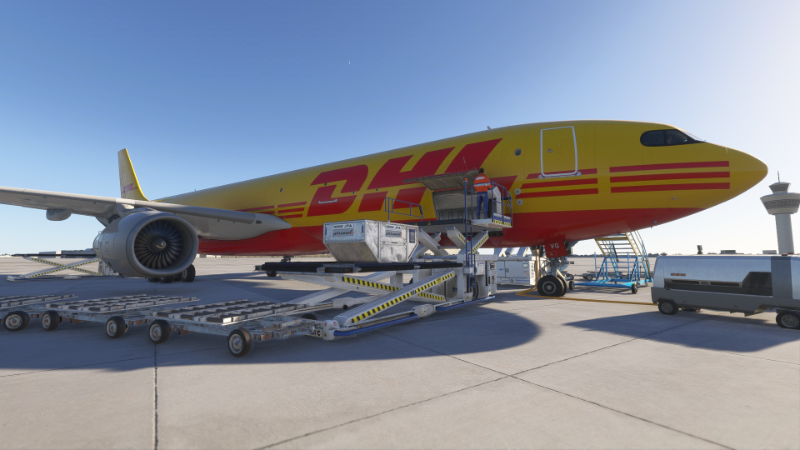
Description
MSFS 2024 GSX profile for the iniBuilds A330-300P2F freighter, requires the latest GSX version.
The cargo can be loaded and unloaded automatically, all except the main cargo doors are opened automatically.
The main cargo door must be opened manually in the cockpit via the EFB, it is not currently stored in GSX.
How to install it: Drag & drop gsx.cfg into C:\Users\[yourname]\AppData\Roaming\Virtuali\Airplanes
GSX-Profil for iniBuilds A330-300P2F Cargo
This GSX profile is designed for the iniBuilds A330-300P2F cargo aircraft in MSFS 2024. It enables automatic loading and unloading of cargo, with the exception of the main cargo doors, which must be opened manually using the cockpit EFB. The add-on requires the latest version of GSX for full functionality. Installation involves placing the gsx.cfg file into the designated Virtuali folder.


User Reviews
1 reviews
Version History
No version history available.
Log in to join the discussion
Log InComments(7)
over 1 year ago
over 1 year ago
over 1 year ago
But for me it doesn't work as described. I am using GSX Pro 3.4.6, three stairs on the left remain unchanged, cargo door on the left opens but is not operated.
How to install it: Drag & drop gsx.cfg into C:\Users\[yourname]\AppData\Roaming\Virtuali\Airplanes
Are you sure? No subfolder?
Greets
Frank
over 1 year ago
over 1 year ago
over 1 year ago
Edit: in the profile you have the wrong ICAO type. You had: A333-P2F. This should be just A333. Simbrief will not load otherwise. I had to revert it back myself.
over 1 year ago