
Description
Please take a moment to answer this quick survey:
https://forms.cloud.microsoft/Pages/ResponsePage.aspx?id=DQSIkWdsW0yxEjajBLZtrQAAAAAAAAAAAAZAAImAMZdUMlFJWFZERjY1RkFPT0JMOTVWWTk1UUk0UC4u
I’m trying to understand how important the standalone version is for users.
If it’s not widely needed, I could stop maintaining it and focus on adding more powerful features—such as PDF streaming—directly in the server app.
This approach would allow better performance and fewer limitations from the MSFS API.
Enhance your Microsoft Flight Simulator 2024 experience with a fully integrated EFB addon designed for VFR flying (IFR also supported).
📑 Features at a glance:
📄 View VAC charts and PDFs directly in the cockpit
🗺️ Access multiple map sources: OACI, Bing, OpenStreetMap, elevation
📍 Overlay your flight plan and generate navlogs
🎥 Record your flights and review routes afterwards
🛬 Quick airport information at your fingertips
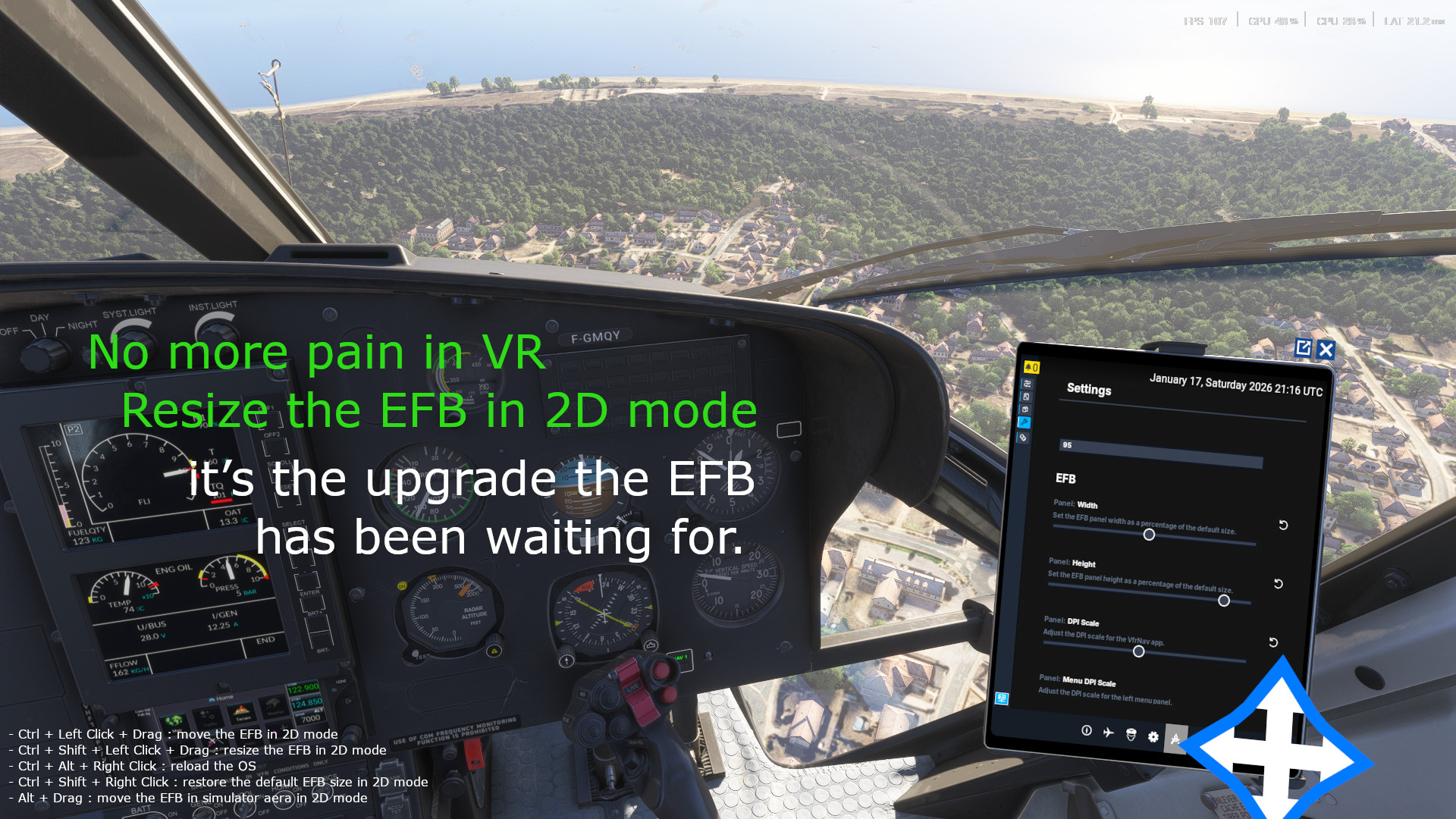
🕶️ Works seamlessly in VR — Add the possibility to resize the EFB ;)
🔮 Working on it (if possible...): add the integrated EFB to all aircraft (even those without a default MSFS EFB)
💡 Free, lightweight, and built for the MSFS community
Améliorez votre expérience sur Microsoft Flight Simulator 2024 avec un EFB entièrement intégré, conçu pour le vol VFR (IFR supporté aussi).
📑 Fonctionnalités principales :
📄 Affichez vos cartes VAC et fichiers PDF directement dans le cockpit
🗺️ Accédez à plusieurs sources cartographiques : OACI, Bing, OpenStreetMap, cartes d’élévation
📍 Superposez votre plan de vol et générez des navlogs
🎥 Enregistrez vos vols et visualisez vos trajectoires ensuite
🛬 Consultez rapidement les informations des aéroports
🕶️ Fonctionne parfaitement en VR — Permet de resizer l'EFB
🔮 En cours (si faisable...) : possibilité d’ajouter l’EFB intégré à tous les avions (même ceux qui n’ont pas d’EFB MSFS par défaut)
💡 Gratuit, léger et conçu pour la communauté MSFS
Antivirus :
The executable might be flagged as a malware by machine learning-based antivirus systems (actually 3 on virustotal). This is a false positive caused by the way the installer executable is compressed (opensource UPX tool). It’s safe to ignore...
Antivirus Report for the Latest Release
L'exécutable peut être détecté comme un malware par certains antivirus basés sur l'apprentissage automatique (actuellement 3 sur virustotal). Il s'agit d'un faux positif, dû à la façon dont le programme d'installation est compressé (outil opensource UPX). Vous pouvez l'ignorer en toute sécurité....
Rapport antivirus pour la dernière version
Discorde
Broken link - fixed
Feel free to share your navlogs, aircraft deviation data, and fuel consumption curves 🙂
N’hésitez pas à partager vos journaux de navigation, données de déviation de l’appareil et courbes de consommation de carburant 🙂
Installation :
Two version are available (Please use only one of the following)
- Legacy Community Version
- Installer
This version includes additional functionality :
🌟 External EFB Access from MSFS
Launch the Electronic Flight Bag outside of Microsoft Flight Simulator for added flexibility. (Note: Settings are not yet persistent.)
🌐 Web & Device Connectivity
Access the EFB via your web browser or external devices such as tablets and smartphones. (Support is still in development.)
📁 File-Based Navlog & Performance Data
Easily import and export your navigation logs, compass deviation charts, and fuel consumption curves via file integration.
Only VFR layers are displayed by default—go to the settings page to enable other layers.
Deux versions sont disponibles (Veuillez n'en utiliser qu'une seule)
- Méthode ancienne (communauté)
- Installeur
Cette version offre des fonctionnalités supplémentaires :
🌟 Accès externe à l’EFB depuis MSFS
Ouvre l’Electronic Flight Bag en dehors de Microsoft Flight Simulator pour plus de flexibilité. (Les paramètres ne sont pas encore sauvegardés.)
🌐 Connexion via navigateur ou appareil externe
Accède à l’EFB depuis un navigateur web ou un appareil externe (tablette, smartphone). (Fonctionnalité encore en cours de développement.)
📁 Import/Export de données de navigation et de performance
Importe ou exporte ton navlog, les courbes de déviation du compas et de consommation de carburant via des fichiers.
Seules les couches VFR sont affichées par défaut—allez dans la page de paramètres pour activer les autres couches.
Trouble Quick Fix
In case of troubles with the EFB you can now fully reload the OS by Ctrl+Alt+clicking the EFB.
En cas de problèmes avec l'EFB vous pouvez maintenant completement rechargez l'OS en cliquant sur l'EFB tout en maintenant Alt et Ctrl enfoncés.
PDF Preview
Microsoft is using a very old browser release (Chrome 49, we are now at Chrome 134...) making integrating pdf a really pain ! Their is still some issues to be corrected (as described below) but they stays minor and must not disturb your flight ;)
Please carrefully read the below known issues section.
What's implemented :
- PDF Viewer
- VAC Charts download from SIA web site
- Wheel for scrolling
- Ctrl + wheel for horizontal scrolling
- Alt + wheel for zooming
- Navlogs
- Upload of PDF/image files from your computer (Require VFRNav's server The File Dialog may be displayed under another one - fix needed.)
- (Up/Down)loading flight plans to/from MSFS EFB from/to VFRNav' Server app
What's on the board :
- Drawing over the PDF
- Meteo TEMSI download from aviation.meteo.fr
- Meteo Weather fronts download from aviation.meteo.fr
- Fix repeated pattern (see below)
- Brasil/UK/... layers
- And more ....
Known issues :
- Drawing a repeated pattern isn't supported by MSFS, I have done a temporary workaroud in order to deactivate it.
==> Prohibited zone will be displayed only with a red stroke (without shaded) (see issue.png in user gallery at the bottom of this page)
- Time to time rendering may be incorrect, in this case please zoom in/out the pdf in order to force a new rendering.
- Avoid uploading very large pdf like manuals, it may crash msfs (investigation in progress).
Microsoft utilise une très vielle version de navigateur internet (Chrome 49, nous en somme à la version 134...) ce qui rends l'intégration des pdf très compliqué ! Il y a toujours quelque problèmes à corriger (comme décrit ci-dessous), mais ils restent mineurs et ne devraient pas vous déranger pendant vos scéances de vol ;)
Merci de lire attentivement la section limitations connues ci-dessous.
Ce qui est implémenté :
- Visualisateur de PDF
- Déssiner par dessus le PDF
- Téléchargement des cartes VAC depuis le site du SIA
- Mollette pour scroller
- Ctrl + Mollette pour scroller horizontalement
- Alt + Mollette pour zoomer
- Navlogs
- (Up/Down)loading plans de vols vers/despuis l'EFB MSFS depuis/vers l'application VFRNav' Server
- Upload de fichiers PDF/image depuis sont ordinateur (VFRNav's server requis La boîte de dialogue de fichiers peut parfois souvrir derrière les autres - correction à effectuer)
Ce qui est prévu :
- téléchargement des TEMSI Météo depuis le site aviation.meteo.fr
- téléchargement des fronts Météo depuis le site aviation.meteo.fr
- Correction du problème de pattern répété (voir ci-dessous)
- Layers Brasil/UK/...
- Et plus ...
Limitations connues :
- Dessiner des patterns répétés n'est pas supporté par MSFS, J'ai mis en place un workaroud temporaire pour desactiver cette fonctionalitée.
==> Les zones interdites sont uniquement déssinées avec un trait (sans le hachurage) (voir issue.png dans la gallerie utilisateur en bas de cette page).
- Le rendu des pdfs peut être de temps en temps incorrect, dans ce cas, merci de zoomer le pdf afin de forcer un nouveau rendu de celui-ci.
- Evitez d'envoyer des très gros pdf comme des manuels utilisateur, cela peut faire crasher msfs (investigation en cours).
Interaction avec l’EFB / EFB Interaction
- Ctrl + Left Click + Drag : move the EFB in 2D mode
- Ctrl + Shift + Left Click + Drag : resize the EFB in 2D mode
- Ctrl + Alt + Right Click : reload the OS
- Ctrl + Shift + Right Click : restore the default EFB size in 2D mode
- Alt + Drag : move the EFB in simulator aera in 2D mode
- Ctrl + Left Click + Drag : Déplacer l'EFB en mode 2D
- Ctrl + Shift + Left Click + Drag : Redimensionner l'EFB en mode 2D
- Ctrl + Alt + Right Click : Recharger l'OS
- Ctrl + Shift + Right Click : Restorer la taille par défault de l'EFB en mode 2D
- Alt + Drag : Déplacer l'EFB dans l'espace du simulateur en mode 2D
Note importante / Important Note
Resizing the EFB is a somewhat hacky workaround, so don’t expect a perfect display — MSFS does not natively support EFB resizing.
This functionality doesn’t actually resize the EFB; it only adjusts the visible area. As a result, the elements behind the EFB remain unclickable. I’m currently exploring ways to overcome this limitation.
In VR, the EFB generally looks better when the display size is set to Large and the orientation to Horizontal.
Le redimensionnement de l’EFB repose sur un contournement assez « bricolé ». Il ne faut donc pas s’attendre à un rendu parfait, car MSFS ne prend pas en charge nativement le redimensionnement de l’EFB.
Cette fonctionnalité ne redimensionne pas réellement l’EFB ; elle ajuste uniquement la zone visible. Par conséquent, les éléments situés derrière l’EFB restent inaccessibles au clic. J’essaie actuellement de trouver une solution pour contourner cette limitation.
En VR, l’affichage est généralement meilleur lorsque la taille de l’EFB est réglée sur Large et l’orientation sur Horizontal.
For more informations / Pour plus d'informations
Updates will be pushed regulary in order to ehance this plugin. Do not hesitate time to time to come back on this thread ;)
For suggestions/difficulties, do not hesitate to open an issue on the repo :
https://github.com/alx-home/msfs2024-vfrnav-efb/issues/new/choose
The Wiki for plugin usage/installation (Strongly prone to ehancement, do not hesitate to take a look back on it ;)) :
https://github.com/alx-home/msfs2024-vfrnav-efb/wiki
If you want to participate on this project, pull request are warmly welcome :)
Des mises à jours serons pushé régulièrement afin d'améliorer ce plugin. N'hésitez pas à revenir jeter un oeil de temps en temps ;)
Si vous avez des suggestions/rencontrez des difficultés, n'hésitez pas à ouvrir une issue sur le repo :
https://github.com/alx-home/msfs2024-vfrnav-efb/issues/new/choose
Le Wiki pour installer/utiliser le plugin (très susceptible d'évoluer, n'hésitez pas à jeter un coup d'oeil ;)) :
https://github.com/alx-home/msfs2024-vfrnav-efb/wiki
Si vous voulez participer au projet les pull requests sont les bien venues :)
EFB MSFS2024 VFRNAV
EFB MSFS2024 VFRNAV is a plugin designed for the integrated EFB in Microsoft Flight Simulator 2024. This add-on includes tools such as an enroute chart reader (VAC/pdf), VFR maps from various sources, flight plan overlays, and a navlog based on the maps flight plans. Users can navigate and plan their VFR flights with added convenience using this enhanced toolkit.


Supporters
User Reviews
17 reviews
Version History
### Installer/Server (new) ### ***🐞 Fixes / Corrections:*** - MSFS now reconnects properly after an unexpected shutdown, without requiring a server restart. MSFS se reconnecte désormais correctement après une fermeture inattendue, sans nécessiter de redémarrage du serveur. ### EFB ### ***🔧 Improvements / Améliorations:*** - General performance improvements. Amélioration des performances générales. - Added a compact mode for the map menu for quicker access to layers. (#306) Ajout d'un mode compact pour le menu de la carte afin d'accéder plus rapidement aux calques. (#306) - Minor graphical improvements. Améliorations graphiques mineures. ***🐞 Fixes / Corrections:*** - Removed stutters when interacting with the map or opening the EFB. (#308) Suppression des saccades lors de l'interaction avec la carte ou à l'ouverture de l'EFB. (#308)
Log in to join the discussion
Log InComments(160)
about 6 hours ago
17 days ago
Does anyone know how to get lower brightness at night on the EFB ? It rips my eyes in VR....
EDIT : Found a way to lower the lowest brightness on the 3d efb in Aerostar 600 editing a variable in one of the xml of the addon related to the tablet. Good day !
This is god's work. But your donation link is broken, please correct it !
3 days ago
Regarding the donation link, thank you for letting me know. Unfortunately, there seems to be an issue with the Flightsim.to PayPal integration on my profile.
I've now switched to Buy Me a Coffee, so the support link should be working again.
Thanks again for your support !
5 months ago
Buttons that resize as you mouse over is a HUGE UX no-no, as they change the clickspot away from where you were pointing.
Add-on WAY OVERSTEPS ITS BOUNDS by messing with default EFB functionality, can no longer be rotated, dragged, or resized the normal way, it effectively breaks the EFB.
5 months ago
- I’m not sure I fully understand what you mean here. Could you clarify which layers are misaligned, or share a screenshot? That would help me identify the issue.
Buttons that resize as you mouse over is a HUGE UX no-no, as they change the clickspot away from where you were pointing.
- For VR users, the enlarged hover state is actually very helpful for interaction. That’s why the feature is there.
Add-on WAY OVERSTEPS ITS BOUNDS by messing with default EFB functionality, can no longer be rotated, dragged, or resized the normal way, it effectively breaks the EFB.
- For VR users, the modified behavior is genuinely useful.
I get the concern and I’m planning to add a setting that allows users to disable the EFB interaction changes entirely.
6 months ago
5 months ago
That might have broken my tweak.
I’ll have to check — hopefully the EFB is finally resizable in VR now.
5 months ago
5 months ago
This isn’t really a feature—more of a workaround until Asobo fixes the underlying issue. I’ve implemented it in a way that remains functional, but I’ll leave the resizing behavior as it is for now since it’s not something you should need to use frequently.
I’ll try to restore the native top‑bar EFB drag functionality as soon as it becomes possible ;)
6 months ago
Problème: je ne peux pas déplacer l'EFB en VR (Quest 3, FS 2024), c'est possible ou non ?
6 months ago
7 months ago
https://forms.cloud.microsoft/Pages/ResponsePage.aspx?id=DQSIkWdsW0yxEjajBLZtrQAAAAAAAAAAAAZAAImAMZdUMlFJWFZERjY1RkFPT0JMOTVWWTk1UUk0UC4u
I’m trying to understand how important the standalone version is for users.
If it’s not widely needed, I could stop maintaining it and focus on adding more powerful features—such as PDF streaming—directly in the server app.
This approach would allow better performance and fewer limitations from the MSFS API.
7 months ago
7 months ago
https://miraviasoftworks.com