
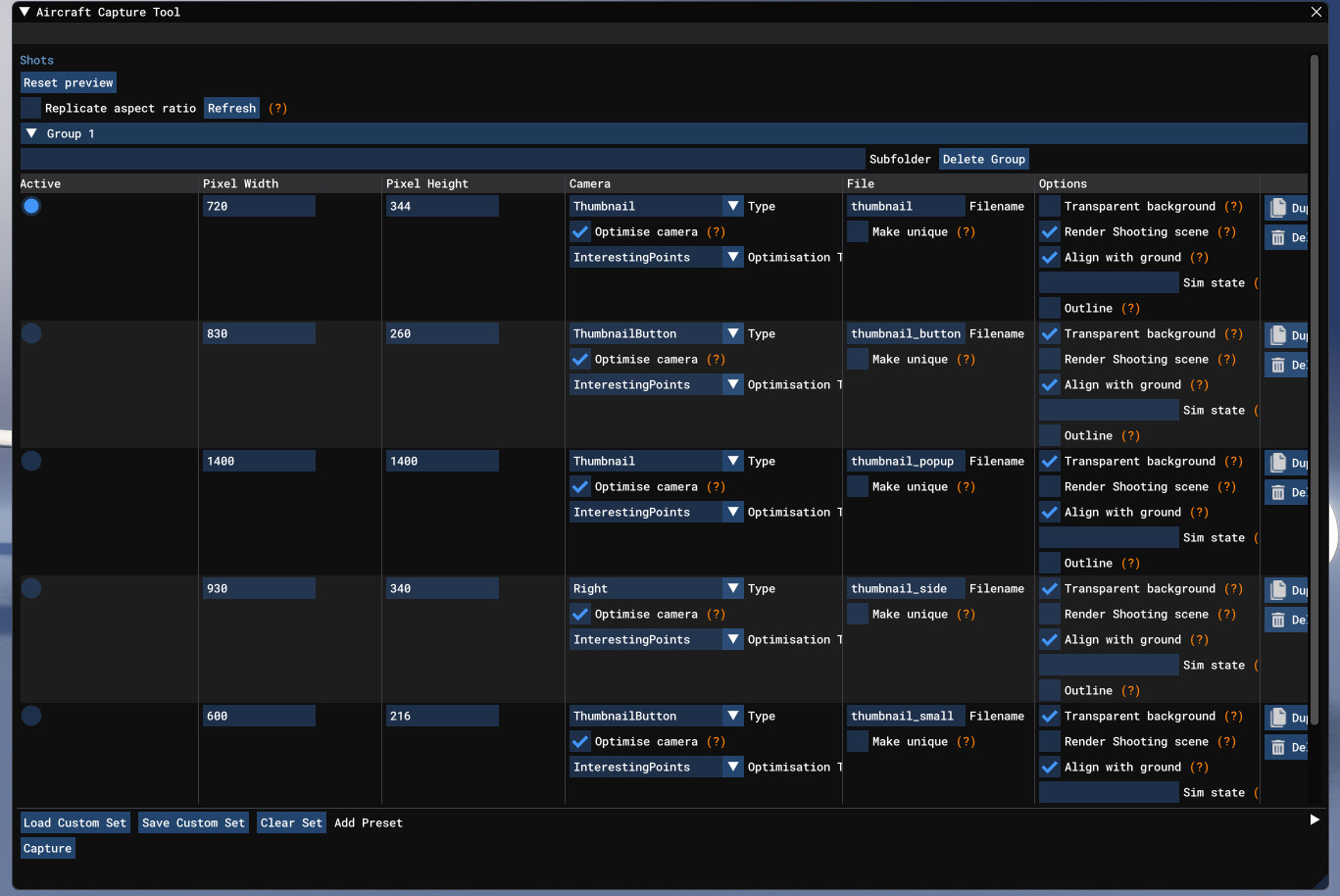
Description
This tool allows you to create default thumbnails for MSFS 2024 more quickly and easily.
Instructions:
Download the .zip file and save the enclosed .xml file somewhere on your computer
Enter Developer mode, select the aircraft you want to create thumbnails for, and create a new project (this final step is required to gain access to the menus needed for the rest of the process, but we won't actually be doing anything with this project)
Select the Aircraft Capture Tool from the Tools menu
Click "Load Custom Set" and select the .xml file you saved earlier
That's it! Click capture, and the simulator will automatically create all five default thumbnails for your plane (including with the correct names)
Create Default Thumbnails (MSFS 2024)
This add-on provides a tool for creating default thumbnails in Microsoft Flight Simulator 2024 efficiently. It includes a simple process that involves downloading an XML file and configuring it in Developer mode. Users can easily capture and generate all five default thumbnails for their selected aircraft with the correct naming conventions.


User Reviews
3 reviews
Version History
No version history available.
Related
iniBuilds A330 Wing Flex Fix
A simple fix for the A330's asymmetric wing flex in MSFS 2024. Works for all variants.
by Fluss

iniBuilds A321LR Wing Flex Fix
This add-on addresses the issue of broken wing flex in the iniBuilds A321LR aircraft. It provides a correction for a more realistic wing movement experience. Additional related mods for the A320neo and A330 are also available on the creator’s profile.
by Fluss
GSX Profile for A350 Improvement Mod
Enhance your A350 experience with this GSX profile improvement mod, designed to fix issues with ground services synchronization and pushback visuals. Ensure smooth operation by following the installation instructions for a seamless integration with your flight simulation setup.
by riverharper
Remove VIP Variants iniBuilds A330
This add-on removes the VIP variants of the iniBuilds A330 from Microsoft Flight Simulator. It provides a straightforward solution for users who prefer not to have these specific aircraft included in their experience. Simply install the mod by placing it in the Community folder to eliminate the VIP versions from your aircraft selection.
by Fluss
Log in to join the discussion
Log InComments(16)
2 months ago
6 months ago
I have the TDFi MD-11 in flying mode with the wheels down but it doesn't capture the thumbnails this way?? Thanks
6 months ago
6 months ago
However for me, it does not work with Fenix A320 when following your instructions. MSFS crashes/freezes.
Will try with other plane later :)
6 months ago
9 months ago
over 1 year ago
over 1 year ago
over 1 year ago
1) 2024 uses PNG thumbnails, so the files should be something like File="thumbnail.png".
2) 2024 doesn't use "thumbnail_small" but you might still want to have it - but add the .jpg (File="thumbnail_small.jpg"). You could also have File="thumbnail.jpg" if you like.
3) 2024 also uses "thumbnail_variation" so maybe add the following (replace the square brackets):
[Thumbnail Width="660" Height="300" Camera="ThumbnailButton" CaptureAlpha="0" File="thumbnail_variation.png" MakeUniqueFilename="0" ShowsShootingScene="0" ShowsShootingSceneLights="0" ShowsWorld="1" ShowsSunLight="1" DrawOutline="0" OutlineWidth="1" OptimiseCamera="1" OptimisationType="InterestingPoints"/]
over 1 year ago
2) thumbnail small is included because it's part of the SDK and default liveries
3) thumbnail_variation is not necessary for everything to show in the game
over 1 year ago
https://docs.flightsimulator.com/msfs2024/html/3_Models_And_Textures/Modeling/Aircraft/Thumbnails.htm
almost 2 years ago
almost 2 years ago
almost 2 years ago
almost 2 years ago
almost 2 years ago