Description
This mod requires to buy Aerosoft Airport Bali from official sellers.
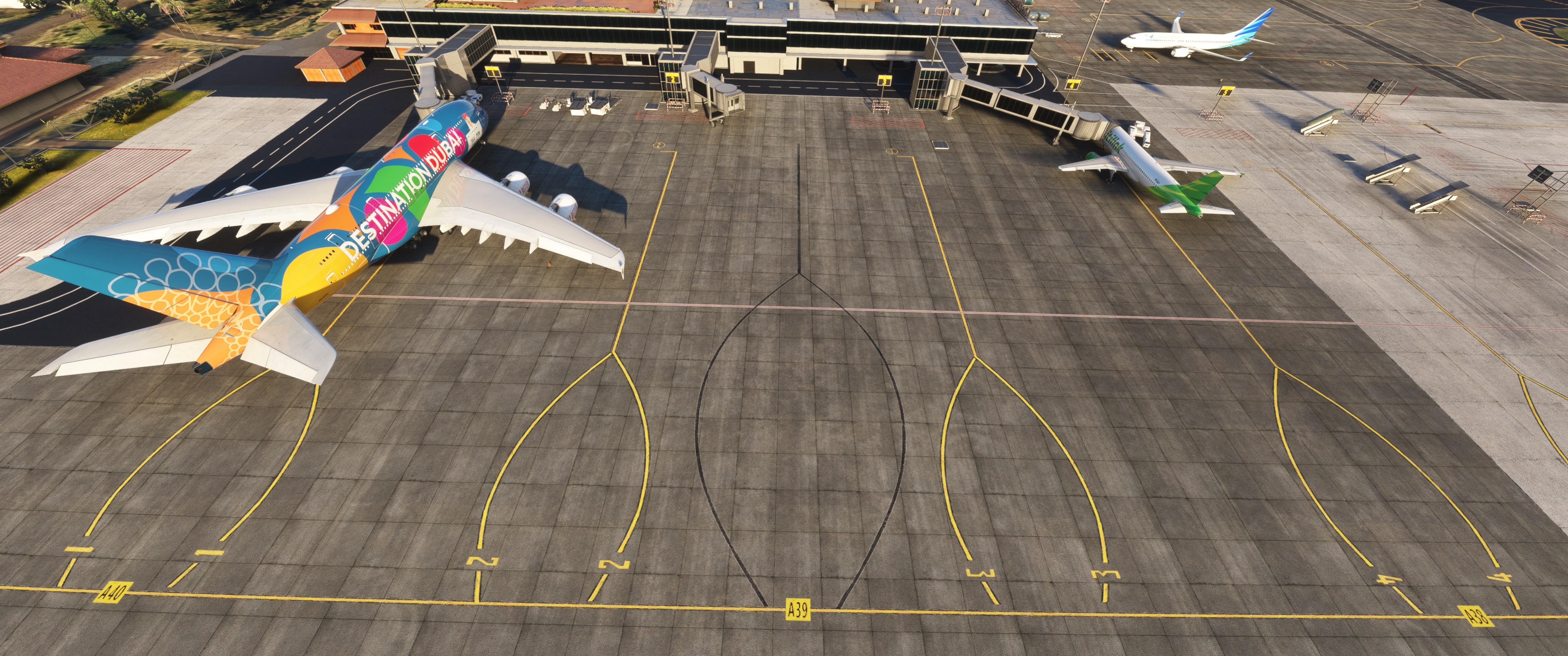
Since version 1.2.1, Aerosoft did not updated WADD airport. In real life, Gates A40, A39 and A38 on West Apron got jetways that are still not implemented by Aerosoft.
In order to fly the A380 to this airport (flight EK368), I decided to update it.
The following are included :
- Added gates A40, A39 and A38 with Jetways models from Aerosoft WADD scenery (did not add A37 to avoid mismatching with Aerosoft ground markings). Stands 1 and 4 have been deleted for placement and jetways control reasons.
- Only added simple gate numbers on ground as i am not able to create models and replace 1 and 4 placed on taxiways.
- Resized gates A15 for A380 and A16 to A24 for B777-300ER.
- Airport marked as Star Airport.
You can find a GSX profile made by D_97K here (choose the alternate one designed for my mod as soon as available) : https://fr.flightsim.to/file/82135/wadd-ngurah-rai-international-airport-aerosoft-gsx-profile
Important : if this does not work properly, please check in "package scenery order" list that this package has a higher priority as the Aerosoft WADD airport package. Same priority should also work.
Aerosoft WADD enhancement with new Jetways and A380 sized parking
This add-on provides an update to the West terminal parkings at Aerosofts WADD Bali Airport, specifically tailored for the Airbus A380. It adds jetways at gates A40, A39, and A38, which were not previously included in the original scenery. Additionally, it includes an updated GSX profile for ground handling and passenger access tailored to these gates. The mod requires the official Aerosoft Bali Airport purchase to function correctly.

User Reviews
5 reviews
Location
More Information
Version History
- A38, A39 and A40 resized for medium aircrafts. - A15 resized for A380-800. - A16 to A24 resized for B777-300ER. - Removed GSX profile. You will file very quickly an adapted version here to fit this mod : https://fr.flightsim.to/file/82135/wadd-ngurah-rai-international-airport-aerosoft-gsx-profile
Related

GSX Pro Profile for ZBAD Beijing Daxing International Airport (TaiModels)
This GSX Pro Profile for ZBAD Beijing Daxing International Airport enhances ground handling procedures with features that reflect real-world operations. It includes optimal VDGS placements, designated stop positions for various airliners, and precise ground services and catering selections. Additionally, it provides authentic passenger boarding processes with accurately arranged jetway heights and incorporates de-icing areas that were previously missing. Installation is straightforward, requiring only the placement of specific files into the appropriate GSX directory.
by Amorisia

GSX Pro Profile for ZUCK Chongqing Jiangbei International Airport (Samscene3D)
Enhance your ground handling experience at ZUCK Chongqing Jiangbei International Airport with this GSX Pro Profile add-on by Samscene3D. This profile includes VDGS to all gates, boarding and deboarding paths to the terminal, stop positions for a variety of airliners, and CKG Ground services with catering selected for all parkings. Simply drag and drop the files to your GSX folder and enjoy a more realistic airport experience.
by Amorisia

GSX Pro Profile for ZPPP Kunming Changshui International Airport (Samscene3D)
Enhance your experience at ZPPP Kunming Changshui International Airport with this GSX Pro profile, featuring VDGS to designated gates, boarding/deboarding paths, tailored stop positions for various airliners, and authentic ground handling and catering services by China Southern and China Eastern. Simply install by dragging and dropping files, ensuring a seamless integration with your MSFS simulation.
by Amorisia

ZUNZ - China Tibet NyingChi Mainling (Linzhi Milin) Airport Navdata (NAIP free)
Experience the thrill of flying into Chinas most dangerous and impressive airport approach with this NAIP-free navdata for Linzhi Airport in Tibet. Featuring all SID and RNP(AR) approaches in use as of May 2021, this add-on offers a unique and immersive flying experience. Enhance your realism with additional old procedures and detailed information about frequencies, minimums, and speeds included in the readme file.
by Amorisia


Comments(21)
Log in to join the discussion
Log Inabout 1 month ago
7 months ago
First thanks for your work.
Can i suggest, if you have the ability to changes things on this airport, to bring some other fixes that could make BATC to work properly on this airport ?
As you can see on the screenshot, some runway exits doesn't have holding point as they should, and the runway is misaligned, and so, it passes over some holding points, that make the BATC logic to fail, so there are no moving aircraft on this airports.
These issues have been reported on BATC discord, but they can do nothing for the scenery.
And i reported it on aerosoft forum, but i got no answer from the devs.
So if you could make these fixes, that will be greatly appreciated.
Regards
9 months ago
10 months ago
If I go to profile-content manager, it tells me it's installed.
10 months ago
10 months ago
10 months ago
about 1 year ago
I guess you (have to) use the older ground layout made by Aerosoft?
Is it possible for you to make the ground marking aka stand numbers fitting to the current status as it is to be seen with Google Earth?
Thanks a lot - cheers!
Bert
FS Reviews
about 1 year ago
Unfortunately, I am not good enough for including textures and can only rely to the default options in the SDK.
I still hope Aerosoft update the scenery to be honest.
about 1 year ago
Would love to know if somebody has tried this in FS2024
about 1 year ago
over 1 year ago
over 1 year ago
over 1 year ago
over 1 year ago
over 1 year ago
over 1 year ago