
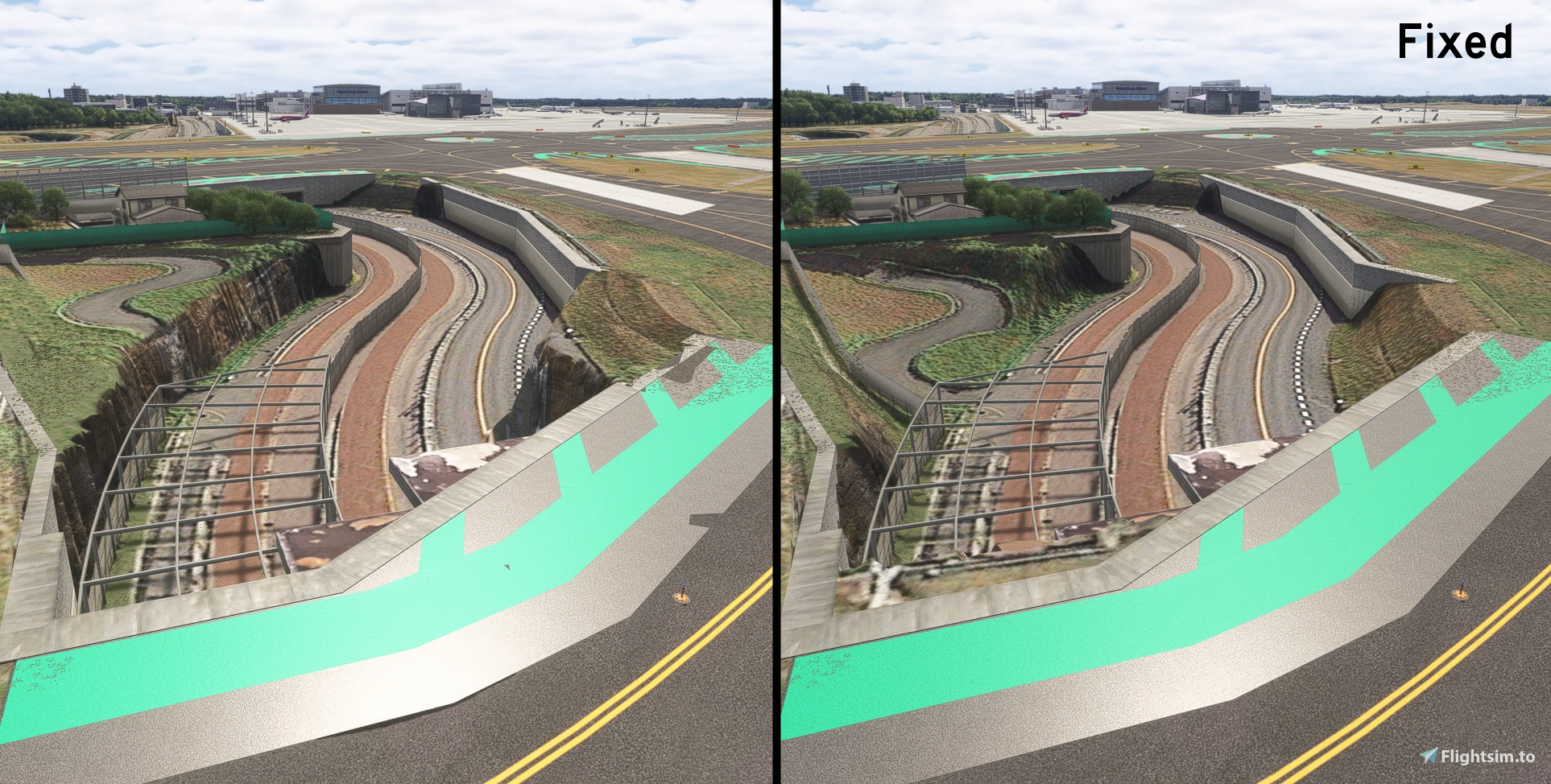
Description
Please delete this scenery once RJAA is updated.
It may cause problems.
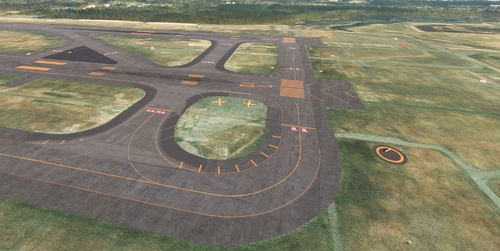
Corrected terrain steps on the RJAA ver 1.3 made by Drzewiecki Design.
Due to terrain flattening, some taxiway signs are slightly hovering or embedded in the ground.
Additional windsock lighting, ABN, heliports and their lighting have been added.
Some redundant taxiway center lights have been deleted, and all 34L/16R runway end lights have been replaced with tip lights.
These require additional libraries.
Install
Please adjust the folder name yourself so that it is loaded after Drzewiecki Design's RJAA.
You can switch between functions by changing the file name.
//Terrain fixes
RJAA_0_Terrain fixes.bgl
RJAA_1_Terrain fixes.bgl
//Add ABN
RJAA_ABN.bgl
//Add helipad
RJAA_helipad.bgl
//Fixes for some lights
RJAA_Light fixes.bgl
//Add lights to the windsock
RJAA_Windsock.bgl
//add Fence Lights
RJAA_FenceLight.bgl
Dependencies
Location
RJAA Narita International Airport Drzewiecki Design Terrain fixes
This add-on offers terrain corrections for the RJAA Narita International Airport scenery by Drzewiecki Design, addressing elevation issues by flattening large and small steps. It includes additional features such as enhanced windsock lighting and modifications to taxiway and runway lights. Users are advised to uninstall this scenery upon updates to avoid conflicts.


User Reviews
2 reviews
Version History
Corrected issues with some Intermediate Holding Position lights and markings. Removed the unnecessary taxiway centerline for Taxiway B8. Modified the overrun area ground markings for Runway 34R. Added lights installed along the fence within the airport grounds.
Related
RJTT Tokyo International Airport Enhanced
Enhance Tokyo International Airport with this add-on, which aligns runways, taxiways, and taxiway names based on the new airfield map. Make various fixes and additions, with the option to disable certain elements like airport equipment and taxiway signs. Ensure compatibility by following instructions, and experience VDSG implementation based on LOD specification for realistic plane positioning.
by karuchie
RJFU NAGASAKI Airport Enhanced
Enhance your flying experience with the RJFU NAGASAKI Airport Enhanced add-on, featuring improvements such as Runway Distance Marker Lights, Glidepath Antenna, and Taxiway signs based on reality. This add-on also includes brighter apron lights, changes to apron lines, and upgraded runway ground markings to Japanese specifications. Additional libraries are required for installation.
by karuchie
RJOO Osaka Itami Airport (MADB payware) Enhanced
Enhance your RJOO Osaka Intl Airport experience with this payware add-on from MADB, featuring added taxiway lights and updated textures for a more realistic simulation. This add-on also includes revamped approach lights, runway features, and various other enhancements to elevate your airport immersion. Additional libraries are required for installation.
by karuchie
RJCC - New Chitose Airport Addition
The RJCC New Chitose Airport Addition enhances the existing RJCC airport scenery by introducing several new taxiways, including A3, B3, A11, B11, G, and L5. It also updates apron markings and adds various objects, although taxi paths remain unchanged, which prevents ATC from recognizing the new taxiways. Users may encounter ILS height issues if using Navigraph, and adjustments to the folder name or priority may be necessary for optimal functionality. Note that some features, like the parking lot in the cargo area, do not have connected taxi paths for GSX use.
by karuchie
Log in to join the discussion
Log InComments(11)
about 10 hours ago
13 days ago
about 1 year ago
over 1 year ago
over 1 year ago
almost 2 years ago
almost 2 years ago
almost 2 years ago
12 months ago
Then again the idiots broke the ai pilot, and there are significant problems with the autopilot too in some aircraft. I really wish Microsoft would just stop making flight sims and ripping people off and hiring very bad developers..
almost 2 years ago
almost 2 years ago