
Description
Introducing RealAcars, your companion for receiving messages via Hoppies, bringing more realism to your flight simulator!
RealAcars leverages Hoppie or SayIntentions ACARS to send a variety of messages to your aircraft. This includes connecting flight schedules for your airline at your destination airport, loadsheets, takeoff and landing performance, as well as notifications about rocket launches near your flight path and natural disasters such as storms and volcanic eruptions. There are many other types of messages you can receive as well. No VATSIM or IVAO is required—only SimBrief and a Hoppie logon or a Say Intentions.AI API Key!
📄 Feature Overview:
ACARS Features:
- Send Preliminary Loadsheet
You will receive a loadsheet with the appropriate data for your flight before starting your preparations! You can choose between a custom setting, allowing you to control when your loadsheet arrives, or a realistic option that times the loadsheet based on your off-block time! - Send Final Loadsheet
You will receive a final loadsheet after engine start, based on the appropriate data. You can also choose exactly when this message should reach you after engine start! - Send TO Report
The TO report contains crucial information for take-off procedures and performance and is sent after you receive your preliminary loadsheet. - Send Departure OBT Log
This message confirms that the company has received and recorded your off-block time. - Send Arrival OBT Log
This message confirms your arrival time and that the company has logged it. - Send LA Report
The LA report contains essential landing information and performance data. It will be delivered approximately 25 minutes before your landing. - Send CONNEX Schedule
The CONNEX schedule provides information about your airline's connecting flights at your destination and will be sent to you prior to your arrival. - Send Possible AC Changes
This notification will alert you to any potential aircraft changes. The likelihood of this occurring is 15%. - Send Crew Schedule
This feature will let you know about the crew member staying on the aircraft for your next flight. - Send Next Leg Change
This will notify you of any changes to the next leg of the flight. The likelihood of this occurring is 15%. - Send COMP Related Difficulties
This will notify you of any issues related to the operation of your company. - Send Space Launches
These settings will enable messages about possible obstacles, specifically spacecraft being launched in your vicinity (within a radius of 300 NM). The messages are generated from real-world data, so you will only receive such notifications if there are actual launches upcoming near your flight path. - Send Fueling Slip
You will receive a fuel dispatch after fueling up the aircraft was completed. - Send Position Assignement
Near your TOD, you will get a message containing a suitable position for your destination airport. - Send Natural Disasters
These settings will fetch data from NASA satellites to check for any storms, earthquakes, volcanoes, or wildfires that might affect your flight plan. You will receive a notification if you are within a 300 nautical mile range of such an event. - Send Funny Messages
It's unclear exactly what this does. It’s also worth noting that the developer of RealAcars is German, so humor might not be a priority. - Send Slot Notification
The slot notification is a message containing an overview of your slot information. You must confirm things like origin and destination, your EOBT and more. - Send Special Events
When this feature is active, any relevant messages will be displayed here (f.e results of big football matches).
ROPS ATC Features:
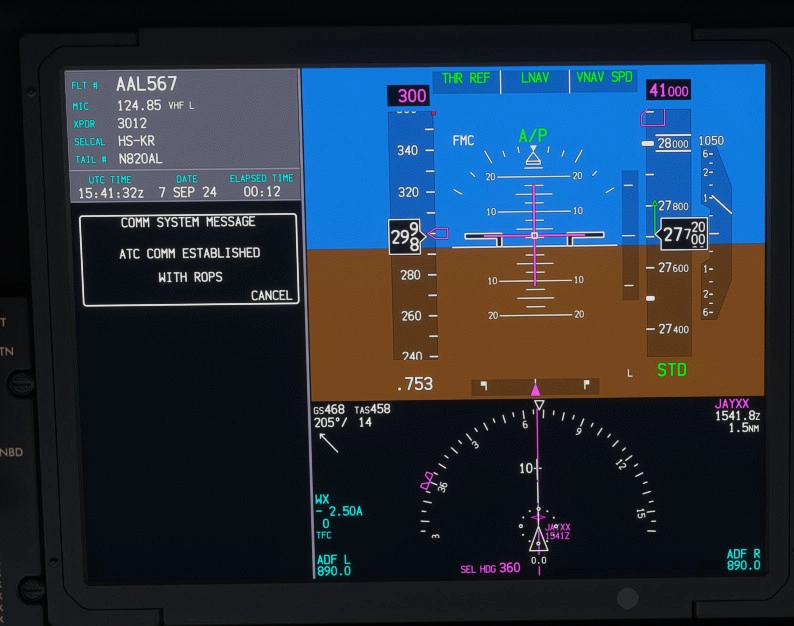
- You can now request PDC (Pre-Departure Clearance) from ROPS.
- Ability to log onto the ROPS station for CPDLC.
- ROPS can now send up to 3 random "Direct To" instructions during a flight.
- Ability to request flight level, speed, and "Direct To" instructions from ROPS, with appropriate response messages.
- Automated step climb messages are generated for flights with planned steps in SimBrief.
- Ability to request oceanic clearance from the ROPS station.
✈️ Compatible Aircraft:
Even though RealAcars should work with all aircraft that have a Hoppie connection, we have unfortunately found some instances where things didn't quite go as planned and where we will need to establish Contact with the Aircraft Developer. Below is a list of Aircraft, and whether or not they work without major issues when using RealAcars. Just note, as we add more Compatible Aircraft to the list, these will be added to the DOCS menu in the RealAcars App.
- FENIX A320 (COMPATIBLE)
- FBW A32NX (COMPATIBLE)
- PMDG B777-300ER (COMPATIBLE)
- Horizon 787 (COMPATIBLE)
- TFDi MD-11 (COMPATIBLE)
- Leonardo MD-80 (COMPATIBLE)
Here you can have a look at RealAcars:
https://www.youtube.com/watch?v=seKJBF-CHf0&t=107s
We hope you like our work! We know there are some hurdles to take and a few things that aren't working 100%, but our goal is to get it working 99% of the time and with your help, we can get there.
If you have any questions or want to join our community, please connect with us on Discord!
Please note that support is available only through our Discord server.
RealAcars
RealAcars is an add-on for Microsoft Flight Simulator that enhances realism by enabling the reception of various messages via Hoppies. Users receive pertinent information such as loadsheets, takeoff and landing reports, and notifications about nearby rocket launches and natural disasters. The add-on is currently in open beta, supporting multiple aircraft with plans for further improvements and features in the future.


User Reviews
42 reviews
Version History
========================== RealAcars Version 1.0.0.0 Release ========================== Changelog --------- - Fixed a bug that could result in the final loadsheet being dispatched twice. - Removed dynamic port assignment and updated the logic to prevent a bug that prevented flights from starting. - Added code signing to all relevant files to prevent false positives from antivirus software. - Introduced a version pop-up modal to notify users when they are running an outdated version. - Rewritten the entire SimConnect instance to improve stability and prevent instance crashes. - Fixed a bug where the connection flights message was not being dispatched. - Fixed a bug where the API for natural disasters could not be called, and the message wasn't being sent. - Fixed a bug where not all related RealAcars processes were closed when exiting the app. - Fixed a bug where the TO Performance Report wasn't sent when using a special configuration in the loadsheet settings. - Fixed a bug where the TO Performance Report could be dispatched twice. - Fixed a bug where the Departure OBT Log could be sent even if it was disabled in the settings. - The Departure OBT Log will now be sent 20 minutes after engine start to maintain a sterile cockpit during takeoff. - Introduced a new loading screen for a better user experience. - Added 3 different setting profiles, allowing you to easily select and edit settings for different aircraft without needing to adjust them each time. - Introduced Dark Mode for the app, providing an alternative theme for users. - The Documentation page has been reworked for improved usability. - The state of the welcome modal is now saved correctly, preventing unnecessary rerenders. New Features: - VATSIM ATC Notification - Near your Top of Descent (TOD), you will receive a notification about online ATC controllers at your destination. - Fuel Report - After fueling is complete, you will receive a dispatch message with fuel details. - Arrival Time Report - After arriving at your gate, a message will confirm that your arrival time has been logged. - Crew Schedule Message - Before arrival, you'll receive a message informing you which crew members will remain on board for the next leg. - Gate Assignment Message - You will receive a provisional gate assignment for your destination before landing. Note: We have decided not to use Navigraph as the data provider for this feature, making it available to all RealAcars users. However, this feature is still in an experimental phase, as it relies on a custom AI system that selects an appropriate gate based on airport data. - Company Difficulties V2 The Company Difficulties feature has been updated. It no longer sends random messages. Instead, a custom AI scans data sources to detect abnormalities at your destination airport or in nearby airspace, generating relevant messages based on its findings. - SayIntentions ACARS Support added. ROPS ATC: - You can now request PDC (Pre-Departure Clearance) from ROPS. - Ability to log onto the ROPS station for CPDLC. - ROPS can now send up to 3 random "Direct To" instructions during a flight. - Ability to request flight level, speed, and "Direct To" instructions from ROPS, with appropriate response messages. - Automated step climb messages are generated for flights with planned steps in SimBrief. - Ability to request oceanic clearance from the ROPS station. Message Design & Layout Rework: One of the issues I heavily worked on was getting messages to 1) look more realistic, 2) to have them be formatted for the different type of CDUs / MFDs and 3) to add realistic functionality. Although we aren’t able to deliver on everything we would like to achieve, we still got everything that was possible for now to work.
Comment Summary
The feedback for RealAcars is generally positive, with many users praising its immersive features and ability to add realism to flight simulation, especially for the Fenix A320 and PMDG 777. Frequent praise includes the convenience of in-flight messaging and the realistic implementation of CPDLC and loadsheets. However, users also report several recurring issues, such as compatibility problems with certain aircraft (notably PMDG 737, some Inibuilds models, and FBW A320), 'weight on wheels' detection issues, blank or crashing panels especially in the loadsheet settings, and false antivirus alerts (particularly with McAfee). There are requests for additional aircraft support, customizable messages, and features like hardware printing and shared cockpit capabilities. Some report that settings occasionally reset themselves. Users suggest bypassing antivirus software (adding RealAcars as an exception) to avoid installation or execution problems, and most support is provided through the developer's Discord. Future updates are anticipated, particularly to improve gate assignment logic and broader compatibility. Overall, the add-on is well-received but requires troubleshooting for specific issues and is still evolving in terms of stability and supported aircraft.
Summarized on Nov 13, 2026
Log in to join the discussion
Log InComments268
real acars seems off since fenix V3, anyone have problems?
thanks for your help
It's a minor thing but the splash screen is very bright for this dark mode user, would prefer a darker shade option, or option to disable the splash.
I am guessing it is not Runway Overrun Protection System 😂
mfs2024 pmdg777-300
Everthing is up to date in my simulator ! what do ii have to do !!??