
Description
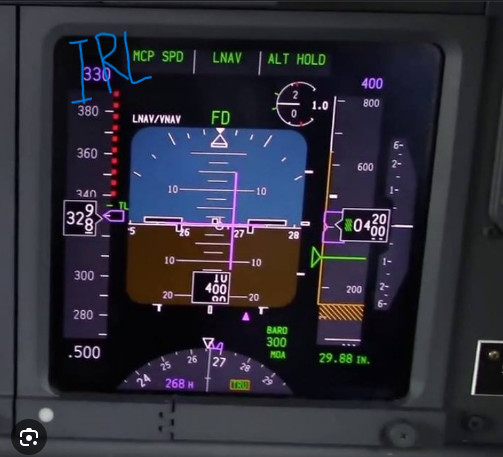
Better PFD and ISFD colors for the PMDG 737 series. let me know if I need to do any tweaking.
HOW TO INSTALL: PMDG SETUP>OPTIONS>COLORS, then go to PFD SKY and input the RGB or Hex color codes. Same thing for the PFD GROUND. Exact same thing for the ISFD, ISFD SKY and ISFD GROUND can be found on the 3rd page of colors.
Thanks!
MSFS 2020MSFS 2024
Better PFD and ISFD Colors for PMDG 737 series
Customize the colors of your PFD and ISFD for the PMDG 737 series with this add-on. Easily adjust the RGB or Hex color codes in the PMDG setup options for a personalized cockpit experience.
Downloads4K
Version1.0
File Size974.50 KB
Published2 years ago
Updated2 years ago
User Reviews
5.0
2 reviews
5
100%
4
0%
3
0%
2
0%
1
0%
Version History
No version history available.
Log in to join the discussion
Log InComments(12)
over 1 year ago
over 1 year ago
over 1 year ago
over 1 year ago
over 1 year ago
I also changed the DU tapes to make them a little darker so they match most 737 cockpit pics I've looked at. The numbers I went with are...
60
50
50
Thanks again!
over 1 year ago
about 2 years ago
about 2 years ago
about 2 years ago
about 2 years ago
about 2 years ago
about 2 years ago