
Description
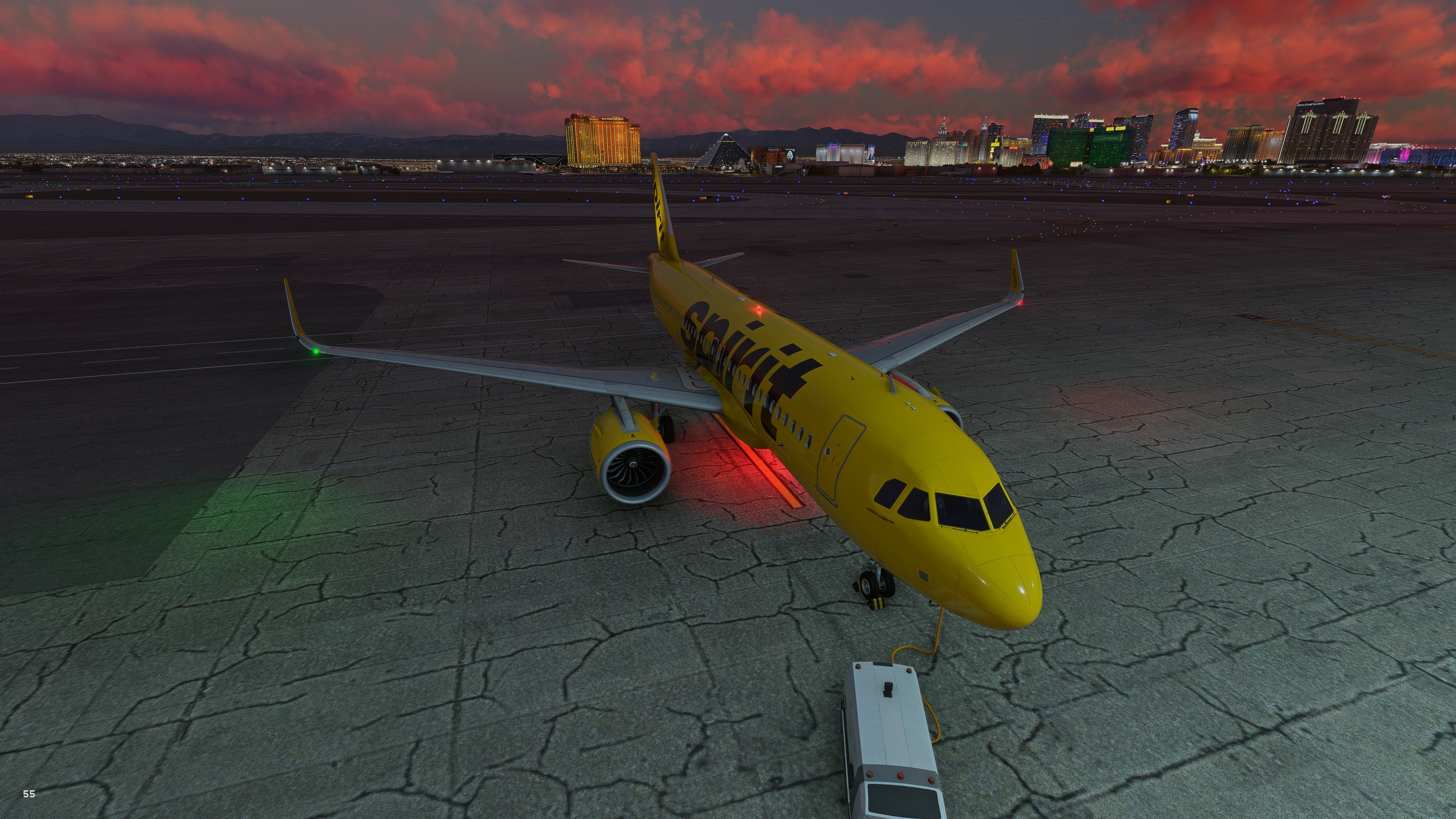
Here is a mod I did for the Asobo/IniBuilds A320 Neo v2!
Here is what I did:
- Brightened up all Nav, Beacon, Strobe Lights
- Nav, Beacon, Strobe lights now visible during day time
- Adjusted to strobe light timings to sync with the tail strobe
- Adjusted Nav lights angle
- Adjusted Beacon light timings
- Strobe Lights visible from cabin
- Nav Lights visible from cabin
- Bottom beacon engine splash
- Beacon splash on top of the wings
- Increased Wing light intensity to properly illuminate the wing
Turn Bloom ON in sim for best results!
Disclaimer:
PLEASE BACKUP ORIGINAL EFFECTS FOLDER BEFORE INSTALLING, for some reason you want to revert back.
Installation:
Simply copy and paste the Effects folder in the microsoft-aircraft-a320neo folder and overwrite.
Windows Store:
if you changed to a custom drive during installation. Those files will be found in a directory that looks like this: //…Official/OneStore/microsoft-aircraft-a320neo/effects
Steam:
MicrosoftFlightSimulator/Packages/Official/Steam/microsoft-aircraft-a320neo/effects
BEWARE!
Whenever the core aircraft gets an update this mod MIGHT break your aircraft! If core files get updated I will need to make the necessary changes in my mod for it to be compatible so PLEASE do not reach out to support devs and ask why your airplane is broken, remove the mod first and try again. I typically have updates out quickly. Thanks for your support!
iniBuilds A320neo V2 External Lights Mod
Enhance the external lighting experience of your Asobo/iniBuilds A320 Neo v2 with this mod. Brightened Nav, Beacon, and Strobe lights are now visible during the day, with adjusted angles and increased range for a more realistic effect. Simply install by copying and pasting the Effects folder into the microsoft-aircraft-a320neo folder.
User Reviews
5 reviews
More Information
Version History
-Compatibility with Aircraft and Avionics Update 3 (AAU3) -Added Top of the wing Beacon splash -Added bottom engine Beacon splash -Drastically increased the wing light intensity to properly illuminate the wings
Comments(20)
Log in to join the discussion
Log In